DVWA Recon Low Sec - Purple Team

Moving to a more advanced topic; this post will demonstrate how to use Nuclei templates to emulate adversarial behaviour. We will use the alerts generated by Nuclei to test our Elastic SIEM rules. I introduce my Omega-cli project to automatically run these tests.
The full list of Shieldia DVWA posts is located here: https://shieldia.co/posts/DVWA_Index/
Video
Prerequisites
If you don’t currently have a Damn Vulnerable Web Application (DVWA) instance you can follow along at home with a simple git clone & vagrant up if your host system meets the minimum specs. For this lab you will need the Blue Team Vagrant file if you want to follow along. :)
Recon Low Sec - Purple Team
Why Purple Team and not include this in the Red & Blue post? Length, posts would be unwieldy if I included everything I wanted to in each. I landed on Purple Team as it best describes where this sort of activity would land in enterprise. There isn’t - in most orgs - a dedicated team that works (and thinks) on both defence and offence.
Nuclei
Nuclei is a best understood as a programmable browser engine. It is a mistake (I know because I wasted hours bug fixing) to think of it as another CLI tool like curl. Instead I think of Nculei as a fully fledged browser that is pragmatically controlled via the CLI and template files.
Knowing how to write your first Nuclei template can be a challenge. There is quite a lot of documentation out there (Some of it quite old, pre v3). Lets dive in and write one yourself to get a feel for it.
Of the three Sigma rules described in the “Recon Low Sec Red & Blue Team” post is the most promising to have automated with Nuclei: “Web Apache Correlation Hack Tool User Agent.”
We will focus for now on the “Web Apache Correlation Hack Tool User Agent” rule, which is looking for suspicious browser User-Agents:
1
2
3
4
5
6
7
        c-useragent|contains:
            # Vulnerability scanner and brute force tools
            - 'Nmap Scripting Engine'
            - 'Fuzz Faster U Fool'
            - 'OpenVAS'
            - 'Nikto'
            ...
So we just need to make a request with one of these User-Agents to the DVWA. Simple! Just run ffuf or nmap right? Unfortunately running the tools ins’t idempotent, instead we will modify the User-Agent that Nuclei uses emulating this activity quite effectively.
From the Nuclei documentation we know we’ll need a template file that looks like the following:
1
2
3
4
5
6
7
id:

info:

flow:

http:
The flow and http protocols are well documented.
There is an example template to authenticate to the DVWA on GitHub, however it’s not quite right. The template manipulates the session cookie on the fly, leading to multiple cookies with different values in each request. Meaning we must hope they are received and understood in the correct order by the server.
It does work:
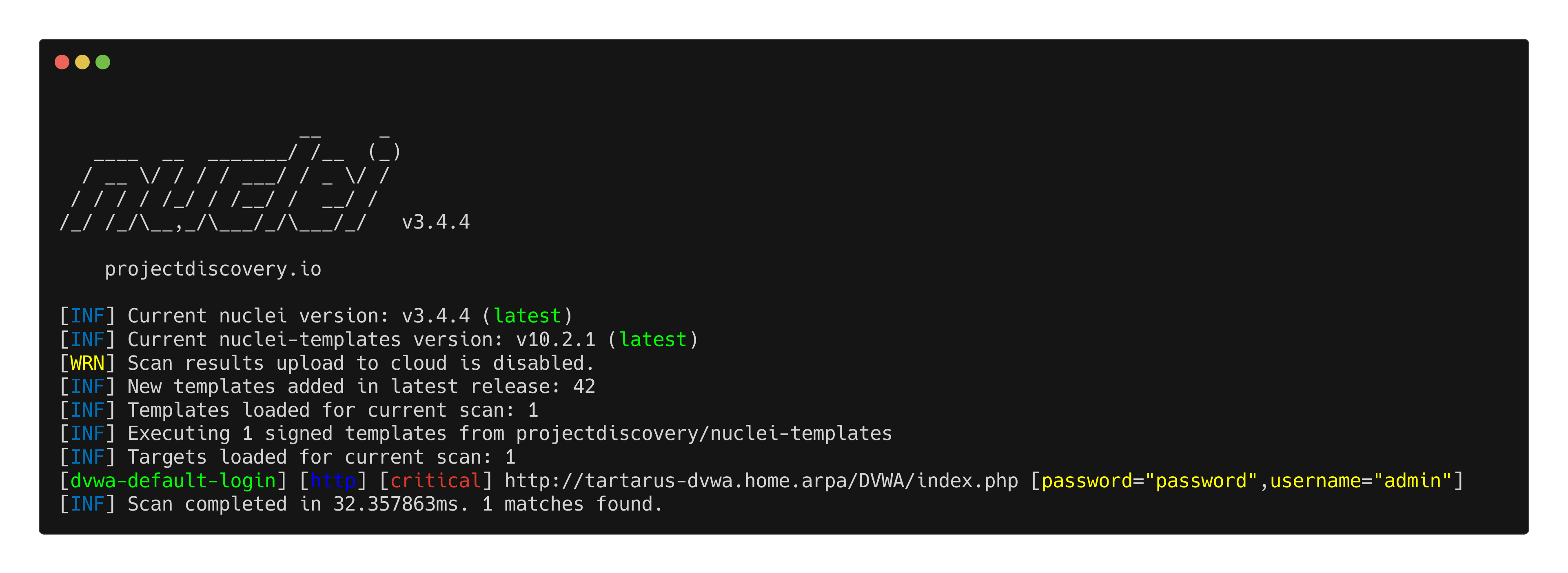 DVWA purple low sec recon nuclei test
However from Wireshark:
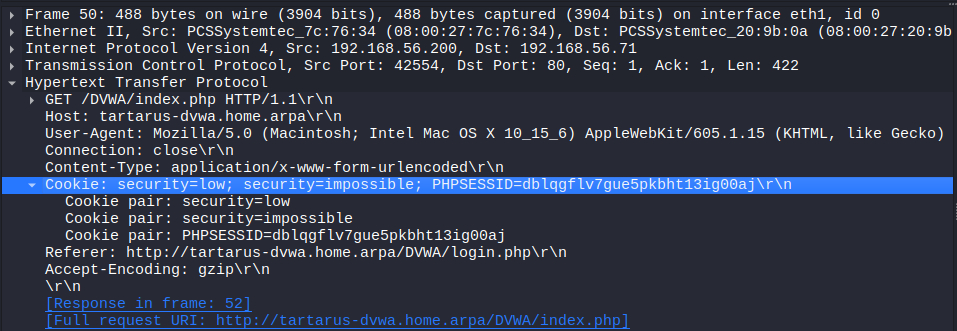 DVWA purple low sec recon nuclei cookies
Instead we will get the template to set the security value like a browser would, we will cover this when we get to the Brute Force templates.
1
2
3
4
5
6
7
8
9
10
11
12
13
14
15
16
17
18
19
20
21
22
23
24
25
26
27
28
29
30
31
32
33
34
35
36
37
38
39
40
41
id: web-hack-tool-ua-enum-simulated

info:
  name: Web Hack Tool User-Agent Enumaration Simulated
  author: Dylan Shield (Shieldia.co)
  severity: info
  description: Simulates Web Hack Tool User-Agent enumaration by sending requests with known bad User-Agents to the target.
  reference:
    - https://attack.mitre.org/techniques/T1595/003/
  tags: dvwa,bad-ua

variables:
  user_agents:
    - "Mozilla/5.0 (compatible; Nmap Scripting Engine; https://nmap.org/book/nse.html)"
    - "Fuzz Faster U Fool v2.1.0-dev"
    - "Mozilla/5.0 (Hydra)"
    - "sqlmap/1.9.2#stable (https://sqlmap.org)"
    - "DirBuster-1.0-RC1 (http://www.owasp.org/index.php/Category:OWASP_DirBuster_Project)"
    # The default UA for Nikto v2.5.0 is the below https://github.com/sullo/nikto/commit/a138740746261568ffe7a0d8875f88a70d13add2
    # Also one of the UAs that Nuclei use
    - "Mozilla/5.0 (Windows NT 10.0; Win64; x64) AppleWebKit/537.36 (KHTML, like Gecko) Chrome/74.0.3729.169 Safari/537.36"

flow: |
  for (let user_agent of iterate(template["user_agents"])) {
    set("user_agent", user_agent);
    http(1);
  }

http:
  - raw:
      - |
        GET /DVWA/login.php HTTP/1.1
        Host: {{Hostname}}
        Accept: */*
        User-Agent: {{user_agent}}
        Connection: close
    matchers:
      - type: status
        status:
          - 200
        internal: true
There is quite a lot going on. Breaking it down by section:
iddescribes an identifier to call the test when you run Nuclei.infohas metadata information like the author, severity, etc.variablesan optional section to declare “global” variables like the list of user agentsflowa new v3 feature that we can programmatically declare with JavaScript how the template executes.httpwhere we define the request, can beraworbasicdefined here.
This template is what I call a “simulated” since it doesn’t have a proper matching condition that templates normally have, however all we are doing with it is making these requests with known bad User-Agents so it’s not necessary.
Running it in Kali we get:
1
nuclei -u http://tartarus-dvwa.home.arpa/ -t /vagrant/nuclei-templates/dvwa/web-hack-tool-ua-enum-simulated.yaml
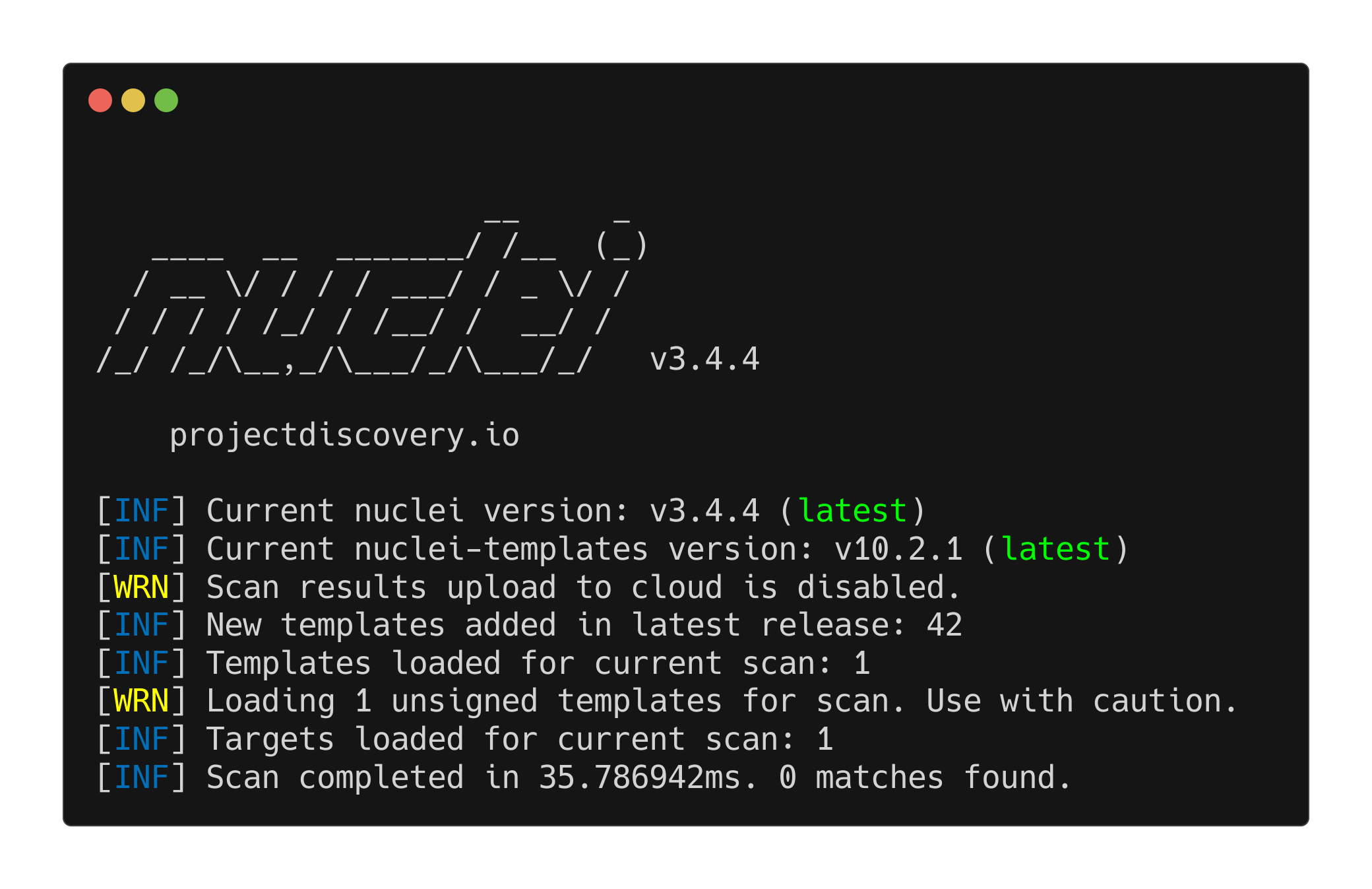 DVWA nuclei test with bad user agents
Looking in the SIEM what are the User-Agents for these requests?
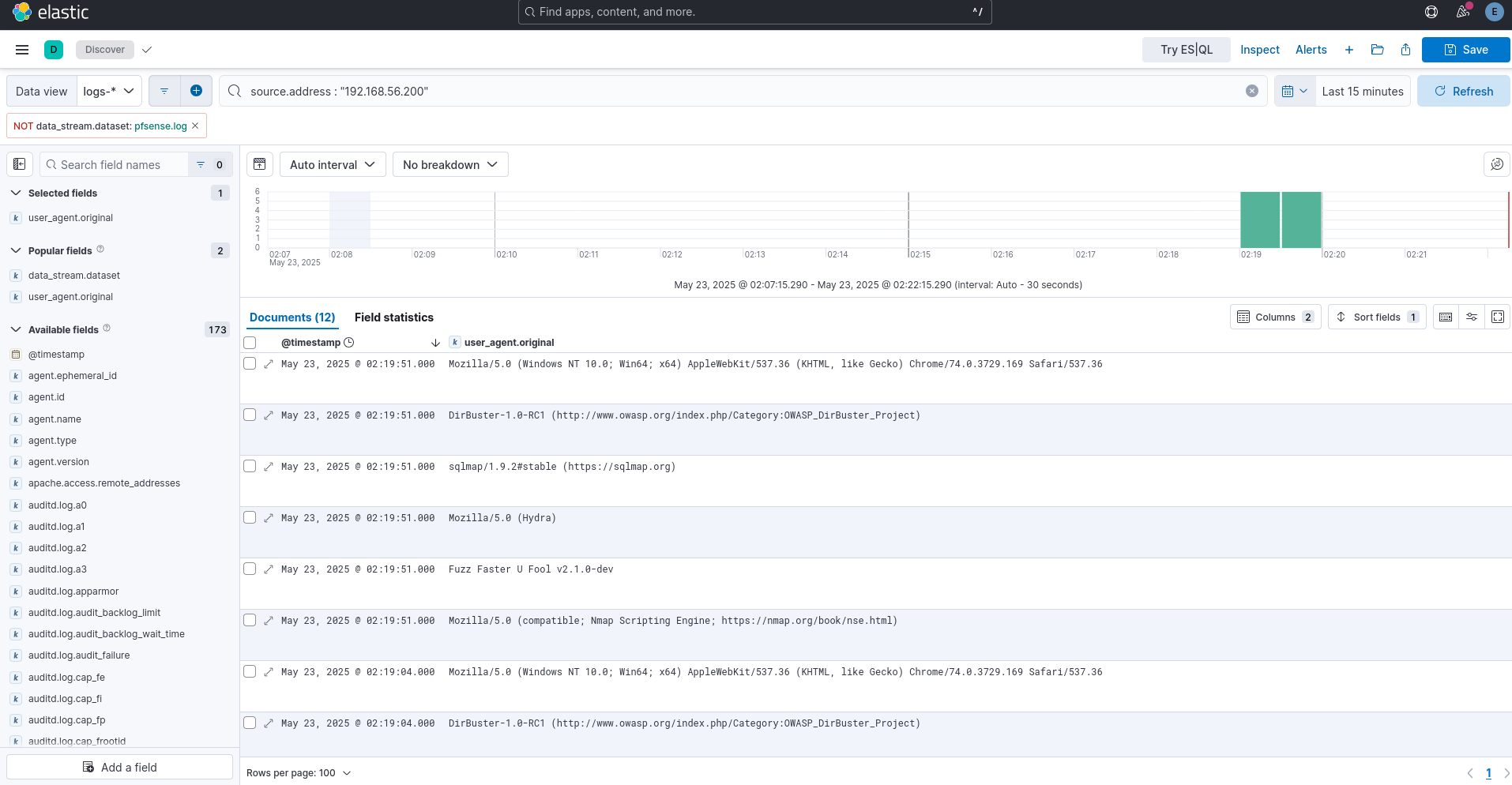 DVWA nuclei elastic bad ua search
Does this activity raise alerts in the SIEM?
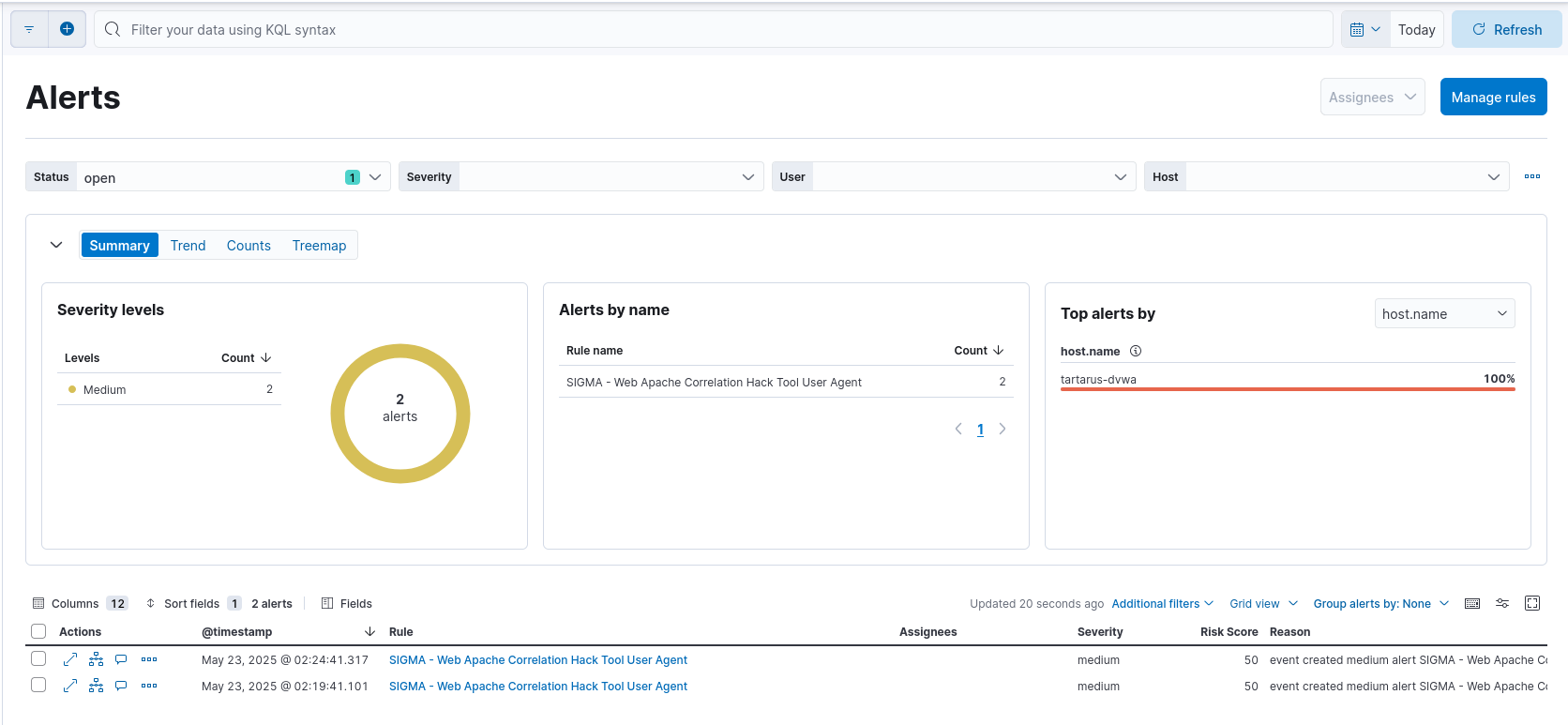 DVWA nuclei test alerts in elastic
The other directory enum test is available as well /vagrant/nuclei-templates/dvwa/web-directory-enum-simulated.yaml
Omega-cli
The alerts are raised, however what happens if they are changed? Or how do we confirm the target is in fact logging correctly in the SIEM (I’m thinking correct channels in Windows logging)?
We can see logs for the requests are making it to Elastic, lets now idempotently test these requests and alerts with my Omega-cli. The next step for the project is to embed the Omega logic directly in a CI/CD pipeline, however we can use the CLI version for now.
On the Kali guest run:
1
git clone https://gitlab.com/Shieldiaco/omega-cli.git
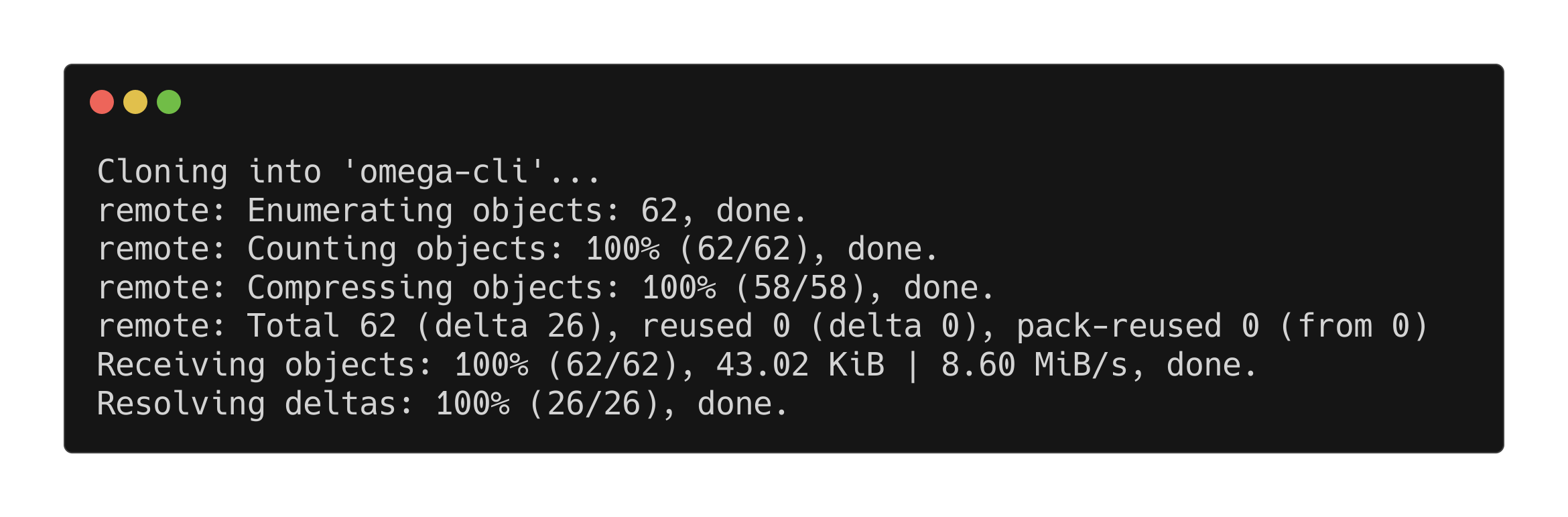 Downloading omega cli from gitlab
Using Kali you’ll get the error
error: externally-managed-environmentto resolve this follow the blog by Jeff
cd into the directory and install the requirements:
1
cd omega-cli
1
python3 -m pip install -r requirements.txt
Now install docker:
1
sudo apt install docker.io
Add yourself to the docker group:
1
sudo usermod -aG docker $USER
You must log in and out to apply the group change properly! You’ll get the following otherwise:
Error while fetching server API version: ('Connection aborted.', PermissionError(13, 'Permission denied'))
You should now be able to run the script:
1
python3 omega.py -h
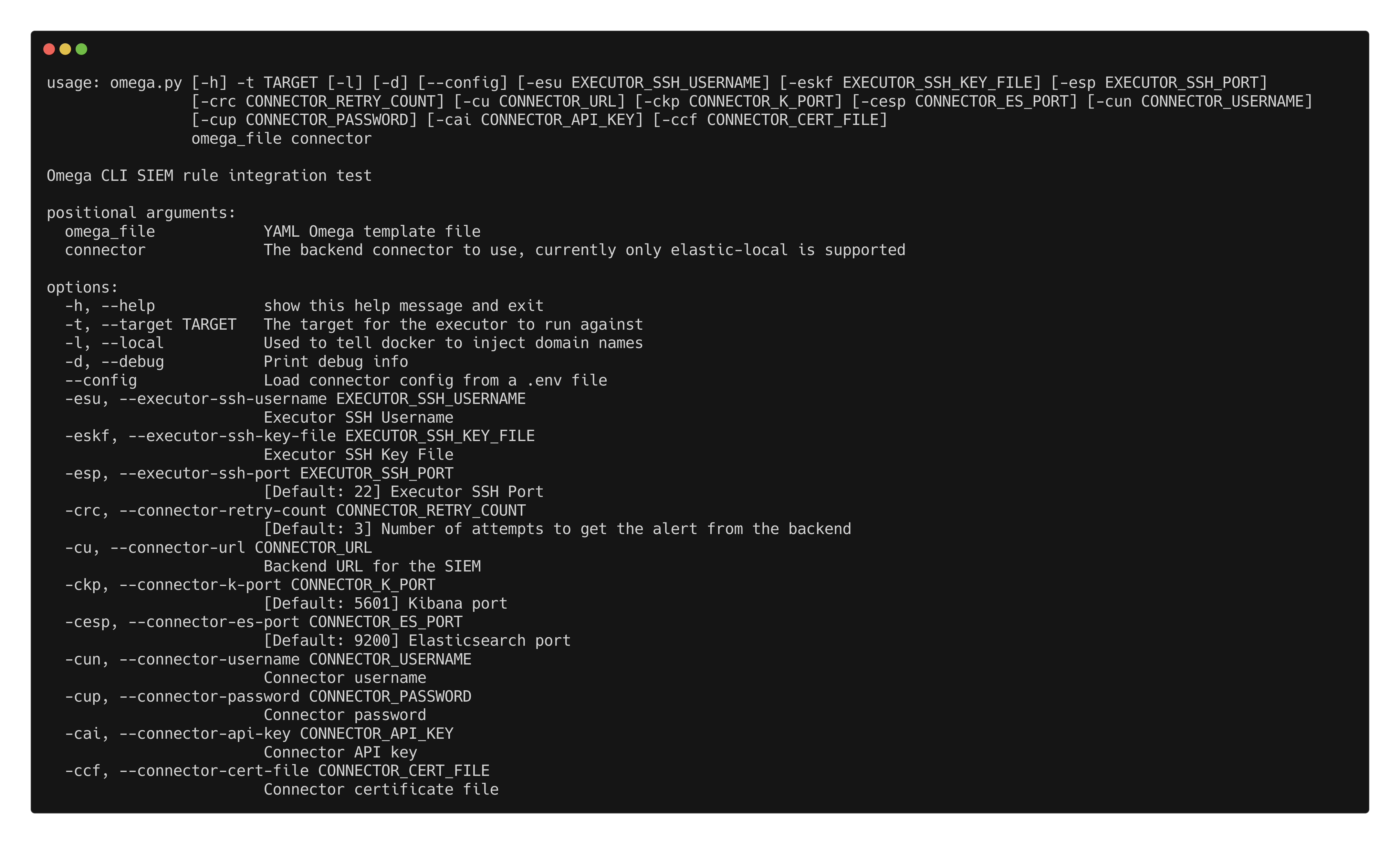 Omega-cli help page
We can see we have some required arguments and a few “optional.”
The omega_file is a .yaml formatted file that directs the Docker containers what tests to run. For example the above Nuclei template has the following test file:
1
2
3
4
5
6
7
8
9
10
11
12
name: Nuclei Apache Directory Enumaration
author(s): Dylan Shield (Shieldia.co)
info: >
  Integration test to confirm Sigma directory enumaration rule
  Expected executor results is aprox. 1100 requests to random directories on the target
  Expected rule result is at least 1 alert
date: 2025-04-29
refrense(s): https://pentestmonkey.net/blog/direnum
executor: Nuclei
executor_file_template: templates/web-directory-enum-simulated.yaml
rule: siem_rule_ndjson
rule_file: rules/web_apache_correlation_dir_enum.json
The executor defines what tool(s) to use to execute the commands, in this case Nuclei. The rule defines a rule file to test.
As seen in the help section we need to define quite a few variables to authenticate to our backend SIEM, it can be done either via the CLI or a .env file (I am aware of the issues with .env files, the CI/CD version will use secrets properly!)
In my case the .env file would look like (copy the cert file cp /vagrant/certs/root_ca.crt certs and your api key is saved in /vagrant/keys/ESapikey.txt):
1
2
3
4
5
URL=https://tartarus-elastic.home.arpa
K_PORT=5443
ES_PORT=9200
API_KEY=SSdkIHByZXRlbmQgSSB3YXMgb25lIG9mIHRob3NlIGRlYWYtbXV0ZXMgb3Igc2hvdWxkIEk/Cg==
CERT_FILE=certs/root_ca.crt
Create the above file in the directory you will run omega-cli from with the correct API key for you!
Now you can run the Dir Enum Test (The command might look like it’s hanging, it needs to download the Docker containers so wait!):
1
python3 omega.py --config tests/nuclei_apache_dir_enum.yml elastic-local -t http://tartarus-dvwa.home.arpa -d
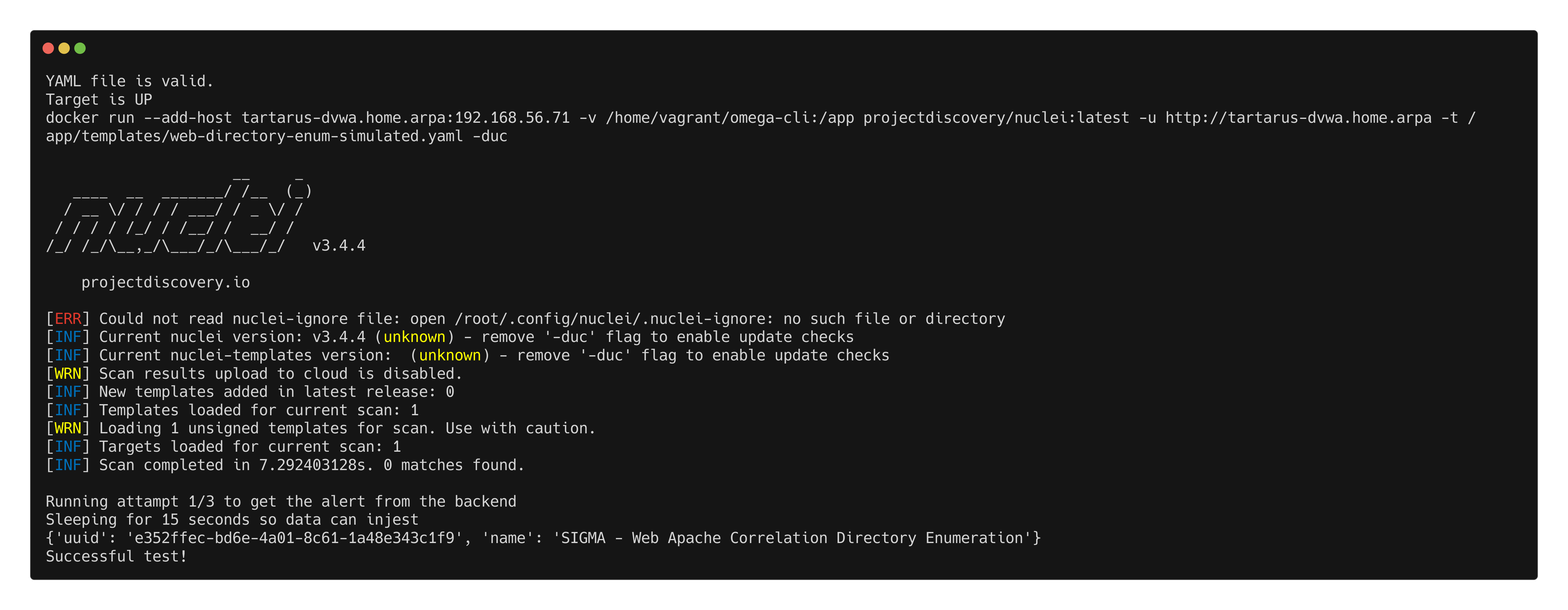 Omega-cli directory enumeration test run
A more complex test example is nc_nuclei_apache_rev_shell.yml we setup a netcat reverse shell listener and fire the revshell.
1
2
3
4
5
6
7
8
9
10
11
12
13
14
name: Netcat Nuclei Apache Reverse Shell
author(s): Shieldia.co
info: >
  Integration test to confirm Sigma reverse shell rule
  Expected executor results is aprox. 1 file upload request and one GET request to trigger the rev shell
  Expected rule result is 1 alert
date: 2025-05-05
executors:
    - name: nc
      executor_command: -nvlp 443
    - name: Nuclei
      executor_file_template: templates/dvwa-rev-shell-low-sec.yaml
rule: siem_rule_ndjson
rule_file: rules/linux_process_creation_web_revshell.json
1
python3 omega.py --config tests/nc_nuclei_apache_rev_shell.yml elastic-local -t http://tartarus-dvwa.home.arpa -d
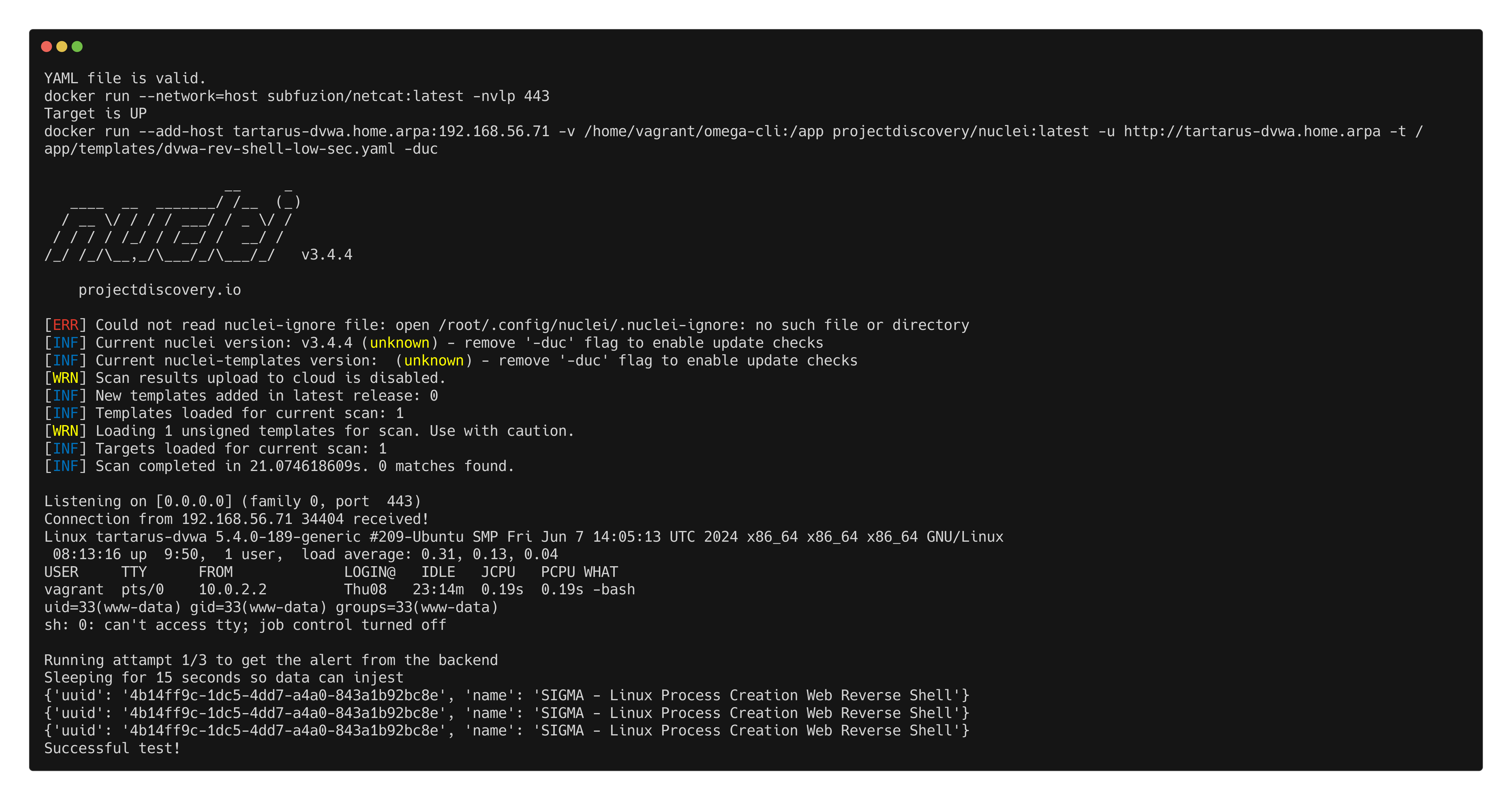 Example nuclei netcat reverse shell elastic alert omega test
Or since Nuclei doesn’t handle firewalled environments well with regards to emulating a port scan we can just run an Nmap scan:
1
python3 omega.py --config tests/nmap_port1-1000_tcp_syn_scan.yml elastic-local -t http://tartarus-dvwa.home.arpa -d
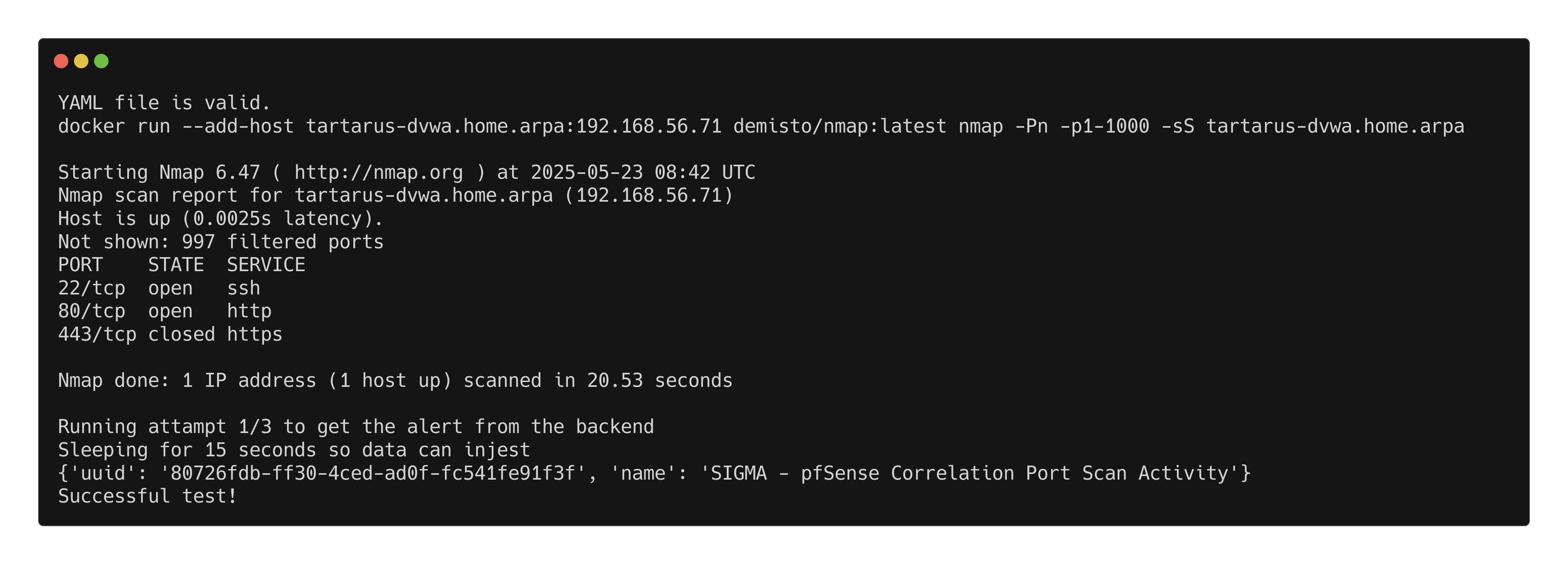 Omega-cli nmap port scan test
Credits
Image thanks to Nasa AS11-44-6549
Icon thanks to Show-password icons created by juicy_fish - Flaticon