DVWA File Inclusion Low Sec - Blue Pruple Team

This post covers the Blue Team perspective of the DVWA File Inclusion on Low Security. Using the Elastic SIEM to detect the File Inclusion (RFI/LFI) attempts on the server. The Purple Team section examines Nuclei templates to test for the vulnerabilities, and Omega-cli to automate the testing.
The full list of Shieldia DVWA posts is located here: https://shieldia.co/posts/DVWA_Index/
Video
Prerequisites
If you don’t currently have a Damn Vulnerable Web Application (DVWA) instance you can follow along at home with a simple git clone & vagrant up if your host system meets the minimum specs.
Blue Team deploys the whole environment.
File Inclusion Low Sec - Blue Team
This one - on the surface - looks incredibly easy. Just look for “badness” in the URL parameters like ../../../../../../../etc/passwd and you’re good, right? Well, yes and no. Websites exposed to the Internet will constantly get scanned from just about everyone, so a rule to detect the “badness” will constantly be triggered on them, compounding the issue is that we won’t know if they succeeded or not!
What exactly would we detect? Since we have access to the Apache access.log we can read all requests including what URI parameters they are requesting. In the Red team post you will recall we did the following request:
1
http://tartarus-dvwa.home.arpa/DVWA/vulnerabilities/fi/?page=../../../../../../../../../../../../../../etc/passwd
Apache is just reading a file, that file will get served to the client.
To exemplify the issue, one of these requests succeed and the others failed. Can you tell which is which?
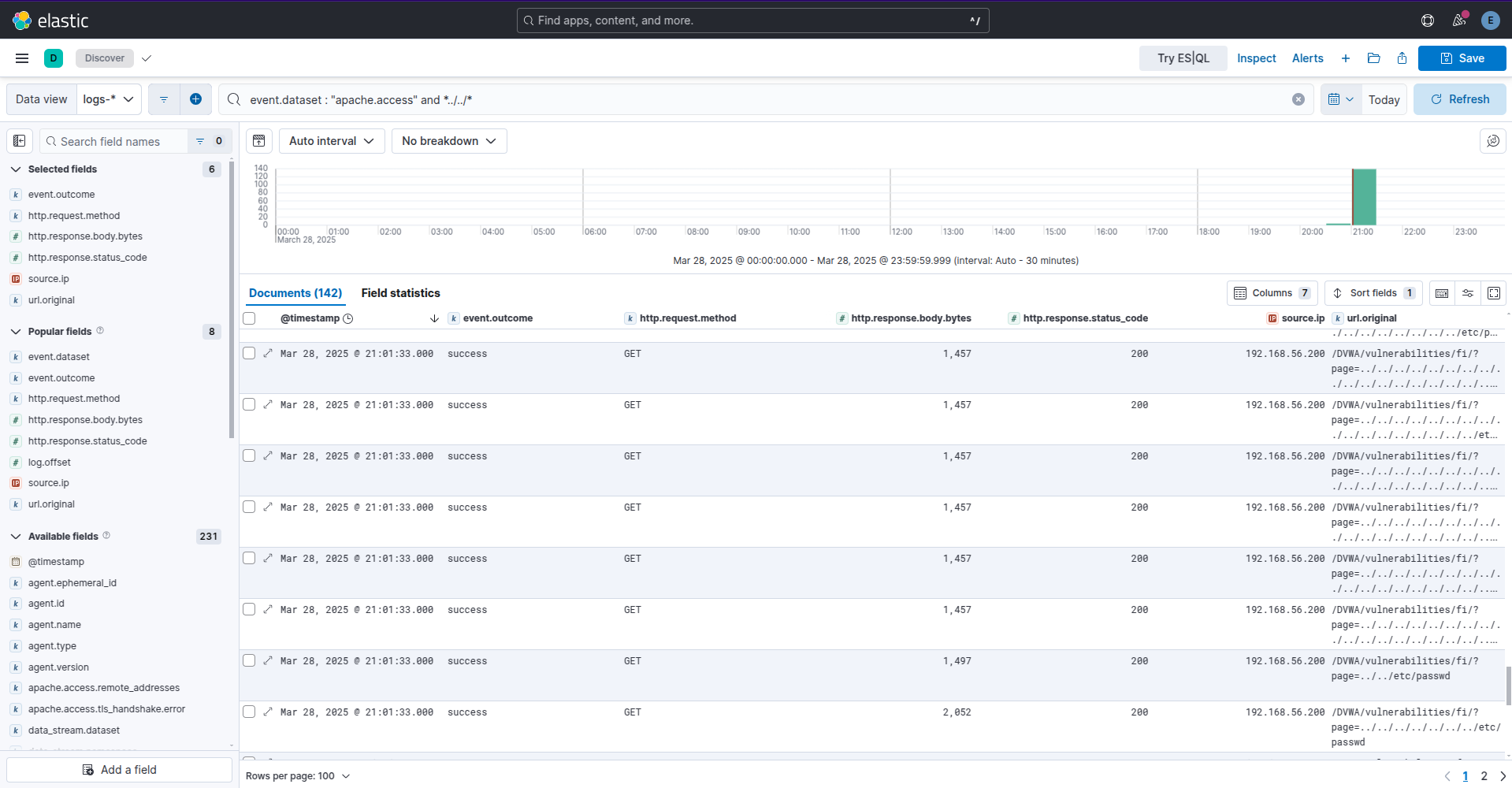 Example kibana lfi attempt apache logs
The last one in the list, you can see the response size is larger than the surrounding logs. I’m not including User-Agent due to obfuscations mentioned previously. Bereft a WAF we need to create searches to normalise the data and look for outliers.
Sigma Rules
In this case there is no need to write a new Sigma rule from scratch as there is already one that fits our requirements, Path Traversal Exploitation Attempts, this rule will detect path traversal chars in any URL in webserver logs. I’ve updated the rule to a correlation rule due to the same problems mentioned with the “Web Apache Correlation Hack Tool User Agent” rule.
The rule:
1
2
3
4
5
6
7
8
9
10
11
12
13
14
15
16
17
18
19
20
21
22
23
24
25
26
27
28
29
30
31
32
33
34
35
36
37
38
39
40
41
42
43
44
45
46
47
48
49
50
51
52
53
54
55
56
57
58
59
60
61
62
63
64
65
66
67
title: Base Rule - Path Traversal Exploitation Attempts
id: 7745c2ea-24a5-4290-b680-04359cb84b35
status: test
name: base_rule_path_traversal_exploitation_attempts
description: Detects path traversal exploitation attempts
references:
    - https://github.com/projectdiscovery/nuclei-templates
    - https://book.hacktricks.xyz/pentesting-web/file-inclusion
author: Subhash Popuri (@pbssubhash), Florian Roth (Nextron Systems), Thurein Oo, Nasreddine Bencherchali (Nextron Systems), Dylan Shield (Shieldia.co)
date: 2021-09-25
modified: 2025-03-29
tags:
    - attack.initial-access
    - attack.t1190
logsource:
    category: webserver
    product: apache
    service: access
detection:
    selection:
        cs-uri-query|contains:
            - '../../../../../lib/password'
            - '../../../../windows/'
            - '../../../etc/'
            - '..%252f..%252f..%252fetc%252f'
            - '..%c0%af..%c0%af..%c0%afetc%c0%af'
            - '%252e%252e%252fetc%252f'
    condition: selection
falsepositives:
    - Expected to be continuously seen on systems exposed to the Internet
    - Internal vulnerability scanners
level: medium
---
title: Path Traversal Exploitation Attempts
id: 5a06ded0-5111-45c9-a8fd-bd8d6d3ecefc
status: experimental
name: path_traversal_exploitation_attempts
description: |
    Detects path traversal exploitation attempts
references:
    - https://github.com/projectdiscovery/nuclei-templates
    - https://book.hacktricks.xyz/pentesting-web/file-inclusion
author: Subhash Popuri (@pbssubhash), Florian Roth (Nextron Systems), Thurein Oo, Nasreddine Bencherchali (Nextron Systems), Dylan Shield (Shieldia.co)
date: 2025-03-29
modified: 2025-04-11
tags:
    - attack.initial-access
    - attack.t1190
logsource:
    category: webserver
    product: apache
    service: access
correlation:
    type: value_count
    rules:
    - base_rule_path_traversal_exploitation_attempts
    group-by:
        - clientip
        - host
    timespan: 5m
    condition:
        gte: 1
        field: cs-uri-query
falsepositives:
    - Expected to be continuously seen on systems exposed to the Internet
    - Internal vulnerability scanners
level: medium
The rule is a two for one, it has the detection section in the base rule, then a correlation section to correlate this activity over 5 minutes to one source IP address.
The detection section:
1
2
3
4
5
6
7
8
9
10
detection:
    selection:
        cs-uri-query|contains:
            - '../../../../../lib/password'
            - '../../../../windows/'
            - '../../../etc/'
            - '..%252f..%252f..%252fetc%252f'
            - '..%c0%af..%c0%af..%c0%afetc%c0%af'
            - '%252e%252e%252fetc%252f'
    condition: selection
This looks for any URI strings that contain (wildcard matching) any of the above values.
The correlation section:
1
2
3
4
5
6
7
8
9
10
11
correlation:
    type: value_count
    rules:
    - base_rule_path_traversal_exploitation_attempts
    group-by:
        - clientip
        - host
    timespan: 5m
    condition:
        gte: 1
        field: cs-uri-query
This sets the rule to correlate the activity between the source and destination over a 5 minute window if there is 1 or more of the bad strings.
There are issues that will be addressed in the Medium Security post, see if you can spot them!
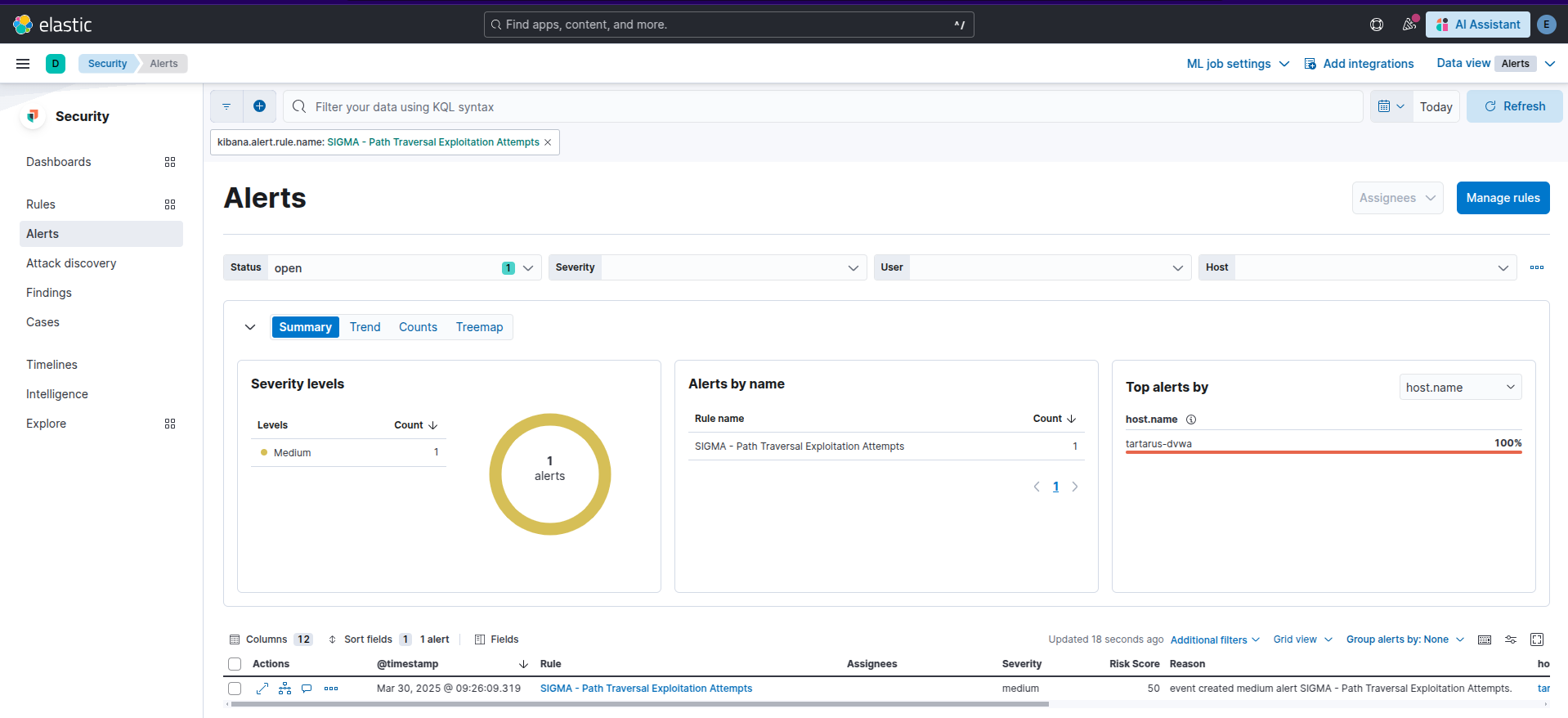 Example kibana path traversal alert
I’ve also created a rule to watch for file inclusion related errors in error.log.
This rule is much simpler, the detection is just looking for:
1
2
3
4
detection:
    selection:
        message|contains:
            - 'Failed opening'
The above message in the /var/log/apache2/error.log
It is also a correlation rule:
1
2
3
4
5
6
7
8
9
10
correlation:
    type: value_count
    rules:
    - base_rule_error_file_inclusion_attempt
    group-by:
        - host
    timespan: 5m
    condition:
        gte: 1
        field: message
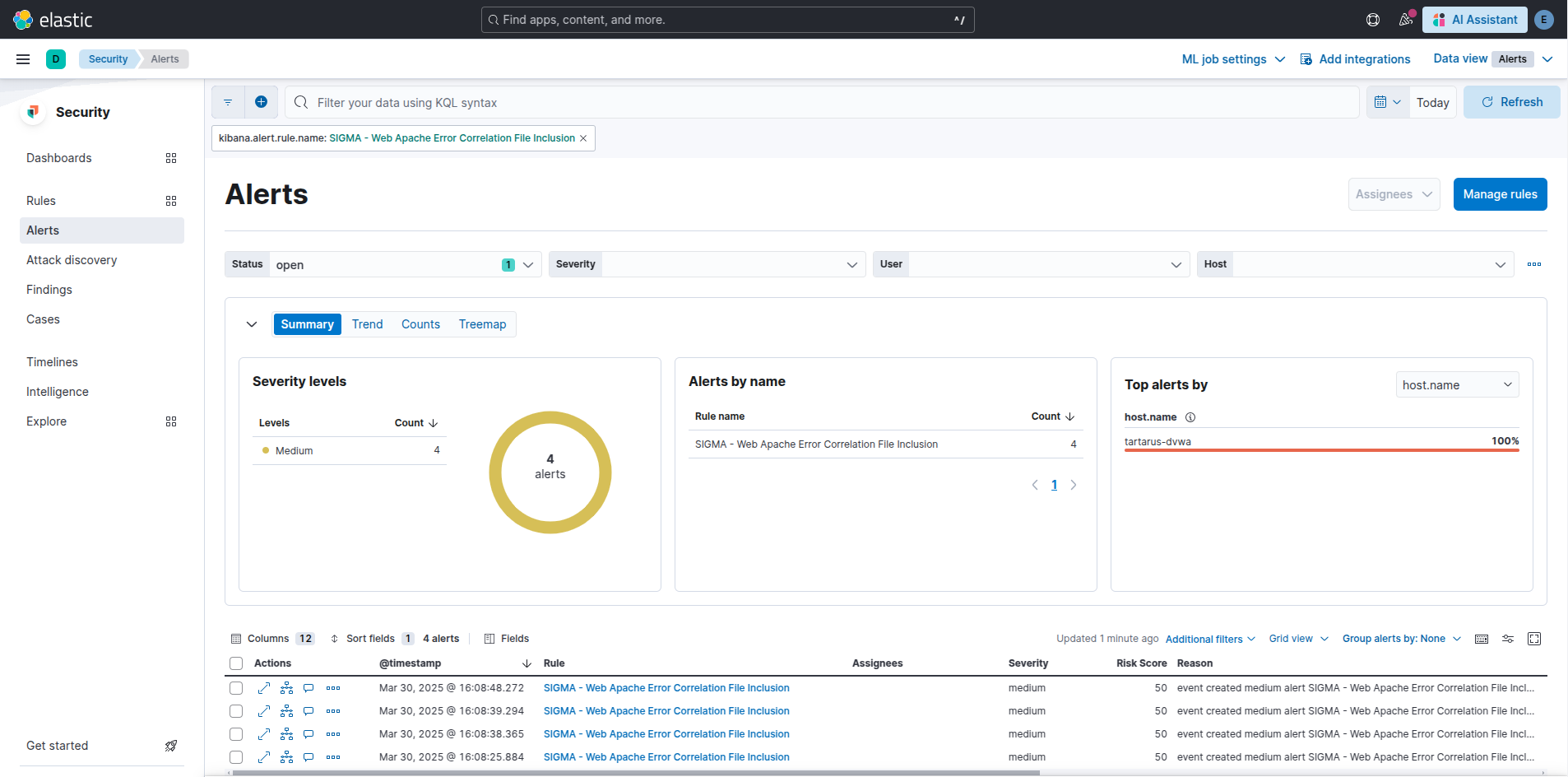 Example kibana error path traversal alert
The error rule just looks for the message “Failed opening” in the Apache error.log.
I’ve also written a rule to detect RFI attempts via URI param values.
This rule uses the regex matcher:
1
2
3
4
5
6
7
8
detection:
    selection:
        uri-query|re:
            - '(.*)http(s?)(.*)'
            - '(.*)(?:25[0-5]|2[0-4][0-9]|1[0-9][0-9]|[1-9][0-9]|[0-9])\.(?:25[0-5]|2[0-4][0-9]|1[0-9][0-9]|[1-9][0-9]|[0-9])\.(?:25[0-5]|2[0-4][0-9]|1[0-9][0-9]|[1-9][0-9]|[0-9])\.(?:25[0-5]|2[0-4][0-9]|1[0-9][0-9]|[1-9][0-9]|[0-9])(.*)'
            - '.*\.(com|net|org|gov|edu|io|dev|arpa|local|test|home|biz|info|co|us|uk|de|fr|jp|ca|au|nz|eu|cn|in)/(.*)|.*\.(com|net|org|gov|edu|io|dev|arpa|local|test|home|biz|info|co|us|uk|de|fr|jp|ca|au|nz|eu|cn|in)'
        status:
            - 200
Above we look for stings like “http” in the access logs (which shouldn’t be there) or for IPv4 addresses, finally for TDLs.
Again the rule is a Correlation type:
1
2
3
4
5
6
7
8
9
10
11
correlation:
    type: value_count
    rules:
    - base_rule_web_apache_correlation_rfi
    group-by:
        - host
        - source.ip
    timespan: 5m
    condition:
        gte: 1
        field: uri-query
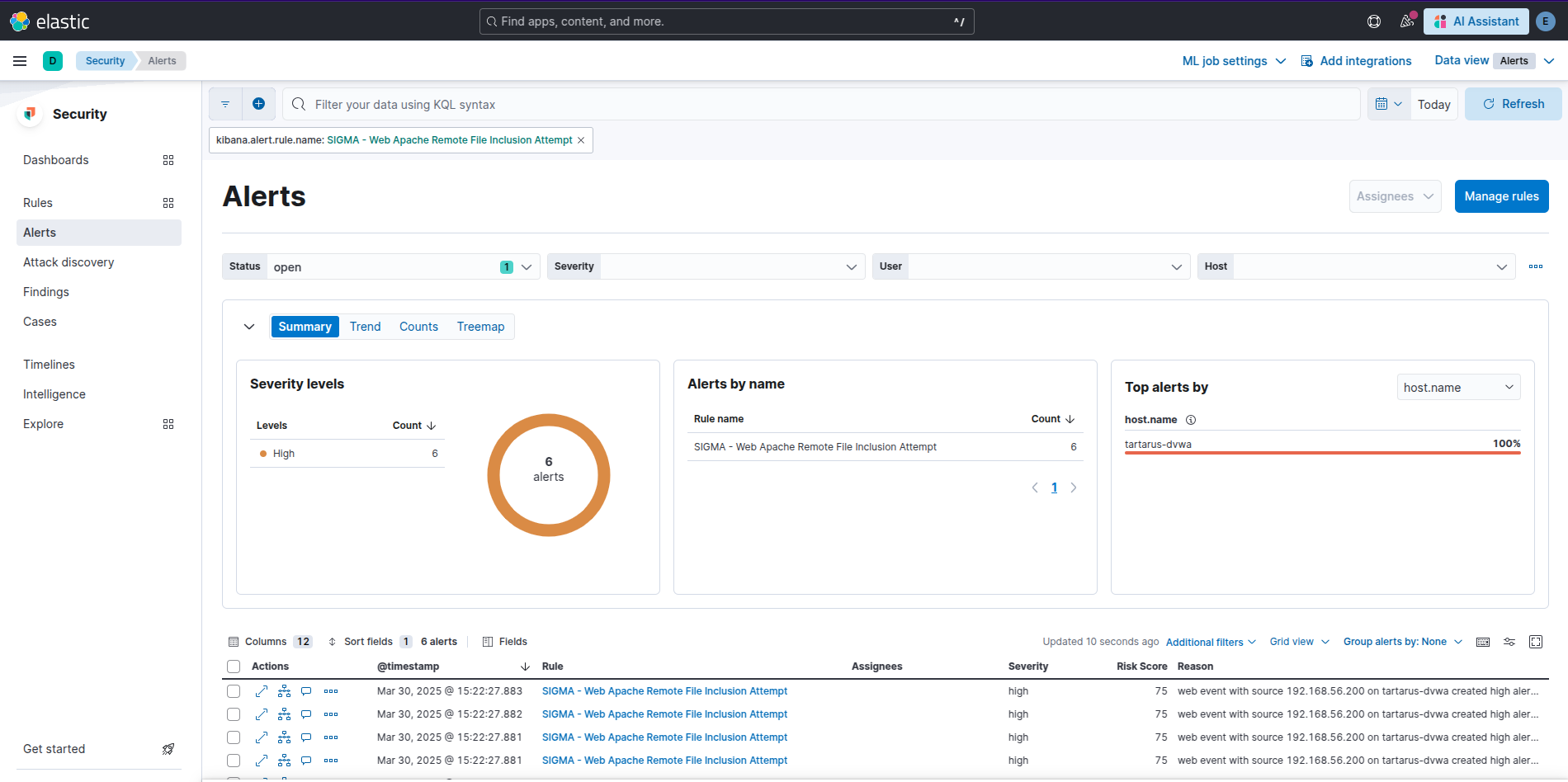 Example kibana remote file include alert
Finally I’ve written a rule to detect <script> in User-Agent fields as demonstrated in the “undocumented” reflected XSS in file3.php.
This rule has the detection to look for XSS related activity in the User-Agent field:
1
2
3
4
5
6
detection:
    selection:
        useragent|contains:
            - '<script>'
            - '</'
            - 'alert('
We correlate on the “useragent” field.
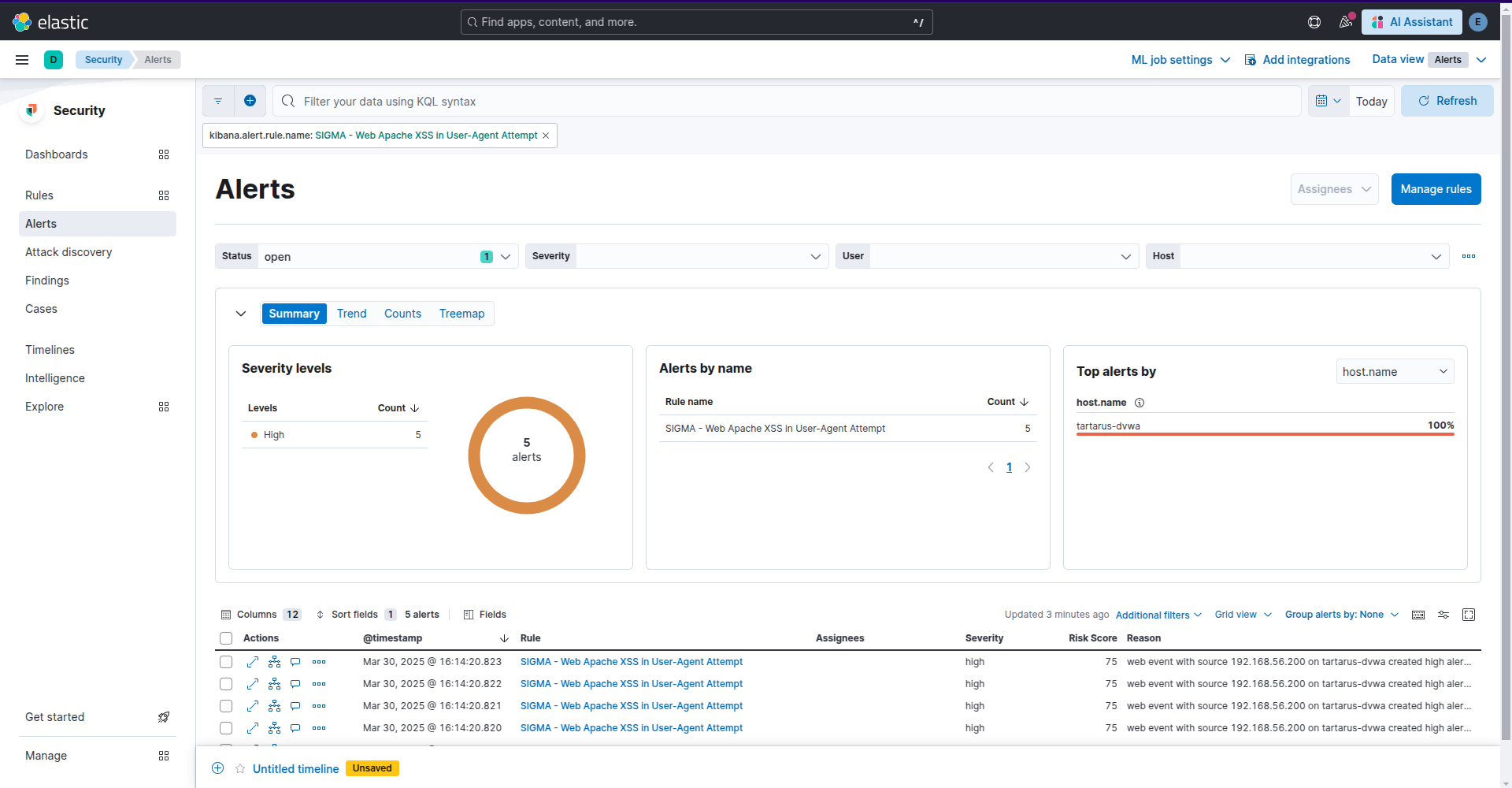 Example kibana user agent reflected xss alert
Reverse shell detection will be covered in the next challenge.
Side Channel: The one who knocks.
This example focuses on ES|QL so you will need to translate it to your own SIEM infra if you would like to use it. In an aim to find what requests may have succeeded I’ve developed the following searches to identify based on the response size which requests may have been successful.
The attack command I’m using is on the Kali guest:
1
PHPSESSID=$(curl -s -c cookies.txt "http://tartarus-dvwa.home.arpa/DVWA/login.php" | grep -Eo "name='user_token' value='[^']*'" | cut -d"'" -f4 | xargs -I {} curl -s -c - -b cookies.txt -X POST "http://tartarus-dvwa.home.arpa/DVWA/login.php" -d "username=admin" -d "password=password" -d "user_token={}" -d "Login=Login" | grep -Eo [a-zA-Z0-9+]{26})
1
ffuf -u "http://tartarus-dvwa.home.arpa/DVWA/vulnerabilities/fi/?page=FUZZ" -mc 200 -fr "Warning" -b "security=low; PHPSESSID=${PHPSESSID}" -w /usr/share/wordlists/seclists/Fuzzing/LFI/LFI-Jhaddix.txt
This first search does what the rule does, it looks for path traversal indicators in the Apache access logs. It returns time buckets you will use in the next search.
1
2
3
from logs-apache.access-default metadata _id, _index, _version | where url.query like "*../../../../../lib/password*" or url.query like "*../../../../windows/*" or url.query like "*../../../etc/*" or url.query like "*..%252f..%252f..%252fetc%252f*" or url.query like "*..%c0%af..%c0%af..%c0%afetc%c0%af*" or url.query like "*%252e%252e%252fetc%252f*"
| eval timebucket=date_trunc(5minutes, @timestamp) | stats value_count=count_distinct(url.query) by timebucket, source.ip, host.name
| where value_count >= 1
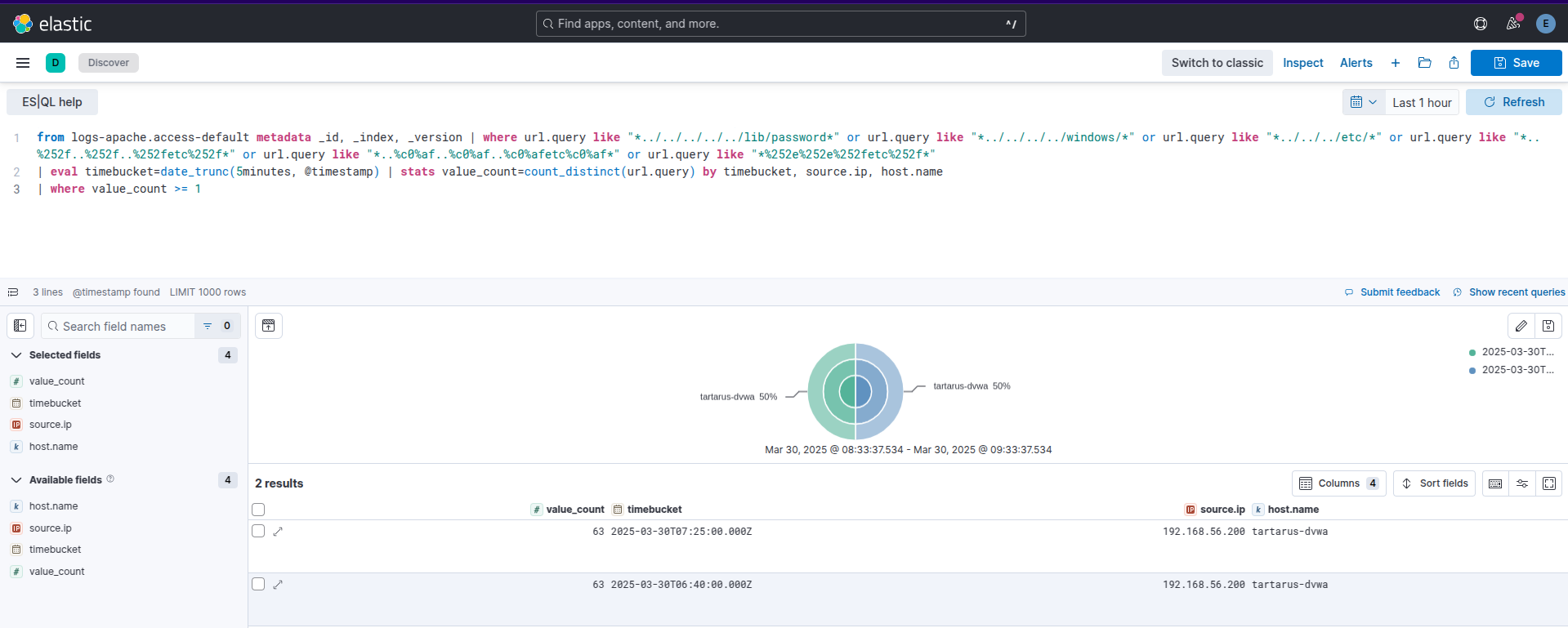 Example kibana esql search for path traversal
Now copy one of the time buckets to do the next search(replace YOURTIMEBUCKET):
1
2
3
4
5
6
7
8
9
10
11
12
13
FROM logs-apache.access-*
| WHERE @timestamp >= "YOURTIMEBUCKET" - 5 hour AND  @timestamp <= "YOURTIMEBUCKET" + 1 hour
| WHERE http.response.status_code == 200
| WHERE url.query rlike """.*../../.*"""
| WHERE url.query IS NOT NULL
| STATS
    avg_size_top = MV_AVG(TOP(http.response.body.bytes, 10, "desc")),
    avg_size_bottom = MV_AVG(TOP(http.response.body.bytes, 10, "asc")),
    mad_size = MEDIAN_ABSOLUTE_DEVIATION(http.response.body.bytes),
    avg_size = AVG(http.response.body.bytes)
| EVAL lower_bound = avg_size - mad_size, upper_bound = avg_size + mad_size
| KEEP avg_size, avg_size_top, avg_size_bottom, mad_size, lower_bound, upper_bound
| SORT avg_size DESC
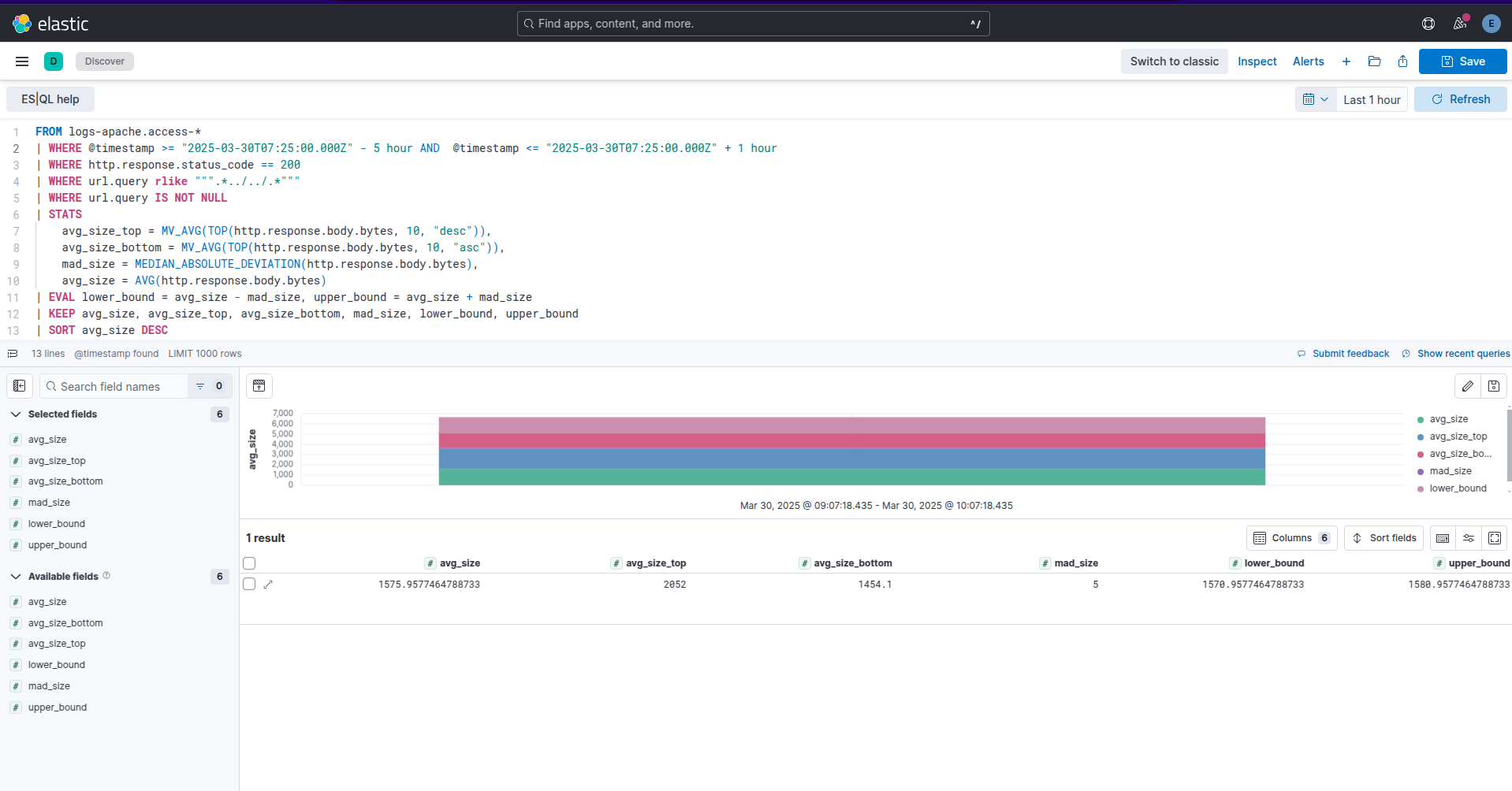 Example kibana esql search for path traversal average resp size
For the final search, we want to find any responses above our upper bound(replace YOURUPPERBOUND):
1
2
3
4
5
6
7
FROM logs-apache.access-*
| WHERE http.response.status_code == 200
| WHERE url.query IS NOT NULL
| EVAL upper_bound = YOURUPPERBOUND
| WHERE http.response.body.bytes > upper_bound
| SORT http.response.body.bytes DESC
| KEEP http.response.body.bytes, url.query, source.ip, host.name
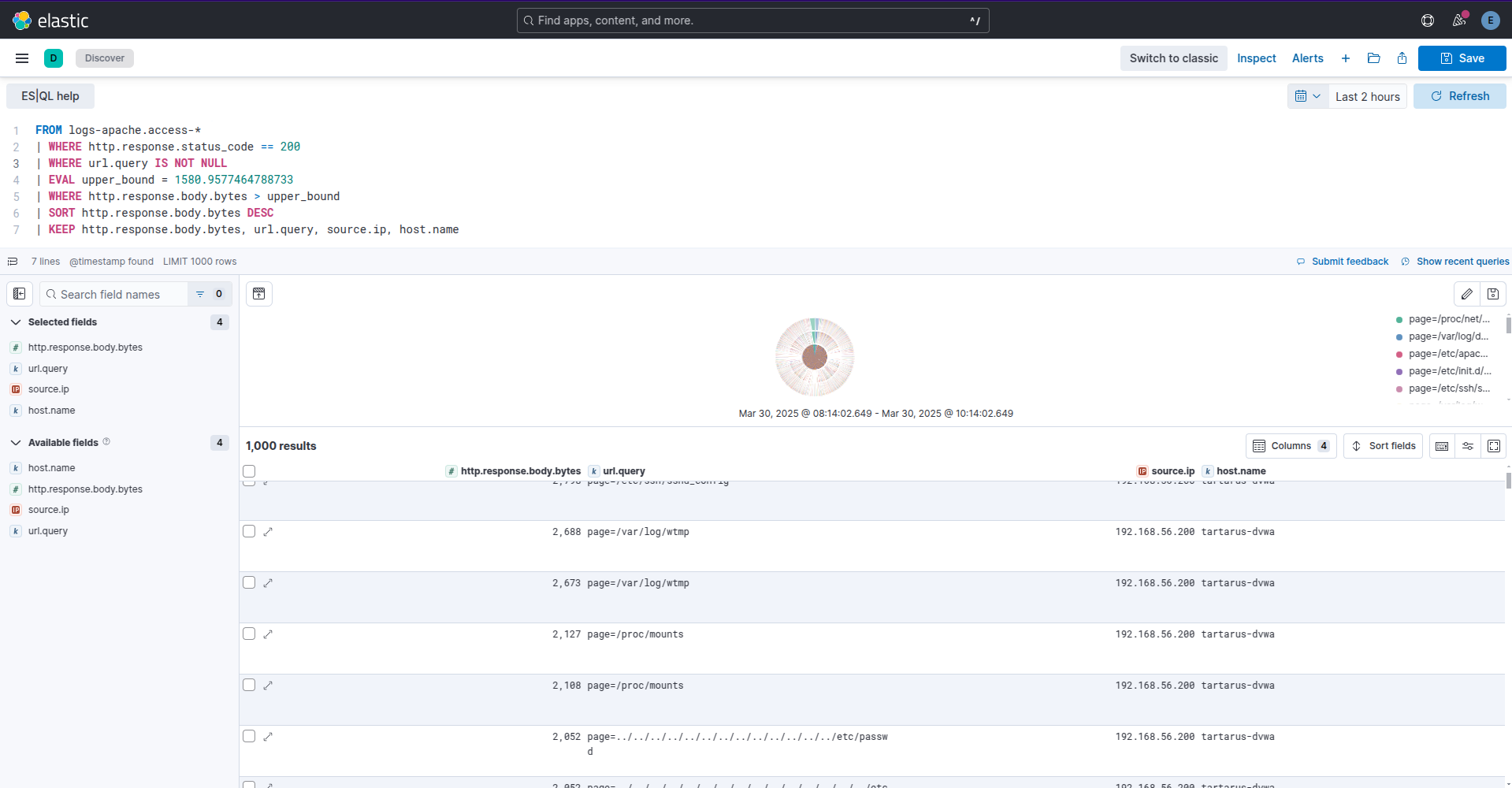 Example kibana esql search for successful path traversal
Life would be so much easier with a WAF (Or if we logged the request response body)! Here you go - based on the average response size we are able to determine which responses probably succeeded, you would need to adjust these searches for your environment but it gives you an idea of how to go about it. The searches also don’t take into account if you have multiple web servers, that’s for you to figure out. :)
No SIEM, nah problem!
Since it’s Apache webserver access logs we can do the same search we did for Brute Force
1
vagrant ssh dvwa
1
sudo grep -E "GET(.*)(\.\./\.\./)(.*)\s200" /var/log/apache2/access.log
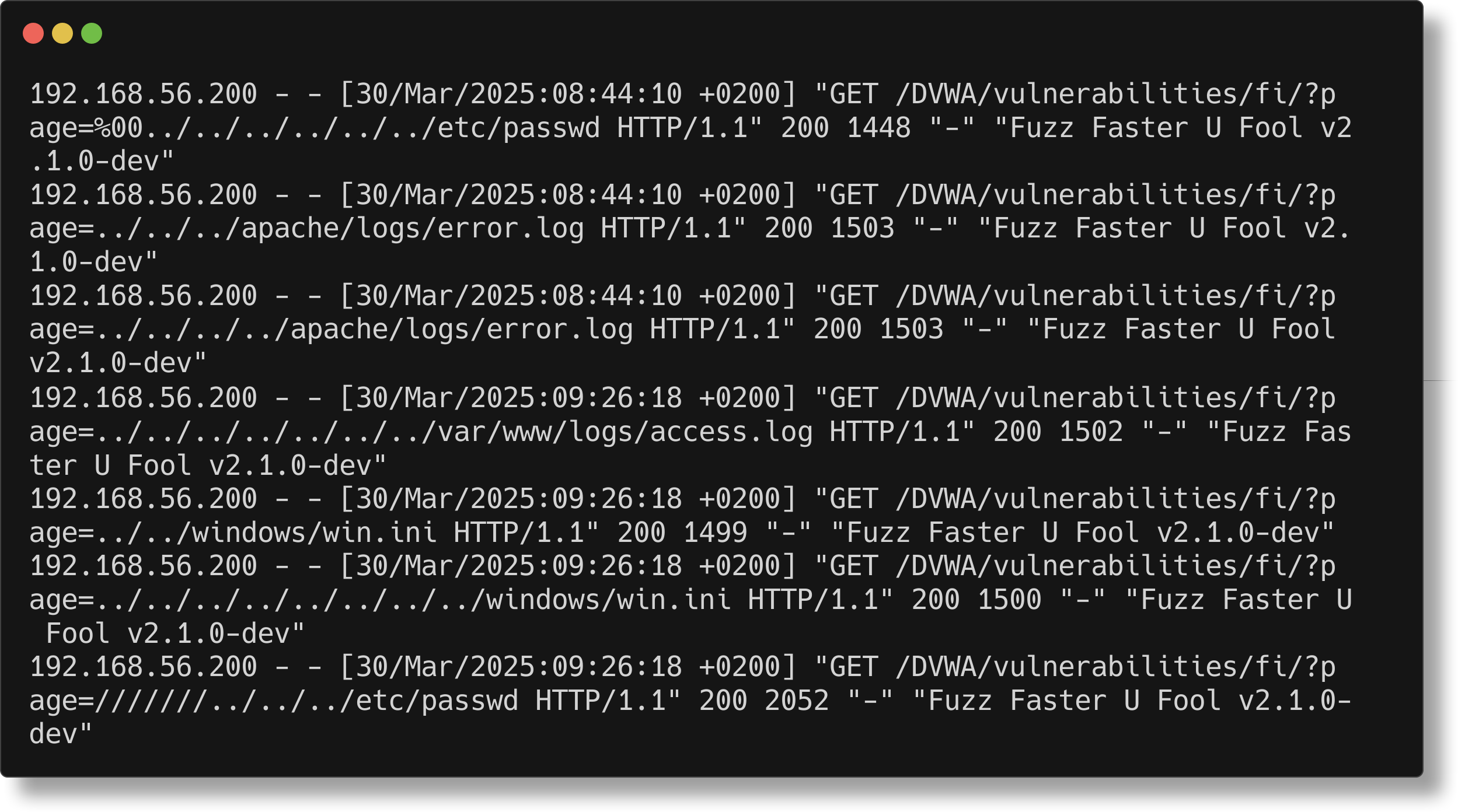 Example dvwa apache logs for path traversal
Again only one of the above requests succeeded in reading the /etc/passwd file.
Remote File Inclusion can be grepped with:
1
sudo grep -E "/\?(.*)http(s?)://" /var/log/apache2/access.log
1
sudo grep -E "/\?(.*)(?:25[0-5]|2[0-4][0-9]|1[0-9][0-9]|[1-9][0-9]|[0-9])\.(?:25[0-5]|2[0-4][0-9]|1[0-9][0-9]|[1-9][0-9]|[0-9])\.(?:25[0-5]|2[0-4][0-9]|1[0-9][0-9]|[1-9][0-9]|[0-9])\.(?:25[0-5]|2[0-4][0-9]|1[0-9][0-9]|[1-9][0-9]|[0-9])" /var/log/apache2/access.log
1
sudo grep -E "/\?(.*).*\.(com|net|org|gov|edu|io|dev|arpa|local|test|home|biz|info|co|us|uk|de|fr|jp|ca|au|nz|eu|cn|in)/(.*)|.*\.(com|net|org|gov|edu|io|dev|arpa|local|test|home|biz|info|co|us|uk|de|fr|jp|ca|au|nz|eu|cn|in)\sHTTP" /var/log/apache2/access.log
See if you can do the grep for the reflected XSS.
File Inclusion Low Sec - Purple Team
Nuclei
Now to automate the testing for LFI, due to the setup requirements of revshell RFI it’s not - in my view - in keeping with how nuclei templates test for vulns. This will be maid clear in the Omega-cli section how we can go about testing for revshells.
Run the template file:
1
nuclei -u http://tartarus-dvwa.home.arpa/DVWA -t /vagrant/nuclei-templates/dvwa/dvwa-local-file-inclusion-low-sec.yaml
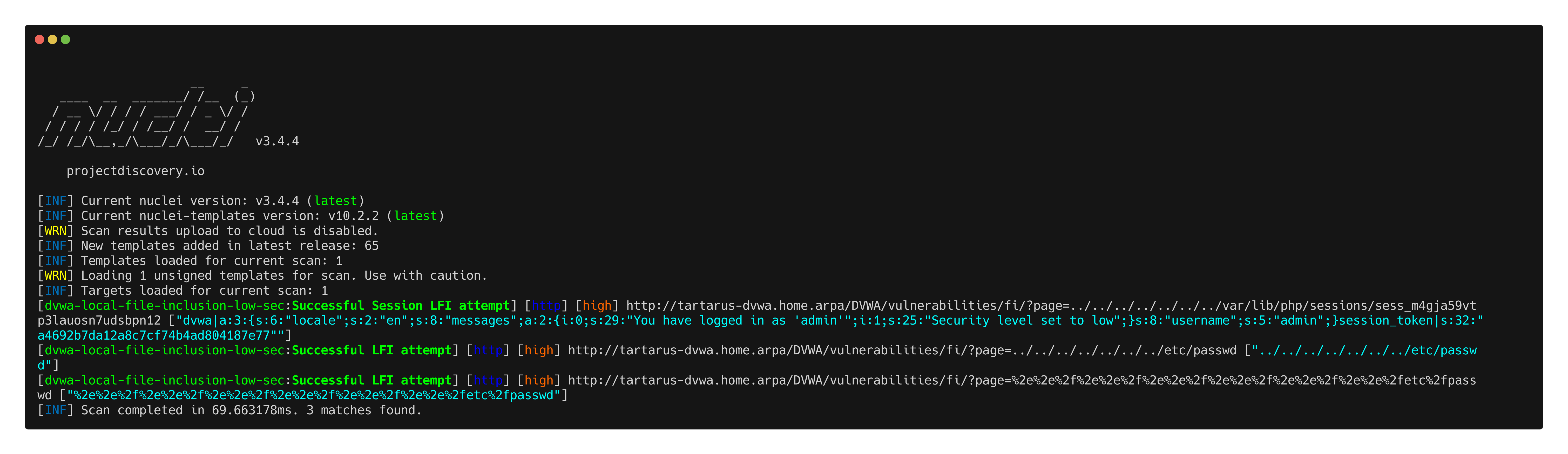 Example nuclei template to test lfi
This is a very specific template as using “headless” mode we aren’t able to inject an array of User-Agents and have each one be tested, instead we have one that gets deployed and we await the alert box. If the alert box is a set value then the XSS worked.
1
nuclei -headless -u http://tartarus-dvwa.home.arpa/DVWA -t /vagrant/nuclei-templates/dvwa/dvwa-headless-xss-user-agent.yaml
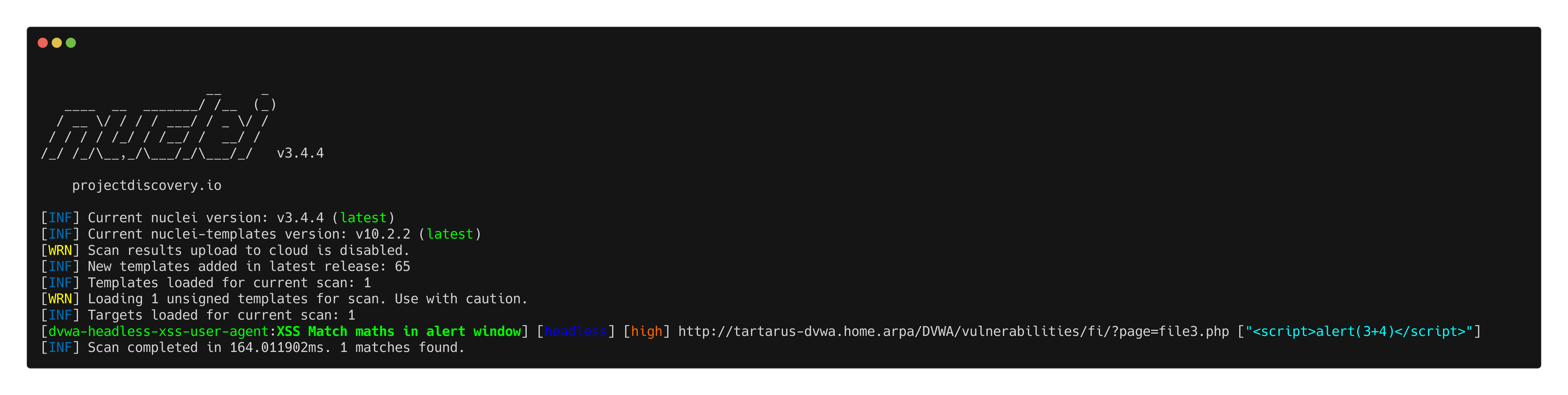 Example user-agent xss nuclei template
Omega-cli
To run this test make sure you have a correctly populated .env file or pass the correct args as mentioned in the Recon Low Sec Purple post.
Local File Inclusion
The Omega test file:
1
2
3
4
5
6
7
8
9
10
11
name: Nuclei Apache Path Traversal LFI
author(s): Dylan Shield (Shieldia.co)
info: >
  Integration test to confirm Sigma Path Traversal LFI rule
  Expected executor results is 7 requests with path traversal like chars in the URL to the target
  Expected rule result is 1 alert
date: 2025-05-06
executor: Nuclei
executor_file_template: templates/dvwa-local-file-inclusion-low-sec.yaml
rule: siem_rule_ndjson
rule_file: rules/web_apache_correlation_path_traversal_exp_attempt.json
Run the test with:
1
python3 omega.py --config tests/nuclei_apache_path_traversal_lfi.yml elastic-local -t http://tartarus-dvwa.home.arpa -d
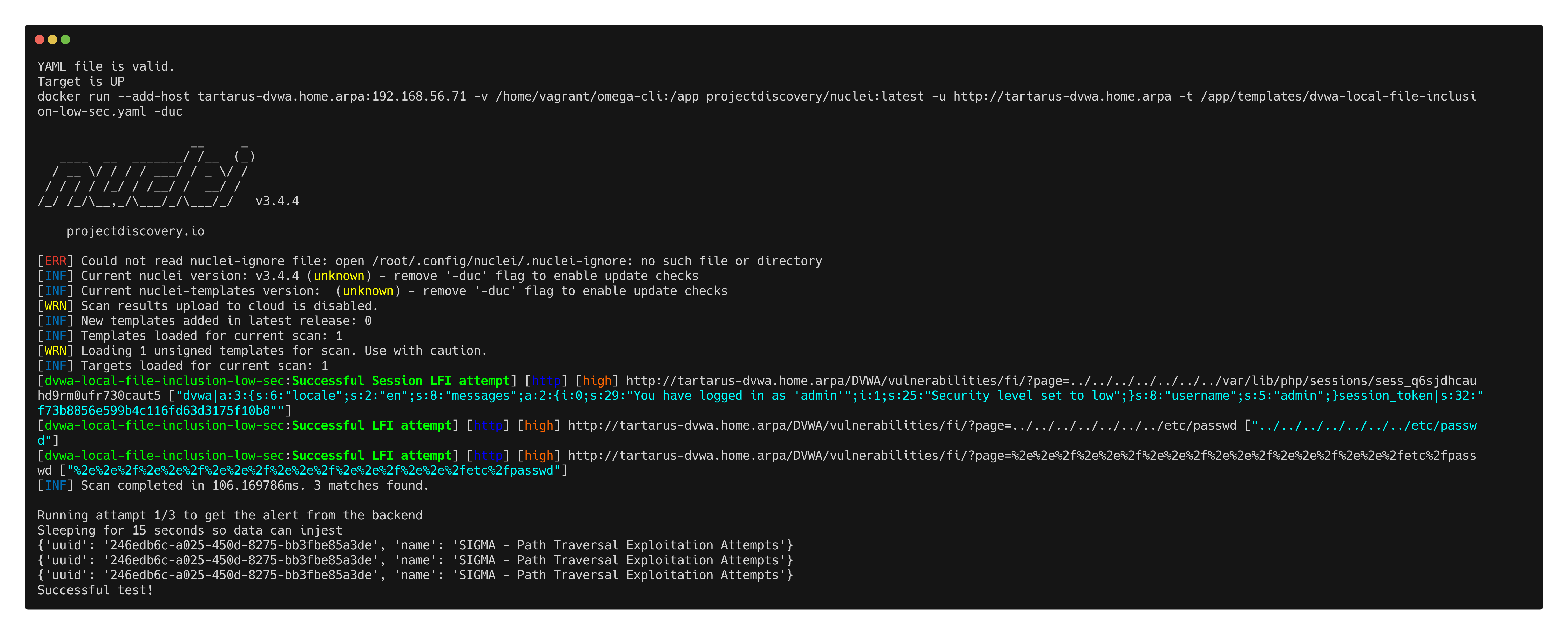
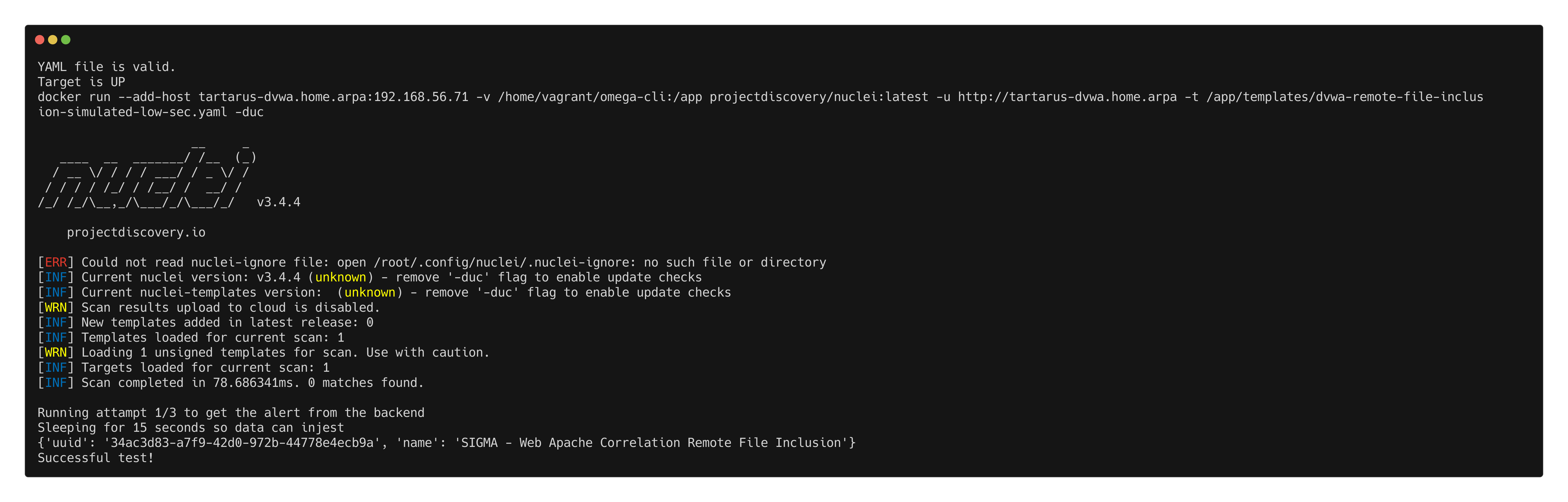
Remote File Inclusion
For this test there is no match contrition in the Nuclei template.
The Omega test file:
1
2
3
4
5
6
7
8
9
10
11
name: Nuclei Apache Remote File Inclusion
author(s): Dylan Shield (Shieldia.co)
info: >
  Integration test to confirm Sigma Remote File Inclusion rule
  Expected executor results is 3 requests with Remote File Inclusion like chars in the URL to the target
  Expected rule result is 1 alert
date: 2025-05-06
executor: Nuclei
executor_file_template: templates/dvwa-remote-file-inclusion-simulated-low-sec.yaml
rule: siem_rule_ndjson
rule_file: rules/web_apache_correlation_rfi.json
Run the test with:
1
python3 omega.py --config tests/nuclei_apache_remote_file_inclusion.yml elastic-local -t http://tartarus-dvwa.home.arpa -d
Credits
Image thanks to Nasa AS11-44-6549
Icon thanks to Malware icons created by juicy_fish - Flaticon